
Aurotlu Q16-H3
Aurotlu Q16-H3 Open Ear Clip Wireless Earbuds User Manual
1. Introduction
Thank you for choosing the Aurotlu Q16-H3 Open Ear Clip Wireless Earbuds. These earbuds are designed to provide a comfortable listening experience while allowing you to remain aware of your surroundings. Featuring Bluetooth 5.4 connectivity, IPX7 waterproofing, and a long-lasting battery, they are suitable for various activities including sports and daily use. This manual will guide you through the setup, operation, and maintenance of your new earbuds.
2. What's in the Box
Please check the package contents to ensure all items are present:
- 2 x Aurotlu Q16-H3 Open Ear Clip Wireless Earbuds
- 1 x Charging Case
- 1 x USB Type-C Charging Cable
- 1 x User Manual
3. Product Overview
The Aurotlu Q16-H3 earbuds feature an open-ear design that rests comfortably on your ear, avoiding insertion into the ear canal. This design promotes comfort during extended wear and allows for environmental awareness. The included charging case provides additional battery life and features an LED display for charge status.

Image: Aurotlu Q16-H3 Earbuds and Charging Case.

Image: Open Air Conduction Design Principle.

Image: Ergonomic Design for Comfort and Fit.
4. Charging the Earbuds and Case
To ensure optimal performance, fully charge your earbuds and charging case before first use.
4.1. Charging the Charging Case
- Connect the provided USB Type-C cable to the charging port on the case and to a USB power adapter (not included) or a computer's USB port.
- The LED display on the charging case will show the current battery level during charging.
- A full charge typically takes about 1 hour.
4.2. Charging the Earbuds
- Place the earbuds into their respective slots in the charging case. Ensure they are correctly seated.
- The earbuds will automatically begin charging from the case. The LED indicators on the earbuds (if present) or the case display will show their charging status.
- The earbuds provide up to 12 hours of playtime on a single charge, with the charging case offering an additional 48 hours of playtime.

Image: Charging Case with LED Display and Battery Information.
5. Bluetooth Pairing
Follow these steps to pair your Aurotlu Q16-H3 earbuds with your device:
- Charge Earbuds: Ensure the earbuds are sufficiently charged.
- Power On: Open the charging case. The earbuds will automatically power on and enter pairing mode. You may see an indicator light flashing on the earbuds.
- Activate Bluetooth: On your smartphone, tablet, or other Bluetooth-enabled device, go to the Bluetooth settings and turn Bluetooth on.
- Search for Device: In the list of available devices, look for "Q16-H3" or a similar name.
- Connect: Select "Q16-H3" to connect. Once connected, you will hear an audible confirmation, and the indicator light on the earbuds will stop flashing.
- Reconnect: After initial pairing, the earbuds will automatically connect to the last paired device when removed from the charging case and Bluetooth is enabled on your device.
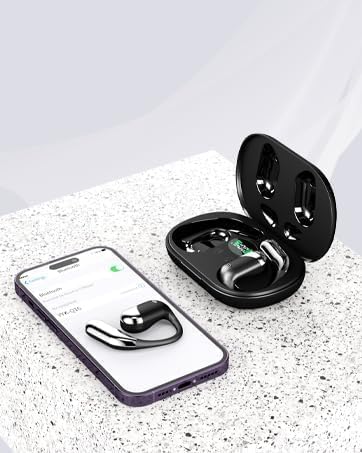
Image: Earbud connected to a smartphone via Bluetooth.
6. Operating Instructions
6.1. Touch Controls
The Aurotlu Q16-H3 earbuds feature intuitive touch controls on each earbud. Refer to the diagram below for common functions:
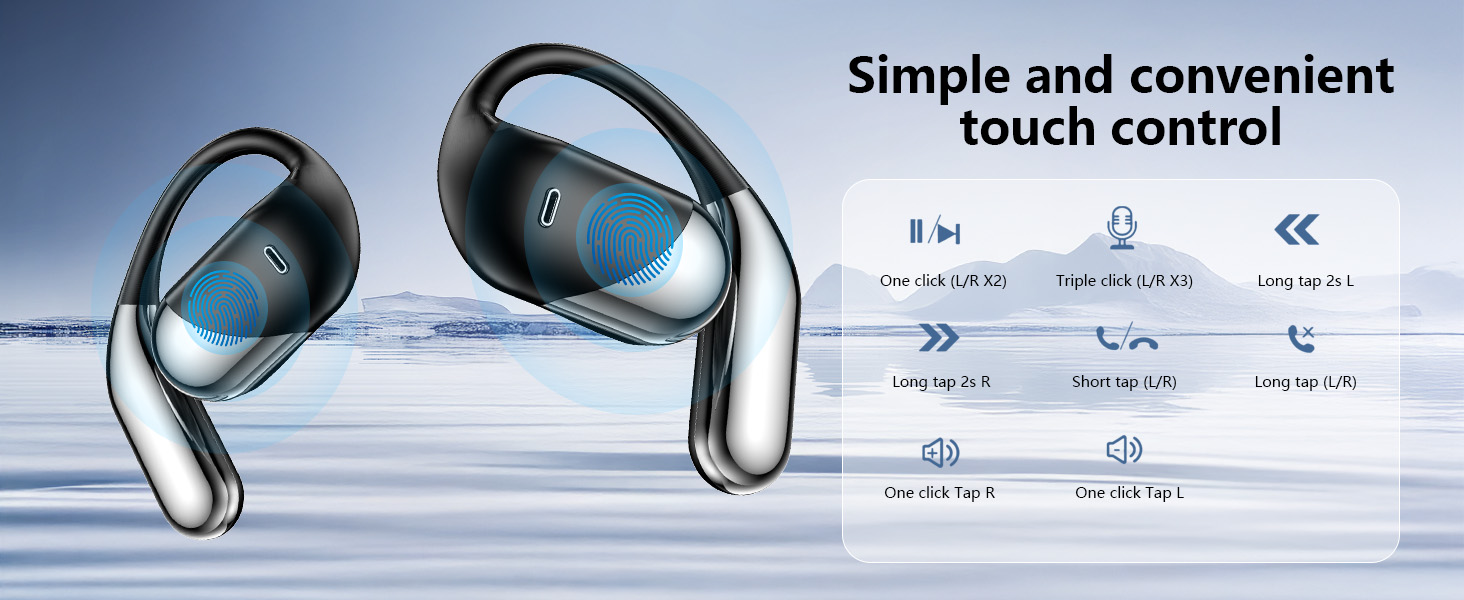
Image: Earbud Touch Control Functions.
- Play/Pause: Double-tap either the Left (L) or Right (R) earbud.
- Next Track: Long tap the Right (R) earbud for 2 seconds.
- Previous Track: Long tap the Left (L) earbud for 2 seconds.
- Volume Up: Single tap the Right (R) earbud.
- Volume Down: Single tap the Left (L) earbud.
- Answer/End Call: Short tap either earbud.
- Reject Call: Long tap either earbud.
- Activate Voice Assistant: Triple-tap either earbud.
6.2. Making and Receiving Calls
The earbuds feature a built-in microphone for clear communication. Use the touch controls as described above to manage calls.
6.3. Waterproofing (IPX7)
The Aurotlu Q16-H3 earbuds are IPX7 waterproof, meaning they can withstand sweat and splashes, making them suitable for workouts and outdoor activities. They are not designed for swimming or submersion in water.
7. Maintenance
Proper care will extend the lifespan of your earbuds:
- Cleaning: Gently wipe the earbuds and charging case with a soft, dry, lint-free cloth. Do not use abrasive cleaners or solvents.
- Storage: When not in use, store the earbuds in their charging case to protect them from dust and damage.
- Avoid Extreme Temperatures: Do not expose the earbuds or charging case to extreme heat or cold, as this can damage the battery and internal components.
- Water Exposure: While IPX7 rated, avoid prolonged exposure to water. Ensure earbuds are dry before placing them back in the charging case to prevent damage to the charging contacts.
8. Troubleshooting
If you encounter issues with your earbuds, refer to the following common problems and solutions:
| Problem | Possible Solution |
|---|---|
| Earbuds won't turn on | Ensure earbuds and charging case are fully charged. Place earbuds in the case and close it, then open again. |
| Earbuds won't pair with device | 1. Ensure Bluetooth is enabled on your device. 2. Make sure earbuds are in pairing mode (indicator light flashing). 3. Forget/delete "Q16-H3" from your device's Bluetooth list and try pairing again. 4. Ensure earbuds are close to your device. |
| Only one earbud is working | 1. Place both earbuds back into the charging case, close the lid, wait a few seconds, then open the lid and remove them. 2. Re-pair the earbuds with your device. |
| Low volume or poor sound quality | 1. Adjust the volume on both your device and the earbuds. 2. Ensure earbuds are clean and free of debris. 3. Try moving closer to your device to avoid interference. |
| Charging case not charging | 1. Check the USB Type-C cable and power adapter. 2. Ensure the charging port is clean and free of debris. |
9. Specifications
| Feature | Detail |
|---|---|
| Model Name | Q16-H3 |
| Connectivity Technology | Wireless (Bluetooth 5.4) |
| Audio Driver Type | Dynamic Driver (16.3mm) |
| Battery Life (Earbuds) | Up to 12 Hours |
| Total Playtime with Case | Up to 60 Hours (Product description says 60H, A+ content says 128H. Using 60H as it's in feature bullets) |
| Charging Time | Approx. 1 Hour (for case) |
| Water Resistance Level | IPX7 |
| Control Method | Touch |
| Earpiece Shape | Ear Hook |
| Compatible Devices | Smartphones, Tablets, Laptops, Desktops, Smart Speakers |
| Item Weight | 0.14 Kilograms (approx. 5 ounces) |
10. Safety Information
Please read and follow these safety guidelines to prevent damage to your device or injury to yourself:
- Do not disassemble, repair, or modify the product.
- Keep the product away from extreme temperatures, direct sunlight, and fire.
- Avoid dropping or subjecting the product to strong impacts.
- Keep out of reach of children and pets.
- Do not use the product at high volume for extended periods to prevent hearing damage.
- Be aware of your surroundings when using the earbuds, especially in traffic or other potentially dangerous situations.
- Use only the provided charging cable or a certified equivalent.
Ask a question about this manual
Ask about setup, troubleshooting, compatibility, parts, safety, or missing instructions. Manuals+ will review the question and use this page’s manual context to help answer it.