
1. Introduction
This manual provides instructions for the Generic replacement remote control designed for use with Consul DG11J2-11 Air Conditioning Controllers. This remote is a functional replacement, but it is important to note that it is not an original equipment manufacturer (OEM) product. As such, some advanced or specific functions present on your original remote may not be fully supported or may operate differently.
The remote control may be supplied in either black or white, and the color will be sent randomly. Due to bulk storage, the remote may exhibit minor surface scratches, which do not affect its functionality.
2. Setup: Battery Installation
To begin using your remote control, you must first install the batteries. This remote requires standard AAA batteries (not included).
- Locate the battery compartment on the back of the remote control.
- As indicated on the back of the remote, insert a thin object, such as a pin or a straightened paperclip, into the small hole located above the battery cover.
- Gently push down with the pin while simultaneously sliding the battery cover downwards to remove it.
- Insert two AAA batteries, ensuring the positive (+) and negative (-) terminals align correctly with the markings inside the compartment.
- Slide the battery cover back into place until it clicks securely.

Figure 2.1: Back of the remote control, illustrating the battery compartment and the method for opening it by inserting a pin.
3. Operating Instructions
This remote control provides essential functions for operating your Consul DG11J2-11 air conditioner. Point the remote directly at the air conditioner's receiver when pressing buttons.
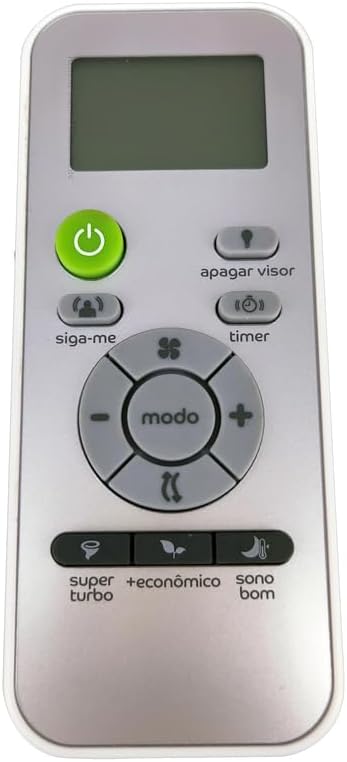
Figure 3.1: Front view of the remote control, displaying its buttons and digital display.
Key Functions:
- Power Button (Green): Turns the air conditioner ON or OFF.
- Mode Button ("modo"): Cycles through operating modes such as Cool, Fan, Dry, Heat (if applicable to your AC unit).
- Temperature Adjustment (+/-): Increases or decreases the set temperature.
- Fan Speed Button (fan icon): Adjusts the fan speed.
- Timer Button ("timer"): Sets the timer for automatic ON/OFF operation.
- Display Light Button ("apagar visor"): Toggles the display light on the air conditioner unit.
- "Siga-me" Button: Activates the "Follow Me" function, where the unit adjusts temperature based on the remote's location.
- "Super Turbo" Button: Activates a rapid cooling/heating mode.
- "Econômico" Button: Activates an energy-saving mode.
- "Sono Bom" Button: Activates a sleep mode for comfortable night operation.
Important Note on Functionality:
As this is a replacement remote, some functions may not be identical to your original remote or may not work with all models of the Consul DG11J2-11 series. Please test all functions after battery installation.
4. Maintenance
Cleaning:
To clean the remote control, wipe it gently with a soft, dry cloth. Do not use liquid cleaners, abrasive cleaners, or chemical solvents, as these can damage the remote's surface or internal components.
Battery Replacement:
Replace batteries when the remote's response becomes sluggish or if the air conditioner does not respond to commands. Always replace both batteries at the same time with new ones of the same type (AAA). Dispose of used batteries according to local regulations.
5. Troubleshooting
- Remote not responding:
- Ensure batteries are installed correctly with the correct polarity.
- Replace old batteries with new ones.
- Ensure there are no obstructions between the remote and the air conditioner's receiver.
- Confirm you are within the effective operating range of the air conditioner.
- Some functions do not work:
- As a replacement remote, not all functions may be compatible with your specific air conditioner model. This is a known limitation.
- Refer to your air conditioner's original manual to confirm if the function is supported by the unit itself.
- Display on remote is dim or blank:
- This indicates low battery power. Replace the batteries immediately.
6. Specifications
| Feature | Detail |
|---|---|
| Product Type | Replacement Remote Control |
| Compatible Model | Consul DG11J2-11 Air Conditioning Controller |
| Material | ABS Plastic |
| Power Source | AAA Batteries (not included) |
| Color | Black or White (sent randomly) |
| Special Feature | Digital Display |
| Max Number of Supported Devices | 10 (Note: This remote is specifically for the listed AC model) |
| Manufacturer | Atfon-RMT |
| ASIN | B0DX1VZ65N |
7. Important Notes and Disclaimer
This product is a replacement remote control and is not manufactured by Consul. While designed to be compatible with the DG11J2-11 model, its functionality may vary compared to the original remote. The manufacturer of this replacement remote is Atfon-RMT.
The package includes one (1) remote control only. Batteries are not included.