
Introduction
This manual provides essential instructions for the assembly, operation, maintenance, and troubleshooting of your SANGMUCEN HBF015H01 Twin Bed Frame. Please read this manual thoroughly before assembly and retain it for future reference. Proper assembly and use will ensure the longevity and safety of your product.
Important Safety Information
Failure to follow these safety instructions may result in injury or damage to the product.
- Always follow the assembly instructions carefully.
- Do not exceed the maximum weight limit of 650 pounds.
- Use appropriate bedding materials, such as a mattress, to ensure safety and comfort.
- Never place this bed in a crib or bassinet.
- Always supervise children when they are near the bed to prevent entrapment or injury.
- Ensure all connections are secure before use. Periodically check and tighten all fasteners.
- Keep small parts away from children during assembly to prevent choking hazards.
Package Contents
Before beginning assembly, verify that all components listed below are present and undamaged. If any parts are missing or damaged, please contact customer support.
- Bed Frame Components
- Headboard with integrated charging station and LED lights
- Bookcase (integrated into headboard)
- Drawer(s) with wheels
- Power station (for charging ports)
- Installation Manual
- All necessary tools and hardware
Setup and Assembly
The SANGMUCEN HBF015H01 bed frame is designed for straightforward assembly. Please follow the detailed, illustrated instructions provided in the included Installation Manual. All parts are numbered, and all necessary tools are supplied.
- Unpack Components: Carefully remove all parts from the packaging and lay them out on a clean, soft surface to prevent scratches.
- Identify Parts: Refer to the parts list in the Installation Manual to identify each component.
- Assemble Frame: Follow the step-by-step instructions to assemble the main bed frame structure. Ensure all bolts and screws are tightened securely.
- Attach Headboard: Secure the headboard to the assembled frame. Connect the power station wiring as directed.
- Install Slats: Place and secure the metal slats onto the frame. These robust slats provide mattress support without the need for a box spring.
- Insert Drawers: Slide the under-bed drawers into position.
- Final Check: Double-check all connections for tightness and stability before placing a mattress on the frame.

Figure 1: Illustration of the bed frame's robust construction and easy assembly points. This image highlights the sturdy metal structure support and non-slip design elements, ensuring stability and ease of setup.
Operating Instructions
A. Headboard with Charging Station
The integrated headboard features a convenient charging station to power your electronic devices.
- Power Outlets: Two standard power outlets are provided for general electronics.
- USB Ports: One USB port (5V/3A) and two USB ports (5V/2.4A) are available for charging phones, tablets, and other USB-powered devices.
- Power Cord: The charging station is powered by a 6.5-foot power cord. Ensure it is plugged into a functional wall outlet.

Figure 2: Close-up of the headboard's charging station, detailing the placement of standard power outlets, USB ports, and the Type-C port for convenient device charging.
B. Multi-Function RGB LED Lights
The bed frame includes an RGB LED light strip for customizable ambiance. Control the lights using the dedicated mobile app.
- App Installation: Scan the QR code in the Installation Manual or search for the specified app in your device's app store.
- Pairing: Follow the in-app instructions to pair your mobile device with the LED light strip.
- Customization: Use the app to adjust colors, brightness, select various lighting modes, and set timing functions.

Figure 3: Visual representation of the RGB LED lighting system, showcasing various color options and the mobile application interface used for control.
C. Storage Features
Maximize your space with the integrated storage solutions.
- Headboard Shelves: Two-tier storage shelves on the headboard are ideal for small items like phones, glasses, books, and decorative objects.
- Under-Bed Drawers: The included drawers with wheels provide ample space for storing clothes, bedding, or other personal items, keeping your room tidy.

Figure 4: Depiction of the under-bed storage drawers, highlighting their wheeled design for smooth operation and efficient space utilization.
Maintenance
Regular maintenance will help preserve the appearance and functionality of your bed frame.
- Cleaning the Frame: Wipe the metal frame with a soft, damp cloth. Avoid abrasive cleaners or harsh chemicals that could damage the finish.
- Upholstered Backrest: For the upholstered backrest, gently vacuum to remove dust. For spills, blot immediately with a clean, dry cloth. Consult a professional cleaner for stubborn stains.
- Checking Connections: Periodically inspect all bolts and screws to ensure they remain tight. Re-tighten as necessary to maintain structural integrity and prevent noise.
- LED Lights: Ensure the LED light strip and its connections are free from dust and moisture.
- Charging Station: Keep the charging ports clean and free of debris. Do not force plugs into the ports.
Troubleshooting
If you encounter issues with your bed frame, refer to the following common problems and solutions:
| Problem | Possible Cause | Solution |
|---|---|---|
| Bed frame is wobbly or noisy. | Loose bolts or screws. Uneven floor. | Check and tighten all assembly bolts and screws. Ensure the bed is on a level surface; use shims if necessary. |
| LED lights are not working. | Power connection issue. App not paired. Damaged light strip. | Ensure the power cord for the headboard is securely plugged in. Re-pair the mobile app with the LED lights. If still not working, contact support. |
| Charging ports are not functioning. | No power to the headboard. Device compatibility issue. | Verify the headboard's power cord is plugged into a live outlet. Test with a different device and cable. |
| Drawers do not slide smoothly. | Obstruction. Damaged wheels. | Check for any objects blocking the drawer's path. Inspect wheels for damage; contact support if damaged. |
Product Specifications
Key technical details for the SANGMUCEN HBF015H01 Twin Bed Frame:
| Feature | Detail |
|---|---|
| Model Number | HBF015H01 |
| Size | Twin |
| Color | Black |
| Material Type | Alloy Steel (Frame), Cotton/Polyester/Microfiber (Upholstery) |
| Item Dimensions (L x W x H) | 81.89" x 39.76" x 37.8" |
| Item Weight | 21 Kilograms |
| Maximum Weight Recommendation | 650 Pounds |
| Special Features | Charging Station, LED Lights, No Box Spring Needed, Space Saving, Storage Drawer |
| Charging Station | 2 Standard Power Outlets, 1 USB Port (5V/3A), 2 USB Ports (5V/2.4A) |
| Required Assembly | Yes |
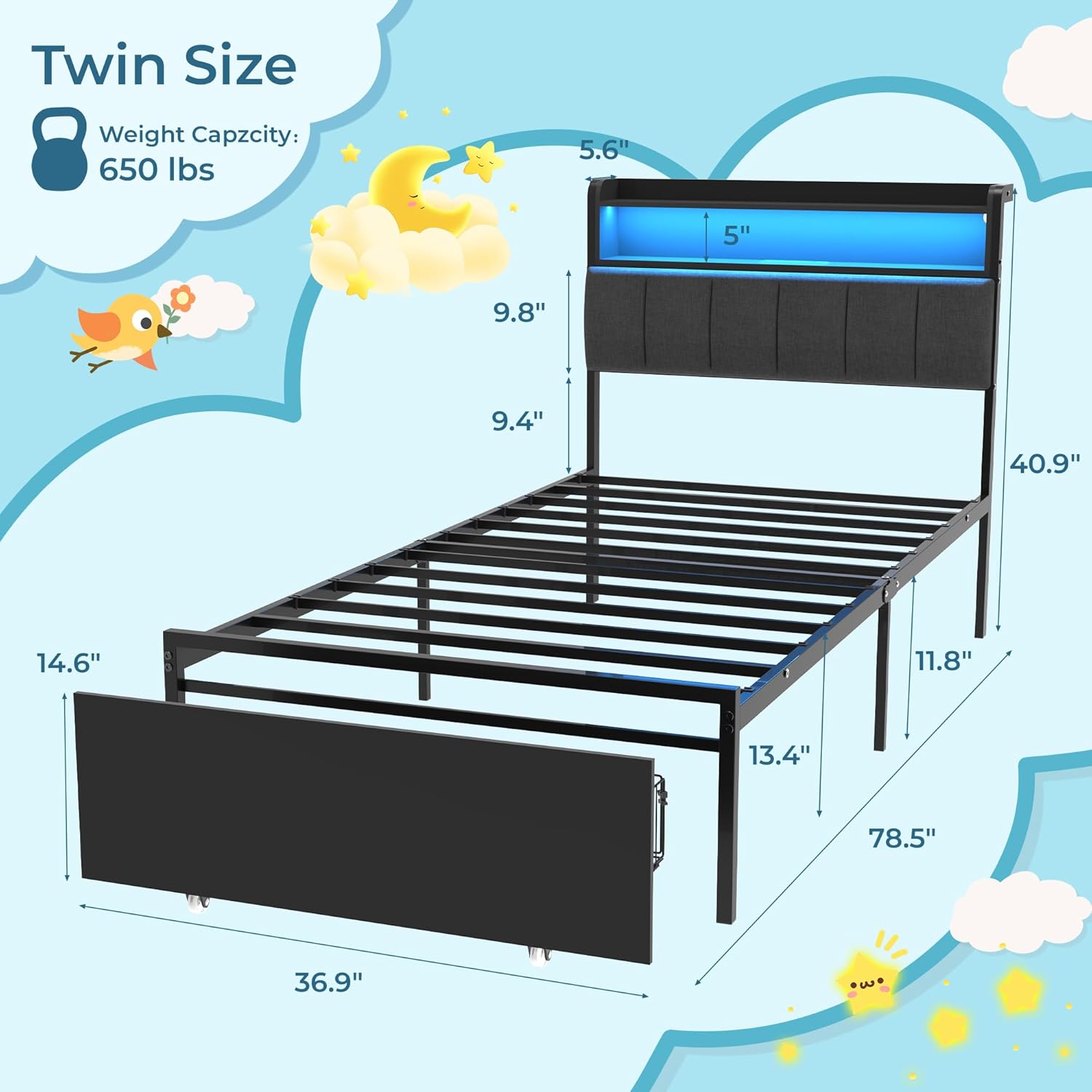
Figure 5: Detailed dimensions of the SANGMUCEN HBF015H01 Twin Bed Frame, including height, width, and length measurements for various components.
Warranty and Customer Support
For warranty information, missing parts, or any other inquiries, please contact the manufacturer directly.
Manufacturer: SENYEEINTERNATIONALCO.,LIMITED
Manufacturer Contact Information: FLAT/RM B 5/F GAYLORD COMMERCIAL BUILDING 114-118 LOCKHART ROAD HONGKONG 999077 HK
Please have your model number (HBF015H01) and purchase details ready when contacting support.