
Introduction
This manual provides essential instructions for the safe and efficient operation of your DiyXenginey KM3299 RC Drift Car. Please read this manual thoroughly before use and retain it for future reference.
The KM3299 is a 1:32 scale high-speed 4WD mini electric remote control drift vehicle designed for thrilling drifting experiences. It features a 4WD system for versatile terrain handling, reaching speeds up to 30 km/h. Equipped with an ESP gyro stabilization chip and dual-way transmission, it offers enhanced stability and control for high-speed maneuvers. The durable construction ensures long-lasting performance.
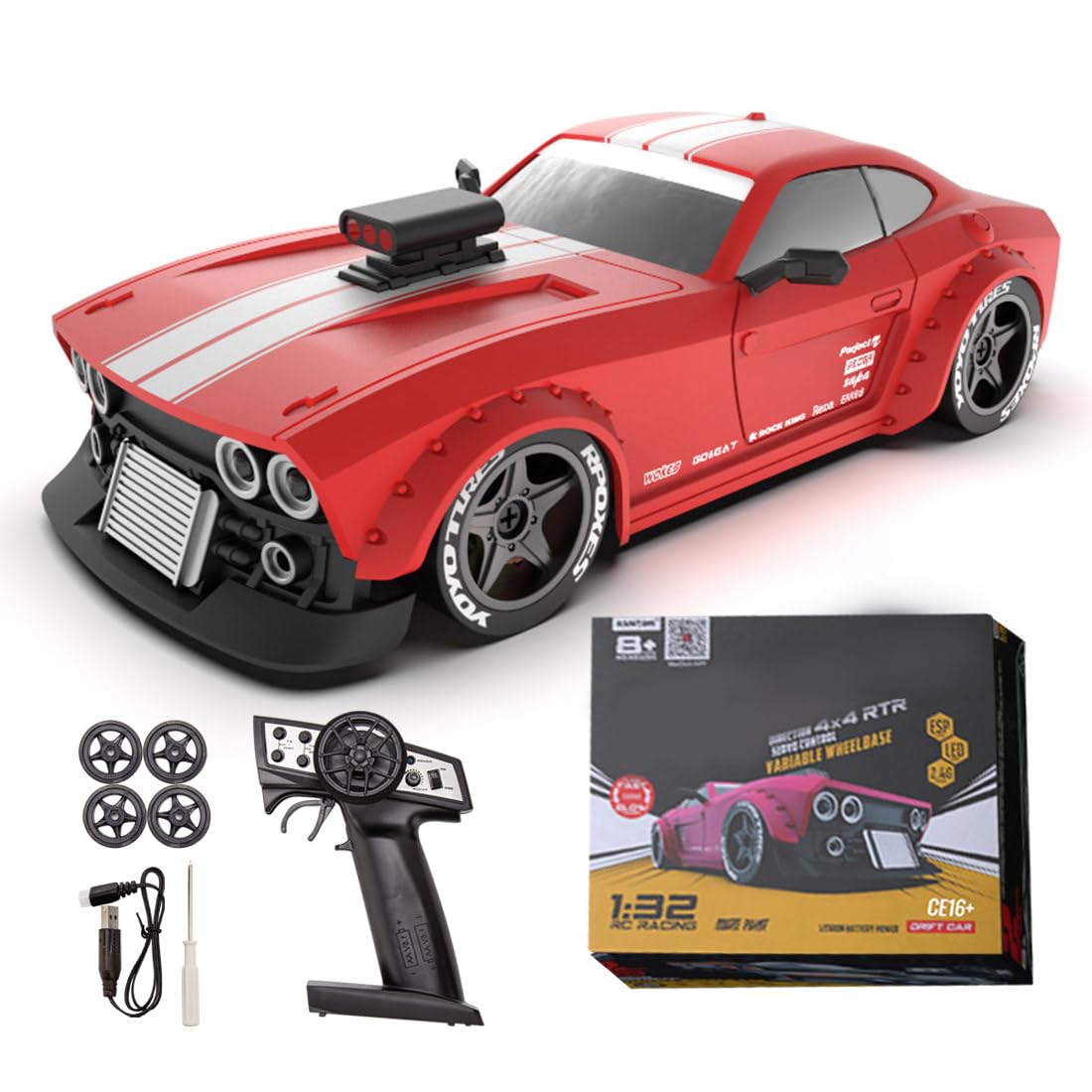
Image: The DiyXenginey KM3299 RC Drift Car.
Package Contents
Verify that all items listed below are included in your package:
- 1 x RC Car
- 1 x Remote Control
- LED Headlights (pre-installed)
- Drift Wheels (set)

Image: KM3299 RC Drift Car and Remote Control.
Setup
Battery Installation (RC Car)
The RC car requires a 7.4V 300mAh battery (included).
- Locate the battery compartment on the underside of the RC car.
- Open the battery compartment cover.
- Connect the battery to the car's power connector.
- Carefully place the battery inside the compartment and close the cover securely.

Image: Underside of KM3299 RC Drift Car with battery compartment.
Battery Installation (Remote Control)
The remote control requires 2 AA batteries (not included).
- Locate the battery compartment on the back of the remote control.
- Open the battery compartment cover.
- Insert 2 AA batteries, ensuring correct polarity (+/-).
- Close the battery compartment cover securely.

Image: Remote control for KM3299 RC Drift Car.
Operating Instructions
Power On/Off
- To power on the RC car, slide the power switch on the car's underside to the "ON" position.
- To power on the remote control, press the power button. The indicator light will illuminate.
- To power off, reverse these steps.
Pairing
The RC car and remote control should automatically pair upon powering on. If pairing fails, power off both devices, then power on the car first, followed by the remote control.
Driving Controls
- Throttle Trigger: Pull to accelerate forward, push to brake/reverse.
- Steering Wheel: Turn left to steer left, turn right to steer right.
- Trim Adjustments: Use the trim dials on the remote to fine-tune steering and throttle for straight driving.
Video: This video demonstrates the KM3299 RC Drift Car in operation, showcasing its drifting capabilities and responsive controls. It highlights the car's movement and handling on various surfaces.
Video: This video provides a closer look at the KM3299 RC Drift Car and its remote control, demonstrating basic functions and features.
Maintenance
Proper maintenance ensures the longevity and optimal performance of your RC drift car.
- Cleaning: After each use, gently clean the car with a soft, dry cloth to remove dust and debris. Avoid using water or chemical cleaners.
- Battery Care: Always disconnect and remove batteries from the car and remote when not in use. Store batteries in a cool, dry place.
- Wheel Inspection: Regularly check the wheels and axles for any obstructions or damage. Ensure the drift wheels are securely attached.
Troubleshooting
If you encounter issues with your KM3299 RC Drift Car, refer to the following common problems and solutions:
Car Not Responding
- Ensure both the car and remote control are powered on.
- Check battery levels in both the car and remote. Replace or recharge as necessary.
- Re-pair the car and remote control (power off both, then power on car, then remote).
- Ensure no interference from other 2.4GHz devices.
Poor Performance/Drifting
- Check battery charge. Low battery can affect performance.
- Ensure the correct wheels are installed for drifting (smooth, hard plastic).
- Adjust steering and throttle trim settings on the remote control.
- Verify the ESP gyro stabilization chip is functioning correctly.
Specifications
| Feature | Detail |
|---|---|
| Model | KM3299 |
| Scale | 1:32 |
| Drive System | 4WD |
| Max Speed | Up to 30 km/h |
| Battery (Car) | 7.4V 300mAh |
| Batteries (Remote) | 2 x AA (not included) |
| Stabilization | ESP Gyro Stabilization Chip |
| Product Dimensions | 5.5 x 2.56 x 1.57 inches |
| Item Weight | 1.2 pounds |
| Recommended Age | 16 years and up |

Image: Dimensions of the DiyXenginey KM3299 RC Drift Car.
Warranty and Support
For warranty information and technical support, please refer to the official DiyXenginey website or contact customer service directly.
Online Support: Visit the DiyXenginey Store on Amazon for product information and support resources.
Protection Plans: Optional 2-Year and 3-Year Protection Plans are available for purchase. Refer to product listing for details.