
Introduction
This manual provides essential information for the safe and effective use of your Manfrotto 055XPRO AS Camera Tripod. Please read these instructions carefully before using the product to ensure proper setup, operation, and maintenance. Familiarizing yourself with the features and functions will help you achieve optimal performance and extend the lifespan of your equipment.

Image: The Manfrotto 055XPRO AS Camera Tripod shown in both folded and extended configurations, featuring the XPRO Ball Head.
Product Features
The Manfrotto 055XPRO AS Tripod Kit is engineered for stability and versatility, catering to professional photographers. Key features include:
- High Load Capacity: Supports camera setups weighing up to 15 kg (33 lbs), ensuring stability for various equipment.
- 3-Section Aluminium Legs: Provides robust support and adjustable height for diverse shooting scenarios.
- XPRO Ball Head: Equipped with independent friction control, a panoramic knob, and an independent sphere break for precise camera positioning and smooth movement.
- 90-Degree Column Mechanism: Allows quick transition of the central column from vertical to horizontal orientation, ideal for low-angle or macro photography.
- Quick Power Lock (QPL) System: Ensures fast, secure, and rigid locking of leg sections with one-handed operation.
- Arca-Swiss Compatible Plate: The included 200PL-PRO quick release plate offers broad compatibility with Arca-Swiss systems.
- Easy Link Connector: A dedicated port for attaching accessories such as LED lights, flashes, or reflectors via an extendable arm.
- Bubble Level: Integrated on the top disc, it rotates for easy observation and precise framing.
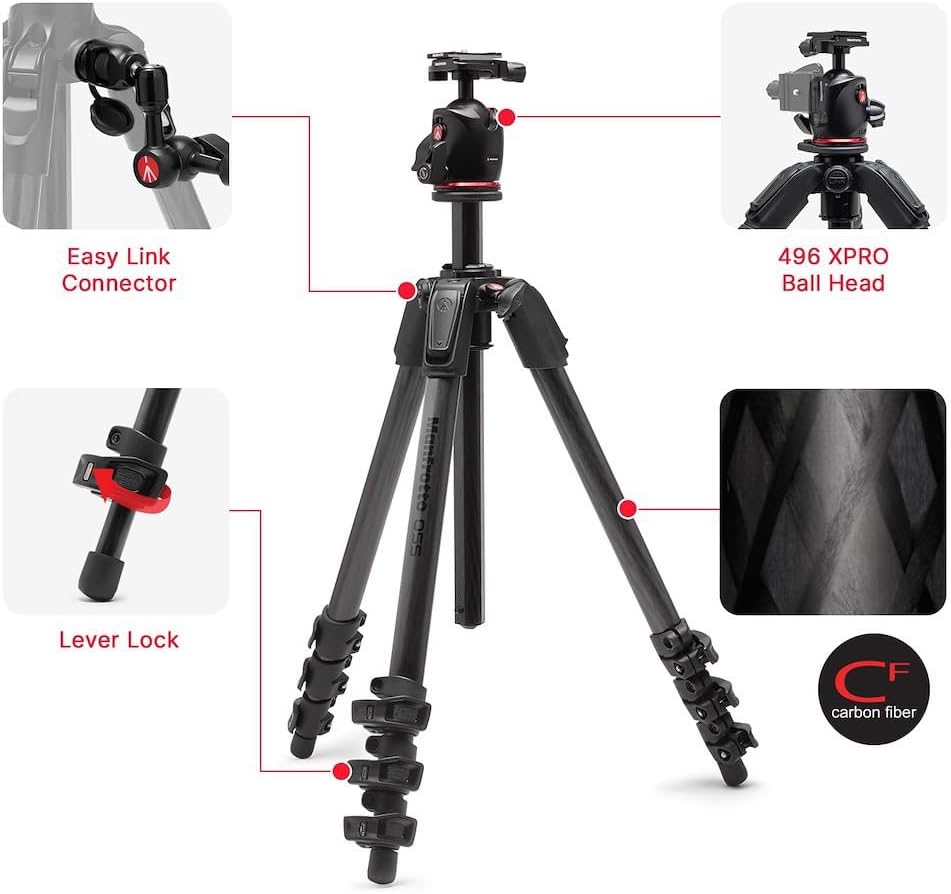
Image: Diagram highlighting key components such as the Easy Link Connector, Lever Lock, and the 496 XPRO Ball Head.

Image: Close-up view of the XPRO Ball Head with the 200PL-PRO Arca-Swiss compatible plate, demonstrating camera mounting.

Image: Detailed view of the XPRO Ball Head's independent friction control, panoramic knob, and main sphere break lever.

Image: Illustrations demonstrating the 90-degree central column mechanism and the adjustable leg angles (25°, 66°, 88°).
What's in the Box
Your Manfrotto 055XPRO AS Tripod Kit includes the following components:
- Manfrotto 055XPRO3 Aluminium Tripod
- Manfrotto XPRO Ball Head with Arca-Swiss compatible plate (BHXPRO)
Setup
1. Attaching the Ball Head
Unscrew the mounting screw from the tripod's top plate. Align the ball head base with the tripod's mounting screw and rotate the ball head clockwise until securely fastened. Ensure it is tight to prevent any rotation during use.
2. Mounting Your Camera
Attach the 200PL-PRO quick release plate to the base of your camera or lens collar. Ensure the plate is securely tightened to the camera. Open the quick release clamp on the XPRO Ball Head, slide the camera with the attached plate into the clamp, and then firmly close the clamp until it locks. Always verify the camera is secure before releasing your grip.
3. Adjusting Leg Sections
The tripod features Quick Power Lock (QPL) levers on each leg section. To extend a leg section, flip open the QPL lever. Extend the leg to the desired length and then firmly close the QPL lever to lock it in place. Repeat this process for all sections and legs to achieve the desired height.
4. Adjusting Leg Angles
Each leg has independent angle selectors located at the top. Press the angle selector button on each leg to adjust it to one of the preset angles (e.g., 25°, 66°, 88°). This allows for stable positioning on uneven terrain or for achieving very low-angle shots.
5. Using the 90-Degree Column
To convert the central column to a horizontal position, first fully extend the column. Locate and press the column release button at the base of the column. This action will allow the column to pivot 90 degrees. Once in the horizontal position, push the column back into the tripod chassis until it locks securely. This feature is particularly useful for macro photography or overhead shots.
Operating Instructions
1. XPRO Ball Head Operation
The XPRO Ball Head provides precise control over camera positioning:
- Independent Friction Control: Use the smaller knob to adjust the tension of the ball movement. This helps prevent sudden camera drops when loosening the main lock, providing a smoother adjustment.
- Panoramic Knob: The knob located at the base of the ball head allows for 360-degree panoramic rotation without affecting the ball's tilt. Loosen this knob to rotate and tighten to lock the panoramic movement.
- Independent Sphere Break (Main Lock): The large lever locks and unlocks the ball's movement, enabling tilt and swivel adjustments. Ensure this lever is fully tightened to secure your camera in position.
2. Easy Link Connector
The tripod features an Easy Link connector, a 3/8" threaded socket located on the side of the top casting. This allows you to attach various photographic accessories such as an LED light, flash, reflector, or monitor using an extendable arm or stand, expanding your creative possibilities.
Maintenance
To ensure the longevity and optimal performance of your Manfrotto tripod, follow these maintenance guidelines:
- Cleaning: After each use, especially in dusty, sandy, or wet environments, wipe down the tripod with a soft, damp cloth. Avoid using abrasive cleaners or solvents, which can damage the finish.
- Lubrication: Do not apply lubricants to the leg locks, column mechanism, or ball head unless specifically instructed by Manfrotto. Improper lubrication can attract dirt and impair the product's function.
- Storage: Store the tripod in a dry, clean environment. When not in use for extended periods, collapse the legs and central column fully to minimize space and protect components.
- Inspection: Periodically check all screws, levers, and connections for tightness. Ensure they are secure but do not overtighten, as this can cause damage.
Troubleshooting
If you encounter issues with your tripod, refer to the following common problems and solutions:
Tripod Instability
- Ensure all leg sections are fully extended and Quick Power Lock levers are securely closed.
- Verify that the leg angle selectors are properly engaged at the desired angle.
- Check that the ball head is firmly attached to the tripod and the camera plate is securely mounted to the ball head.
Stiff Leg Sections or Locks
- Clean any dirt, sand, or debris from the leg sections and QPL levers.
- If stiffness persists after cleaning, contact Manfrotto customer support for further assistance. Do not force the mechanisms.
Ball Head Movement Not Smooth
- Adjust the independent friction control knob to your preferred tension.
- Ensure the main lock lever is fully disengaged when attempting to move the ball.
- Clean any dust or debris from the ball head mechanism, especially around the ball and socket area.
Specifications

Image: Visual representation of the tripod's dimensions, including maximum height, folded length, and packed size.
| Feature | Detail |
|---|---|
| Brand | Manfrotto |
| Model Number | MK055XPRO3 |
| Material | Aluminum |
| Leg Sections | 3 |
| Maximum Height | 181.5 cm (71.5 in) |
| Closed Length | 65 cm (25.6 in) |
| Load Capacity | 15 kg (33 lbs) |
| Tripod Head Type | Ball Head (XPRO Ball Head) |
| Quick Release Plate | 200PL-PRO (Arca-Swiss compatible) |
| Compatible Devices | Camera, DSLR, Mirrorless, Lens |
| Special Features | 90-Degree Column, Quick Power Lock System, Easy Link Connector |
Warranty and Support
Manfrotto products are covered by a limited warranty. For detailed warranty information, product registration, or technical support, please visit the official Manfrotto website or contact their customer service department. It is recommended to keep your proof of purchase for any warranty claims.
Official Manfrotto Website: www.manfrotto.com