Introduction
This manual provides essential information for the installation, maintenance, and safe use of HeEHQA replacement propellers for VISUO RC quadcopter drones. These propellers are specifically designed for compatibility with VISUO models XS816, XS809W, XS809HW, XS809, and XS809S. Please read these instructions carefully before replacing any parts to ensure proper function and safety.
Safety Information
Adhering to safety guidelines is crucial when handling drone components. Failure to do so may result in injury or damage to the drone.
- WARNING: Do not fly the drone with broken or damaged rotors. Damaged rotors can cause instability, loss of control, and lead to injury.
- Always ensure the drone's power is off and the battery is disconnected before performing any maintenance or part replacement.
- Keep fingers and loose clothing away from propellers, especially when the drone is powered on.
- Store spare parts out of reach of children.
- Use only genuine or compatible replacement parts to maintain drone performance and safety.
Package Contents
The 'Blades' package typically includes the following items:
- 4 x Propellers
- 4 x Propeller Screws
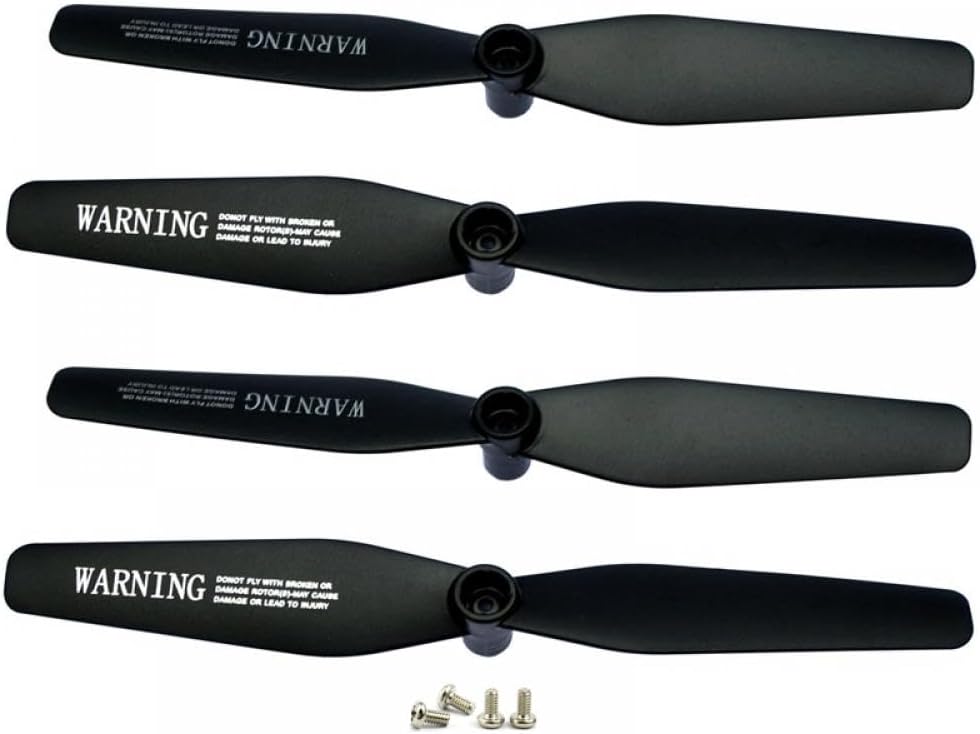
This image displays four black replacement propellers for VISUO RC quadcopters, along with four small silver screws. Each propeller has a central hub for attachment and features a 'WARNING' label indicating not to fly with broken or damaged rotors to prevent injury.
Propeller Installation Instructions
Follow these steps to replace the propellers on your VISUO RC quadcopter:
- Power Off: Ensure the drone is powered off and the battery is removed or disconnected before beginning.
- Identify Damaged Propeller: Locate the propeller that needs replacement. Note its orientation (clockwise or counter-clockwise rotation, often indicated by a letter or mark on the propeller or drone arm).
- Remove Old Propeller: Carefully unscrew the small screw holding the damaged propeller to the motor shaft. Gently pull the propeller straight up to remove it.
- Clean Motor Shaft: If necessary, gently clean any debris from the motor shaft.
- Install New Propeller: Take a new propeller, ensuring it matches the orientation of the one you removed. Align the hole in the propeller with the motor shaft.
- Secure Propeller: Place a new screw into the propeller's center and carefully tighten it. Do not overtighten, as this can strip the screw threads or damage the propeller. The propeller should be securely attached but still able to spin freely without excessive wobble.
- Repeat for Other Propellers: If multiple propellers need replacement, repeat steps 2-6 for each one.
- Test Flight: After installation, perform a short, low-altitude test flight in a safe area to ensure all propellers are functioning correctly and the drone is stable.
Product Specifications
- Brand: HeEHQA
- Model Name: HeEHQA169
- Compatibility: VISUO XS816, XS809W, XS809HW, XS809, XS809S RC Quadcopter Drones
- Product Dimensions: Approximately 1.18 x 0.79 x 0.39 inches (individual propeller)
- Item Weight: Approximately 14.1 ounces (total package)
- Material: Durable composite material
- Color: Black
- Assembly Required: No (for individual propellers, installation required)
Maintenance
Proper maintenance extends the lifespan of your drone's propellers and ensures safe flight.
- Regular Inspection: Before each flight, visually inspect all propellers for any signs of cracks, bends, chips, or other damage.
- Cleaning: Gently wipe propellers with a soft, dry cloth to remove dust or debris. Avoid using harsh chemicals.
- Storage: Store spare propellers in a cool, dry place, away from direct sunlight and extreme temperatures, to prevent material degradation.
- Replacement: Replace propellers immediately if any damage is detected, even minor. Damaged propellers can affect flight stability and efficiency.
Troubleshooting
If you encounter issues after replacing propellers, consider the following:
- Drone Unstable After Replacement:
- Ensure propellers are installed on the correct motor arms with the correct rotation direction.
- Check that all screws are securely tightened, but not overtightened.
- Verify that no propeller is bent or damaged.
- Propeller Not Spinning Freely:
- Loosen the screw slightly; it might be overtightened.
- Check for any debris or obstruction under the propeller.
- Unusual Noise During Flight:
- Inspect propellers for any subtle damage that might cause vibration.
- Ensure propellers are balanced and seated correctly.
Warranty and Support
HeEHQA replacement parts are designed for durability and performance. For specific warranty information or technical support regarding your HeEHQA products, please refer to the seller's policies or contact the manufacturer directly through their official channels. Keep your purchase receipt as proof of purchase.