
1. Introduction
The Prodillo MS01 is a 6-in-1 keyless fingerprint smart lock designed for enhanced security and convenience. This weatherproof security solution is suitable for both hinged and sliding doors, offering multiple unlocking methods and real-time mobile alerts. Its slim, modern design ensures durability for indoor and outdoor use. This manual provides detailed instructions for installation, operation, and maintenance of your MS01 smart lock.
2. Key Features
- Multiple Entry Methods: Offers 6 ways to unlock: fingerprint access (up to 100 fingerprints), passcodes, key cards, mobile app access, voice control (with Amazon Alexa or Google smart home devices, sold separately), and traditional keys.
- Guest Access: Easily grant temporary access to family members, guests, or service providers with one-time codes.
- Activity Tracking: Track entry logs and monitor access history through the compatible mobile application.
- Enhanced Security: Features auto-locking functionality and anti-theft tamper detection.
- Anti-Peeping Function: Allows entry of random numbers before or after your actual passcode to prevent others from discerning your code.
- Durable Design: Constructed from aluminum alloy with an IP68 weather resistance rating, ensuring performance in various weather conditions.
- Versatile Installation: Reversible handle design accommodates both left and right-handed doors, and is compatible with hinged and sliding door types.
3. Product Overview
Familiarize yourself with the components and dimensions of your Prodillo MS01 Smart Door Lock.
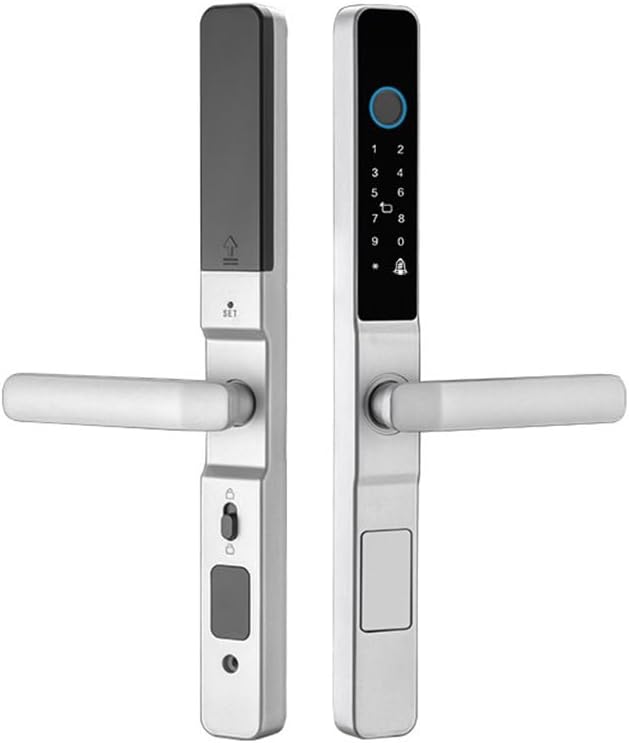
Figure 3.1: Front and back view of the Prodillo MS01 smart lock in silver, showcasing the sleek design of both the exterior and interior units.

Figure 3.2: Labeled diagram of the Prodillo MS01 smart lock, highlighting key components such as the fingerprint sensor, touchscreen keypad, doorbell, battery compartment (4x AAA), manual lock switch, and backup key slot with emergency USB port. Dimensions are also indicated (13.9 inches length, 1.38 inches width).
4. Setup and Installation
The MS01 smart lock is designed for easy installation, often replacing existing door locks, deadbolts, or doorknobs with minimal tools. A screwdriver is typically sufficient.
4.1 Compatibility
- The lock comes with a 60mm backset mortise and is compatible with most existing locks.
- The reversible handle design allows for installation on both left and right-handed doors.
- Suitable for both hinged and sliding doors.
4.2 Installation Steps (General)
- Prepare the Door: Ensure your door is properly prepped for a mortise lock. The MS01 requires a specific mortise size. Refer to the mortise dimensions provided in Figure 4.1.
- Install the Mortise Lock: Insert the mortise into the door edge and secure it with screws.
- Install Exterior and Interior Panels: Connect the exterior and interior lock panels, ensuring all cables are properly routed and connected.
- Attach Handles: Secure the handles to both the exterior and interior units. The handle direction can be reversed to match your door's swing.
- Insert Batteries: Open the battery compartment on the interior unit and insert 4x AAA batteries.
- Test Functionality: After installation, test all locking and unlocking mechanisms, including the manual key, before closing the door.

Figure 4.1: Detailed diagram of the mortise lock component, including its dimensions (76.5mm, 60mm, 240mm, 85mm, 22mm). Note: This image depicts a black mortise lock, but the functionality and dimensions apply to the silver product.

Figure 4.2: Illustration demonstrating the locking mechanism for the Prodillo MS01 smart lock. Lifting the handle upwards locks the door, and pulling it downwards unlocks it. Note: This image depicts a black variant of the lock.
5. Operating Instructions
The Prodillo MS01 offers multiple convenient ways to secure and access your property.
5.1 Unlocking Methods
- Fingerprint Access: Place your registered fingerprint on the sensor. The lock will unlock upon successful verification.
- Passcode Entry: Enter your registered passcode on the touchscreen keypad. For added security, utilize the anti-peeping function by entering random digits before or after your actual code.
- Key Card: Present a registered key card to the designated reader area on the lock.
- Mobile App: Use the compatible mobile application to remotely unlock the door. Ensure your lock is connected to your home network (Wi-Fi/Bluetooth).
- Voice Control: If integrated with Amazon Alexa or Google Assistant (devices sold separately), use voice commands to unlock the door.
- Traditional Key: In case of power failure or emergency, use the physical backup key to unlock the door via the hidden key slot.
5.2 Locking Methods
- Auto-Lock: The lock is equipped with an auto-locking feature that engages after a set period (configurable via the app) once the door is closed.
- Manual Locking: Lift the handle upwards from the exterior or interior to manually engage the lock.
- Mobile App: Use the compatible mobile application to remotely lock the door.

Figure 5.1: An illustration depicting the voice control functionality of the Prodillo MS01 smart lock, showing compatibility with Amazon Alexa and Google Assistant. A person is shown interacting with a smart speaker to unlock the door.
6. Maintenance
Proper maintenance ensures the longevity and optimal performance of your Prodillo MS01 Smart Door Lock.
- Battery Replacement: The lock requires 4x AAA batteries. Replace them promptly when the low battery indicator appears on the lock or in the mobile app. Use high-quality alkaline batteries for best performance.
- Cleaning: Wipe the touchscreen and lock body with a soft, dry cloth. Avoid abrasive cleaners or solvents that could damage the finish or electronic components.
- Weather Resistance: The MS01 has an IP68 weather resistance rating, making it suitable for outdoor use. However, avoid direct and prolonged exposure to extreme weather conditions if possible, and ensure all seals are intact during installation.
- Firmware Updates: Regularly check the mobile application for available firmware updates to ensure your lock has the latest features and security enhancements.
7. Troubleshooting
If you encounter issues with your Prodillo MS01 Smart Door Lock, refer to the following common problems and solutions.
- Lock Not Responding:
- Check battery levels. Replace batteries if low.
- Ensure the lock is properly installed and all connections are secure.
- Try using the physical backup key to confirm the mechanical function.
- Fingerprint Not Recognized:
- Ensure your finger is clean and dry.
- Try re-registering your fingerprint in the mobile app.
- Ensure the fingerprint sensor is clean.
- Passcode Not Working:
- Verify you are entering the correct passcode.
- Ensure the touchscreen is clean and responsive.
- Check if the lock is in a 'locked out' state due to multiple incorrect attempts. Wait for the lockout period to expire.
- App Connectivity Issues:
- Ensure your smartphone's Bluetooth or Wi-Fi is enabled.
- Verify the lock is within range of your Wi-Fi router or Bluetooth device.
- Restart the mobile application and/or your smartphone.
- Check for app updates.
- Auto-Lock Not Engaging:
- Verify the auto-lock feature is enabled and configured correctly in the mobile app.
- Ensure the door sensor (if applicable) is properly aligned and detecting the door's closed state.
- Emergency USB Port: If batteries are completely drained, connect a power bank to the emergency USB port to temporarily power the lock and gain entry using a registered method.
8. Specifications
| Feature | Detail |
|---|---|
| Brand | Prodillo |
| Model Name | Prodillo MS01 6-in-1 Smart Door Lock |
| Item Model Number | PROMS01 |
| Lock Type | Smart Door Lock |
| Material | Aluminum |
| Color | Silver |
| Item Dimensions (L x W x H) | 13.9 x 1.38 x 0.9 inches |
| Item Weight | 4 Pounds |
| Special Features | Auto-Lock, Fingerprint, Passcode Unlock, Touchscreen, Weather Resistant |
| Connectivity Protocol | Bluetooth, Wi-Fi |
| Controller Type | Android, iOS (App) |
| Power Source | 4x AAA Batteries (not included) |
| UPC | 667758938131 |
9. Warranty and Support
Prodillo stands behind the quality of the MS01 Smart Door Lock.
- Return Policy: Enjoy a 30-day return policy from the date of purchase.
- Manufacturer Warranty: The product is covered by a 1-year manufacturer warranty from the date of purchase.
- Mobile App Access: Lifetime free access to the compatible mobile application is included.
For further assistance or technical support, please refer to the contact information provided with your product packaging or visit the official Prodillo website.


