
Introduction
This manual provides detailed instructions for the setup, operation, maintenance, and troubleshooting of your LICAEVEY Wireless Gamepad. Please read this manual thoroughly before using the product to ensure proper functionality and to maximize your gaming experience.
The LICAEVEY Wireless Gamepad features RGB backlighting, dual vibration motors, and supports custom key settings (for Android systems via the ShootingPlusV3 App). It is compatible with a wide range of devices including Android phones/tablets (Android 6.0+), iOS devices (iOS 13.0+), PC (Windows 8/10), and various game consoles.
Package Contents
Verify that all items are present in your package:
- 1 x LICAEVEY Wireless Game Controller
- 1 x Data Cable (USB-C)
- 1 x Stand (Phone Holder)
- 1 x Instruction Manual (this document)

Image: The LICAEVEY Wireless Gamepad shown with its included USB-C data cable and phone holder stand.
Setup and Connection
Charging the Gamepad
Before first use, ensure the gamepad is fully charged. Connect the provided USB-C data cable to the gamepad's charging port and the other end to a USB power source (e.g., computer, USB wall adapter).
Wired Connection (Initial Pairing)
- Connect the gamepad to your host device (e.g., PC, game console) using the provided USB data cable.
- The gamepad's LED indicators (LED 1, 2, 3) will illuminate steadily, indicating a successful wired connection.
Wireless Connection (Bluetooth Pairing)
After establishing a wired connection, you can switch to wireless mode:
- Ensure the gamepad is connected via USB cable as described above.
- Press the HOME button on the gamepad to enter pairing mode. LED4 will begin flashing.
- After a few seconds, LED4 will illuminate steadily, indicating successful wireless pairing.
- You can now unplug the USB cable, and the gamepad will remain connected wirelessly.

Image: Front view of the LICAEVEY Wireless Gamepad with the integrated phone holder extended, ready for mobile gaming.
Device Compatibility
- Android Devices: Supports Android 6.0 or higher (phones, tablets, Android TVs).
- iOS Devices: Compatible with iOS 13.0 or higher, supporting gamepad mode.
- PC: Supports Windows 8 and Windows 10 systems.
- Game Consoles: Supports for Switch, for PS4, for PS3 game consoles (Note: No touchpad or somatosensory function for PS4/PS3).
Operating Instructions
Basic Controls
The gamepad features standard controls including dual analog sticks, a D-pad, action buttons (A, B, X, Y), shoulder buttons (L1, R1), and triggers (L2, R2). Additional buttons include SELECT, START, TURBO, and HOME.

Image: A close-up view of the LICAEVEY Wireless Gamepad's face buttons, D-pad, and analog sticks.
RGB Backlight
The gamepad features RGB backlighting. Specific controls for adjusting or turning off the backlight are typically integrated into the gamepad's firmware or accessible via a dedicated button combination. Refer to the quick start guide included in the package for specific backlight control instructions if available.
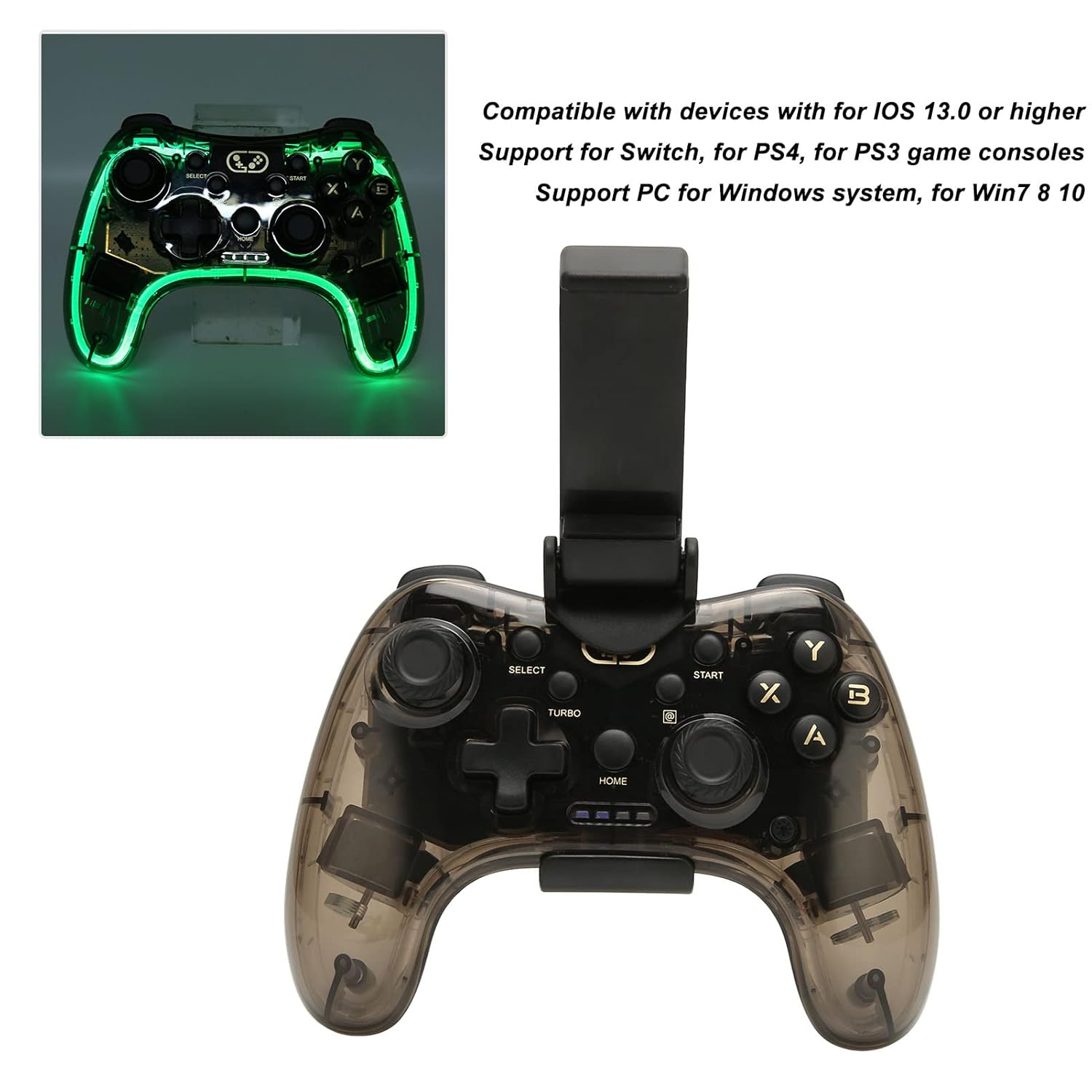
Image: The LICAEVEY Wireless Gamepad with its RGB backlighting active, showcasing the illuminated edges and buttons.
Dual Vibration
The built-in dual vibration motors provide haptic feedback during gameplay, enhancing immersion. This feature is automatically active when supported by the game and connected device.
Custom Key Settings (Android Only)
For Android devices, custom key settings are supported through the ShootingPlusV3 App. Download and install this application on your Android device to configure button mappings and other settings according to your preferences.
Maintenance and Care
- Cleaning: Use a soft, dry cloth to clean the gamepad. Do not use liquid cleaners or abrasive materials.
- Storage: Store the gamepad in a cool, dry place away from direct sunlight and extreme temperatures.
- Battery Care: To prolong battery life, avoid fully discharging the gamepad frequently. Charge it regularly, even if not in use for extended periods.
- Avoid Drops: Protect the gamepad from drops and impacts, which can damage internal components.
Troubleshooting
Gamepad Not Connecting Wirelessly
- Ensure the gamepad is charged.
- Repeat the wired connection and wireless pairing steps carefully.
- Check your device's Bluetooth settings to ensure it is discoverable and the gamepad is listed. Try "forgetting" the device and re-pairing.
- Ensure your device's operating system is compatible (Android 6.0+, iOS 13.0+, Windows 8/10).
Buttons or Joysticks Not Responding
- Verify the gamepad is properly connected (wired or wireless).
- Restart the gamepad and your host device.
- Test the gamepad with a different game or application to rule out software-specific issues.
- For Android, check the ShootingPlusV3 App settings if custom mappings are enabled.
Vibration Not Working
- Ensure the game you are playing supports vibration feedback.
- Check in-game settings to ensure vibration is enabled.
- Verify the gamepad is fully charged.
Specifications
| Feature | Detail |
|---|---|
| Model Number | LICAEVEY5hwgrx2mpf |
| Connection | Wireless (Bluetooth), Wired (USB-C) |
| Light Effect | RGB Backlight |
| Vibration | Dual Vibration Motors |
| Battery Type | Built-in 800mAh Lithium Ion Battery |
| Android System Support | Android 6.0 or higher (Phones, Tablets, Android TVs) |
| iOS System Support | iOS 13.0 or higher (Gamepad Mode) |
| PC System Support | Windows 8, Windows 10 |
| Game Console Support | Switch, PS4, PS3 (Note: No touchpad/somatosensory for PS4/PS3) |
| Custom Key Settings | Supported via ShootingPlusV3 App (Android only) |
| Package Dimensions | 6.3 x 4.72 x 2.76 inches |
| Item Weight | 15.1 ounces |
| Manufacturer | LICAEVEY |
Warranty and Support
For warranty information and technical support, please refer to the documentation included with your purchase or visit the official LICAEVEY website. Keep your proof of purchase for warranty claims.