1. Introduction
The Generic LCR-P1 Transistor Tester is a versatile electronic component testing device designed for efficient identification and measurement of various components. It features intelligent identification, anti-burn protection, and a replaceable patch holder, making it suitable for a wide range of testing needs, including transistors, diodes, capacitors, resistors, inductors, and battery voltage.
2. Package Contents
Please verify that all items listed below are included in your package:
- 1x LCR-P1 Transistor Tester
- 1x Patch Test Board
- 1x Data Cable (Type-C)
- 1x Description (Manual)
- 3x Test Hooks

Image 2.1: The LCR-P1 Transistor Tester along with its included accessories: a Type-C data cable, a patch test board, and three test hooks.
3. Product Features
- Efficient Component Identification: Automatically identifies device parameters with a single button press upon insertion.
- Anti-Burn Protection: Features a mechanism to discharge undischarged capacitors upon insertion, protecting the meter.
- Replaceable Patch Holder: Innovative design allows for easy adaptation to various testing requirements.
- Infrared Signal Decoding: Supports decoding of infrared signals, useful for remote control testing.
- Precise Zener Diode Testing: Dedicated measurement channel for Zener diodes, with a measurable range of 0.01-32V.
- Compact and Portable Design: Small and lightweight for easy transport and use anywhere.
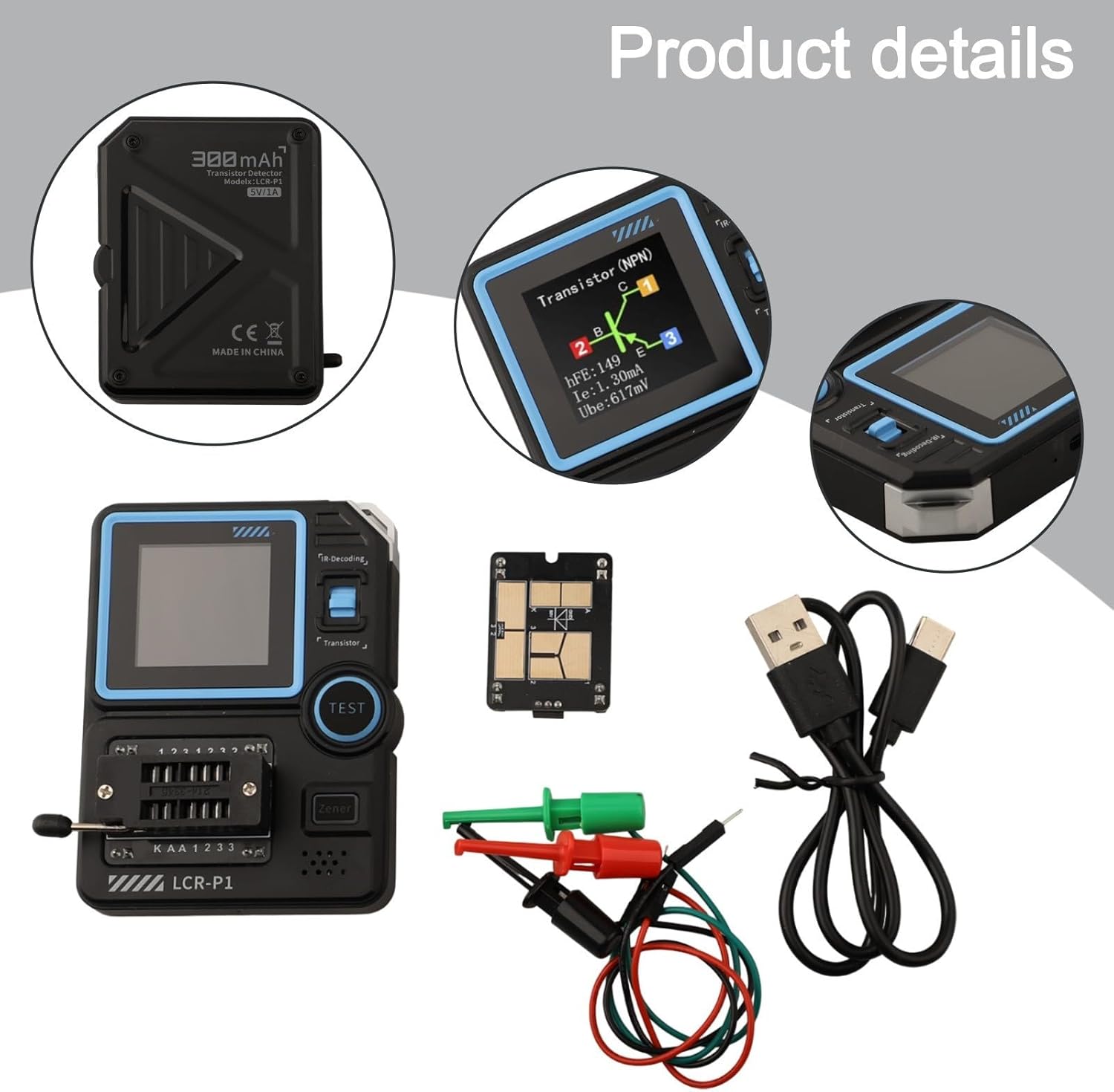
Image 3.1: Detailed view of the LCR-P1 tester, showing its screen, patch holder, and the Type-C charging port. The back of the device indicates a 300mAh battery.

Image 3.2: The LCR-P1 Transistor Tester displayed with its patch test board, test hooks, and Type-C data cable, highlighting the complete set of components.
4. Setup
- Unpacking and Inspection: Carefully remove all components from the packaging. Inspect the tester and accessories for any visible damage.
- Initial Charging: Before first use, ensure the device is fully charged. Connect the provided Type-C data cable to the tester's charging port and a 5V/1A power source. The battery capacity is 300mAh.
- Connecting Test Accessories:
- Patch Test Board: For surface-mount components or specific test configurations, insert the patch test board into the designated socket on the tester.
- Test Hooks: For through-hole components or connecting to larger circuits, attach the test hooks to the appropriate terminals on the tester or patch test board.
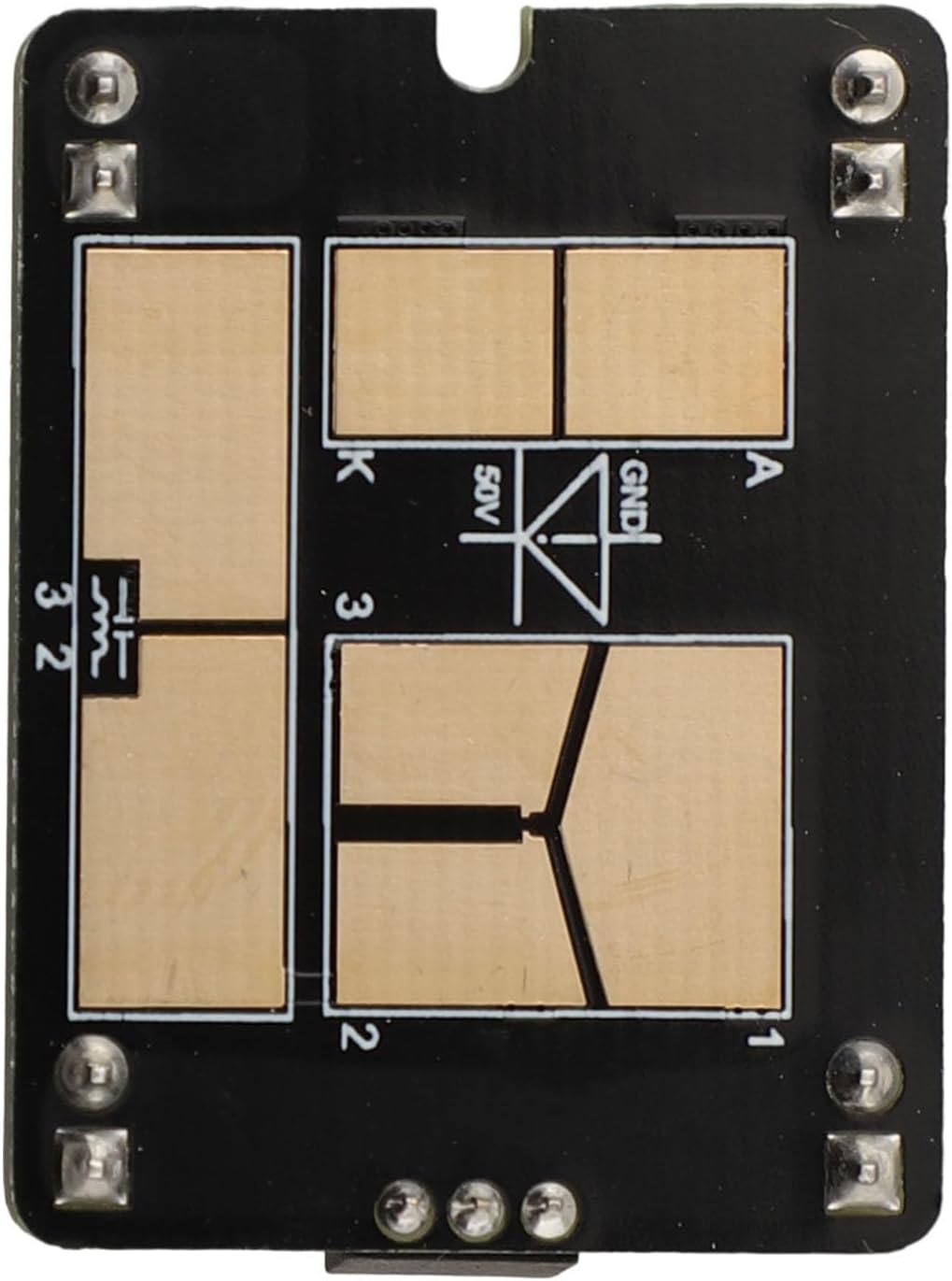
Image 4.1: A close-up view of the replaceable patch test board, showing its contact pads and markings for component placement.
5. Operating Instructions
The LCR-P1 Transistor Tester is designed for straightforward operation. Always ensure the component to be tested is discharged, especially capacitors, to prevent damage to the tester.
- Powering On/Off: Press the 'TEST' button to power on the device. The device will automatically power off after a period of inactivity to conserve battery.
- Component Testing (General):
- Insert the component leads into the ZIF (Zero Insertion Force) socket or connect via test hooks/patch board.
- Gently clamp the component.
- Press the 'TEST' button. The tester will automatically identify the component type (e.g., transistor, diode, resistor, capacitor, inductor) and display its parameters on the 1.44-inch screen.

Image 5.1: A close-up of the LCR-P1 tester's screen displaying the results of a transistor test, including NPN type, hFE, collector current (Ic), and base-emitter voltage (Ube).
- Zener Diode Testing: For Zener diodes, ensure the device is powered on. The tester has a dedicated channel for Zener diodes, allowing measurement within the 0.01-32V range. Connect the Zener diode to the appropriate terminals and press 'TEST'.
- Infrared (IR) Decoding: The tester supports infrared signal decoding. Point an IR remote control towards the IR receiver on the tester and press a button on the remote. The tester will display the decoded protocol and code.
- Battery Voltage Test: Connect the battery to the designated terminals. The tester can measure battery voltage from 0.1-4.5V.

Image 5.2: An angled view of the LCR-P1 Transistor Tester, highlighting its compact form factor and the layout of its controls and display.
6. Maintenance
- Cleaning: Use a soft, dry cloth to clean the device. Do not use abrasive cleaners or solvents.
- Storage: Store the tester in a cool, dry place away from direct sunlight and extreme temperatures.
- Battery Care: Recharge the internal lithium battery regularly, especially if the device will not be used for an extended period, to maintain battery health.
7. Troubleshooting
- Device not powering on: Ensure the battery is charged. Connect the Type-C cable to a 5V/1A power source and allow it to charge for at least 30 minutes before attempting to power on again.
- Incorrect readings or no detection:
- Verify that the component leads are properly inserted and making good contact in the ZIF socket or with the test hooks.
- Ensure the component is not damaged.
- For capacitors, ensure they are fully discharged before testing.
- Screen is blank or flickering: Recharge the battery. If the issue persists, contact customer support.
8. Specifications
| Parameter | Value |
|---|---|
| Model | LCR-P1 |
| Display | 1.44 inches |
| Battery Capacity | 300mAh Lithium Battery |
| Charging Specification | Type-C, 5V/1A |
| Dimensions | 71 × 87 × 28mm (2.8 x 3.4 x 1.1 inches) |
| Weight | 140 Grams (4.9 ounces) |
| Transistors (Triodes) | 10 |
| Diodes | Positive pressure drop < 4.5V |
| Stabilization Diode (Zener) | 0.01-4.5V, 0.01-32V |
| Field Effect Tube | JFET, IGBT, MOSFET |
| Unidirectional/Dual-directional Sailor | Open voltage < 5V, Mental Touch Dive current < 6mA |
| Capacitor | 25pF ~ 100mF |
| Resistance | 0.01Ω - 50MΩ |
| Inductance | 10µH - 1000µH |
| Battery Test | 0.1-4.5V |
| Infrared Remote Control Decoding | Protocol infrared code |
9. Warranty and Support
For warranty information or technical support, please refer to the documentation provided with your purchase or contact the seller directly. Keep your purchase receipt as proof of purchase.
10. Application Examples

Image 10.1: A technician using the LCR-P1 Transistor Tester during the inspection and repair of an air conditioning unit, demonstrating its utility in field service.

Image 10.2: The LCR-P1 Transistor Tester being used by a technician while performing maintenance on a boiler system, indicating its applicability in industrial and home appliance repair.

Image 10.3: A collage illustrating the LCR-P1 Transistor Tester's use in diverse scenarios, including electronic circuit development, appliance repair, and educational settings.


