
1. Product Overview
This VINABTY replacement remote control is designed to function as a direct substitute for the original remote controls of various JVC DVD/VCR Combo units. It offers full functionality without requiring complex programming.
Compatible JVC Models:
- RM-SDR106U
- RM-SDR108U
- DR-MV99BU
- DR-MV99B
- DR-MV7SU
- DRMV7S
Key Features:
- No setup or programming required.
- Ergonomic design for comfortable handling.
- Infrared connectivity.
2. Setup and Battery Installation
The remote control requires two AAA batteries (not included) for operation. No additional programming or pairing is necessary; simply insert the batteries, and the remote is ready for use with your compatible JVC device.
Battery Installation Steps:
- Locate the battery compartment on the back of the remote control.
- Slide the battery compartment cover downwards or press the latch and lift to open.
- Insert two new AAA batteries, ensuring the positive (+) and negative (-) terminals align correctly with the markings inside the compartment.
- Replace the battery compartment cover, ensuring it clicks securely into place.
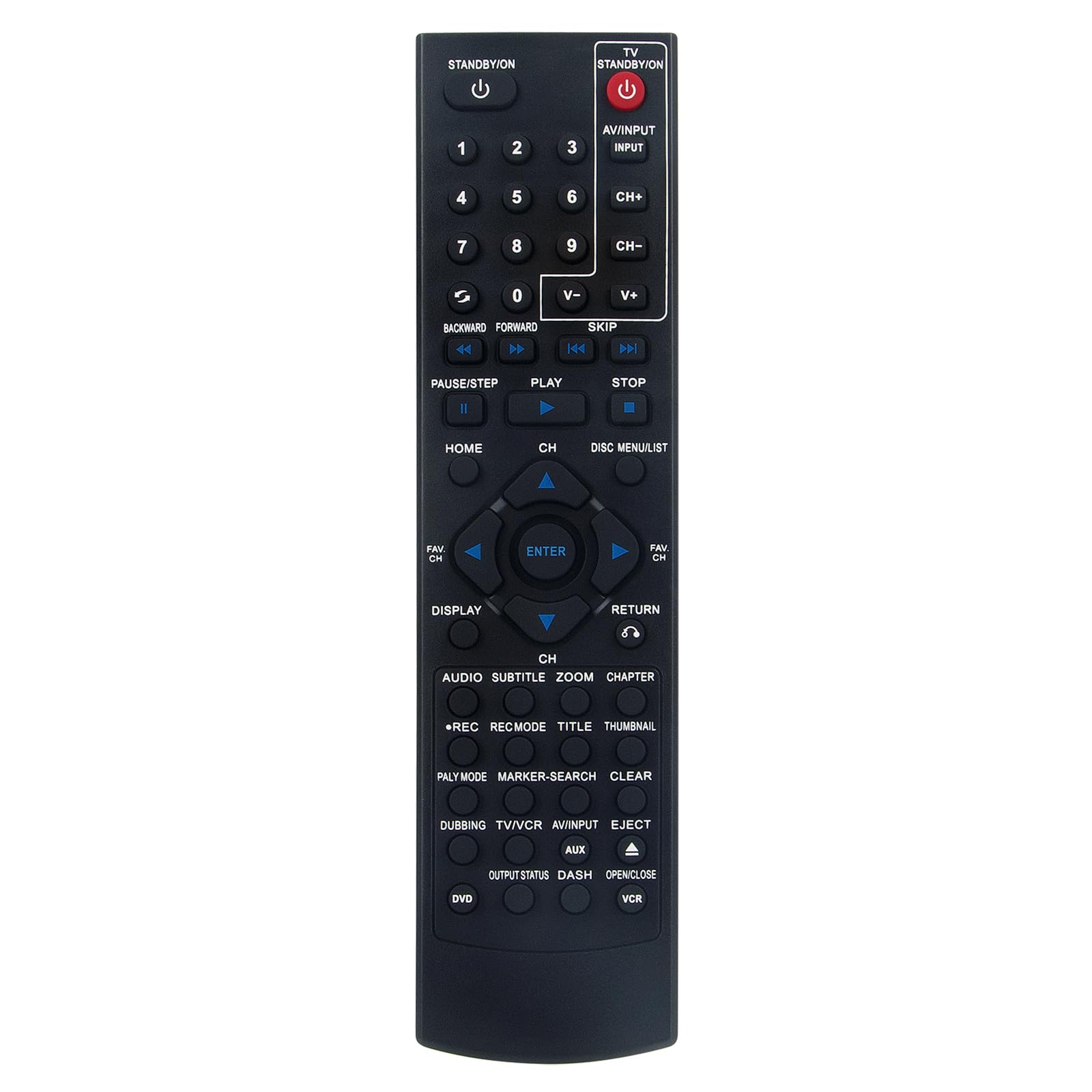
Image: Back view of the remote control, highlighting the battery compartment at the bottom.

Image: Front view of the remote control, displaying the layout of its 20 buttons.
3. Operating Instructions
This replacement remote control is designed to replicate the functions of your original JVC remote. Point the remote control directly at the infrared receiver on your JVC DVD/VCR Combo unit. Press the desired buttons to control playback, menu navigation, volume, channel selection, and other functions as you would with the original remote.
General Usage Tips:
- Ensure a clear line of sight between the remote control and the JVC device.
- Avoid placing objects that may block the infrared signal.
- Operate within the maximum range of 33 feet (10 meters) for optimal performance.
4. Maintenance
Proper maintenance ensures the longevity and reliable operation of your remote control.
Battery Replacement:
- Replace batteries when the remote's response becomes sluggish or stops working.
- Always replace both AAA batteries at the same time with new ones.
- Do not mix old and new batteries, or different types of batteries.
- Remove batteries if the remote will not be used for an extended period to prevent leakage.
Cleaning:
- Wipe the remote control with a soft, dry cloth.
- For stubborn dirt, lightly dampen the cloth with water or a mild cleaning solution, then wipe dry immediately.
- Do not use abrasive cleaners, alcohol, or solvents, as these can damage the surface.
5. Troubleshooting
If you encounter issues with your remote control, refer to the following troubleshooting steps:
- Remote Not Responding:
- Check if the batteries are inserted correctly with the correct polarity.
- Replace the batteries with fresh AAA batteries.
- Ensure there are no obstructions between the remote and the JVC device's infrared sensor.
- Verify that you are within the effective operating range (up to 33 feet).
- Intermittent Operation:
- This often indicates low battery power. Replace the batteries.
- Ensure the remote's infrared emitter is clean and free from debris.
- Specific Buttons Not Working:
- If only certain buttons fail, try replacing the batteries.
- Ensure the remote is pointed directly at the device.
If problems persist after following these steps, please refer to the warranty and support information.
6. Specifications
| Feature | Detail |
|---|---|
| Brand | VINABTY |
| Compatible Devices | JVC DVD/VCR Combo units (RM-SDR106U, RM-SDR108U, DR-MV99BU, DR-MV99B, DR-MV7SU, DRMV7S) |
| Connectivity Technology | Infrared |
| Power Source | 2 x AAA Batteries (not included) |
| Button Quantity | 20 |
| Maximum Range | 33 Feet (10 meters) |
| Color | Black |
| Item Weight | 1.9 Ounces |
| Item Dimensions (L x W x H) | 5" x 2" x 0.55" |
7. Warranty and Support
This VINABTY remote control comes with a 12-month warranty from the date of purchase. This warranty covers manufacturing defects and ensures the product functions as intended under normal use.
For warranty claims, technical support, or any questions regarding the operation of your remote control, please contact your retailer or the VINABTY customer service directly. Please retain your proof of purchase for warranty validation.