
1. Introduction
This manual provides essential instructions for the safe operation, assembly, and maintenance of your Pop Shope P1 Folding Electric Scooter. Please read this manual thoroughly before using the scooter to ensure proper function and safety.

Image 1.1: The Pop Shope P1 Folding Electric Scooter, showcasing its design and a smartphone displaying the companion app interface.
2. Safety Information
Your safety is paramount. Adhere to all local traffic laws and regulations. Always wear a helmet and appropriate safety gear when riding. Regular checks of your scooter's components are recommended.
- Non-Zero Start: For your safety, the P1 electric scooter requires a non-zero start. Use one foot to slide for a short distance (kick-start) before pressing the throttle to accelerate.
- Braking: Familiarize yourself with the disc brakes and electronic brakes for effective stopping.
- Visibility: Utilize the headlights for increased visibility and the tail light, which flashes automatically during braking, especially when riding at night.
- Load Limit: Do not exceed the maximum load capacity of 100 kg.
- Weather Conditions: Avoid riding in heavy rain or extreme weather conditions. The scooter has an IPx4 waterproof rating, meaning it is resistant to splashing water from any direction, but not fully submersible.
3. Package Contents
Upon opening the package, please verify that all the following items are included:
- P1 Electric Scooter
- Instruction Manuals (this document)
- Installation Tool Kit
- Charger
4. Setup and Assembly
The P1 scooter comes partially assembled. Use the provided installation tool kit to complete the setup. Typically, this involves attaching the handlebars and performing initial checks.
- Unfold the Scooter: Carefully unfold the main frame until it locks into place. Ensure all locking mechanisms are securely engaged.
- Attach Handlebars: Connect the handlebar assembly to the main stem. Secure it using the screws and tools provided.
- Initial Charge: Before first use, fully charge the scooter' battery. Connect the charger to the charging port and then to a power outlet. The charging indicator will show the status.
- Pre-Ride Check: Before each ride, check tire pressure (if applicable, though P1 uses solid tires), brake function, and ensure all bolts and quick releases are tight.
5. Operating Instructions
5.1 Starting and Riding
- Power On: Press the power button to turn on the scooter. The LCD display will illuminate.
- Non-Zero Start: Place one foot on the deck and use the other foot to push off the ground, gaining a slight momentum.
- Accelerate: Once moving, gently press the throttle lever to engage the motor and accelerate.
- Braking: Release the throttle and use the brake lever to slow down or stop.
5.2 Speed Modes
The P1 electric scooter offers three adjustable speed levels:
- Energy Saving Mode: Approximately 15 km/h
- Standard Mode: Approximately 20 km/h
- Sport Mode: Approximately 25 km/h (Maximum Speed)
To switch between speed modes, double-click the start button.
5.3 Constant Cruising Speed (Cruise Control)
To activate cruise control:
- Reach your desired constant speed.
- Hold down the throttle for 6 seconds. You will hear a beep, indicating that cruise mode is active.
To cancel cruise control, simply press the throttle or apply the brake.
5.4 LCD Digital Display
The high-definition LCD display provides real-time information:
- Battery Level
- Current Speed
- Selected Gear (Speed Mode)
- Headlight Status
- Fault Conditions (if any)

Image 5.4: Close-up of the scooter's intelligent LCD display and the Bluetooth app interface, showing various operational metrics.
5.5 Bluetooth App Connection
Connect your P1 scooter to a smartphone app via Bluetooth to monitor status and adjust settings. Refer to the app's instructions for detailed usage.
6. Features
The Pop Shope P1 Electric Scooter is designed with several key features for an efficient and convenient riding experience:
- Powerful Motor: Equipped with a 350W rated motor, capable of reaching a maximum power of 400W, providing stable acceleration and a top speed of 25 km/h.
- Long-Range Battery: A 6Ah lithium-ion battery offers an electric range of 18-20 km on a full charge.
- Solid Tires: 8.5-inch honeycomb solid tires provide excellent wear resistance and shock absorption without the need for inflation.
- Dual Braking System: Features efficient disc brakes and electronic brakes for reliable stopping power.
- Integrated Lighting: Includes a bright headlight and an automatic flashing tail light for enhanced safety and visibility.
- Foldable Design: Lightweight and compact, the scooter folds with a push of a button for easy storage and transport.
- Durable Construction: Made from high-quality aluminum, ensuring sturdiness while maintaining a net weight of 11.6 kg.
- Anti-Slip Pedals: Designed for secure foot placement during rides.
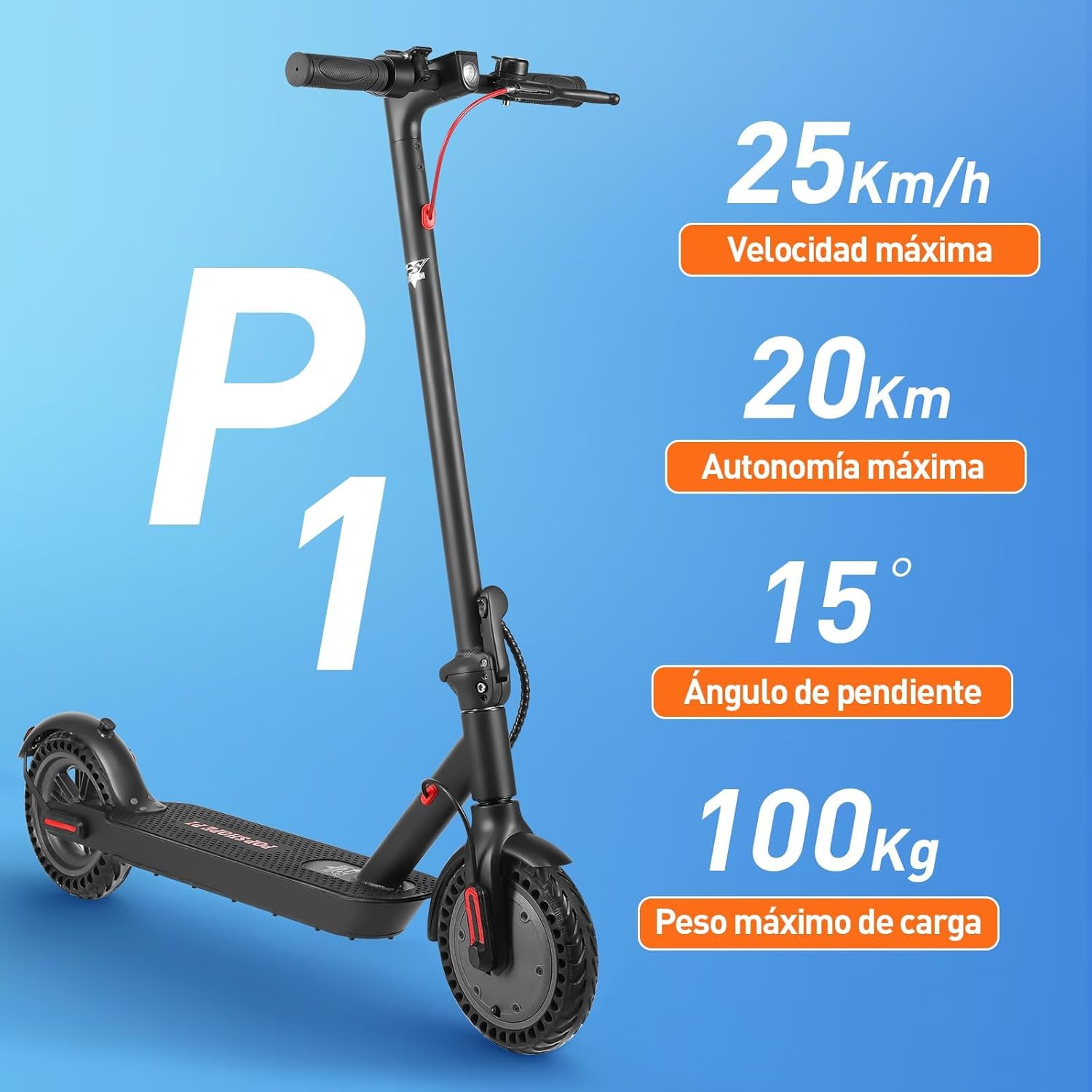
Image 6.1: Key performance indicators of the P1 scooter, including maximum speed, range, climbing angle, and load capacity.

Image 6.2: Details on the scooter's 400W maximum motor power, 36V nominal voltage, and 8.5-inch solid tires.

Image 6.3: Information regarding the 6AH battery, charging time, range, and the EABS with rear disc brake system.

Image 6.4: Visual representation of the scooter's dimensions (109cm length, 101cm height), weight (11.6 kg net), and anti-slip pedals.

Image 6.5: The P1 scooter in its folded state, demonstrating its portability and ease of storage in a vehicle trunk.
7. Maintenance
Regular maintenance ensures the longevity and safe operation of your P1 scooter.
- Cleaning: Wipe the scooter with a damp cloth. Do not use high-pressure water jets or immerse the scooter in water.
- Battery Care: Charge the battery regularly, even if not in use, to maintain its health. Avoid completely draining the battery. Store in a cool, dry place.
- Brake Inspection: Periodically check the brake levers and cables for proper tension and wear. Ensure the disc brakes are functioning effectively.
- Tire Inspection: Although solid tires are used, inspect them for any signs of damage or excessive wear.
- Fastener Checks: Regularly check all screws and bolts to ensure they are tight.
8. Troubleshooting
If you encounter issues with your P1 scooter, refer to the following common troubleshooting tips:
| Problem | Possible Cause | Solution |
|---|---|---|
| Scooter does not power on. | Low battery; loose connection; power button issue. | Charge the battery fully. Check all visible connections. Contact support if problem persists. |
| Motor does not engage after kick-start. | Throttle not pressed; insufficient kick-start momentum; motor fault. | Ensure sufficient kick-start. Press throttle firmly. Check for error codes on display. |
| Reduced range or speed. | Battery degradation; heavy load; riding uphill; low temperature. | Ensure battery is fully charged. Reduce load. Ride on flat terrain. Battery performance can be affected by cold. |
| Brakes feel weak. | Brake pads worn; cable loose; disc issue. | Inspect brake pads and disc. Adjust brake cable tension. Seek professional service if needed. |
| Bluetooth app connection issues. | Bluetooth off on phone/scooter; app not updated; interference. | Ensure Bluetooth is enabled on both devices. Restart app and scooter. Try connecting in a different location. |
For issues not listed here or if solutions do not resolve the problem, please contact customer support.
9. Specifications
| Feature | Detail |
|---|---|
| Product Name | P1 Electric Scooter |
| Brand | Pop Shope |
| Model Name | P1 |
| Rated Voltage | 36 V |
| Battery Capacity | 6 AH |
| Charging Time | < 5 Hours |
| Motor Power | 350W Rated, 400W Max |
| Tire Size | 8.5 inch Solid Tires |
| Waterproof Grade | IPx4 |
| Maximum Speed | 25 km/h |
| Maximum Electric Range | 18-20 km |
| Maximum Load | 100 kg |
| Body Material | Aluminum |
| Item Net Weight | 11.6 kg |
| Product Dimensions (Unfolded) | 109 cm (L) x 43 cm (W) x 101 cm (H) |
| Folded Dimensions | 109 cm (L) x 14.5 cm (W) x 49 cm (H) |
| Brake Style | Disc brakes and electronic brakes |
| Included Components | P1 Electric Scooter, Instruction manuals, Installation Tool, charger |
10. Warranty and Support
Warranty information for the Pop Shope P1 Electric Scooter is typically provided with your purchase documentation or can be found on the manufacturer's official website. Please retain your proof of purchase for warranty claims.
For technical support, service, or further inquiries, please contact Pop Shope customer service through their official channels.