
Introduction and Safety Guidelines
Thank you for choosing the HONEYWHALE M2 MAX Electric Scooter. This manual provides essential information for the safe operation, maintenance, and troubleshooting of your scooter. Please read it thoroughly before your first ride and keep it for future reference. Always prioritize safety by wearing appropriate protective gear, including a helmet, and adhering to local traffic laws.
General Safety Warnings:
- Always wear a helmet and other protective gear (knee pads, elbow pads) when riding.
- Do not ride in heavy rain, snow, or icy conditions.
- Avoid riding on uneven surfaces, potholes, or obstacles.
- Ensure all components are securely fastened before each ride.
- Do not exceed the maximum load capacity of 120 kg.
- Children should only operate the scooter under adult supervision.
- Familiarize yourself with local regulations regarding electric scooter usage.
Setup and Initial Assembly
Your HONEYWHALE M2 MAX scooter comes partially assembled. Follow these steps to complete the setup and prepare for your first ride.
1. Unboxing and Component Check:
Carefully remove all components from the packaging. Verify that all items are present:
- HONEYWHALE M2 MAX Electric Scooter
- Charger
- Basic tool kit for assembly
- Spare inner tube (8.5" x 2")
- Tire lever
- Inflation extender
- User Manual (this document)
2. Handlebar Assembly:
Attach the handlebar to the main stem. Align the handlebar with the stem and secure it using the provided screws and tools. Ensure the cables are not pinched during assembly. Tighten all screws firmly to prevent any wobbling.

Image: The HONEYWHALE M2 MAX Electric Scooter with its handlebars securely attached, ready for use.
3. Initial Battery Charge:
Before your first ride, fully charge the scooter's battery. Connect the charger to the charging port on the scooter and then to a power outlet. The charging indicator on the charger will change (e.g., from red to green) when charging is complete. The charging time is approximately 7 hours.
4. Tire Pressure Check:
Ensure the inflatable tires are properly inflated to 48-50 PSI (Pounds per Square Inch). Correct tire pressure is crucial for optimal performance, range, and ride comfort. Use the provided inflation extender if needed.
Image: A detailed view of the front wheel and integrated motor of the M2 MAX scooter, highlighting the tire and motor components.
5. Bluetooth App Pairing:
Download the official HONEYWHALE app from your smartphone's app store. Enable Bluetooth on your phone and open the app. Follow the in-app instructions to pair your M2 MAX scooter. Ensure your phone's location services are active for successful pairing.

Image: The digital LCD display of the M2 MAX scooter alongside a smartphone screen showing the connected HONEYWHALE app, illustrating app control and display features.
Operating Instructions
Learn how to safely operate your HONEYWHALE M2 MAX Electric Scooter.
1. Power On/Off:
Press and hold the power button on the display to turn the scooter on or off.
2. Starting the Ride (Non-Zero Start):
The M2 MAX features a non-zero start mechanism for safety. To begin riding, push off with your foot to gain a slight initial speed, then press the accelerator to engage the motor.
Video: A demonstration of riding the HONEYWHALE M2 MAX electric scooter, including starting, maneuvering, and folding for portability.
3. Speed Modes:
The scooter offers three speed modes, selectable via the control panel or the app:
- Mode 1: 15 KM/H (9.3 MPH) - Ideal for beginners or crowded areas.
- Mode 2: 25 KM/H (15.5 MPH) - Standard cruising speed.
- Mode 3: 32 KM/H (19.9 MPH) - Maximum speed for open roads.
4. Braking System:
The M2 MAX is equipped with a dual braking system for reliable stopping power:
- Disc Brake: Mechanical disc brake on the rear wheel for strong, responsive braking.
- Electronic Brake: Integrated electronic brake for additional stopping assistance and energy recovery.
- When braking, the rear light automatically illuminates to alert others.
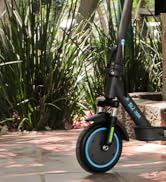
Image: Illustration of the M2 MAX scooter's safety features, including the dual braking system (disc and electronic brakes) and integrated turn signals for enhanced visibility.
5. Lights and Turn Signals:
The scooter features front and rear lights for visibility. Use the turn signals located on both ends of the handlebar to indicate your turning intentions to other road users.
6. LCD Digital Display:
The high-definition LCD display provides real-time information:
- Battery Level
- Current Speed
- Mileage (total distance traveled)
- Selected Gear/Speed Mode
- Fault Indicator Icon (for troubleshooting)
7. Cruise Mode:
Activate cruise mode for a consistent speed on longer rides. Refer to the app or the scooter's specific controls for activation instructions. Note that cruise mode may not always activate precisely as desired, as mentioned in user feedback.
8. Folding Mechanism:
The M2 MAX is designed for portability. To fold the scooter, locate the folding latch mechanism on the stem. Release the latch and carefully fold the stem downwards until it locks into place. Ensure the hinge is handled with care to maintain its durability.

Image: A person demonstrating the folding process of the HONEYWHALE M2 MAX electric scooter, highlighting its portability.
Maintenance
Regular maintenance ensures the longevity and safe operation of your scooter.
1. Tire Care:
- Pressure: Check tire pressure weekly and maintain 48-50 PSI. Under-inflated tires significantly impact performance and increase the risk of punctures.
- Inspection: Regularly inspect tires for wear, cuts, or embedded objects.
- Replacement: If a tire needs replacement, use the provided spare inner tube, tire lever, and inflation extender. Professional assistance is recommended for tire changes, especially for the front wheel.
2. Battery Care:
- Charging: For optimal battery life, avoid completely draining the battery. If not using the full range, charge the battery to 80-85%.
- Storage: If storing the scooter for an extended period, charge the battery to about 50-60% and recharge every 1-2 months to prevent deep discharge.
- Environment: Charge and store the scooter in a cool, dry place, away from direct sunlight and extreme temperatures.
Image: The M2 MAX electric scooter highlighting its battery capacity (7.8AH), maximum range (22KM), and charging time (7 hours), essential for battery maintenance.
3. Cleaning:
Wipe the scooter with a damp cloth. Do not use high-pressure water jets or corrosive cleaning agents. Ensure the charging port cover is securely closed before cleaning.
4. Brake Inspection:
Regularly check the brake levers and cables for proper tension and function. Ensure the disc brake pads are not excessively worn. Adjust or replace components as necessary.

Image: A close-up view of the rear disc brake system on the HONEYWHALE M2 MAX electric scooter, showing the caliper and rotor.
5. Suspension Check:
The M2 MAX features front hydraulic and rear spring suspension. Periodically check for any signs of damage or reduced effectiveness. Proper suspension ensures a comfortable ride and reduces vibration.

Image: Detailed view of the M2 MAX scooter's suspension system, illustrating both the front hydraulic and rear spring shock absorbers for enhanced ride comfort.
Troubleshooting
This section addresses common issues you might encounter with your HONEYWHALE M2 MAX Electric Scooter.
1. Scooter Does Not Power On:
- Ensure the battery is charged. Connect the charger and check if the charging indicator lights up.
- Verify that the power button is pressed and held correctly.
- If the issue persists, check for any visible damage to cables or connections.
2. Difficulty with Bluetooth App Pairing:
- Make sure Bluetooth is enabled on your smartphone.
- Ensure location services are active on your phone, as this is often required for successful pairing.
- Restart both your phone and the scooter, then attempt pairing again.
- Ensure the app is updated to the latest version.
3. Reduced Range or Speed:
- Check tire pressure; under-inflated tires significantly impact performance.
- Ensure the battery is fully charged.
- Riding conditions (e.g., uphill, strong headwinds, rider weight) can affect range and speed.
- Extreme temperatures can temporarily reduce battery performance.
4. Flat Tire:
- If you experience a flat tire, carefully inspect the tire for punctures.
- Use the provided tire lever and spare inner tube for replacement. If you are not comfortable performing this task, seek professional assistance.
5. Fault Indicator on Display:
If a fault indicator icon appears on the LCD display, consult the detailed troubleshooting section in the full user manual (physical copy) for specific error codes and their solutions. If the issue persists, contact customer support.
Specifications
Detailed technical specifications for the HONEYWHALE M2 MAX Electric Scooter.
| Model | M2 MAX |
| Brand | HONEYWHALE |
| Motor Power | Rated 350 W, Max 500 W |
| Max Speed | <32 KM/H (19.9 MPH) |
| Battery Voltage | 36 V |
| Battery Capacity | 7.8 AH |
| Max Electric Range | <22 KM (13.7 Miles) |
| Charging Time | <7 hours |
| Tire Size | 8.5 inches |
| Tire Type | Inflatable Tires |
| Waterproof Rating | IPx4 |
| Max Load Capacity | 120 kg (264 lbs) |
| Body Material | Aluminum |
| Braking System | Disc Brakes + Automatic Cut-off |
| Suspension Type | Double Suspension (Front Hydraulic, Rear Spring) |
| Instrument Display | Battery Level, Mileage, Speed, Gear |
| Product Size (Unfolded) | 106 x 43 x 110 cm (41.7 x 16.9 x 43.3 inches) |
| Folded Size | 106 x 43 x 47 cm (41.7 x 16.9 x 18.5 inches) |
| Net Product Weight | 13.5 kg (29.8 lbs) |
| Special Features | Bluetooth App Control, Cruise Mode, Left/Right Turn Signals, LCD Digital Display, 3 Speed Modes |
Warranty and Support
HONEYWHALE is committed to providing quality products and customer service.
Warranty Information:
Your HONEYWHALE M2 MAX Electric Scooter comes with a standard manufacturer's warranty. Please refer to the warranty card included in your packaging or contact HONEYWHALE customer service for specific terms and conditions regarding coverage and duration. Keep your proof of purchase for warranty claims.
Customer Support:
For technical assistance, troubleshooting beyond this manual, or warranty inquiries, please contact HONEYWHALE customer support. You can typically find contact information on the official HONEYWHALE website or through the retailer where you purchased the scooter.
HONEYWHALE also maintains service centers, including one in Mexico City, for repairs and parts supply. For original spare parts, please contact our support team to ensure compatibility and quality.