
Introduction
This manual provides detailed instructions for the installation, operation, and maintenance of your ZYSKABQ Tuya Smart Lock. Please read this manual thoroughly before installation and use to ensure proper functionality and safety. This smart lock offers multiple unlocking methods including fingerprint, password, IC card, traditional key, and remote access via the Tuya/Smartlife app.
Product Features
- Connection Support: Tuya version for smart home integration.
- Multiple Unlock Modes: APP, Fingerprint, Password, Smart Card, Key.
- Fingerprint Reading: FPC semiconductor sensor for quick and accurate recognition.
- Material: Durable aluminium alloy construction.
- Color Options: Available in Red Bronze and Black.
- Voice Support: Supports 8 voice languages (Arabic, English, Indonesian, Portuguese, Russian, Spanish, Thai, Vietnamese).
- Temporary & Timed Passwords: Create access codes for guests or specific timeframes.
- Normal Open Mode: Allows for free access when desired.
- Universal Design: Suitable for both right and left-handed doors.
- Virtual Password Support: Enhances security by allowing random digits before and after the actual password.
Package Contents
Verify that all items listed below are included in your package. If any items are missing or damaged, please contact customer support.

Image: Contents of the Tuya Smart Lock package. This includes the main lock units (front and back panels), a mortise lock (which may vary based on selection), a set of physical keys, various installation screws and pins, and multiple IC cards for contactless entry.
- Front Lock Panel with Keypad and Fingerprint Sensor
- Rear Lock Panel with Battery Compartment
- Mortise Lock (specific type may vary based on order)
- Installation Screws and Connecting Rods
- Physical Keys (typically 2-3)
- IC Cards (multiple)
Specifications
| Brand Name | ZYSKABQ |
| Model Number | ESVjgWNJ57oyXNnucg |
| ASIN | B0DWXDP2SL |
| Unlock Modes | APP, Fingerprint, Password, Smart Card, Key |
| Fingerprint User Capacity | 100 |
| Card User Capacity | 100 |
| Fingerprint Reading Time | 0.3 seconds |
| Working Power | 4 x 1.5V AA batteries (not included) |
| Operating Temperature | -25 to 55 Centigrades |
| Suitable Door Thickness | 35-55 mm (approx. 1.38 - 2.17 inches) |
| System Voice Languages | Arabic, English, Indonesian, Portuguese, Russian, Spanish, Thai, Vietnamese |
Setup and Installation
1. Door Thickness Compatibility
The ZYSKABQ Tuya Smart Lock is designed for doors with a thickness ranging from 35mm to 55mm. Please measure your door thickness before installation to ensure compatibility.

Image: Door thickness compatibility. The image shows the lock is suitable for doors between 35mm and 55mm thick. Examples of compatible door types include metal doors, wooden doors, broken bridge aluminium doors, and sliding doors.
2. Mortise Lock Selection and Dimensions
Select the mortise lock that best suits your door type. The connecting rod screw position can be adjusted for easier installation, making the lock universal for right or left-opening doors.

Image: Mortise lock and smart lock dimensions. This diagram provides detailed measurements for selecting the correct mortise lock (e.g., 22x190 with 50/50 round corners) and the overall dimensions of the smart lock unit, ensuring proper fitment for your door.
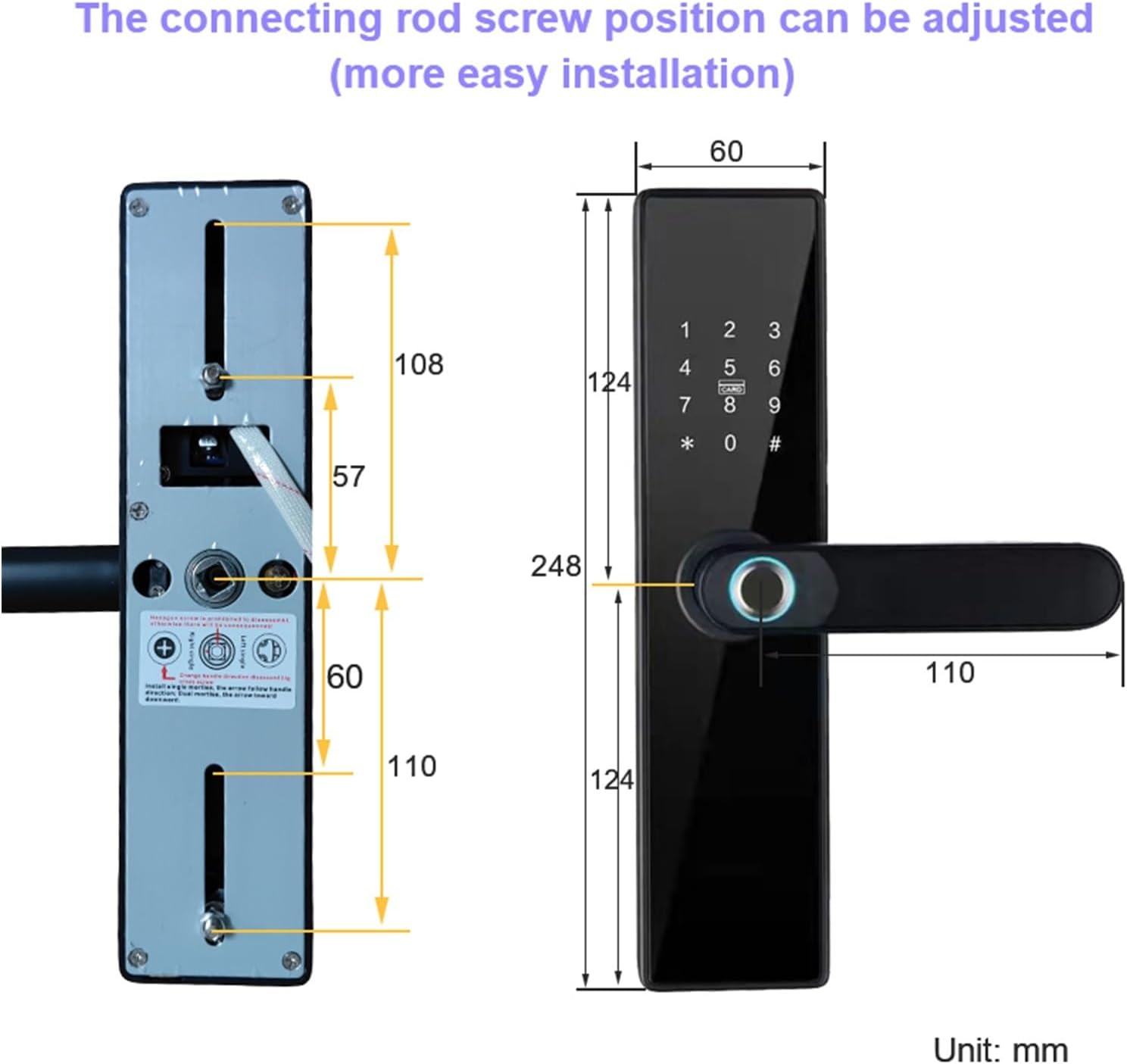
Image: Adjustable connecting rod and lock dimensions. This image highlights how the connecting rod screw position can be adjusted for easier installation. It also provides detailed dimensions of the lock's internal mechanism and external panels in millimeters.
3. General Installation Notes
- Ensure the door frame is clean and free of obstructions.
- Follow the specific instructions provided with your mortise lock for cutting and drilling the door.
- Connect the front and rear panels using the provided connecting rods and screws, ensuring cables are not pinched.
- Test the mechanical operation of the handles and latch before securing all screws.
Operating Instructions
1. Unlocking Methods
Your smart lock supports five primary unlocking methods:
- Tuya App: Remote unlock via your smartphone.
- Fingerprint: Place your registered finger on the sensor.
- Password: Enter your registered PIN code on the keypad.
- IC Card: Tap your registered IC card on the designated area.
- Key: Use the physical key as a backup.
2. Tuya App Integration
The Tuya Smart Lock connects directly to your home Wi-Fi network, eliminating the need for a separate gateway. This allows for convenient remote management and monitoring.
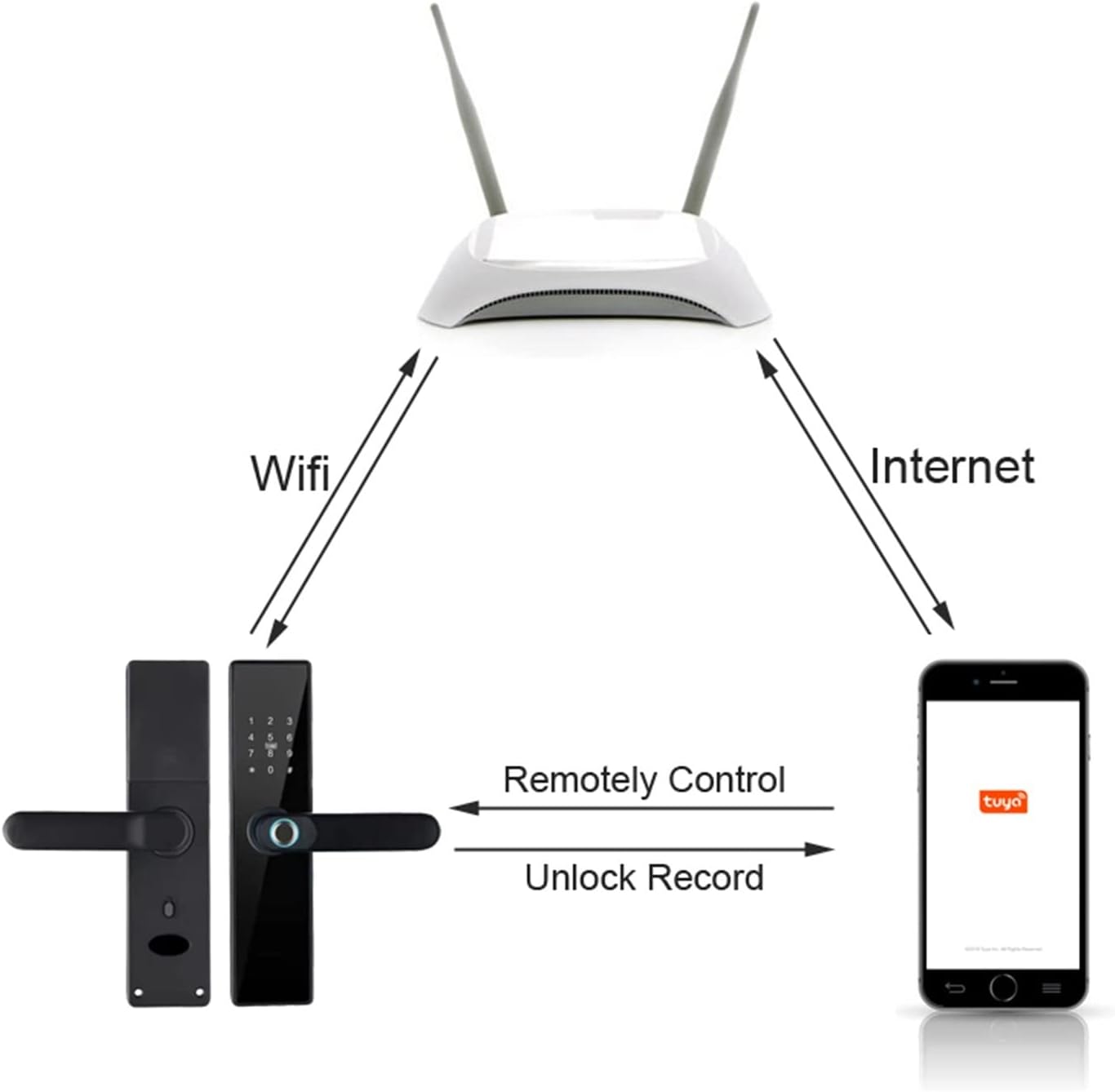
Image: Tuya App connectivity diagram. This diagram shows how the smart lock connects to your Wi-Fi router, which then communicates with your smartphone via the internet. This setup enables remote control of the lock and allows you to receive unlock records directly on the Tuya app.
Key functions available through the Tuya App:
- Remote Unlock: Unlock your door from anywhere using your phone.
- Unlock Records: Receive notifications and view a history of who unlocked the door and when.
- Temporary/Timed Passwords: Generate and manage temporary access codes for visitors or service providers.
- User Management: Add or remove fingerprints, passwords, and IC cards.
3. Initial Setup and User Registration
Refer to the detailed instructions within the Tuya/Smartlife app for initial device pairing and registration of administrator fingerprints, passwords, and IC cards. The first registered user typically becomes the administrator with full control over the lock settings.
Maintenance
1. Battery Installation and Replacement
The smart lock operates on 4 x 1.5V AA alkaline batteries (not included). For optimal performance and longer standby time, use high-quality alkaline batteries.
- To install/replace batteries, open the battery compartment cover on the rear lock panel.
- Insert the batteries according to the polarity markings (+/-).
- Close the battery compartment cover securely.
- The lock will provide a low battery warning when replacement is needed.
2. Cleaning
Wipe the lock's exterior surfaces with a soft, dry cloth. Avoid using abrasive cleaners, solvents, or harsh chemicals, as these can damage the finish and electronic components. Keep the fingerprint sensor clean and dry for accurate readings.
Troubleshooting
If you encounter issues with your smart lock, please refer to the following common troubleshooting steps:
- Lock not responding: Check battery levels and replace if necessary. Ensure the lock is properly installed and all connections are secure.
- Fingerprint not recognized: Ensure your finger is clean and dry. Try re-registering your fingerprint.
- Password not working: Verify you are entering the correct password. Ensure the keypad is clean and responsive.
- App connectivity issues: Check your Wi-Fi connection. Ensure the Tuya app is updated to the latest version. Restart your router and the lock if necessary.
- Lock mechanism stuck: Ensure the door frame is aligned and not causing friction. Check for any physical obstructions.
For more complex issues or persistent problems, please consult the Tuya app's help section or contact ZYSKABQ customer support.
Warranty and Support
Specific warranty details for the ZYSKABQ Tuya Smart Lock are not provided within this manual. Please refer to the product packaging, your purchase receipt, or the seller's website for information regarding warranty coverage and customer support contacts.