
ZYSKABQ ES73DuH8a733HAY8Ke
ZYSKABQ Smart Lock User Manual
Model: ES73DuH8a733HAY8Ke
1. Product Overview
The ZYSKABQ Smart Lock is an advanced keyless entry system designed for various door types, including metal, wooden, sliding, and heat-insulated broken aluminum doors. It offers multiple unlocking methods for enhanced security and convenience.
Key Features:
- Multiple Unlock Methods: Fingerprint, Password, Smart Card, Mechanical Key, and Tuya App.
- Remote Access: View access logs and unlock remotely via the Tuya App (Tuya Hub required).
- Dynamic Password Generation: Create temporary passwords for guests or service providers.
- Universal Design: Compatible with both right and left-handed doors.
- Durable Construction: Features a wire drawing board and frosted shell.
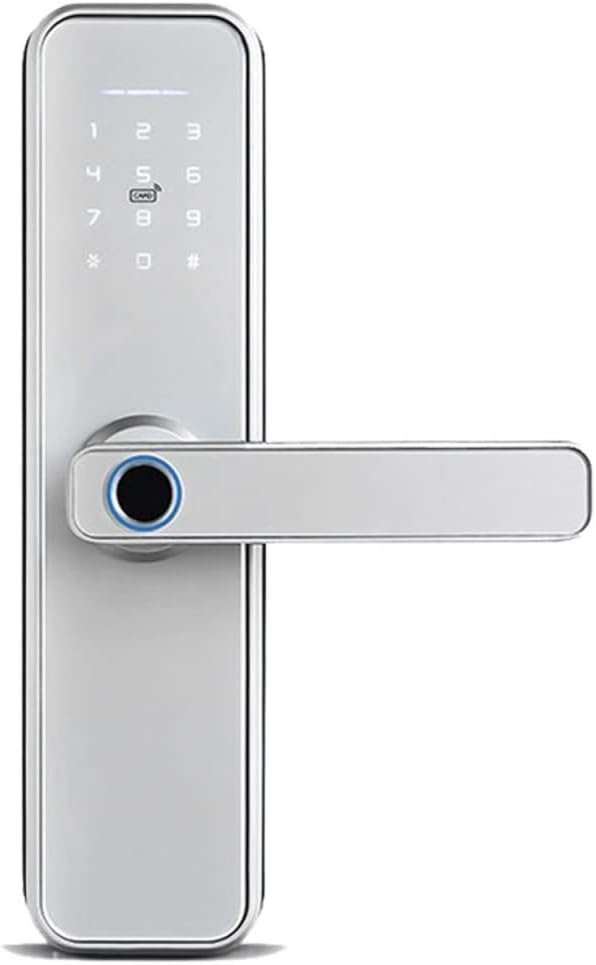
Figure 1.1: Front view of the ZYSKABQ Smart Lock, showcasing the sleek design and integrated keypad.
2. Package Contents
Please verify that all components are present in your package:
- Front panel x 1
- Back panel x 1
- Mortice Lock x 1
- Smart Card x 2
- Mechanical wrenches x 2
- Screw Kit x 1

Figure 2.1: Diagram illustrating the main components of the smart lock, including the front and back panels, keypad, fingerprint reader, and various ports.
3. Installation Guide
Before beginning installation, ensure your door is compatible with the smart lock's dimensions. The lock is universal for right or left-opening doors and can be adjusted accordingly.
3.1 Mortise Lock Dimensions
Confirm your door's mortise size matches the provided lock. The standard mortise dimensions are 22mm x 240mm, with a backset of 35mm and a center-to-center distance of 85mm.

Figure 3.1: Diagram showing the dimensions of the mortise lock and its compatibility with universal right/left door directions.
3.2 Battery Installation
The smart lock requires 4 AA alkaline batteries. The battery box is located on the back panel of the lock. Ensure correct polarity when inserting batteries.

Figure 3.2: Illustration of the battery box location on the back panel, indicating where to insert 4 AA alkaline batteries.
3.3 General Installation Steps
- Prepare the door: Ensure the door frame and boreholes are correctly sized for the mortise lock and lock panels.
- Install the mortise lock: Insert the mortise lock into the door edge and secure it with screws.
- Attach the front panel: Route the cable through the door and align the front panel with the mortise lock.
- Attach the back panel: Connect the cable from the front panel to the back panel. Secure the back panel to the door using the provided screws.
- Test the lock: After installation, test all unlocking methods to ensure proper functionality.
4. Operating Instructions
4.1 Unlocking Methods
- Fingerprint Unlock: Place your registered fingerprint on the fingerprint reader.
- Password Unlock: Enter your registered password on the touch keypad.
- Smart Card Unlock: Present the registered smart card to the card reading area.
- Mechanical Key Unlock: Insert the mechanical key into the keyhole and turn to unlock.
- App Unlock: Use the Tuya Smart App to remotely unlock the door.
4.2 Preventing Peeping Password
To enhance security, you can enter random numbers before or after your actual password. The lock will recognize the correct password sequence within the longer string of numbers.

Figure 4.1: Example of using the anti-peep password feature, where random numbers can be entered before or after the correct password.
4.3 Tuya App Control
The Tuya Smart App provides comprehensive control and monitoring features for your smart lock. A Tuya Hub is required for full app functionality.

Figure 4.2: Screenshot of the Tuya Smart App interface, showing options for remote unlock, user management, viewing unlock records, and sending temporary passwords.
- Remote Unlock: Press the "9+#" on the front panel, and the app will receive a remote unlock request. Click to open remotely.
- Generate Dynamic Password: Swipe left to the second interface in the app to generate temporary passwords that expire after a set time (e.g., 5 minutes).
- User Management: Add, modify, or delete user fingerprints, passwords, and smart cards.
- View Unlock Record: Access a log of all lock and unlock events, including method and time.
- Check Alarm Record: Review any alarm events triggered by the lock.

Figure 4.3: Example of sharing a dynamic password through the Tuya App, allowing temporary access for others.
4.4 Normal Open Mode
The lock supports a normal open mode, allowing free access without requiring authentication. Refer to the app or lock settings for instructions on enabling/disabling this mode.
5. Maintenance
- Battery Replacement: Replace all 4 AA alkaline batteries when the low battery indicator appears or when the lock's performance degrades. Do not mix old and new batteries.
- Cleaning: Wipe the lock's surface with a soft, dry cloth. Avoid using abrasive cleaners or solvents that could damage the finish or electronic components.
- Fingerprint Sensor: Keep the fingerprint sensor clean and dry for optimal performance.
6. Troubleshooting
- Lock not responding: Check battery levels. Replace batteries if low. Ensure the lock is properly installed and all connections are secure.
- Fingerprint not recognized: Ensure your finger is clean and dry. Re-register your fingerprint if the issue persists.
- Password not working: Verify the correct password is being entered. Try the anti-peep password method.
- App connectivity issues: Ensure your Tuya Hub is powered on and connected to the internet. Check your Wi-Fi signal strength. Restart the app and the lock if necessary.
- Lock is stuck or difficult to operate: Check for any obstructions around the deadbolt or handle. Ensure the mortise lock is properly aligned.
If you encounter persistent issues not covered here, please refer to the support section for assistance.
7. Specifications
| Brand Name | ZYSKABQ |
| Model Number | ES73DuH8a733HAY8Ke |
| Color | 3585 |
| Size | Large |
| Power Source | 4 x AA Alkaline Batteries |
| Unlock Methods | Fingerprint, Password, Smart Card, Mechanical Key, Tuya App |
| Compatibility | Metal door, Wooden door, Sliding door, Heat insulated broken aluminum door |
| App Integration | Tuya Smart App (Tuya Hub required) |
8. Warranty and Support
This product is covered by a standard manufacturer's warranty. For specific warranty terms and conditions, please refer to the documentation included with your purchase or contact the retailer.
For technical support, troubleshooting assistance, or inquiries regarding your ZYSKABQ Smart Lock, please contact our customer service team through the contact information provided by your point of purchase.
Ask a question about this manual
Ask about setup, troubleshooting, compatibility, parts, safety, or missing instructions. Manuals+ will review the question and use this page’s manual context to help answer it.