
Introduction
This manual provides essential instructions for the safe and effective use of your Generic X33 Clip On Open Ear Headphones. Please read this manual thoroughly before using the product and retain it for future reference.
The X33 headphones feature an open-ear design with bone conduction technology, allowing you to enjoy audio while remaining aware of your surroundings. They connect wirelessly via Bluetooth, making them suitable for sports and daily activities.
Package Contents
- Generic X33 Clip On Open Ear Headphones
- USB Charging Cable
- User Manual
Product Overview
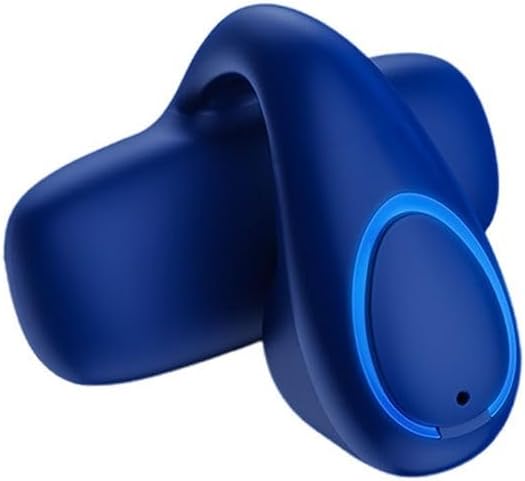
This image displays the Generic X33 Clip On Open Ear Headphones in a blue finish. The design features an ergonomic ear clip for secure placement and an open-ear listening experience. A circular control area with a subtle blue LED light is visible on the side, indicating power or connection status. A small microphone hole is also present.
Familiarize yourself with the various components of your X33 headphones:
- Ear Clip: Designed for secure and comfortable fit over the ear.
- Control Button/Touch Area: For power, playback, and call management.
- LED Indicator: Displays power, pairing, and charging status.
- Microphone: For hands-free calls.
- Charging Port: For connecting the USB charging cable.
Setup
1. Charging the Headphones
- Connect the small end of the USB charging cable to the charging port on the headphones.
- Connect the larger end of the USB charging cable to a USB power adapter (not included) or a computer's USB port.
- The LED indicator will typically show a solid light (e.g., red) during charging and turn off or change color (e.g., blue) when fully charged.
- Allow approximately 1-2 hours for a full charge.
2. Pairing with a Bluetooth Device
- Ensure the headphones are fully charged.
- Power On: Press and hold the control button/touch area for approximately 3-5 seconds until the LED indicator flashes (e.g., blue and red alternately), indicating pairing mode.
- On your Bluetooth-enabled device (smartphone, tablet, computer), go to the Bluetooth settings.
- Enable Bluetooth and search for available devices.
- Select "X33" (or similar name) from the list of found devices.
- Once paired, the LED indicator on the headphones will typically flash blue slowly or turn off, and you will hear a confirmation tone.
- If prompted for a password, enter "0000".
Note: The headphones will automatically attempt to reconnect to the last paired device when powered on, if that device's Bluetooth is active and within range.
Operating Instructions
Power On/Off
- Power On: Press and hold the control button/touch area for approximately 3-5 seconds.
- Power Off: Press and hold the control button/touch area for approximately 5-7 seconds.
Music Playback
- Play/Pause: Single press the control button/touch area.
- Next Track: Double press the control button/touch area.
- Previous Track: Triple press the control button/touch area.
Call Management
- Answer/End Call: Single press the control button/touch area during an incoming call or during an active call.
- Reject Call: Press and hold the control button/touch area for approximately 2 seconds during an incoming call.
- Voice Assistant: Press and hold the control button/touch area for approximately 2 seconds when not on a call to activate your device's voice assistant (Siri, Google Assistant, etc.).
Volume Control
Volume control is typically managed directly from your connected Bluetooth device. Some models may have dedicated volume buttons; refer to the product's physical design if present.
Maintenance
Cleaning
- Wipe the headphones with a soft, dry, lint-free cloth.
- Do not use abrasive cleaners, solvents, or spray cleaners.
- Avoid getting moisture into any openings.
Storage
- Store the headphones in a cool, dry place away from direct sunlight and extreme temperatures.
- When not in use for extended periods, charge the headphones periodically to maintain battery health.
Troubleshooting
| Problem | Solution |
|---|---|
| Headphones will not power on. | Ensure the headphones are fully charged. Connect to a power source and check the LED indicator. |
| Cannot pair with a Bluetooth device. |
|
| No sound or low volume. |
|
| Intermittent connection. |
|
Specifications
- Model Name: X33
- Item Model Number: 1XwpdKLvQ
- Brand: Generic
- Connectivity: Bluetooth Wireless
- Headphone Type: Clip On, Open Ear, Bone Conduction
- Manufacturer: Generic
- First Available Date: May 9, 2025
- (Additional specifications such as battery life, Bluetooth version, range, etc., are not provided in the source data.)
Warranty and Support
Information regarding specific warranty terms and customer support contact details is not available in the provided product data. For warranty claims or technical assistance, please refer to the retailer or point of purchase where the product was acquired. Keep your proof of purchase for any warranty-related inquiries.