1. Introduction
The Huepar 4-in-1 Wall Detector WS02 is an advanced tool designed for accurately locating studs, metal, live AC wires, and non-metallic materials behind various surfaces such as walls, floors, and ceilings. Equipped with an intelligent micro-sensor chip, it provides reliable detection to prevent damage during drilling or construction tasks. This manual provides detailed instructions for safe and effective use of your device.

Image: The Huepar WS02 Wall Detector is applicable to various surface materials, including walls, wallpaper, floors, and ceilings, as shown in this composite image.
2. Safety Information
Always read and understand all instructions before using the device. Failure to follow these instructions may result in electric shock, fire, and/or serious injury.
- Do not use the device in a humid environment, as this will affect its accuracy.
- Always turn off power to the area you are working on before drilling or cutting.
- The device detects live AC wires; however, always exercise caution and verify findings with other methods if possible.
- Keep the device away from children.

Image: This illustration highlights the dangers of blind drilling, such as hitting electrical wires or pipes, and how the wall scanner helps mitigate these risks by identifying hidden objects.
3. Product Overview
Key Features:
- 4-in-1 Detection: Accurately finds edges and center of metal, studs, joists, pipes, live AC wires, and non-metallic materials.
- Intelligent Micro-sensor Chip: Provides high sensitivity for precise and quick detection.
- LCD Display & Buzzer: Features a 4-level flashing LCD indicator and an audible alarm to signal object proximity and center.
- Automatic Calibration: Ensures reliability and accuracy before each scan.
- Ergonomic Design: Comfortable for extended use by DIY enthusiasts and professionals.
- IP54 Protection: Impact-resistant housing with protection against dust and water splashes.
Components:
The device features a clear LCD display, power button, mode selection button, sensor area, and battery cover.
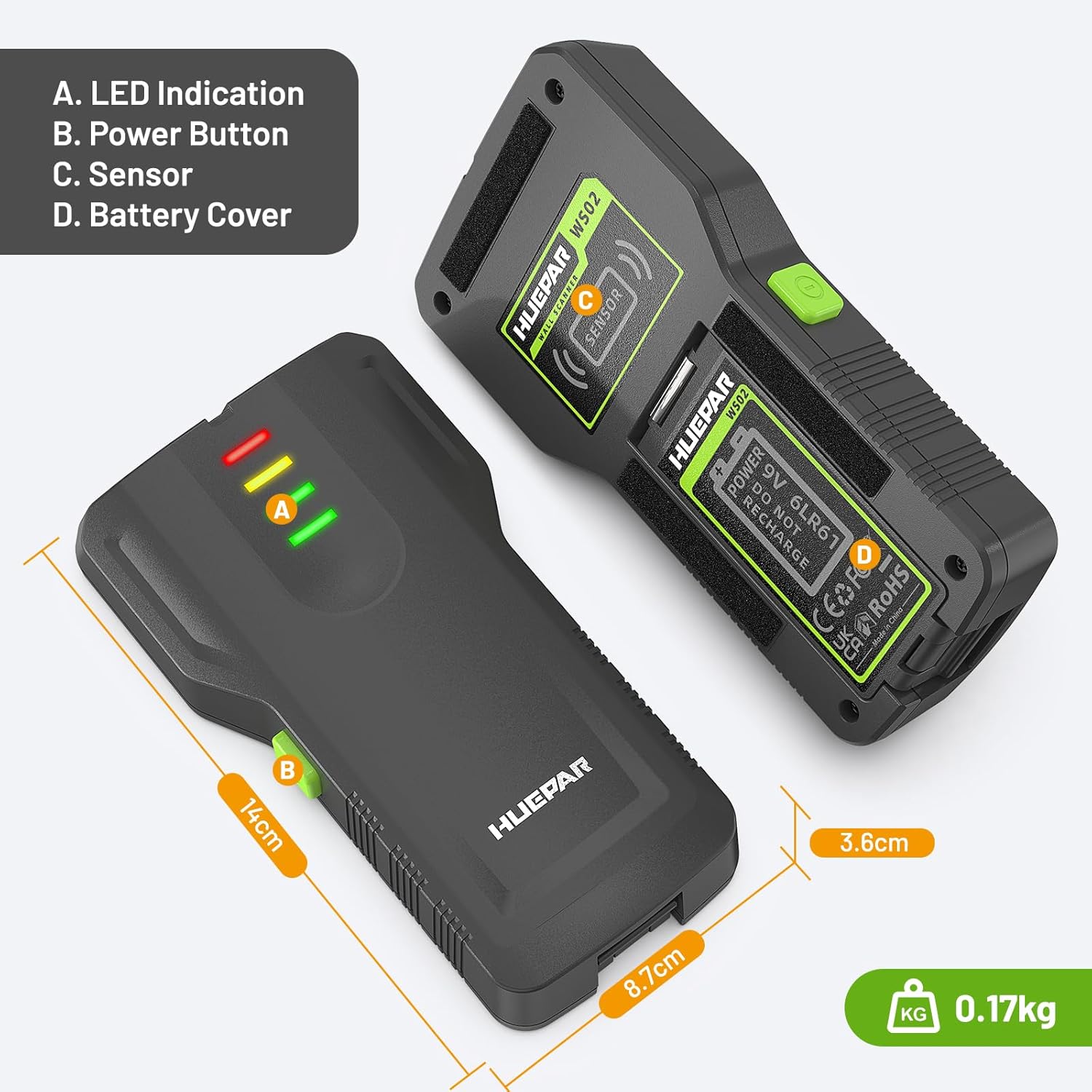
Image: This diagram illustrates the main components of the Huepar WS02 Wall Detector, highlighting the LED indicators, power button, sensor area, and battery compartment.
4. Setup
Battery Installation:
The device requires one 9V battery (included). Open the battery cover on the back of the device, insert the 9V battery, and close the cover securely.
Calibration:
Before each use, perform automatic calibration to ensure accuracy.
- Place the detector flat against the wall in an area where you are certain there are no studs, metal, or AC wires.
- Press and hold the scan button for 3 seconds until the calibration is complete. A single beep confirms successful calibration.
Video: This video demonstrates the auto-calibration process of a wall detector, showing how to press the button to initiate calibration and confirming successful completion with a beep.
5. Operating Modes
The WS02 detector offers multiple detection modes for various materials:
- Stud Detection Mode: Detects wood studs up to 38 mm (1.5 inches) deep. The LCD shows signal intensity, and a flashing icon indicates the center of a wood stud.
- Metal Detection Mode: Accurately detects metal up to 45 mm (1.77 inches) deep. Ensure to perform self-check and detection in an environment free of metal or strong magnetic interference.
- AC Wire Detection Mode: Detects live AC wires up to 120 mm (4.72 inches) deep. For safety, the scanner always detects and indicates live AC wires in all modes.
- Non-Metallic Material Detection: Identifies non-metallic objects.

Image: This diagram shows the various materials detectable by the device, such as pipes, wood, steel, wires, PVC pipes, and screws, indicating its versatility.
6. Usage Instructions
General Scanning Procedure:
- Power On: Press the power button to turn on the device.
- Select Mode: Use the mode button to select the desired detection mode (e.g., Stud Scan, Metal Scan, AC Scan).
- Calibrate: Perform automatic calibration as described in the Setup section.
- Scan: Place the detector firmly against the wall and move it slowly across the surface. Do not lift or shake the scanner during the process.
- Interpret Readings: The LCD display will show signal intensity. A flashing icon and a continuous beep indicate the center of the target.
- Mark Location: Once the center is found, mark the location on the wall.

Image: This step-by-step guide illustrates the proper technique for using the WS02 Wall Scanner, demonstrating how to move the device across a wall to accurately locate hidden elements.
Changing Temperature Units:
Briefly press the °C/°F button to switch between Celsius and Fahrenheit temperature units.
Sound Mode Toggle:
Press and hold the °C/°F button until you hear a beep to switch between sound and silent modes.
Video: This video demonstrates the detection of cables and pipes using the wall detector, showing the device's display and audible alerts as it identifies hidden elements.
Video: This video shows the operation of a 7-in-1 wall scanner, demonstrating its ability to detect various materials and providing visual feedback on the display.
Video: This video explains how to correctly use the AC mode to detect live electrical wires, showing the detector's response when an AC source is found.
Video: This video demonstrates a wall detector's ability to find studs up to 12cm deep, highlighting its protective features and accuracy.
7. Maintenance
- Clean the device with a soft, dry cloth. Do not use abrasive cleaners or solvents.
- Store the device in a dry place, away from direct sunlight and extreme temperatures.
- Remove the battery if the device will not be used for an extended period.
8. Troubleshooting
Signal Interference / Constant Beeping:
If the detector shows signal interference or beeps continuously even when no AC power is present, it might be due to improper calibration or external factors.
- Move away from all strong AC sources or other electronic devices.
- Perform a fresh calibration in an area known to be free of obstructions.
- Ensure your hand is placed on the wall about 30cm away from the detector during calibration to help stabilize the baseline.
Video: This video demonstrates how to use the wall detector, showing the steps for calibration and scanning to accurately locate objects behind a wall.
9. Specifications
| Feature | Detail |
|---|---|
| Model Number | WS02 |
| Power Source | 1 x 9V AA Battery (included) |
| Dimensions | 1 x 1 x 1 cm; 137 g |
| Material | Acrylonitrile Butadiene Styrene (ABS) |
| Protection Rating | IP54 (Dust/Water Splash Protection) |
| Recommended Use | Structure Detection |
10. Warranty and Support
The Huepar WS02 Wall Detector comes with a two-year warranty. For any questions or support needs, please contact our customer service. We offer 24-hour quick response after-sales service.
Contact information can typically be found on the product packaging or the official Huepar website.


