
1. Important Safety Instructions
Please read all instructions carefully before using the AFMAT Electric Pencil Sharpener. Retain this manual for future reference.
- Keep the sharpener away from water or other liquids.
- Do not insert fingers or foreign objects into the pencil opening or blade assembly.
- Supervise children when using the sharpener to ensure safe operation.
- Ensure the shavings tray is properly closed before operation. The sharpener will not operate if the lid is removed.
- Use only pencils within the specified diameter range (7-11.5mm).
- Avoid sharpening ultra-soft pencils (e.g., pastel/soft charcoal) on sharp settings to prevent breakage. Use medium or blunt settings for these types.
- Do not attempt to disassemble or repair the sharpener yourself. Contact customer support for assistance.
- Charge the device using a USB-C cable with a 5V 2A adapter (not included).
2. Package Contents
- AFMAT Electric Pencil Sharpener (PSX6)
- USB-C Charging Cable
- User Manual
- Replaceable Blade (one pre-installed)
3. Product Overview
The AFMAT Electric Pencil Sharpener PSX6 is a fully automatic, hands-free device designed for efficient and precise pencil sharpening. It features a rechargeable battery, multiple sharpness settings, and compatibility with a wide range of pencil sizes.
Key Features:
- Hands-Free Automatic Operation: Automatically grips, sharpens, and ejects pencils (7-11.5mm diameter).
- 3 Sharpness Options: Select between Blunt, Medium, or Sharp tips for various artistic and writing needs.
- Wide Pencil Compatibility: Sharpens pencils as short as 2.9 inches and accommodates different shapes (round, oval, triangle, hexagon).
- Compact & Portable Design: Lightweight and travel-ready, suitable for home, classroom, or office use.
- Rechargeable Battery: Built-in 2000mAh Lithium-Ion battery provides long-lasting cordless operation.
- Safety Features: Notifies when the lid is removed, overheat protection, and enclosed sharp blade for child safety.

Figure 1: The AFMAT Electric Pencil Sharpener demonstrating its fully automatic in and out feature, with a child and adult using pencils in the background. The image highlights the "AUTO IN" and "AUTO OUT" arrows, indicating hands-free operation. A diagram shows the durable and replaceable blade, supporting over 4000 sharpening times.

Figure 2: This image illustrates the sharpener's versatility, fitting most 7-11.5mm diameter pencils of different shapes (oval, triangle, hexagonal, round) and sizes. It also displays the three sharpness options: Sharp, Medium, and Blunt, selectable via a slider on the device.
4. Setup
4.1 Charging the Sharpener
The AFMAT Electric Pencil Sharpener comes with a built-in rechargeable Lithium-Ion battery. Before first use, or when the battery is low, charge the device using the provided USB-C cable.
- Connect the USB-C cable to the charging port located at the bottom of the sharpener.
- Connect the other end of the USB-C cable to a 5V 2A USB power adapter (not included).
- The LED indicator light will illuminate during charging. A full charge typically takes approximately 2 hours and provides power for up to 600 sharpenings.
- The sharpener can be used while charging.
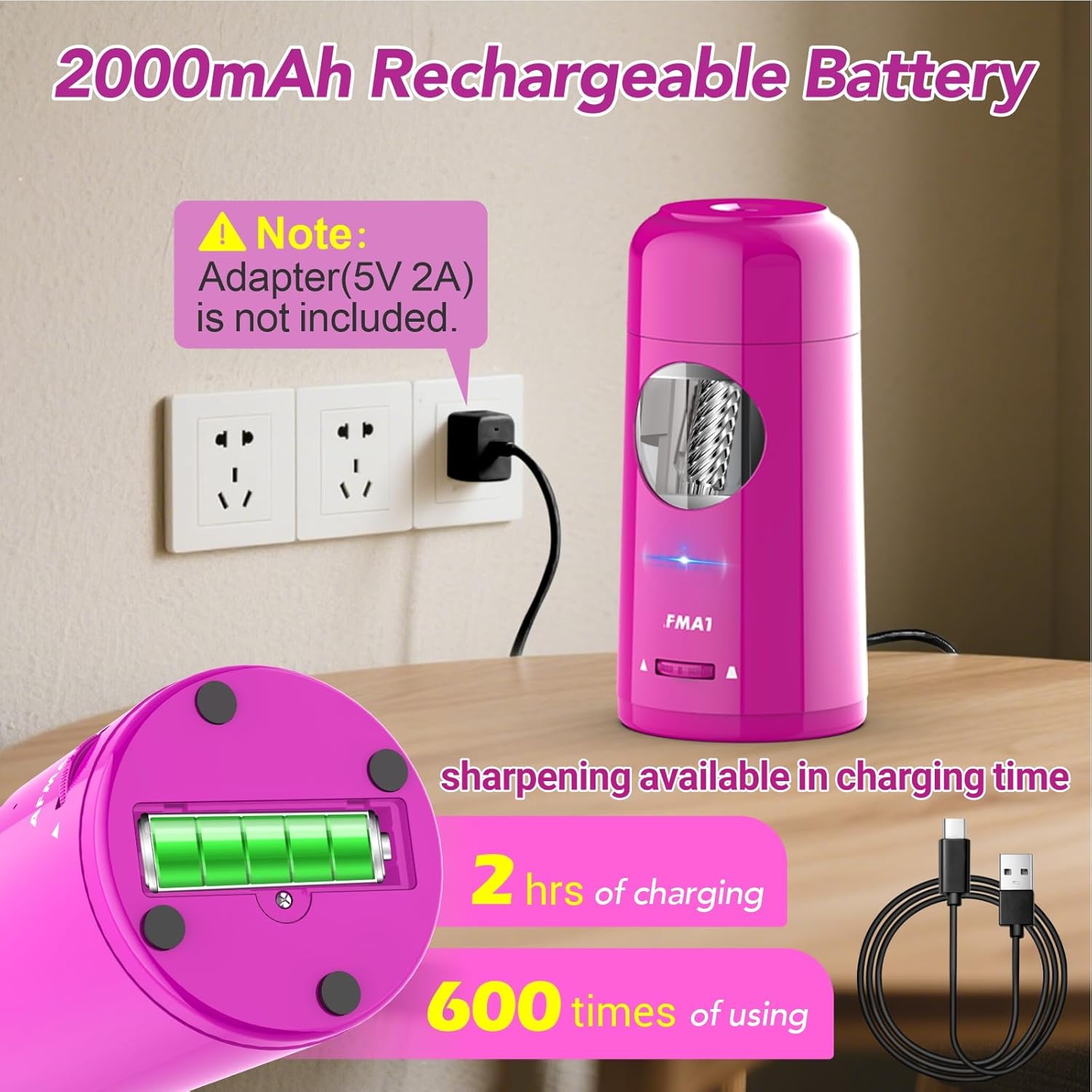
Figure 3: The sharpener is shown connected to a wall adapter via a USB-C cable, illustrating the charging process. A note indicates that a 5V 2A adapter is recommended and not included. The image also highlights the 2000mAh rechargeable battery, 2 hours of charging for 600 uses, and the ability to sharpen while charging.
5. Operating Instructions
5.1 Basic Sharpening
- Ensure the sharpener is charged or connected to a power source.
- Gently insert the pencil into the sharpening hole at the top of the device. The sharpener will automatically grip the pencil.
- The sharpening process will begin automatically. The sharpener will pull the pencil in, sharpen it to your selected tip, and then eject it when complete. This process typically takes 3-5 seconds.
- Remove the sharpened pencil.

Figure 4: The sharpener is shown with a pencil being sharpened, indicating a fast sharpening time of 3-5 seconds. This highlights the efficiency of the automatic mechanism.
5.2 Adjusting Sharpness
The sharpener offers three adjustable sharpness settings to suit different needs and pencil types.
- Locate the sharpness adjustment slider on the front of the sharpener.
- Slide the selector to choose your desired tip:
- Blunt: Ideal for soft-core pencils (e.g., colored pencils, charcoal) to prevent breakage.
- Medium: A versatile option for general use.
- Sharp: For fine details and precise lines.
- Note: For soft-core pencils, it is recommended to use the Medium or Blunt settings to minimize lead breakage.
Figure 5: This image displays the three sharpness options: Sharp, Medium, and Blunt, selectable via a slider on the device, along with examples of sharpened pencils for each setting.
6. Maintenance
6.1 Emptying Shavings Tray
The sharpener features a large shavings tray for convenient disposal. The transparent window allows you to monitor the fill level.
- Twist the top part of the sharpener counter-clockwise to detach it from the base.
- Carefully empty the pencil shavings into a waste bin.
- Align the top part with the base and twist clockwise until it clicks securely into place.
6.2 Replacing the Blade
The sharpener is equipped with a durable, replaceable helical blade. If sharpening performance decreases, the blade may need replacement.
- Ensure the sharpener is powered off and unplugged (if charging).
- Remove the top part of the sharpener as described in section 6.1.
- Carefully remove the old blade assembly. Refer to the product packaging or manufacturer's website for specific instructions on blade removal and replacement.
- Insert a new AFMAT replacement blade (ASIN: B0CJ8YYSV5) into the designated slot.
- Reattach the top part of the sharpener.

Figure 6: This image highlights the compact and portable design, the easy-to-empty shavings tray, and the anti-slip design on the base for stability during use.
7. Troubleshooting
| Problem | Possible Cause | Solution |
|---|---|---|
| Sharpener does not operate. | Lid is not properly closed or removed. Battery is low. | Ensure the lid is securely attached. Charge the sharpener. |
| Pencil lead breaks frequently. | Pencil is too soft for the selected sharpness setting. Blade is dull. | Adjust sharpness to Medium or Blunt for soft-core pencils. Replace the blade (see section 6.2). |
| Pencil is not sharpening evenly. | Pencil is not inserted correctly. Blade is worn. | Ensure pencil is inserted straight. Replace the blade (see section 6.2). |
8. Specifications
- Brand: AFMAT
- Model: PSX6
- Item Weight: 1.34 pounds
- Product Dimensions: 3.4 x 3.4 x 7.2 inches
- Batteries: 1 Lithium Ion battery (included)
- Color: Purple
- Material Type: ABS housing + S.S. blade
- Specific Uses For Product: 7-11.5mm diameter pencils
- Power Source: Rechargeable Battery
9. Official Product Videos
AFMAT Fully Automatic Pencil Sharpener Overview
This video provides a comprehensive overview of the AFMAT Fully Automatic Pencil Sharpener, demonstrating its key features and ease of use. It showcases the automatic pencil feeding and ejection, highlighting its hands-free operation for various pencil types and sizes.
10. Warranty and Support
For warranty information, technical support, or any inquiries regarding your AFMAT Electric Pencil Sharpener PSX6, please refer to the contact information provided on the product packaging or visit the official AFMAT website. Keep your purchase receipt as proof of purchase.
You can also visit the AFMAT Store on Amazon for additional products and support.