
ZYSKABQ ESsrSnWJIfdQLw8DRl
ZYSKABQ Smart Lock User Manual
Model: ESsrSnWJIfdQLw8DRl
1. Product Overview
The ZYSKABQ Smart Lock is a keyless entry system designed for enhanced home security and convenience. It offers multiple unlocking methods including fingerprint, password, smart card, mechanical key, and control via the Tuya application. This smart lock is suitable for various door types, including metal, wooden, sliding, and heat-insulated broken aluminum doors.
Key Features:
- Multiple Unlock Methods: Fingerprint, Password, Smart Card, Mechanical Key, Tuya App.
- Remote Access & Management via Tuya App (Tuya Hub required).
- Access Log Viewing and Alarm Record Checking.
- Dynamic and Temporary Password Generation.
- Anti-Peep Password Function for enhanced security.
- Universal design for both right and left-handed doors.
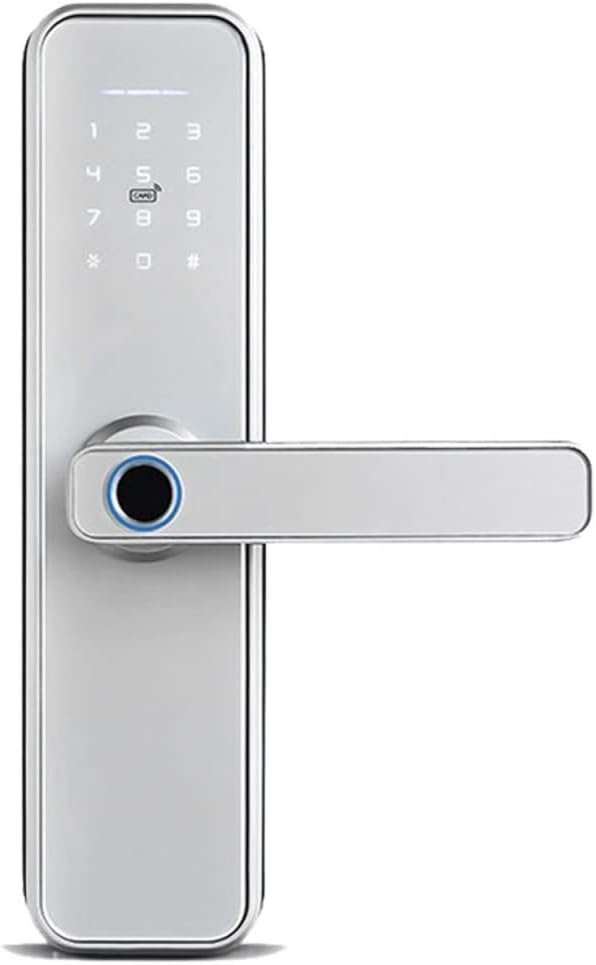
Figure 1.1: Front view of the ZYSKABQ Smart Lock, showcasing the keypad, fingerprint reader, and handle.
2. Package Contents
Please verify that all items listed below are included in your package:
- Front Panel x 1
- Back Panel x 1
- Mortice Lock x 1
- Smart Card x 2
- Mechanical Wrenches x 2
- Screw Kit x 1
3. Product Components
Familiarize yourself with the main components of the smart lock:

Figure 3.1: Labeled diagram of the smart lock's external components, including the Touch Keypad, Card Reading Area, Fingerprint Reader, Deadbolt, Mechanical Key Hole, and USB Charging Port.

Figure 3.2: Rear view of the smart lock showing the Battery Box, Set Button, and Waterproof Rubber seal.
4. Setup and Installation
4.1 Door Compatibility
This smart lock is designed to be compatible with various door types, including metal doors, wooden doors, sliding doors, and heat-insulated broken aluminum doors. Ensure your door meets the necessary thickness and bore hole requirements for proper installation.
4.2 Mortise Lock Selection
It is crucial to select the correct mortise lock size for your door. The standard mortise lock included is 22*180 (50 50) in silver finish. Please refer to the diagram below for dimensions.

Figure 4.1: Diagram illustrating the dimensions of the mortise lock (180mm height, 22mm width, 50mm backset) and confirming universal right/left door direction.
4.3 Handle Direction Adjustment
The smart lock is universal for both right and left-handed doors. The handle direction can be adjusted freely during installation to match your door's opening direction.
4.4 Battery Installation
The lock requires 4 AA alkaline batteries. Install them into the battery box located on the back panel of the lock. Ensure correct polarity.
Figure 4.2: Illustration showing the insertion of 4 AA alkaline batteries into the battery compartment on the back panel.
4.5 Tuya Hub Requirement
To utilize the full range of smart features, including remote access and app control, a Tuya Hub (sold separately) is required. Ensure your Tuya Hub is properly set up and connected to your home network before attempting to connect the smart lock.
5. Operating Instructions
5.1 Unlocking Methods
The ZYSKABQ Smart Lock offers multiple ways to unlock your door:
- Fingerprint: Place your registered fingerprint on the fingerprint reader.
- Password: Enter your registered password on the touch keypad.
- Smart Card: Present a registered smart card to the card reading area.
- Mechanical Key: Insert and turn the mechanical key in the keyhole.
- Tuya App: Use the Tuya application on your smartphone for remote unlocking.
5.2 Tuya App Functionality
The Tuya app provides comprehensive control and monitoring features for your smart lock:

Figure 5.1: Screenshot of the Tuya app interface showing options for Smart Lock Power Indicator, Remote Unlock, User Management, View Unlock Record, Check Alarm Record, Send Temporary Password, and Generate Dynamic Password.
- Remote Unlock: Press "9+#" on the front panel, and the app will receive a remote unlock request. You can then click "open remotely" in the app.
- User Management: Add, modify, or delete user fingerprints, passwords, and smart cards.
- View Unlock Record: Access a log of all lock and unlock events, including method and timestamp.
- Check Alarm Record: Review any alarm events triggered by the lock.
- Send Temporary Password: Generate and send time-limited passwords to guests or service providers.
- Generate Dynamic Password: Create a one-time or temporary dynamic password for immediate access.

Figure 5.2: Example of sharing a dynamic password via the Tuya app, allowing temporary access for others.
5.3 Anti-Peep Password Function
To prevent others from peeping your password, you can enter random numbers before or after your actual password. The lock will still recognize the correct sequence within the longer string of numbers.

Figure 5.3: Visual explanation of the anti-peep password feature, showing how to embed the correct password (e.g., 123456) within a longer sequence of numbers (e.g., 258123456369).
5.4 Normal Open Mode (Free Access)
The lock supports a normal open mode, allowing for free access without requiring authentication. This mode is useful for periods when the door needs to remain unlocked for frequent entry and exit. Refer to the app or lock settings for instructions on enabling/disabling this mode.
6. Maintenance
6.1 Battery Replacement
When the battery level is low, the lock will provide an audible or visual alert. Replace all 4 AA alkaline batteries promptly to ensure continuous operation. Refer to Section 4.4 for battery installation instructions.
6.2 Cleaning
Clean the lock's exterior surfaces with a soft, dry cloth. Avoid using abrasive cleaners, solvents, or harsh chemicals, as these can damage the finish or electronic components. Regularly wipe the fingerprint sensor to ensure optimal performance.
7. Troubleshooting
This section addresses common issues you might encounter with your smart lock.
| Problem | Possible Cause | Solution |
|---|---|---|
| Lock does not respond. | Low or dead batteries. | Replace all 4 AA alkaline batteries. |
| Fingerprint not recognized. | Finger dirty/wet, sensor dirty, unregistered fingerprint. | Clean finger and sensor. Ensure fingerprint is properly registered. Try re-registering. |
| Password not accepted. | Incorrect password, anti-peep feature misunderstood. | Verify the password. Ensure you are using the anti-peep feature correctly if applicable. |
| Cannot connect to Tuya App. | No Tuya Hub, incorrect Wi-Fi, lock not in pairing mode. | Ensure Tuya Hub is installed and connected. Check Wi-Fi signal. Follow app instructions to put lock in pairing mode. |
| Lock is stiff or difficult to turn. | Improper installation, misaligned mortise. | Check installation alignment. Ensure mortise lock is correctly fitted and lubricated if necessary. |
If the issue persists after attempting these solutions, please contact customer support.
8. Specifications
| Attribute | Detail |
|---|---|
| Brand Name | ZYSKABQ |
| Model Number | ESsrSnWJIfdQLw8DRl |
| Color | Silver/Grey (Note: '180 x 5050' appears to be an internal code) |
| Manufacturer | ZYSKABQ |
| Size | Large |
| ASIN | B0DWWVCDGR |
| Power Source | 4 x AA Alkaline Batteries |
| Connectivity | Tuya (requires Tuya Hub) |
| Door Compatibility | Metal, Wooden, Sliding, Heat-insulated Broken Aluminum Doors |
| Mortise Lock Size | 22*180 (50 50) |
9. Warranty and Support
For warranty information or technical support, please contact ZYSKABQ customer service through the retailer where the product was purchased or refer to the official ZYSKABQ website for contact details. Please have your model number (ESsrSnWJIfdQLw8DRl) and ASIN (B0DWWVCDGR) ready when contacting support.
Ask a question about this manual
Ask about setup, troubleshooting, compatibility, parts, safety, or missing instructions. Manuals+ will review the question and use this page’s manual context to help answer it.