
Introduction
This manual provides essential information for the installation, operation, and maintenance of your QNAP QSW-2104-2T-R2-US 6-Port Unmanaged Switch. Please read this manual thoroughly before using the device to ensure proper setup and optimal performance.

Image: Front view of the QNAP QSW-2104-2T-R2-US 6-Port Unmanaged Switch, showing the DC IN port, LED indicators, and six RJ45 ports.
Package Contents
Verify that all items are present in the package:
- QNAP QSW-2104-2T-R2-US Unmanaged Switch
- Power Supply
- Bracket Screws
- Anchors
- Foot Pads
- Quick Installation Guide (QIG)
Setup
1. Physical Placement
- Place the switch on a stable, flat surface.
- Ensure adequate ventilation around the device. Avoid placing it in enclosed spaces or near heat sources.
- The fanless design ensures quiet operation, but proper airflow is still important for heat dissipation.

Image: Diagram illustrating the fanless design and heat dissipation of the QNAP QSW-2104-2T-R2-US switch, showing arrows indicating airflow.
2. Power Connection
- Connect the power adapter to the DC IN port on the switch.
- Plug the power adapter into a suitable power outlet.
- The PWR/SYS LED indicator will illuminate when power is supplied.
3. Network Connections
The QSW-2104-2T-R2-US features six RJ45 ports:
- Ports 1-4: 2.5GBASE-T RJ45 ports, supporting 2.5Gbps, 1Gbps, and 100Mbps speeds.
- Ports 5-6: 10GBASE-T RJ45 ports, supporting 10Gbps, 5Gbps, 2.5Gbps, 1Gbps, and 100Mbps speeds.
- Connect your network devices (e.g., computers, NAS, routers, access points) to the available RJ45 ports using Ethernet cables (CAT5e, CAT6, or CAT7 recommended for optimal performance).
- The switch is unmanaged, meaning it operates on a plug-and-play basis without requiring complex configuration.

Image: Close-up view of the QNAP QSW-2104-2T-R2-US switch ports, clearly labeling the two 10GbE RJ45 ports and four 2.5GbE RJ45 ports.
Operating the Switch
LED Indicators
The switch features LED indicators to provide status information:
- PWR/SYS LED: Indicates power status and system activity.
- LINK/ACT LEDs (for each port):
- Solid Green: Link established at 2.5G/5G/10G speed.
- Solid Amber: Link established at 100M/1G speed.
- Flashing: Data activity.
- Off: No link or device connected.
- LOOP LED: Indicates detection of a network loop.
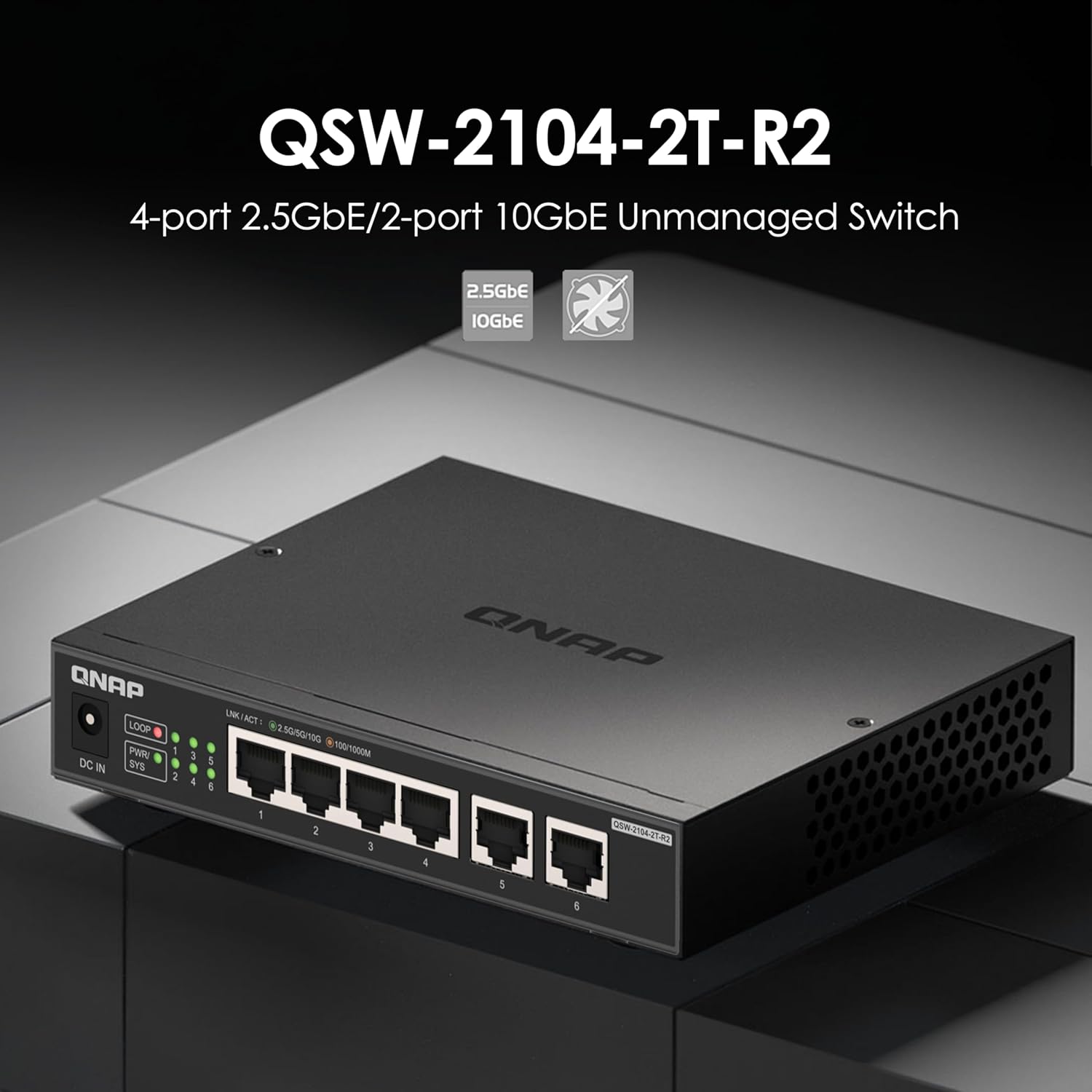
Image: Front view of the QNAP QSW-2104-2T-R2-US switch, highlighting the LED indicators for power, system, link/activity, and loop detection.
Plug and Play Operation
The QSW-2104-2T-R2-US is an unmanaged switch, requiring no software configuration. Simply connect your devices, and the switch will automatically detect and negotiate the optimal speed for each connected device.

Image: Network diagram illustrating various devices like a router, NAS, PC, TV, gaming console, and Wi-Fi access point connected to the QNAP QSW-2104-2T-R2-US switch.
Maintenance
- Cleaning: Use a soft, dry cloth to clean the exterior of the switch. Do not use liquid or aerosol cleaners.
- Ventilation: Ensure that the ventilation holes are not obstructed to maintain proper heat dissipation.
- Firmware: As an unmanaged switch, firmware updates are typically not required or available.
Troubleshooting
| Problem | Possible Cause | Solution |
|---|---|---|
| No power (PWR/SYS LED off) | Power adapter not connected or faulty; power outlet not working. | Check power connections. Try a different power outlet. Ensure the power adapter is functioning correctly. |
| No link (LINK/ACT LED off) | Ethernet cable disconnected or faulty; connected device is off or faulty. | Ensure the Ethernet cable is securely connected at both ends. Try a different cable. Verify the connected device is powered on and working. |
| Slow network speed | Cable quality; device compatibility; network congestion. | Use CAT6 or CAT7 cables for 2.5Gbps/10Gbps connections. Ensure connected devices support the desired speeds. Check for other network activity. |
| LOOP LED is on | Network loop detected. | A network loop occurs when there are redundant paths between devices, which can cause network instability. Disconnect one of the redundant connections to break the loop. The switch has built-in loop detection to help prevent issues. |

Image: Diagram illustrating the loop detection feature of the QNAP QSW-2104-2T-R2-US switch, showing a warning symbol when a network loop is identified.
Specifications
| Feature | Detail |
|---|---|
| Model | QSW-2104-2T-R2-US |
| Number of Ports | 6 |
| 2.5GBASE-T RJ45 Ports | 4 (supports 2.5G/1G/100Mb) |
| 10GBASE-T RJ45 Ports | 2 (supports 10G/5G/2.5G/1G/100Mb) |
| Switching Capacity | 60 Gbps |
| Jumbo Frame Support | 12K |
| Design | Fanless, Unmanaged |
| Dimensions (H x W x D) | 4 x 6 x 1 inches (approximate) |
| Weight | 1.61 pounds (approximate) |
| Interface Type | RJ45 |
| UPC | 885022028153 |
Warranty Information
QNAP products typically come with a standard manufacturer's warranty. For specific warranty terms and conditions, please refer to the warranty card included in your product packaging or visit the official QNAP website. Keep your proof of purchase for warranty claims.
This product is noted to come with a 2-year warranty.
Customer Support
For technical assistance, product information, or support, please visit the official QNAP support website or contact their customer service. Refer to the Quick Installation Guide (QIG) for contact details.
You can also visit the QNAP Store on Amazon for more product information and resources.


