
1. Introduction
This manual provides detailed instructions for the installation, operation, and maintenance of your XWXLIJV QS-S4 48V-60V Thumb Throttle LCD Display Kit. This kit is designed for use with Zero 8, 9, 10, 8X, and 10X electric scooters. Please read this manual thoroughly before installation and use to ensure proper function and safety.
2. Safety Information
- Always disconnect the scooter's power source before attempting any installation or maintenance.
- Ensure all connections are secure and properly insulated to prevent short circuits.
- If you are unsure about any installation steps, consult a qualified technician.
- Do not modify the kit components. Unauthorized modifications may void the warranty and pose safety risks.
- Keep the display and throttle away from water and extreme temperatures.
3. Package Contents
The package includes the following components:
- 1 x QS-S4 LCD Display with Integrated Thumb Throttle
Note: Other products or scooter components are not included.
4. Product Overview
The QS-S4 kit combines an LCD display and a thumb throttle into a single unit, providing essential information and control for your electric scooter. It features a 6-pin connector for integration with compatible scooter systems.

Figure 4.1: Front view of the QS-S4 Thumb Throttle LCD Display Kit. This image shows the circular LCD display screen, the red power button, and the 'MODE' button, along with the integrated thumb throttle on the right side and the mounting clamp on the left.
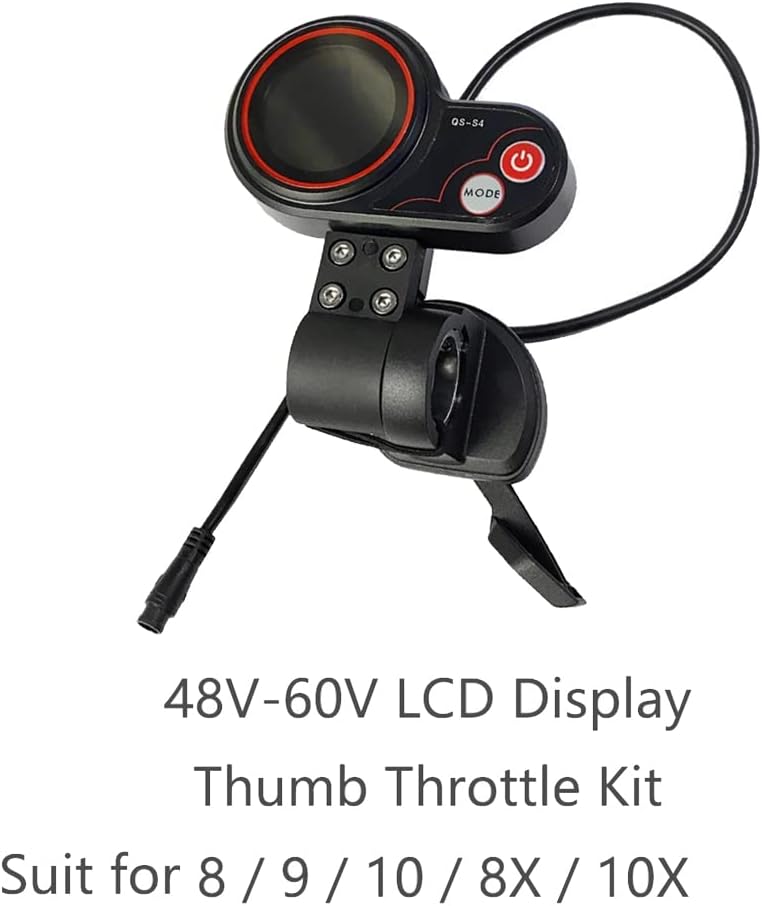
Figure 4.2: The QS-S4 kit with an illustrative text overlay indicating it is a 48V-60V LCD Display Thumb Throttle Kit suitable for Zero 8, 9, 10, 8X, 10X scooters. This view highlights the complete assembly.

Figure 4.3: Rear view of the QS-S4 kit, illustrating the wiring and the mounting mechanism. The 6-pin connector cable is visible, extending from the main unit.
5. Setup and Installation
Follow these general steps for installing the QS-S4 kit on your electric scooter. Specific scooter models may have slight variations.
- Power Off: Ensure your electric scooter is completely powered off and the battery is disconnected before beginning installation.
- Remove Old Components (if applicable): If replacing an existing display or throttle, carefully remove the old components and disconnect their wiring.
- Mount the Kit: Position the QS-S4 unit on your scooter's handlebar in a comfortable and accessible location. Use the integrated clamp and screws to securely fasten it. Ensure the display is visible and the thumb throttle is within easy reach.
- Connect Wiring: Locate the corresponding 6-pin connector on your scooter's wiring harness. Carefully align and connect the 6-pin cable from the QS-S4 kit to the scooter's harness. Ensure the connection is firm and secure.
- Secure Cables: Route and secure all cables to prevent them from interfering with steering or moving parts. Use cable ties if necessary.
- Test Functionality: Reconnect the scooter's battery and power on the scooter. Verify that the display illuminates and the thumb throttle responds correctly. Test all functions in a safe, controlled environment before riding.

Figure 5.1: The QS-S4 display and thumb throttle kit shown mounted on an electric scooter handlebar, demonstrating typical placement and orientation.
6. Operating Instructions
Once installed, operating the QS-S4 kit is straightforward:
- Power On/Off: Press and hold the red power button to turn the display on or off.
- Mode Selection: Press the MODE button to cycle through different display modes or settings (e.g., speed, odometer, trip distance).
- Throttle Control: Use the thumb throttle to control the speed of your electric scooter. Gently press down with your thumb to accelerate. Release to decelerate.
- Voltage Compatibility: The display is designed for 48V-60V systems. Ensure your scooter's battery voltage is within this range for proper operation.
7. Maintenance
Regular maintenance helps ensure the longevity and reliable performance of your QS-S4 kit:
- Cleaning: Wipe the display screen and throttle unit with a soft, damp cloth. Avoid using abrasive cleaners or solvents.
- Connection Check: Periodically inspect all wiring connections to ensure they are secure and free from corrosion or damage.
- Physical Inspection: Check the mounting clamp for tightness and ensure the throttle mechanism moves smoothly without obstruction.
8. Troubleshooting
If you encounter issues with your QS-S4 kit, consider the following:
| Problem | Possible Cause | Solution |
|---|---|---|
| Display does not turn on. | No power from scooter; loose 6-pin connection; scooter battery low. | Ensure scooter is powered on. Check 6-pin cable connection. Verify scooter battery charge. |
| Throttle not responding. | Loose 6-pin connection; throttle mechanism obstructed; internal fault. | Check 6-pin cable connection. Ensure throttle moves freely. If problem persists, contact support. |
| Incorrect readings on display. | Incompatible scooter settings; internal fault. | Consult your scooter's manual for display compatibility. Contact support if readings remain incorrect. |
If troubleshooting steps do not resolve the issue, please contact customer support.
9. Specifications
- Model: QS-S4
- Voltage Compatibility: 48V-60V
- Connector Type: 6-PIN
- Material: Plastic
- Color: Black
- Package Dimensions: 1.18 x 0.79 x 0.39 inches
- Item Weight: 1.76 ounces
- Manufacturer Model Number: XWXLIJV
- Protocol: Protocol (Note: Specific protocol details may vary or require scooter manufacturer confirmation.)
10. Warranty and Support
For warranty information, technical support, or any questions regarding your XWXLIJV QS-S4 Thumb Throttle LCD Display Kit, please contact the seller or manufacturer directly. Keep your purchase receipt as proof of purchase for warranty claims.