
Introduction
This manual provides essential information for the safe and efficient use of your Samsung WW90DG6G94LK AI Control Slim Washing Machine. Please read these instructions carefully before using the appliance and keep them for future reference. This washing machine features AI Control for intelligent washing, an Ecodosatore for automatic detergent dispensing, and AI Energy Mode for optimized energy consumption, all within a slim, front-load design with a 9 kg capacity.
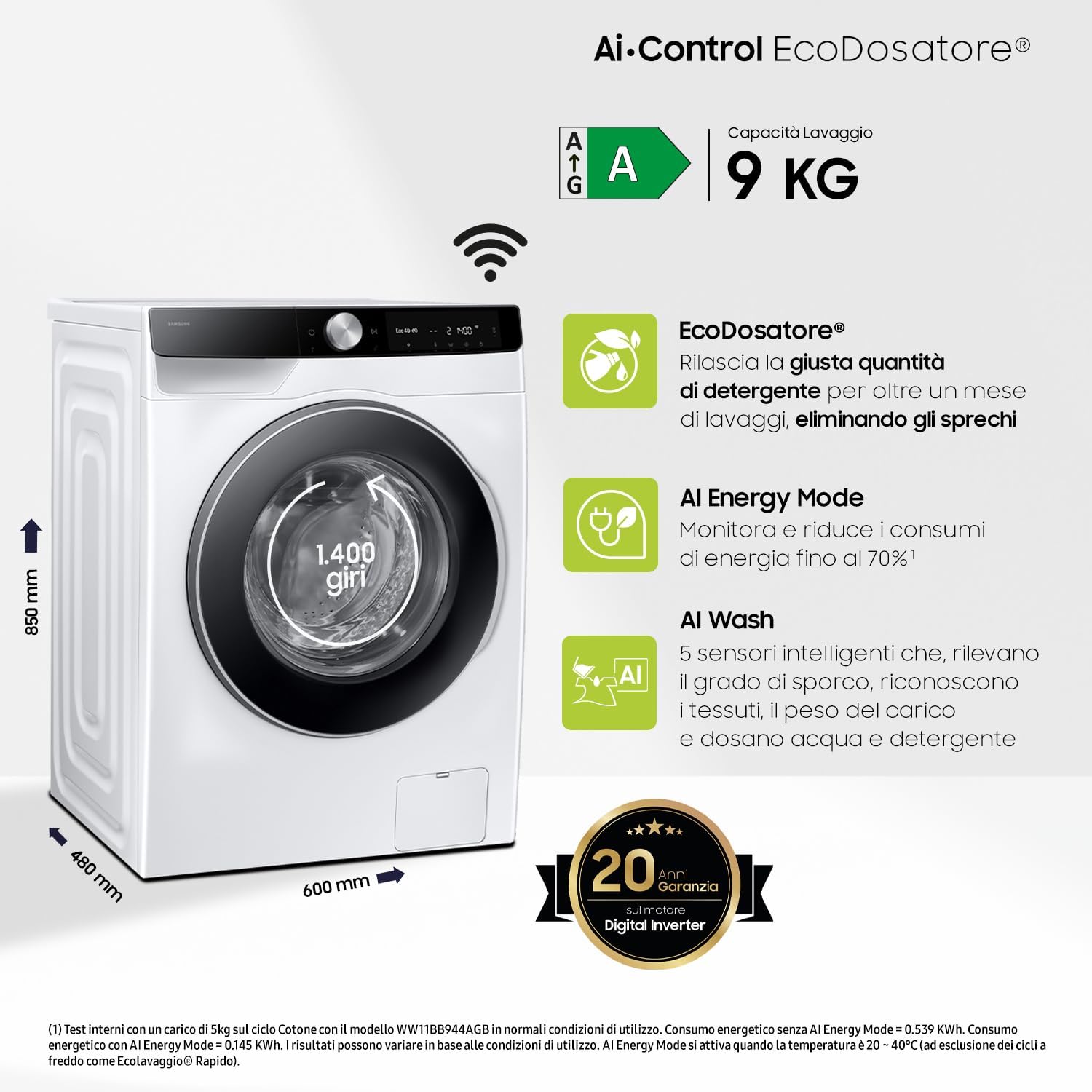
Figure 1: Front view of the Samsung WW90DG6G94LK AI Control Slim Washing Machine.
Important Safety Information
Always follow basic safety precautions when using any electrical appliance to reduce the risk of fire, electric shock, and injury to persons.
- Electrical Safety: Ensure the washing machine is connected to a properly grounded outlet. Do not use extension cords or adapters.
- Water Supply: Connect the water inlet hoses securely to prevent leaks. Check for leaks periodically.
- Children and Pets: Keep children and pets away from the appliance during operation. Do not allow them to play on or inside the washing machine.
- Flammable Materials: Do not wash items that have been soiled with flammable substances (e.g., gasoline, oil, alcohol).
- Maintenance: Disconnect the power supply before performing any maintenance or cleaning.
- Installation: Ensure the appliance is installed on a firm, level surface to prevent excessive vibration and noise.
Setup and Installation
Proper installation is crucial for the performance and longevity of your washing machine. Refer to the detailed installation guide provided with your appliance for specific instructions.
Unpacking
- Remove all packaging materials and transport bolts from the rear of the machine. Failure to do so will cause severe vibration and damage.
- Inspect the machine for any damage incurred during transit.
Location and Leveling
- Place the washing machine on a solid, level floor.
- Adjust the leveling feet to ensure the machine is perfectly stable and balanced.

Figure 2: Washing machine dimensions (Depth: 48 cm, Width: 60 cm, Height: 85 cm).
Water and Drain Connections
- Connect the cold water inlet hose to the cold water tap and the machine's inlet valve.
- Securely attach the drain hose to a standpipe or laundry tub, ensuring it is not kinked or blocked.

Figure 3: Rear view illustrating water inlet and drain hose connections.
Power Connection
- Plug the power cord into a grounded electrical outlet.
Initial Use
- Before washing clothes, run a complete wash cycle without laundry and detergent to clean the drum.
Operating Instructions
Your Samsung WW90DG6G94LK washing machine is equipped with advanced features for optimal washing performance and energy efficiency.
Control Panel Overview

Figure 4: The touch control panel for program selection and settings.
Loading Laundry
- Open the door and load laundry into the drum. Do not overload the machine.
- Close the door firmly.
Ecodosatore (Auto Dispense)
The Ecodosatore automatically dispenses the ideal amount of detergent and softener for each wash cycle, preventing waste and ensuring optimal cleaning. Refill the dispenser when prompted by the SmartThings app.

Figure 5: The Ecodosatore system for automatic detergent and softener dispensing.
AI Wash
AI Wash uses 5 intelligent sensors to detect fabric type, load weight, and soil level. It then automatically adjusts the amount of detergent, water, and wash time for a perfect wash cycle.

Figure 6: Illustration of AI Wash sensors detecting load weight, fabric, and soil level.
SmartThings App and AI Energy Mode
Connect your washing machine to the SmartThings app via Wi-Fi. The app allows you to select cycles, schedule washes, and troubleshoot issues. AI Energy Mode monitors and reduces energy consumption by up to 70% by optimizing wash settings based on your usage patterns.

Figure 7: SmartThings app interface showing energy monitoring and AI Energy Mode savings.
Special Wash Programs
- Hygiene Steam: Emits a powerful jet of steam from the bottom of the drum to remove stubborn dirt and eliminate 99.9% of bacteria and allergens.
- Less Microfiber Cycle: Reduces the release of microplastics during wash cycles, contributing to environmental protection.
- Super Speed: Washes a 5 kg load in just 39 minutes.

Figure 8: Visual representation of the Hygiene Steam function eliminating bacteria and allergens.

Figure 9: The Less Microfiber cycle, designed to reduce microplastic dispersion during washing.

Figure 10: Super Speed cycle graphic indicating a 39-minute wash time.
Maintenance and Cleaning
Regular maintenance ensures optimal performance and extends the lifespan of your washing machine.
Cleaning the Detergent Drawer
- Pull out the detergent drawer completely.
- Remove any removable inserts and rinse all components under running water.
- Clean the drawer housing with a soft brush.
- Reinsert the components and push the drawer back into place.

Figure 11: The detergent dispenser drawer, which should be cleaned regularly.
Cleaning the Drum
- Use the "Drum Clean" or "Eco Drum Clean" cycle (if available) to clean the drum and remove detergent residue and bacteria.
- Run this cycle regularly, typically once a month or every 40 washes.
Cleaning the Debris Filter
- Locate the debris filter at the bottom front of the washing machine.
- Open the cover, drain any residual water, and then unscrew the filter.
- Clean the filter under running water and remove any lint or debris.
- Screw the filter back in and close the cover.
Exterior Cleaning
- Wipe the exterior of the washing machine with a soft, damp cloth.
- Do not use abrasive cleaners or solvents.
Troubleshooting
Before contacting customer service, refer to this section for solutions to common issues. The SmartThings app can also provide diagnostic assistance.
| Problem | Possible Cause | Solution |
|---|---|---|
| Washing machine does not start. | Power cord unplugged, door not closed properly, power outage, cycle not selected. | Check power connection, ensure door is latched, check circuit breaker, select a wash cycle and press Start/Pause. |
| Water does not fill or fills slowly. | Water tap closed, water inlet hose kinked or blocked, water pressure too low. | Open water tap, straighten hose, clean inlet filter, check household water pressure. |
| Water does not drain. | Drain hose kinked or blocked, debris filter clogged. | Straighten drain hose, clean debris filter. |
| Excessive vibration or noise. | Machine not level, transport bolts not removed, unbalanced load. | Adjust leveling feet, ensure transport bolts are removed, redistribute laundry in the drum. |
| Error code displayed. | Specific malfunction. | Refer to the SmartThings app or the full user manual for specific error code meanings and solutions. |
Specifications
| Model Name | WW90DG6G94LK |
| Brand | Samsung |
| Capacity | 9 kg |
| Dimensions (W x H x D) | 60 cm x 85 cm x 48 cm |
| Weight | 50 kg |
| Max Spin Speed | 1400 RPM |
| Energy Efficiency Class | A |
| Control Type | Touch |
| Special Features | AI Control, Ecodosatore, AI Energy Mode, Wi-Fi Connectivity, Hygiene Steam, Less Microfiber Cycle |

Figure 12: Energy efficiency rating of the washing machine, indicating A-10% Extra savings.
Warranty and Support
Warranty Information
Your Samsung WW90DG6G94LK washing machine comes with a 20-year warranty on the Digital Inverter Motor. For full warranty terms and conditions, please refer to the warranty card included with your product or visit the official Samsung website.

Figure 13: Emblem indicating a 20-year warranty on the Digital Inverter Motor.
Customer Support
For technical assistance, service requests, or further information, please contact Samsung Customer Service. You can find contact details on the official Samsung website or through the SmartThings app.
- Online Support: Visit the Samsung support website for FAQs, manuals, and software downloads.
- SmartThings App: Use the app for diagnostics and troubleshooting tips.
- Telephone Support: Refer to your product documentation for local service numbers.


