
HONGTOP H Magnetic (Black, 2PCS)
HONGTOP H GPS Tracking Device for Vehicles User Manual
Model: Magnetic (Black, 2PCS)
Brand: HONGTOP H
1. Introduction
The HONGTOP H GPS Tracking Device is designed to help you locate your valuable assets, including vehicles, personal items, and even pets. This device operates exclusively with Apple's 'Find My' network, providing real-time tracking capabilities without the need for a monthly subscription. Its compact, waterproof design and strong magnetic attachment offer versatile and discreet placement options.
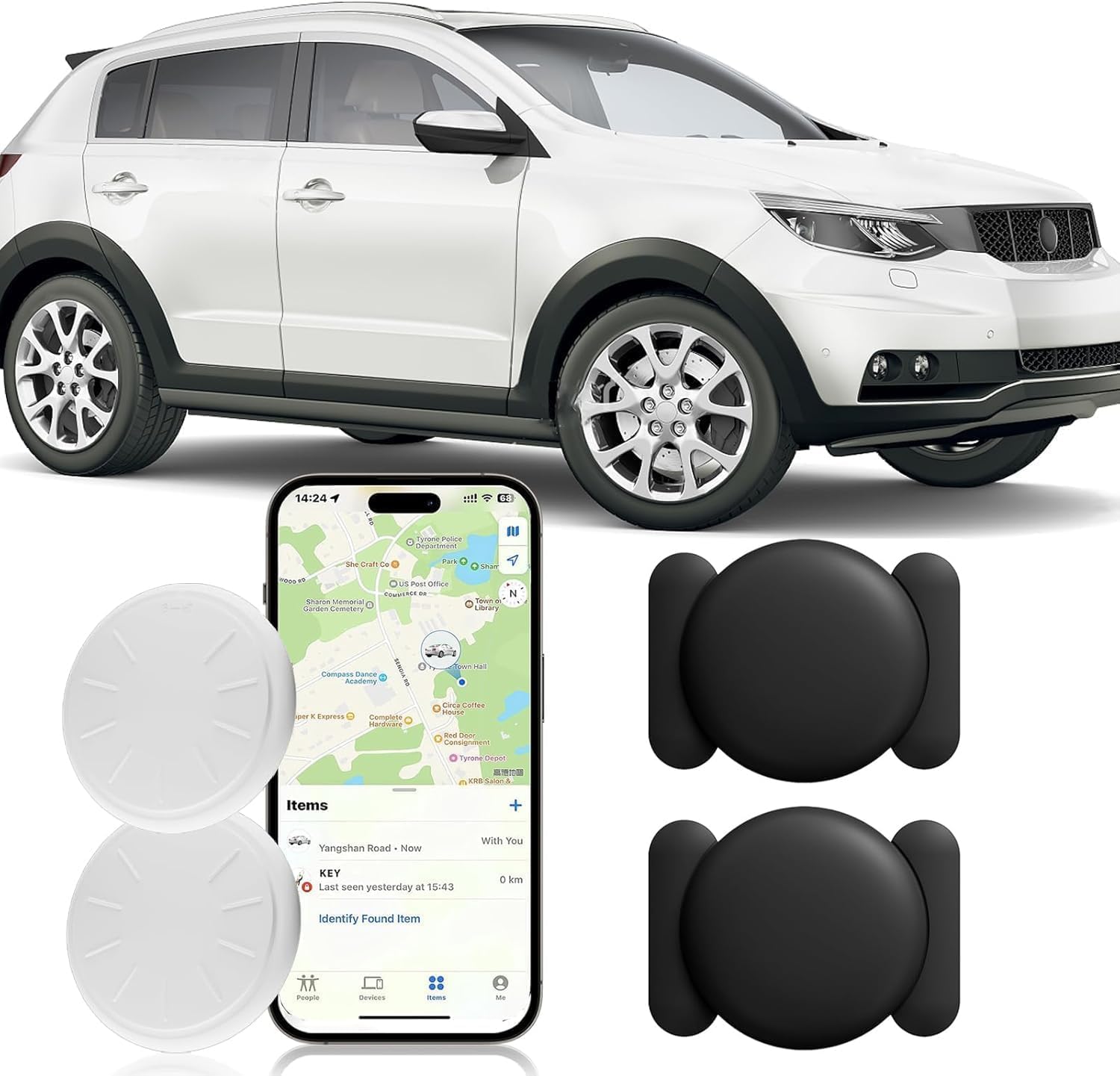
This image displays the HONGTOP H GPS tracking device, including two white circular trackers and two black magnetic cases. An iPhone screen shows the 'Find My' application with a map indicating a tracked item's location. A white car is visible in the background, illustrating the device's primary use for vehicle tracking.
2. Key Features
- No Monthly Subscription: Utilize Apple's 'Find My' network without recurring fees.
- iOS Only Compatibility: Designed to work seamlessly with Apple devices (iPhone, iPad, etc.).
- Real-Time Tracking: Pinpoint the location of your items with precision.
- Ultra-Strong Magnetic Suction: Securely attach the device to any iron surface.
- Mini Hidden Design: Compact size allows for discreet placement.
- Waterproof Case: Provides protection against water exposure.
- Replaceable Battery: Long-lasting battery, typically over a year, with easy replacement.
- Privacy Built-in: Leverages Apple's privacy features for secure tracking.

This graphic highlights the key features of the HONGTOP H GPS tracker. It emphasizes no monthly fees, compatibility with Apple's 'Find My' network, built-in privacy features, and a replaceable battery designed to last over a year. The image also showcases the device as an anti-theft locator, with an iPhone displaying its tracking capabilities.
3. Package Contents
Your HONGTOP H GPS Tracking Device package includes:
- 2 x HONGTOP H GPS Tracking Devices (White)
- 2 x Magnetic Waterproof Cases (Black)
- 1 x User Manual
4. Specifications
| Feature | Detail |
|---|---|
| Product Dimensions | 1.77 x 1.77 x 0.39 inches (4.5 x 4.5 x 1.0 cm) |
| Item Weight | 1.44 ounces (40.8 grams) |
| Model Number | Magnetic (Black, 2PCS) |
| Connectivity | Wireless (Bluetooth for Find My network) |
| Compatibility | iOS devices only (iPhone, iPad) |
| Manufacturer | HONGTOP H |
| Special Features | Waterproof case, Ultra-strong magnetic suction, Replaceable battery |

A technical diagram illustrating the precise dimensions of the HONGTOP H GPS tracker and its magnetic case. Measurements are provided in both millimeters and inches for the diameter and thickness of the tracker, and the length and width of the magnetic case.
5. Setup Guide
Follow these steps to pair your HONGTOP H GPS Tracking Device with your Apple device:
- Prepare Your Device: Ensure your Apple device (iPhone, iPad) has Bluetooth enabled and the 'Find My' app is installed and updated.
- Activate the Tracker: The tracker is typically activated upon first use or by removing a battery tab. If it has been used before, you may need to reset it (refer to troubleshooting for reset instructions).
- Open Find My App: On your Apple device, open the 'Find My' application.
- Add New Item: Tap on the 'Items' tab at the bottom of the screen. Then, tap the '+' icon and select 'Add Other Item'.
- Pair the Tracker: Your device will begin searching for nearby compatible items. When 'Mtag' or a similar identifier appears, tap 'Connect'. Follow any on-screen prompts to complete the pairing process, including naming your tracker.

This image provides a three-step visual guide for setting up the HONGTOP H GPS tracker. Step 1 shows turning on the 'Find My' app and Bluetooth. Step 2 illustrates tapping 'Add Item' and selecting 'Other Supported Item'. Step 3 displays the 'Mtag' pairing screen, confirming successful connection.
6. Operating Instructions
6.1 Attaching the Tracker
The HONGTOP H GPS tracker comes with a magnetic waterproof case for secure and discreet attachment.
- For Vehicles: Place the tracker, enclosed in its magnetic case, onto any clean, flat iron surface on the vehicle's underside. Ensure the surface is free of dirt or debris for optimal magnetic adhesion. The mini hidden design allows for discreet placement.
- For Personal Items: The tracker can be placed inside bags, wallets, or attached to keychains.
- For Pets: Securely attach the tracker to a pet's collar using a suitable holder (not included).

This image illustrates the ultra-strong magnetic suction feature of the HONGTOP H GPS tracker. The black magnetic case is securely attached to a metallic surface on the underside of a vehicle, demonstrating its robust adhesion.

A close-up view showcasing the mini and hidden design of the HONGTOP H GPS tracker. The black tracker is discreetly mounted on the underside of a vehicle, near a tire, with an arrow indicating its concealed placement, highlighting its low-profile nature.
6.2 Using the Find My App for Tracking
Once paired, you can use the 'Find My' app to locate your tracker:
- View Location: Open the 'Find My' app and navigate to the 'Items' tab. Select your HONGTOP H tracker from the list to see its current location on a map.
- Play Sound: If the tracker is nearby, you can tap 'Play Sound' to make it emit an audible alert, helping you pinpoint its exact location.
- Get Directions: Tap 'Directions' to get turn-by-turn navigation to your tracker's location.
- Lost Mode: If your item is lost, you can enable 'Lost Mode' in the app. This will lock your tracker, display a message and contact number to anyone who finds it, and provide you with its location if it comes within range of the 'Find My' network.

An image depicting the HONGTOP H GPS tracker's real-time tracking capability. A white car is shown driving on a road, while a hand holds an iPhone displaying the 'Find My' app, which shows a detailed map with a route and the current location of the tracked vehicle.

An iPhone displaying the 'Find My' app, showing a map with a tracked item. A white circular tracker is depicted with sound waves, indicating its ability to emit a sound to help locate it when nearby.
7. Placement and Usage Scenarios
The HONGTOP H GPS Tracking Device is versatile and can be used in various scenarios:
- Vehicles: Cars, motorcycles, bicycles, tractors, jeeps, and other motorized vehicles.
- Personal Items: Wallets, keys, backpacks, luggage.
- Pets: Attach to dog or cat collars for tracking.

A collage demonstrating the versatile application of the HONGTOP H GPS tracker across various vehicle types. It shows the tracker being used on a motorcycle, a car, a bicycle, a tractor, and a jeep. An iPhone screen is also visible, displaying the 'Find My' app's 'nearby' feature, indicating proximity to a tracked item.


8. Maintenance
8.1 Battery Replacement
The HONGTOP H GPS tracker uses a replaceable coin cell battery (e.g., CR2032). When the battery level is low, you will receive a notification on your Apple device via the 'Find My' app.
- Gently twist the back cover of the tracker counter-clockwise to open it.
- Remove the old battery.
- Insert a new CR2032 battery with the positive (+) side facing up.
- Align the back cover and twist clockwise to secure it.
8.2 Cleaning
Wipe the tracker and its magnetic case with a soft, dry cloth. Avoid using harsh chemicals or abrasive materials.
9. Troubleshooting
- Tracker Not Pairing:
- Ensure Bluetooth is enabled on your Apple device.
- Make sure the tracker is within range of your Apple device.
- Check if the tracker's battery is charged or needs replacement.
- Try resetting the tracker (refer to product-specific instructions for reset, usually involving pressing a button or removing/reinserting the battery).
- Inaccurate Location:
- Location accuracy depends on the density of Apple devices in the 'Find My' network. In remote areas, updates may be less frequent.
- Ensure your Apple device has a stable internet connection.
- Battery Drains Quickly:
- Ensure you are using a fresh, high-quality CR2032 battery.
- Extreme temperatures can affect battery life.
- Tracker Not Responding:
- Replace the battery.
- Attempt to re-pair the device with your Apple device.
10. Safety Information
- Keep the device out of reach of small children and pets to prevent accidental ingestion of small parts or batteries.
- Do not attempt to disassemble or modify the device, as this may void the warranty and cause damage.
- Avoid exposing the device to extreme temperatures, direct sunlight for prolonged periods, or corrosive liquids.
- Dispose of batteries responsibly according to local regulations.
11. Warranty and Support
For warranty information and customer support, please refer to the documentation provided with your purchase or contact HONGTOP H customer service through the retailer where the product was purchased. Please have your model number (Magnetic (Black, 2PCS)) and purchase details ready when contacting support.