Introduction
Thank you for choosing the ONEVAN Handheld Battery Operated Seed Spreader. This manual provides essential information for the safe and effective use of your new tool. Please read all instructions carefully before operation and retain this manual for future reference.
Product Overview
The ONEVAN Handheld Battery Operated Seed Spreader is designed for efficient and even distribution of various granular materials across lawns, gardens, and other areas. Its cordless design and adjustable settings offer convenience and precision.

Figure 1: ONEVAN Handheld Battery Operated Seed Spreader with included batteries and charger.
Key Components

Figure 2: Labeled diagram of the seed spreader components.
- Hopper: 5.5L capacity for holding granular materials.
- Switch: Power on/off and trigger for operation.
- Spread Area Knob: Adjusts the opening of the sowing disc for material flow.
- Lithium Battery: Provides cordless power (2x 20V 2000mAh included).
- Discharge Port: Where materials exit the hopper.
- Speed Knob: Controls the rotation speed of the spreading mechanism (6 levels).
Specifications
| Feature | Specification |
|---|---|
| Rated Voltage | 20V |
| Battery Capacity | 2x 2000mAh (included) |
| Gear Levels | 6 gears for spreading speed |
| Motor Type | Copper Motor |
| Rotation Speed | 1000-1700 r/min |
| Power | 600W |
| Storage Capacity | 5.5L |
| Net Weight | 1.3 kg (2.87 lbs) |
| Product Dimensions | 12 x 7.4 x 9.99 inches |
| Noise Level | 87dB |
| Max Coverage Area | 600m² |
| Adjustable Sowing Disc Opening | 140° |
Setup
1. Charging the Batteries
Before first use, fully charge both 20V 2000mAh lithium-ion batteries using the provided charger. Insert the charger plug into the battery charging port. The indicator light on the charger will show charging status.

Figure 3: The two 20V 2000mAh lithium-ion batteries.
2. Installing the Battery
- Align the charged battery with the battery slot on the underside of the spreader.
- Slide the battery firmly into place until it clicks, ensuring a secure connection.
Video 1: Demonstration of battery installation and basic operation of a battery-operated spreader. This video shows how to insert the battery and adjust the spread settings.
Operating Instructions
1. Filling the Hopper
- Ensure the spreader is turned off and the discharge port is closed to prevent material leakage.
- Carefully pour your desired granular material (seeds, fertilizer, rock salt, etc.) into the 5.5L hopper. Do not overfill.

Figure 4: Filling the hopper with granular material.
2. Adjusting Spreading Area/Angle
The spreader features a 140° adjustable opening for the sowing disc, allowing precise control over the spread pattern.
- Locate the spread area knob near the handle.
- Rotate the knob to adjust the opening size of the discharge port. A smaller opening provides a narrower, more concentrated spread, while a larger opening allows for a wider distribution.
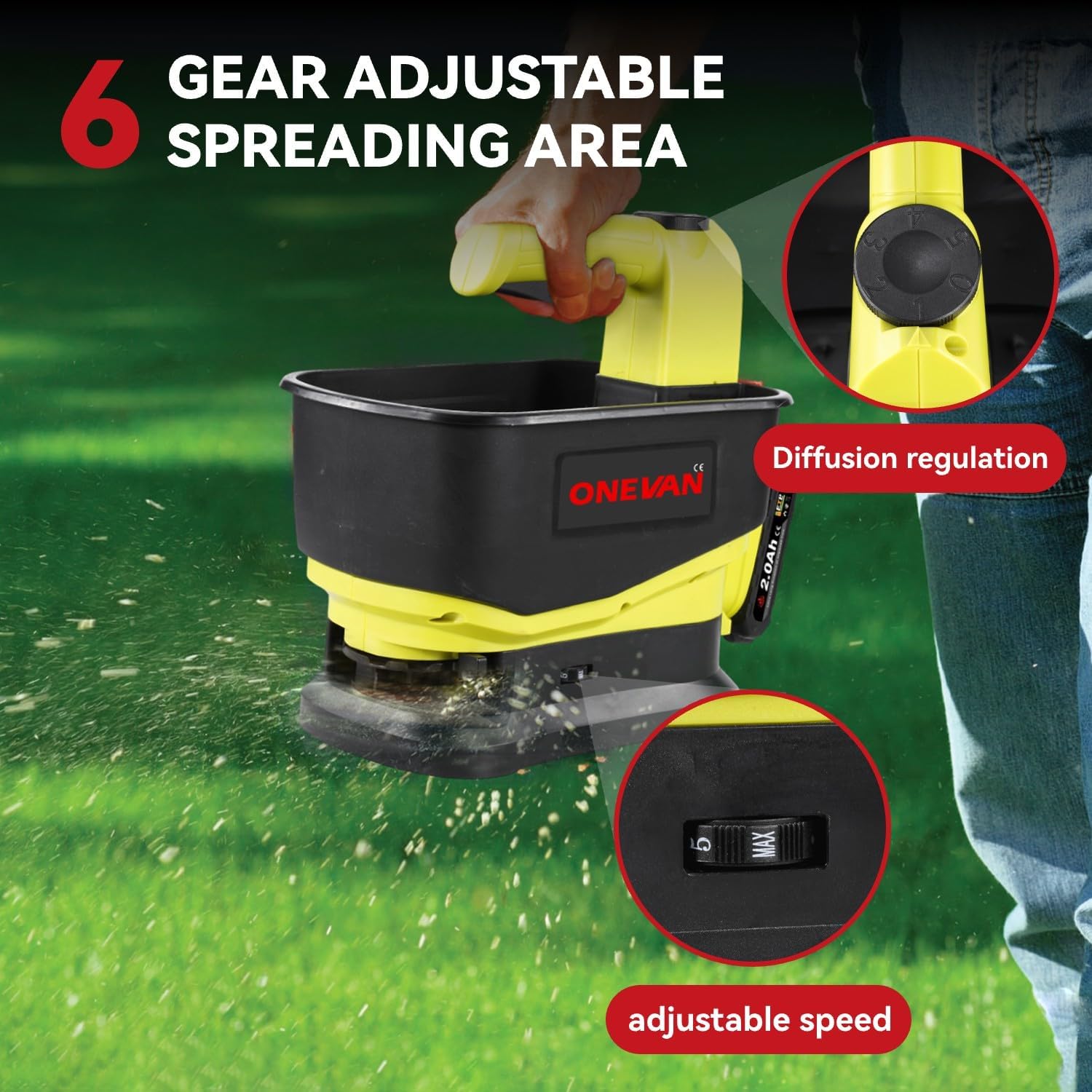
Figure 5: Adjusting the spreading area/angle for desired coverage.
3. Adjusting Spreading Speed
The spreader offers 6 speed levels to control the rotation of the spreading mechanism, influencing the distance and density of material distribution.
- Locate the speed knob on the side of the unit.
- Slide the knob to select your desired speed level from 1 (slowest) to 6 (fastest).
Video 2: Demonstration of adjusting the spreading speed and material flow on a similar handheld spreader.
4. Operation
- Hold the spreader comfortably by the handle.
- Point the spreader towards the area where you wish to distribute material.
- Press the trigger to activate the spreading mechanism. Release the trigger to stop.
- Walk at a consistent pace to ensure even distribution. Adjust speed and spread area as needed for different materials and coverage requirements.

Figure 6: Using the cordless spreader for even material distribution.
5. Year-Round Applications
This versatile spreader is suitable for various tasks throughout the year:
- Spring: Sowing grass seeds, applying starter fertilizers.
- Summer: Distributing granular weed control, feeding animal feed.
- Fall: Applying winterizing fertilizers, overseeding lawns.
- Winter: Spreading rock salt or ice melt on sidewalks and driveways.

Figure 7: Examples of multifunctional use for the seed spreader.
Maintenance
1. Cleaning
- After each use, empty any remaining material from the hopper.
- Wipe down the hopper and exterior of the spreader with a damp cloth to remove dust and residue.
- Ensure the discharge port and spreading mechanism are free from clogs.
2. Storage
- Store the spreader in a cool, dry place away from direct sunlight and moisture.
- Remove the battery from the spreader before storing for extended periods.
Troubleshooting
| Problem | Possible Cause | Solution |
|---|---|---|
| Spreader does not turn on. | Battery not installed correctly or discharged. | Ensure battery is fully charged and securely inserted. |
| Material is not spreading evenly or is clogging. | Discharge port is blocked; material is moist or clumpy; incorrect speed/spread setting. | Clear any blockages. Use dry, free-flowing material. Adjust speed and spread area settings. |
| Reduced spreading distance. | Low battery charge; speed setting too low. | Recharge battery. Increase speed setting. |
Warranty and Support
For warranty information, technical support, or replacement parts, please refer to the product packaging or contact ONEVAN customer service. Keep your purchase receipt as proof of purchase.