
Alcatel ATL1428452
Alcatel XL685 Duo Cordless Phone User Manual
Model: ATL1428452
Product Overview
The Alcatel XL685 Duo is a cordless landline phone system designed for ease of use and enhanced accessibility. It features a large, backlit XL display, oversized buttons, and an indicator light for incoming calls, making it ideal for users seeking clear readability and simple operation. This system includes two handsets for extended coverage within your home or office.
Key features include an audio amplification function for increased call volume, a hands-free speakerphone, a directory for up to 100 contacts, and robust call blocking capabilities to manage unwanted calls.

Image: The Alcatel XL685 Duo cordless phone system, showing two black handsets and their charging bases.
Setup Guide
1. Unpacking the Box
Carefully remove all components from the packaging. The box should contain:
- XL685 Handsets (x2)
- Handset Bases (x2)
- Rechargeable AAA Batteries (x4)
- Telecom Cable
- Power Cords (x2)
- User Sheet (Quick Start Guide)

Image: The product packaging for the Alcatel XL685 Duo, displaying the model number and a "2 Year Warranty" label.
2. Battery Installation
For each handset:
- Open the battery compartment cover on the back of the handset.
- Insert the two supplied AAA rechargeable batteries, ensuring correct polarity (+ and -).
- Close the battery compartment cover securely.
3. Connecting the Base Unit
For the main base unit:
- Connect one end of the telecom cable to the telephone wall jack and the other end to the TEL port on the main base unit.
- Connect the power adapter to the DC IN port on the main base unit and plug the other end into a standard electrical outlet.
For the secondary base unit:
- Connect the power adapter to the DC IN port on the secondary base unit and plug the other end into a standard electrical outlet. No telephone line connection is needed for the secondary base.
4. Initial Charging and Setup
Place each handset on its respective charging base. The handsets will begin charging. Allow at least 15 hours for the initial charge to ensure optimal battery performance.
Upon first use, the phone may prompt you to select a language. Initial setup typically begins in French and requires the main base to be connected to the telephone line for full configuration options.
Operating Instructions
Making and Receiving Calls
- Making a Call: Press the green call button, then dial the number. Alternatively, dial the number first and then press the green call button.
- Receiving a Call: When the phone rings, press the green call button to answer. The incoming call indicator light will flash.
- Ending a Call: Press the red end call button or place the handset back on the base.
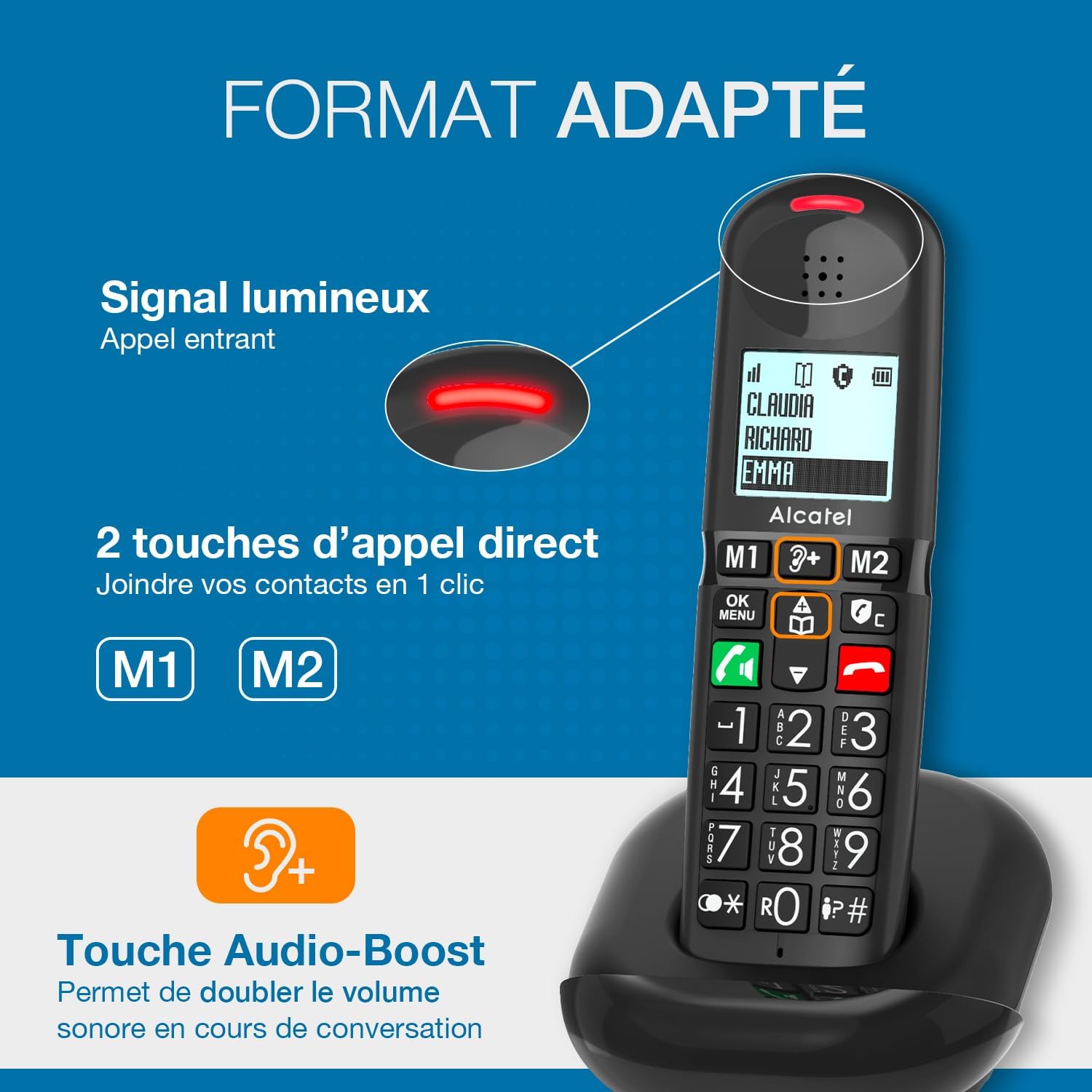
Image: A close-up of the Alcatel XL685 Duo handset, highlighting the large buttons, direct call keys (M1, M2), and the incoming call light signal.
Hands-Free Function
During a call, press the speakerphone button (often indicated by a speaker icon) to activate hands-free mode. You can adjust the speaker volume using the navigation keys.
Audio Amplification (Audio Boost)
The XL685 features an audio amplification button (often marked with a speaker and plus sign, or "Audio Boost") that instantly doubles the call volume by up to +10 dB, reaching a total of 25 dB. This feature is particularly useful for users with hearing difficulties and is compatible with hearing aids.

Image: Visual representation of the Alcatel XL685 Duo's features, including powerful ringer, audio boost (up to 25dB), large graphic screen, and hands-free function.
Contact Directory
The phone can store up to 100 contacts (names and numbers) in its directory. To access, add, or edit contacts, navigate through the phone's menu using the OK/Menu button.
- Direct Call Keys (M1, M2): Assign frequently called numbers to the M1 and M2 buttons for quick access.
- Directory Copy: The directory can be automatically copied to any registered handset.
Call Log
The phone saves the last 50 incoming and outgoing calls in its call log. Access this log via the menu to view numbers, dates, and times, and to redial numbers.
Call Blocking
Manage unwanted calls with the integrated call blocking features:
- Manual Blocking: Block up to 100 unwanted numbers with a dedicated button. Simply press the block button during or after a call from an unwanted number to add it to the blacklist.
- Automatic Blocking: Activate automatic mode to only allow calls from numbers saved in your contact directory. All other calls, including anonymous ones, will be blocked.

Image: Illustration of the Alcatel XL685 Duo's call blocking capabilities, showing manual blocking for up to 100 numbers and an automatic mode to block all but registered contacts.
Maintenance
To ensure the longevity and optimal performance of your Alcatel XL685 Duo cordless phone, follow these maintenance guidelines:
- Cleaning: Use a soft, damp cloth to clean the handset and base units. Avoid using abrasive cleaners, solvents, or strong chemicals, as these can damage the plastic surfaces.
- Battery Care:
- Always use the supplied rechargeable AAA batteries.
- If the phone will not be used for an extended period, remove the batteries to prevent leakage.
- Do not expose batteries to excessive heat or direct sunlight.
- Replace batteries when their performance significantly degrades.
- Placement: Place the base units on a stable, flat surface away from direct sunlight, heat sources, and moisture. Ensure adequate ventilation.
- Avoid Interference: Keep the phone away from other electronic devices that may cause interference, such as microwaves, Wi-Fi routers, or computers.
Troubleshooting
If you encounter issues with your Alcatel XL685 Duo, refer to the following common problems and solutions:
| Problem | Possible Cause / Solution |
|---|---|
| No dial tone / Cannot make or receive calls. |
|
| Poor sound quality / Static. |
|
| Handset not charging. |
|
| Display backlight is not active at night. |
|
| Cannot block calls. |
|
Specifications
| Feature | Detail |
|---|---|
| Product Dimensions (L x W x H) | 4.02 x 2.56 x 4.41 inches |
| Item Weight | 14.6 ounces (413 Grams) |
| Model Number | ATL1428452 |
| Batteries | 4 AAA batteries required (included) |
| Brand | Alcatel |
| Color | Black |
| Material | Plastic |
| Power Source | Corded Electric |
| Answering System Type | Digital |
| Phone Talk Time | 8 Hours |
| Manufacturer | ATLINKS |
| First Available Date | December 31, 2024 |
Warranty and Support
The Alcatel XL685 Duo cordless phone comes with a 2-Year Warranty from the date of purchase, covering defects in materials and workmanship. Please retain your proof of purchase for warranty claims.
For technical support, troubleshooting assistance, or warranty inquiries, please contact ATLINKS customer service. Refer to the contact information provided in your product packaging or visit the official Alcatel telecommunications website for support details.