
Inkbird Wireless Pool Thermometer with Indoor Monitor
INKBIRD Wireless Pool Thermometer with Indoor Monitor User Manual
Model: Wireless Pool Thermometer with Indoor Monitor
1. Introduction
Thank you for choosing the INKBIRD Wireless Pool Thermometer with Indoor Monitor. This device provides accurate water temperature readings for swimming pools, bathtubs, fish tanks, and hot springs, along with indoor temperature and humidity monitoring. Its solar-powered design and long-distance wireless transmission ensure convenience and reliability.

Image: The INKBIRD Wireless Pool Thermometer (floating unit) and its accompanying Indoor Monitor.
2. Product Overview
The INKBIRD Wireless Pool Thermometer system consists of two main components:
- Pool Thermometer (Transmitter): This floating unit is solar-powered and measures water temperature. It is designed with IPX68 waterproof rating for durability in aquatic environments.
- Indoor Monitor (Receiver): This unit displays the water temperature from the floating thermometer, as well as indoor temperature and humidity. It operates on 2 AAA batteries.

Image: Detailed view of the pool thermometer showing its action button, solar panel, screen, and anti-collision gasket. It also indicates temperature measurement range and accuracy.
Key features include:
- High-efficiency solar panel for charging the floating unit.
- IPX68 waterproof rating for the pool thermometer.
- Simultaneous display of indoor and outdoor temperatures, and indoor humidity.
- Long-distance wireless transmission up to 980 feet (300 meters).
- HD display with switchable Celsius/Fahrenheit units.
- Ability to view MAX/MIN water temperature and water temperature comfort level.
3. Specifications
| Brand | Inkbird |
| Model | Wireless Pool Thermometer with Indoor Monitor |
| Power Source (Transmitter) | Solar Powered |
| Power Source (Receiver) | 2 AAA Batteries (included) |
| Waterproof Rating | IPX68 (Pool Thermometer) |
| Transmission Distance | Up to 980 feet / 300 meters (open air) |
| Temperature Measurement Range | -40°F ~ 158°F (-40°C ~ 70°C) |
| Temperature Measurement Accuracy | ±1.8°F (±1°C) |
| Display Accuracy | 0.1°F (0.1°C) |
| Display Type | Digital |
| Material | Plastic |
| Package Dimensions | 7.2 x 6.5 x 4.17 inches |
| Item Weight | 1.3 Pounds |
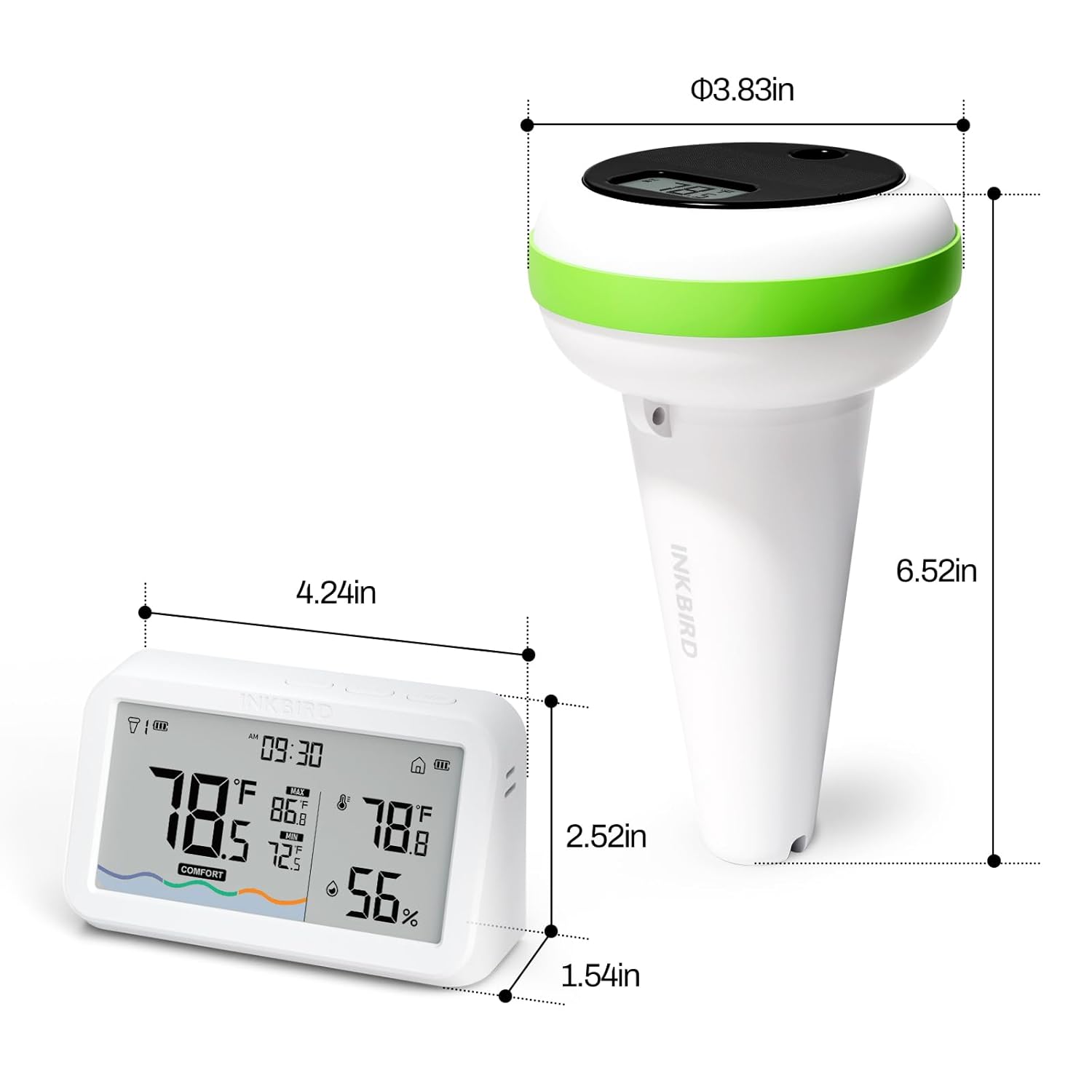
Image: Diagram showing the dimensions of both the floating pool thermometer and the indoor monitor unit.
4. Setup Guide
- Install Batteries in Indoor Monitor:
Locate the battery compartment on the back of the Indoor Monitor. Insert 2 AAA batteries, ensuring correct polarity (+/-). Close the battery cover securely.

Image: Illustration showing the battery compartment of the indoor monitor and the insertion of AAA batteries.
- Activate Pool Thermometer:
Press the action button located on the top of the floating pool thermometer. The display on the thermometer should light up, indicating it is powered on and ready to transmit data.

Image: A finger pressing the action button on the top of the floating pool thermometer.
- Placement:
Place the floating pool thermometer in the water (e.g., swimming pool, bathtub, fish tank). Ensure the solar panel is exposed to sunlight for optimal charging. Position the Indoor Monitor within the wireless transmission range (up to 980 feet/300 meters) of the floating unit, ideally in a central location indoors.
- Synchronization:
The Indoor Monitor should automatically receive data from the pool thermometer once both units are powered on and within range. Allow a few moments for the initial synchronization.
5. Operating Instructions
5.1 Indoor Monitor Display
The Indoor Monitor provides comprehensive information at a glance:

Image: Close-up of the Indoor Monitor display, highlighting various indicators such as local time, water temperature, indoor temperature, indoor humidity, and battery levels.
- Local Time: Displays the current time.
- Water Temperature: Shows the real-time temperature from the floating pool thermometer.
- Indoor Temperature: Displays the ambient temperature at the Indoor Monitor's location.
- Indoor Humidity: Shows the relative humidity at the Indoor Monitor's location.
- Indoor Monitor's Battery Level: Indicates the remaining battery life of the Indoor Monitor.
- Pool Thermometer's Battery Level: Indicates the remaining battery life of the floating unit.
- Highest Water Temp (MAX): Shows the maximum water temperature recorded.
- Lowest Water Temp (MIN): Shows the minimum water temperature recorded.
- Water Temperature Comfort Level: An indicator (Cold, Comfort, Hot) based on the water temperature.
5.2 Switching Temperature Units (C°/F°)
To switch between Celsius (°C) and Fahrenheit (°F) temperature units, locate the dedicated button on the Indoor Monitor (refer to the device's physical buttons, usually labeled "C/F" or similar). Press this button to toggle the display units.
5.3 Multi-Thermometer Support
The Indoor Monitor is capable of displaying temperature readings from up to three separate INKBIRD pool thermometers. This is useful for monitoring multiple bodies of water (e.g., pool, hot tub, fish pond) from a single indoor unit.

Image: An illustration showing one indoor monitor receiving and displaying temperature data from three different floating pool thermometers placed in a pool, a bathtub, and an aquarium.
6. Maintenance
- Cleaning: Wipe both the floating thermometer and the Indoor Monitor with a soft, damp cloth. Do not use abrasive cleaners or solvents.
- Solar Panel Care: Ensure the solar panel on the floating thermometer is kept clean and free of debris to maximize charging efficiency.
- Battery Replacement: Replace the AAA batteries in the Indoor Monitor when the low battery indicator appears on the display.
- Storage: If storing the device for an extended period, remove batteries from the Indoor Monitor and store both units in a cool, dry place away from direct sunlight.
- Water Quality: While the pool thermometer is IPX68 waterproof, it is generally recommended for fresh water applications. Some users have reported issues in saltwater pools; consult Inkbird support if you have a saltwater pool.
7. Troubleshooting
| Problem | Possible Cause | Solution |
|---|---|---|
| No reading on Indoor Monitor / "---" displayed |
|
|
| Inaccurate temperature readings |
|
|
| Pool thermometer stopped working (water inside) |
|
|
8. Warranty and Support
INKBIRD products typically come with a limited warranty. Please refer to the warranty card included with your product or visit the official INKBIRD website for detailed warranty terms and conditions. For technical support, troubleshooting assistance, or warranty claims, please contact INKBIRD customer service through their official channels. You can often find contact information on their website or within the product packaging.
Official Website: www.inkbird.com
For further assistance, you may also refer to the Inkbird Store on Amazon.
Ask a question about this manual
Ask about setup, troubleshooting, compatibility, parts, safety, or missing instructions. Manuals+ will review the question and use this page’s manual context to help answer it.