1. Product Overview
The NJTY T21L is a high-precision digital multimeter designed for electricians, DIY enthusiasts, and anyone requiring accurate electrical measurements. This versatile tool offers a wide range of functions, including voltage, current, resistance, capacitance, inductance, frequency, temperature, diode, and continuity testing.
Key features include:
- Large HD Display: A 6000-count display provides clear, easy-to-read measurements without parallax issues.
- Multifunctional Measurement: Capable of measuring DC/AC Voltage, DC/AC Current, Resistance, Capacitance, Inductance, Temperature, Diode, and Circuit Continuity.
- Non-Contact Voltage (NCV) Detection: Safely detect AC voltage without direct contact, indicated by a light and buzzer alarm.
- Secure Test Lead Jacks: Designed for smooth and tight insertion of test leads, ensuring accurate and reliable connections.
- Backlight and Flashlight: Equipped with a display backlight and a built-in flashlight for convenient operation in low-light environments.

Front view of the NJTY T21L Digital Multimeter, showcasing its large display and rotary switch.
2. Setup and Preparation
2.1 Battery Installation
The NJTY T21L multimeter requires three (3) 1.5V AAA batteries (not included) for operation.
- Locate the battery compartment cover on the back of the multimeter.
- Use a screwdriver to open the battery compartment cover.
- Insert three 1.5V AAA batteries, ensuring correct polarity (+ and -).
- Replace the battery compartment cover and secure it with the screw.
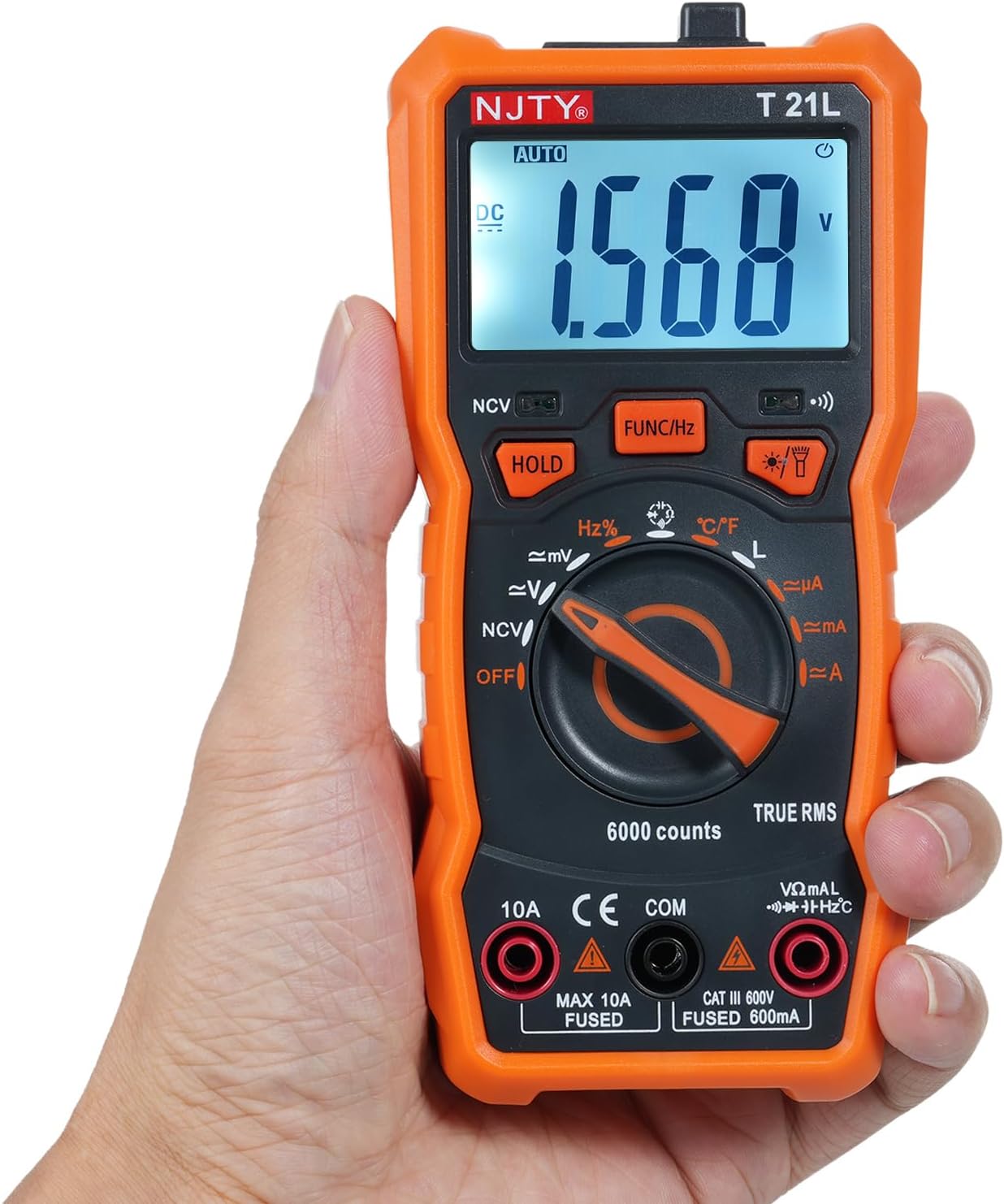
Image showing the open battery compartment for installing 3 AAA batteries.
2.2 Connecting Test Leads
Always ensure test leads are securely connected before taking measurements.
- Insert the black test lead into the COM (Common) input terminal.
- For most measurements (voltage, resistance, capacitance, frequency, temperature, diode, continuity, and current up to 600mA), insert the red test lead into the VΩmA input terminal.
- For high current measurements (up to 10A), insert the red test lead into the 10A input terminal.

The included red and black test leads used for making electrical measurements.

The multimeter with its test leads properly connected to the input terminals.
3. Operating Instructions
3.1 Multimeter Components
Familiarize yourself with the various parts of the NJTY T21L multimeter:

This diagram identifies all key components and controls of the NJTY T21L digital multimeter.
- Flashlight: Located at the top, provides illumination for work areas.
- NCV Sensing Area: Top-front area for non-contact voltage detection.
- LED Display: Shows measurement readings and indicators.
- Buzzer Indicator Light: Illuminates and buzzes for NCV and continuity.
- Flashlight/Backlight Button: Activates the flashlight and display backlight.
- Gear Rotary Switch: Selects the primary measurement function.
- Resistance/Voltage Input Terminal (VΩmA): For voltage, resistance, capacitance, frequency, temperature, diode, continuity, and low current measurements.
- Common Terminal (COM): For the black test lead.
- Current Input Terminal (10A): For high current measurements (up to 10A).
- Data Hold Button (HOLD): Freezes the current reading on the display.
- Function Switch/Frequency Button (FUNC/Hz): Toggles between sub-functions within a rotary switch setting (e.g., AC/DC voltage, diode/continuity) or activates frequency measurement.
- NCV Indicator Light: Illuminates during NCV detection.
3.2 Basic Measurement Procedures
Always ensure the multimeter is set to the correct function and range before connecting to a circuit. Start with a higher range if the expected value is unknown.
3.2.1 DC/AC Voltage Measurement (V~, V=)
- Set the rotary switch to the V~ (AC Voltage) or V= (DC Voltage) position.
- Connect the red test lead to the VΩmA terminal and the black test lead to the COM terminal.
- Connect the test probes in parallel across the component or circuit to be measured.
- Read the voltage value on the display.
3.2.2 Resistance Measurement (Ω)
- Set the rotary switch to the Ω (Resistance) position.
- Connect the red test lead to the VΩmA terminal and the black test lead to the COM terminal.
- Ensure the circuit is de-energized before measuring resistance.
- Connect the test probes across the component.
- Read the resistance value on the display.
3.2.3 Continuity Test and Diode Test
- Set the rotary switch to the Diode/Continuity position.
- Connect the red test lead to the VΩmA terminal and the black test lead to the COM terminal.
- Press the FUNC/Hz button to toggle between Diode Test and Continuity Test.
- For Continuity: Touch the probes to the ends of the circuit. A continuous beep indicates continuity.
- For Diode: Connect the red probe to the anode and the black probe to the cathode. The display shows the forward voltage drop. Reverse the probes; an open circuit (OL) indicates a good diode.
3.2.4 Capacitance Measurement (F)
- Set the rotary switch to the Capacitance position.
- Connect the red test lead to the VΩmA terminal and the black test lead to the COM terminal.
- Ensure the capacitor is fully discharged before measurement.
- Connect the test probes across the capacitor terminals.
- Read the capacitance value on the display.
3.2.5 DC/AC Current Measurement (µA, mA, A)
Caution: Always connect the multimeter in series with the circuit. Never connect it in parallel across a voltage source when measuring current, as this can damage the meter and the circuit.
- Set the rotary switch to the appropriate current range (µA, mA, or A).
- For currents up to 600mA, connect the red test lead to the VΩmA terminal. For currents up to 10A, connect the red test lead to the 10A terminal. The black test lead always goes to COM.
- Open the circuit where current is to be measured and insert the multimeter in series.
- Read the current value on the display.
3.2.6 Non-Contact Voltage (NCV) Detection
- Set the rotary switch to the NCV position.
- Move the NCV sensing area (top of the meter) close to the AC voltage source.
- The NCV indicator light will illuminate, and the buzzer will sound, with increasing frequency as the meter gets closer to the voltage source.
3.2.7 Temperature Measurement (°C/°F)
- Set the rotary switch to the °C/°F position.
- Connect the temperature probe (if included) to the VΩmA and COM terminals, observing polarity.
- Place the tip of the temperature probe on the object or area whose temperature is to be measured.
- Read the temperature value on the display. Press FUNC/Hz to switch between Celsius and Fahrenheit.
3.3 Special Functions
- Data Hold: Press the HOLD button to freeze the current reading on the display. Press it again to release.
- Backlight/Flashlight: Press the Flashlight/Backlight Button to turn on the display backlight. Press and hold to activate the top flashlight. Press again to turn off.
- Automatic Shutdown: The multimeter will automatically power off after a period of inactivity to conserve battery life.
4. Maintenance
4.1 Cleaning
To clean the multimeter, wipe the case with a damp cloth and a mild detergent. Do not use abrasives or solvents. Ensure the device is powered off and disconnected from any circuits before cleaning.
4.2 Battery Replacement
When the low battery indicator appears on the display, replace the batteries promptly to ensure accurate readings. Follow the battery installation steps in Section 2.1.
4.3 Safety Precautions
- Always turn off the multimeter and disconnect test leads before opening the case for battery replacement or fuse inspection.
- Do not operate the meter if the battery cover is not properly closed.
- Do not use the meter if it appears damaged or if the insulation on the test leads is compromised.
5. Troubleshooting
- No Display: Check if batteries are correctly installed and have sufficient charge. Replace if necessary.
- Incorrect Readings: Ensure the rotary switch is set to the correct function and range. Check test lead connections. Verify the circuit is properly connected.
- "OL" on Display: This usually indicates an over-range condition (measurement exceeds the selected range) or an open circuit (e.g., when measuring resistance of an open circuit).
- Low Battery Indicator: Replace the batteries as soon as possible to maintain accuracy.
6. Specifications
The following table details the technical specifications and measurement ranges for the NJTY T21L Digital Multimeter:

This table details the measurement ranges and accuracies for all functions of the NJTY T21L multimeter.
| Parameter | Specification |
|---|---|
| Model | T21L |
| DC Voltage | 60mV, 600mV, 6V, 60V, 600V; ±(0.5% reading + 5 digits) |
| AC Voltage | 60mV, 600mV, 6V, 60V, 600V; ±(1% reading + 4 digits) |
| DC Current | 600µA, 6000µA, 60mA, 600mA, 6A, 10A; ±(1.2% reading + 5 digits) for µA/mA, ±(3% reading + 5 digits) for A |
| AC Current | 600µA, 6100µA, 60mA, 600mA, 6A, 10A; ±(1.2% reading + 5 digits) for µA/mA, ±(3% reading + 5 digits) for A |
| Resistance | 600Ω, 6kΩ, 60kΩ, 600kΩ, 6MΩ, 60MΩ; ±(0.8% reading + 5 digits) |
| Frequency | 9.999Hz, 99.99Hz, 999.9Hz, 9.999KHz, 99.99KHz, 999.9KHz, 9.999MHz; ±(1.5% reading + 5 digits) |
| Capacitance | 6000pF, 60nF, 600nF, 6µF, 60µF, 600µF, 6mF, 60mF, 100mF; ±(4.0% reading + 5 digits) |
| Temperature | -20℃ ~ 1000℃ / -4℉ ~ 1832℉ |
| Inductance | 600µH, 6mH, 60mH, 600mH, 6H, 60H; ±(4.0% reading + 5 digits) |
| Diode Test | Yes |
| ON-OFF Buzzing (Continuity) | Yes |
| NCV (Non-Contact Voltage) | Yes |
| Data Retention | Yes |
| Backlight / Flashlight | Yes |
| Automatic Shutdown | Yes |
| Low Voltage Indicator | Yes |
| Display | 6000 counts |
| Power Supply | 3 * 1.5V AAA batteries (Not included) |
| Size | 147 * 71 * 45mm |
| Manufacturer | EVTSCAN |
| Manufacturer Reference Number | EVTSCANgfqdsmt5na |
7. Warranty and Support
Specific warranty information for the NJTY T21L Digital Multimeter is not provided in the product details. For warranty claims, technical support, or service inquiries, please contact your retailer or the manufacturer, EVTSCAN, directly. Retain your proof of purchase for any warranty-related requests.


