1. Introduction
This manual provides essential information for the safe and efficient operation of your Livwell Touch IQ Matte Grey 2-Slice Toaster. Please read these instructions thoroughly before first use and retain them for future reference.
The Livwell Touch IQ Toaster features a high-resolution touch screen for precise control over toasting, offering settings for various bread types and browning levels. Its design aims to provide a consistent toasting experience.
2. Important Safety Instructions
WARNING: To reduce the risk of fire, electric shock, or injury, always follow these basic safety precautions:
- Read all instructions before operating the toaster.
- Do not touch hot surfaces. Use handles or knobs.
- To protect against electrical hazards, do not immerse the cord, plug, or toaster in water or other liquids.
- Close supervision is necessary when any appliance is used by or near children.
- Unplug from outlet when not in use and before cleaning. Allow to cool before putting on or taking off parts.
- Do not operate any appliance with a damaged cord or plug, or after the appliance malfunctions or has been damaged in any manner.
- Do not use outdoors.
- Do not let the cord hang over the edge of a table or counter, or touch hot surfaces.
- Do not place on or near a hot gas or electric burner, or in a heated oven.
- Do not insert oversized foods, metal foil packages, or utensils into the toaster as this may create a fire or electric shock hazard.
- A fire may occur if toasters are covered or touching flammable material, including curtains, draperies, walls, and the like, when in operation.
- Do not attempt to dislodge food when the toaster is plugged in.
- Do not use the appliance for other than intended use.
- Always attach plug to appliance first, then plug cord into the wall outlet. To disconnect, turn any control to "off", then remove plug from wall outlet.
- The appliance is not intended to be operated by means of an external timer or separate remote-control system.
3. Product Components
Familiarize yourself with the parts of your Livwell Touch IQ Toaster:
- Toasting Slots: Two slots for inserting bread.
- Touch Screen Display: High-resolution interface for settings and control.
- Carriage Lever: Lowers bread into the toasting slots and initiates the toasting cycle.
- Crumb Tray: Removable tray located at the bottom for easy cleaning of crumbs.
- Power Cord: For connecting the toaster to an electrical outlet.

Image: Top-down view of the toaster's slots, illustrating the internal heating elements.
4. Setup
- Unpack: Carefully remove the toaster and all packaging materials.
- Placement: Place the toaster on a stable, heat-resistant, and non-flammable surface, away from curtains or other flammable materials. Ensure adequate ventilation around the toaster.
- Clean: Wipe the exterior of the toaster with a damp cloth. Ensure the crumb tray is properly inserted.
- Power Connection: Plug the power cord into a standard 120V AC electrical outlet. The touch screen will illuminate.
- Initial Use: For the first use, operate the toaster without bread on a medium setting to burn off any manufacturing residues. A slight odor or smoke is normal during this process.
5. Operating Instructions
5.1 Using the Touch Screen Interface
The Livwell Touch IQ Toaster features an intuitive touch screen for all settings. Upon powering on, the screen will display the current time and options for toasting.

Image: The toaster's touchscreen showing bread type selection and browning level adjustment.
5.2 Selecting Bread Type
The toaster offers 10 preset bread types for optimized toasting. Tap the bread icon on the screen to browse and select your desired bread type (e.g., White, Wheat, Multigrain, Bagel, Gluten-Free).

Image: Toaster with bagels, showing the touchscreen set to 'Bagel' mode.
5.3 Adjusting Browning Levels
Choose from 6 browning levels to achieve your preferred toast shade. After selecting the bread type, use the on-screen dial or buttons to adjust the browning level from 1 (lightest) to 6 (darkest).
5.4 Special Functions
- Defrost: Use this setting for frozen bread. The toaster will automatically adjust the toasting time.
- Reheat: Briefly warms already toasted bread without further browning.
- Cancel: Press the 'Cancel' button on the screen or lift the carriage lever to stop the toasting cycle at any time.
5.5 Language Settings
The toaster supports 4 language options: English, Spanish, French, and Mandarin. Access the settings menu (usually represented by a gear icon) on the touch screen to change the language.
5.6 Starting the Toasting Cycle
- Insert bread slices into the toasting slots.
- Select your desired bread type and browning level on the touch screen.
- Press down the carriage lever until it locks into place. The toasting cycle will begin, and a countdown timer will appear on the screen.
- Once the toasting cycle is complete, the bread will automatically pop up.
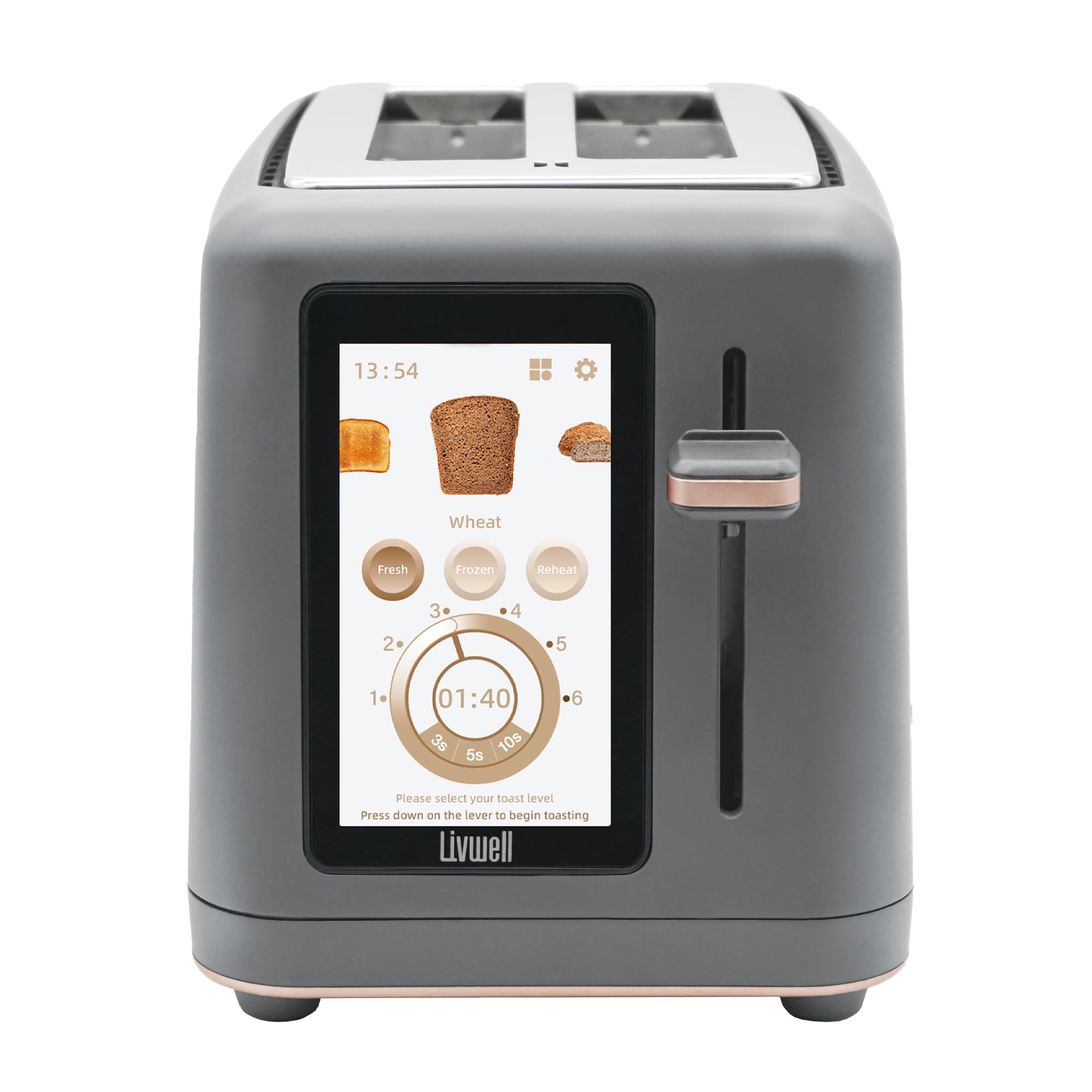
Image: Toast popping out of the Livwell Touch IQ Toaster after completion of the toasting cycle.
6. Maintenance and Cleaning
Regular cleaning ensures optimal performance and extends the life of your toaster.
- Always Unplug: Before cleaning, ensure the toaster is unplugged from the power outlet and completely cooled down.
- Crumb Tray: Pull out the removable crumb tray from the bottom of the toaster. Discard crumbs and wipe the tray clean with a damp cloth. Dry thoroughly before reinserting.
- Exterior: Wipe the exterior surfaces with a soft, damp cloth. Do not use abrasive cleaners or metal scouring pads, as they may scratch the finish.
- Interior: Never insert any objects into the toasting slots to clean. If food becomes lodged, unplug the toaster and carefully remove it once cooled.
7. Troubleshooting
| Problem | Possible Cause | Solution |
|---|---|---|
| Toaster does not turn on. | Not plugged in, power outage, or faulty outlet. | Ensure the toaster is securely plugged into a working outlet. Check your circuit breaker. |
| Carriage lever does not stay down. | Toaster is not powered on, or a setting has not been selected on the touchscreen. | Ensure the toaster is plugged in and the screen is active. Select a bread type and browning level on the touchscreen before pressing the lever down. |
| Bread is unevenly toasted. | Inconsistent bread thickness, or specific bread type requires adjustment. | Ensure bread slices are of uniform thickness. Experiment with different browning levels or bread type settings for optimal results. |
| Smoke or burning smell. | Crumbs in the toaster, or food lodged in slots. | Immediately unplug the toaster. Allow to cool, then remove and clean the crumb tray. Carefully remove any lodged food. |
| Touch screen is unresponsive. | Temporary software glitch or power issue. | Unplug the toaster for 30 seconds, then plug it back in to reset the system. If the issue persists, contact customer support. |
8. Specifications
- Brand: LIVWELL
- Model Number: LWTO2TFTG
- Color: Matte Grey
- Material: Polypropylene (PP)
- Product Dimensions: 10.82"D x 7.08"W x 7.79"H
- Number of Slices: 2
- Wattage: 850 watts
- Voltage: 120 Volts
- Number of Settings: 12
- Special Features: Built-In Timer, Cancel Function, Defrost Mode, Removable Crumb Tray, Touchscreen
- Item Weight: 2.87 pounds
- UPC: 850064866148
9. Official Product Video
Video: An official product video from Livwell Brands demonstrating the features and operation of the Livwell Touch IQ Toaster, including its touchscreen interface and various settings.
10. Warranty and Support
LIVWELL products are manufactured to high-quality standards. For warranty information, product support, or to inquire about replacement parts, please visit the official LIVWELL website or contact their customer service department. Keep your purchase receipt as proof of purchase.
Online Support: Visit the LIVWELL Store on Amazon