
Introduction
Thank you for choosing the Sharper-Image Lightweight Handheld Vacuum. This portable and powerful cordless cleaner is designed for efficient and convenient cleaning in your car, home, or office. With its strong suction, versatile 2-in-1 upholstery and crevice tool, and rechargeable battery, it makes quick work of dust, crumbs, and pet hair.
This manual provides important information on the safe operation, setup, maintenance, and troubleshooting of your new handheld vacuum. Please read it thoroughly before first use and keep it for future reference.
Important Safety Instructions
To reduce the risk of fire, electric shock, or injury, please observe the following safety precautions:
- Read all instructions before using this appliance.
- Do not use outdoors or on wet surfaces.
- Do not allow to be used as a toy. Close attention is necessary when used by or near children.
- Use only as described in this manual. Use only manufacturer's recommended attachments.
- Do not use with damaged cord or plug. If appliance is not working as it should, has been dropped, damaged, left outdoors, or dropped into water, return it to a service center.
- Do not pull or carry by cord, use cord as a handle, close a door on cord, or pull cord around sharp edges or corners. Do not run appliance over cord. Keep cord away from heated surfaces.
- Do not unplug by pulling on cord. To unplug, grasp the plug, not the cord.
- Do not handle plug or appliance with wet hands.
- Do not put any object into openings. Do not use with any opening blocked; keep free of dust, lint, hair, and anything that may reduce air flow.
- Keep hair, loose clothing, fingers, and all parts of body away from openings and moving parts.
- Do not pick up anything that is burning or smoking, such as cigarettes, matches, or hot ashes.
- Do not use to pick up flammable or combustible liquids, such as gasoline, or use in areas where they may be present.
- Do not pick up toxic material, such as chlorine bleach, ammonia, or drain cleaner.
- Do not use without dust cup and/or filters in place.
- Prevent unintentional starting. Ensure the switch is in the off-position before picking up or carrying the appliance.
- Recharge only with the charger specified by the manufacturer. A charger that is suitable for one type of battery pack may create a risk of fire when used with another battery pack.
- Under abusive conditions, liquid may be ejected from the battery; avoid contact. If contact accidentally occurs, flush with water. If liquid contacts eyes, additionally seek medical help. Liquid ejected from the battery may cause irritation or burns.
Package Contents
Please check the package contents to ensure all items are present and in good condition:
- Sharper-Image Lightweight Handheld Vacuum
- 2-in-1 Upholstery & Crevice Tool
- USB Charging Cable

Image: The handheld vacuum, its charging base, and the 2-in-1 tool, displayed alongside its retail packaging.
Product Overview
Familiarize yourself with the main components of your Sharper-Image Handheld Vacuum:
- Main Unit: Contains the motor, battery, and dust collection bin.
- Dust Cup: Transparent container for collecting debris.
- Washable Filter: Located inside the dust cup, filters fine particles.
- Power Button: Controls ON/OFF and suction modes.
- Charging Port: USB-C port for charging the vacuum.
- 2-in-1 Upholstery & Crevice Tool: An attachment that combines a narrow crevice tool for tight spaces and a brush for upholstery and delicate surfaces.
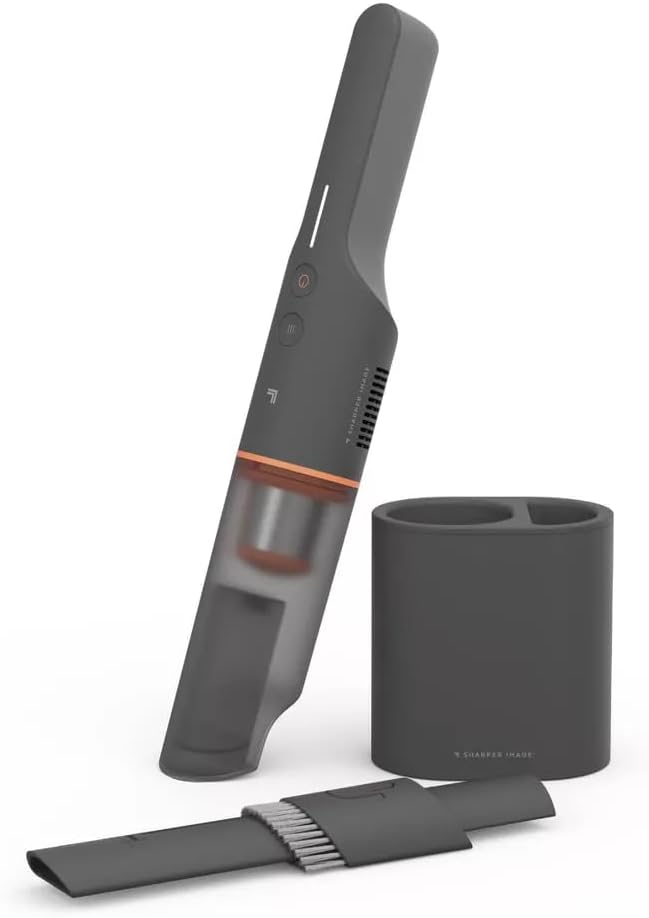
Image: The Sharper-Image handheld vacuum, its charging base, and the versatile 2-in-1 upholstery and crevice tool.
Setup
- Initial Charge: Before first use, fully charge the vacuum. Connect the USB charging cable to the vacuum's charging port and plug the other end into a compatible USB power adapter (not included) or a USB port. The charging indicator light will show charging status. A full charge provides up to 25 minutes of runtime on low suction power.

Image: The handheld vacuum placed in its charging base, connected to a power outlet via a USB cable, indicating it is ready for charging.
- Attach Accessories: The 2-in-1 Upholstery & Crevice Tool can be attached to the nozzle of the vacuum for specialized cleaning tasks. Simply push the tool firmly onto the vacuum's suction opening until it clicks into place.

Image: A person demonstrating the use of the extendable 2-in-1 upholstery and crevice tool to clean car seats, highlighting its versatility.
Operating Instructions
- Power On/Off and Suction Modes: Press the power button once to turn on the vacuum in standard suction mode. Press it a second time to switch to high suction mode. Press it a third time to turn the vacuum off. The vacuum features an 80-watt motor for powerful cleaning.

Image: The handheld vacuum being used to clean crumbs from a high chair, emphasizing its powerful 80W motor.
- Using the 2-in-1 Tool:
- Crevice Tool: Extend the narrow nozzle for reaching into tight corners, between car seats, or along edges.
- Upholstery Brush: Slide the brush attachment forward to use the bristles for cleaning fabric surfaces like upholstery, carpets, or pet beds.
- Cleaning Surfaces: Move the vacuum slowly over the surface to be cleaned. For best results, ensure the nozzle is in full contact with the surface. The lightweight and ergonomic design makes it comfortable for extended use.

Image: A woman comfortably using the ergonomic handheld vacuum to clean a couch, with a dog resting nearby, illustrating its ease of use for pet hair removal.
Maintenance
- Emptying the Dust Cup: For optimal performance, empty the dust cup regularly, especially when debris reaches the MAX fill line.
- Twist the dust cup counter-clockwise to detach it from the main unit.
- Carefully empty the contents into a trash bin.
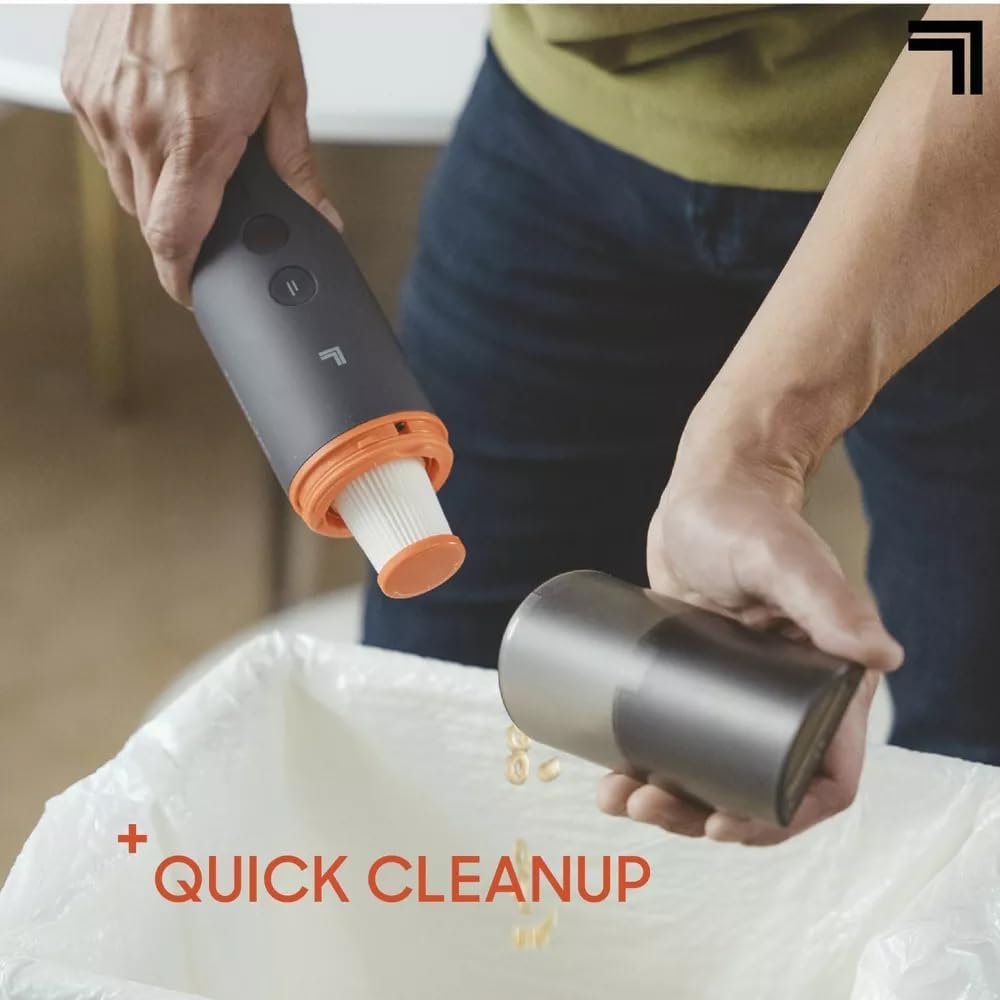
Image: Hands demonstrating the quick and easy process of detaching and emptying the dust bin of the handheld vacuum into a trash receptacle.
- Cleaning the Washable Filter: The filter should be cleaned regularly to maintain suction power.
- Remove the filter from the dust cup.
- Rinse the filter under cool running water until clean.
- Allow the filter to air dry completely for at least 24 hours before reinserting it into the dust cup. Do not use the vacuum with a wet filter.
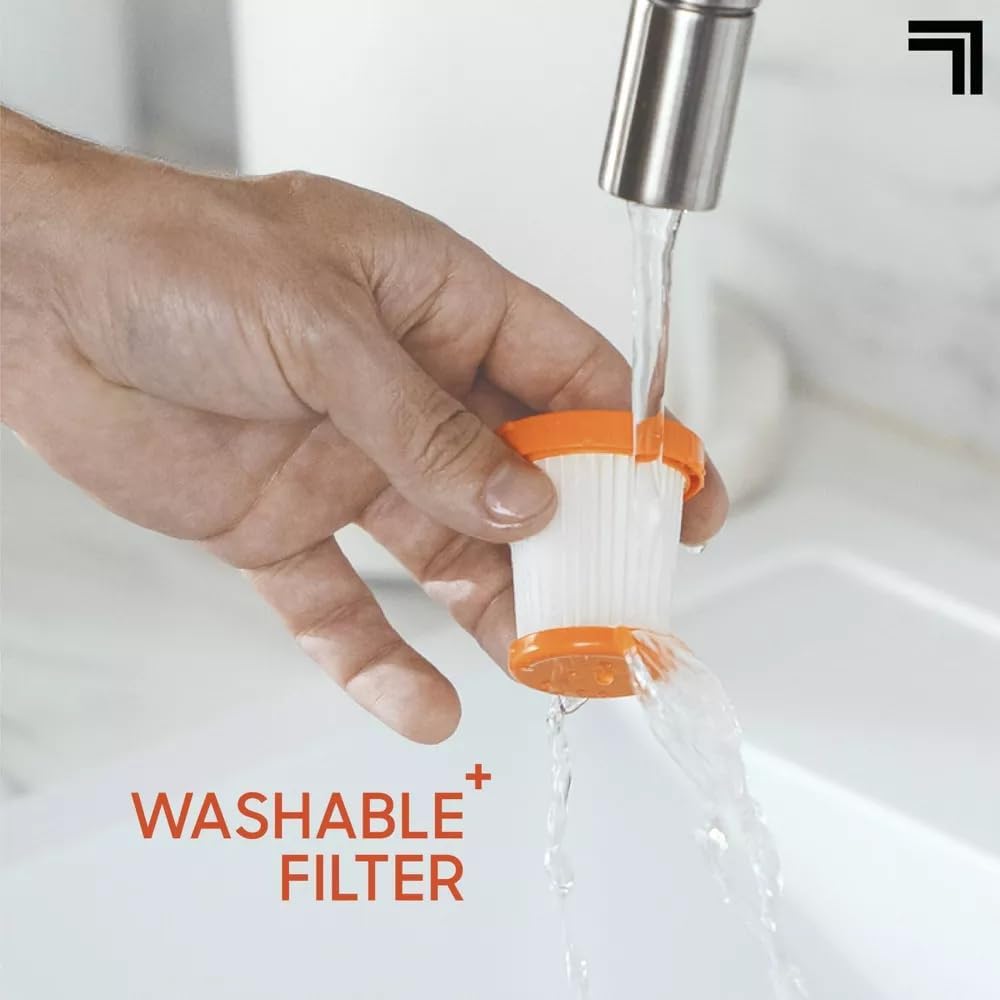
Image: A hand holding the washable filter of the vacuum under running water, illustrating the ease of cleaning and maintenance.
- Storage: Store the vacuum and its accessories in a cool, dry place, away from direct sunlight and moisture.
Troubleshooting
| Problem | Possible Cause | Solution |
|---|---|---|
| Vacuum does not turn on. | Battery is depleted. | Charge the vacuum fully using the provided USB cable. |
| Weak suction. | Dust cup is full or filter is clogged. | Empty the dust cup and clean the washable filter. Ensure filter is completely dry before reinserting. |
| Weak suction. | Nozzle or attachment is blocked. | Check the nozzle and attachment for any obstructions and remove them. |
| Vacuum not charging. | USB cable or power adapter issue. | Ensure the USB cable is securely connected. Try a different USB power adapter or port. |
| Short runtime. | Battery not fully charged or aging battery. | Ensure the vacuum is fully charged. Runtime may decrease over time with battery degradation. |
Specifications
| Feature | Detail |
|---|---|
| Brand | Sharper-Image (Generic) |
| Model Name | Lightweight Handheld Vacuum |
| Model Number | 75037 |
| Special Features | Cordless, Portable, Rechargeable, Lightweight, Powerful Suction, 2-in-1 Upholstery & Crevice Tool |
| Filter Type | Washable |
| Included Components | Handheld Vacuum, 2-in-1 Upholstery & Crevice Tool, USB Charging Cable |
| Cordless | Yes |
| Capacity | 0.16 Liters |
| Wattage | 80 watts |
| Runtime | Up to 25 minutes (at low suction power on a full charge) |
| Recommended Uses | Car, Upholstery, Furniture, Small Spaces |
| Form Factor | Handheld |
| Color | Black |
| Product Dimensions | 16.86"L x 5.51"W x 3.93"H |
| Item Weight | 2.91 pounds |
| Controller Type | Push Button |
| Control Method | Touch |
| Connectivity Technology | USB |
| Number of Speeds | 2 |
| Indoor/Outdoor Usage | Indoor |
Warranty and Support
Specific warranty information for your Sharper-Image Lightweight Handheld Vacuum is typically provided with your purchase documentation. Please refer to the warranty card or contact the retailer where you purchased the product for details regarding warranty coverage and terms.
For technical support, replacement parts, or further assistance, please contact the manufacturer's customer service. Contact information can usually be found on the product packaging or the manufacturer's official website.
