
Introduction
Thank you for choosing the EcoExplorer Commercial Ice Maker Machine. This high-capacity, air-cooled unit is designed for demanding commercial environments such as restaurants, bars, cafes, and businesses, providing a continuous supply of clear ice cubes. With a production capacity of 550 lbs per 24 hours and a spacious 441 lbs storage bin, it ensures you always have ice readily available. This manual provides essential information for safe installation, operation, maintenance, and troubleshooting to ensure optimal performance and longevity of your ice machine.

Image: The EcoExplorer Commercial Ice Maker Machine shown with its various accessories, including the control panel, water filter, pipes, and ice scoop.
Safety Instructions
Please read all safety instructions carefully before operating the ice maker. Failure to follow these instructions may result in electric shock, fire, or serious injury.
- Electrical Safety: Ensure the unit is connected to a grounded power outlet with the correct voltage (220V) as specified. Do not use extension cords or adapters.
- Placement: Install the ice maker on a level, stable surface in a well-ventilated area, away from direct sunlight or heat sources. Maintain adequate clearance around the unit for proper airflow.
- Water Connection: Connect the unit to a potable water supply using the provided water filter and pipes. Ensure all connections are secure to prevent leaks.
- Drainage: Ensure the drain pipe is properly installed and allows for continuous drainage to prevent water accumulation.
- Handling: The unit is heavy. Use appropriate lifting techniques or assistance when moving.
- Initial Setup: It is crucial to keep the ice machine upright for at least 24 hours before initial use to allow the refrigerant to settle.
- Cleaning: Always unplug the unit before cleaning or performing any maintenance.
- Children and Pets: Keep children and pets away from the appliance during operation and maintenance.
Package Contents
Verify that all components are present and undamaged upon unpacking:
- Commercial Ice Maker Unit (Top Section)
- Ice Storage Bin (Bottom Section)
- Water Filter
- Water Inlet Pipe
- Drain Pipe
- Ice Scoop
- Adjustable Stand Feet
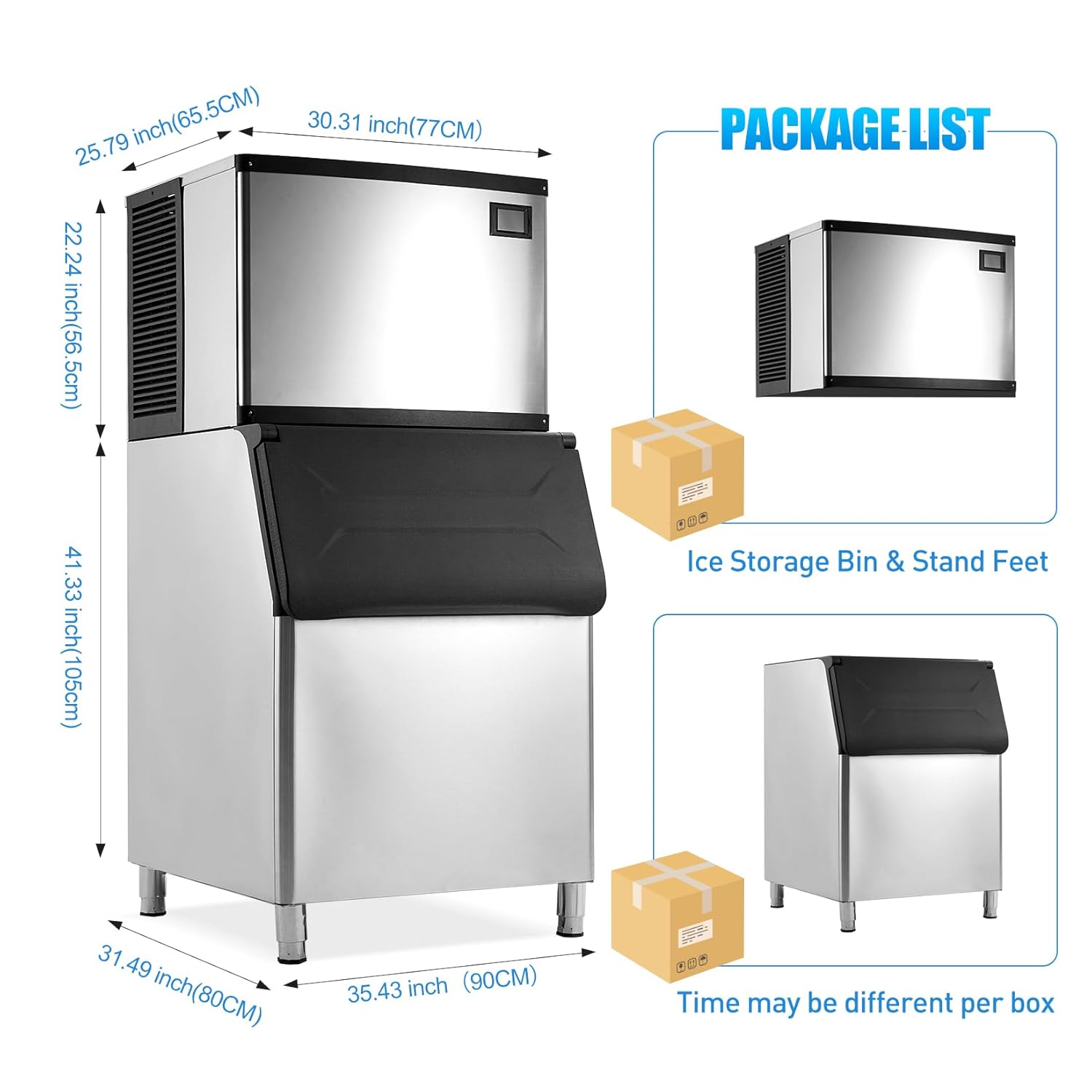
Image: Diagram showing the dimensions of the ice maker and a visual representation of the package contents, including the ice storage bin and stand feet.
Setup
Follow these steps for proper installation of your ice maker:
- Unpacking: Carefully remove all packaging materials. Inspect the unit for any shipping damage.
- Positioning: Place the ice maker on a firm, level surface capable of supporting its weight when full of ice. Ensure there is at least 6 inches of clearance on all sides for proper ventilation.
- Leveling: Adjust the adjustable stand feet at the bottom of the unit to ensure it is perfectly level. This is crucial for proper water flow and ice production.
- Refrigerant Settling: After moving or unpacking, allow the unit to stand upright for a minimum of 24 hours before plugging it in. This allows the refrigerant to stabilize.
- Water Supply Connection: Connect the water inlet pipe to a cold potable water supply. Install the provided water filter in line with the water supply. Ensure all connections are tight to prevent leaks.
- Drain Connection: Connect the drain pipe to a suitable floor drain or a larger drainage system. Ensure the drain pipe has a continuous downward slope to allow water to flow freely.
- Power Connection: Once all connections are secure and the unit has settled for 24 hours, plug the ice maker into a dedicated, grounded 220V electrical outlet.
Operating Instructions
Your EcoExplorer ice maker is designed for efficient and user-friendly operation.
Control Panel Overview
The smart touch-sensitive control panel allows for easy management of the ice making process.

Image: Close-up of the advanced LCD control panel, detailing icons for process mode, auto clean, thickness adjustment, reservation function, temperature display, power, and fault indicators.
- Power On/Off: Press the power button to turn the unit on or off.
- Process Mode: Indicates the current operational status (e.g., ice making, defrosting).
- Temperature Display: Shows the internal temperature.
- Reservation Function: Set a timer for the machine to start making ice at a specific time.
- Fault Icon: Illuminates if an error or malfunction is detected.
- Ice Full Icon: Indicates when the ice storage bin is full.
Ice Production and Thickness Adjustment
The machine produces 234 ice cubes per cycle in approximately 8-15 minutes, with a total capacity of 550 lbs per 24 hours.

Image: Visual guide demonstrating adjustable ice cube thickness for various needs: thin (5-8 mins) for smoothies/seafood, medium (8-11 mins) for beverages/cocktails, and thick (11-15 mins) for beer buckets/whiskeys.
- Adjusting Thickness: Use the dedicated buttons on the control panel to increase or decrease the ice cube thickness. Thinner ice cubes are produced faster, while thicker cubes take longer.
- Monitoring Production: The display will show the current status of ice production.
Self-Cleaning Function
The ice maker features an automated self-cleaning system for convenience and hygiene.
- Initiating Cleaning: Press the 'Auto Clean' button on the control panel to start the self-cleaning cycle.
- Frequency: It is recommended to run the self-cleaning cycle regularly, especially in high-usage environments, to maintain hygiene and efficiency.
Maintenance
Regular maintenance ensures the longevity and efficient operation of your ice maker.
- Exterior Cleaning: Wipe the exterior stainless steel surfaces with a soft cloth and mild detergent. Avoid abrasive cleaners.
- Interior Cleaning: In addition to the self-cleaning function, periodically clean the interior of the ice bin and ice-making components manually with a food-grade sanitizer.
- Water Filter Replacement: The included water filter helps ensure clean ice. Replace the filter cartridge regularly according to the manufacturer's recommendations or if you notice a decrease in water quality or ice production.
- Condenser Cleaning: The air-cooled condenser fins can accumulate dust and debris, reducing efficiency. Periodically clean the condenser fins with a soft brush or vacuum cleaner. Ensure the unit is unplugged before cleaning.
- Drain Line Check: Ensure the drain line is free of kinks and blockages to allow proper water drainage.
Troubleshooting
Refer to the table below for common issues and their solutions.
| Problem | Possible Cause | Solution |
|---|---|---|
| No ice production | No power; Water supply off; Clogged water filter; High ambient temperature; Compressor issue. | Check power connection; Ensure water supply is on; Replace water filter; Ensure proper ventilation; Contact customer support. |
| Ice production is slow | Clogged water filter; Dirty condenser; High ambient temperature; Incorrect ice thickness setting. | Replace water filter; Clean condenser; Ensure proper ventilation; Adjust ice thickness setting. |
| Ice cubes are too small/soft | Low water pressure; High water temperature; Incorrect ice thickness setting. | Check water supply pressure; Ensure cold water supply; Adjust ice thickness setting to thicker. |
| Water leakage | Loose water connections; Clogged drain pipe; Unit not level. | Tighten all water connections; Clear drain pipe blockage; Level the unit. |
| Unusual noise | Unit not level; Loose components; Fan obstruction. | Level the unit; Check for loose parts; Clear any obstructions around the fan. |
| Error code on display | Specific system malfunction. | Note the error code and refer to the full service manual or contact customer support. |
Specifications
Key technical specifications for the EcoExplorer Commercial Ice Maker Machine:
| Feature | Specification |
|---|---|
| Brand | EcoExplorer |
| Model Name | Commercial Ice Maker |
| Ice Production Capacity | 550 lbs / 24 hours |
| Ice Storage Bin Capacity | 441 lbs |
| Ice Cube Type | Clear Ice Cubes (Adjustable Thickness) |
| Cooling Type | Air Cooled |
| Material | Stainless Steel |
| Voltage | 220V |
| Product Dimensions (D x W x H) | 31.49" x 35.43" x 63.57" |
| Weight | 180 Pounds |
| Compressor Power | 1340W |
Warranty and Support
EcoExplorer stands behind the quality of its products. For specific warranty details, including coverage period and terms, please refer to the warranty card included with your purchase or visit the official EcoExplorer website.
If you encounter any issues that cannot be resolved using the troubleshooting guide, or if you require technical assistance, please contact EcoExplorer customer support. Have your model number and purchase date ready when contacting support.
- Customer Support: Refer to your product packaging or the EcoExplorer official website for contact information (phone, email, or online support portal).
- Returns: This product is eligible for 30-day easy returns through Amazon.com.