
ITOTIN ITO-LD-C60B
ITOTIN LD-C60B 60W Bi-Color LED Video Light Instruction Manual
Model: ITO-LD-C60B | Brand: ITOTIN
1. Introduction
This manual provides detailed instructions for the safe and effective use of your ITOTIN LD-C60B 60W Bi-Color LED Video Light. This compact and powerful COB light is designed for photography and video recording, offering adjustable color temperature, brightness, and various lighting effects. Please read this manual thoroughly before operation and retain it for future reference.
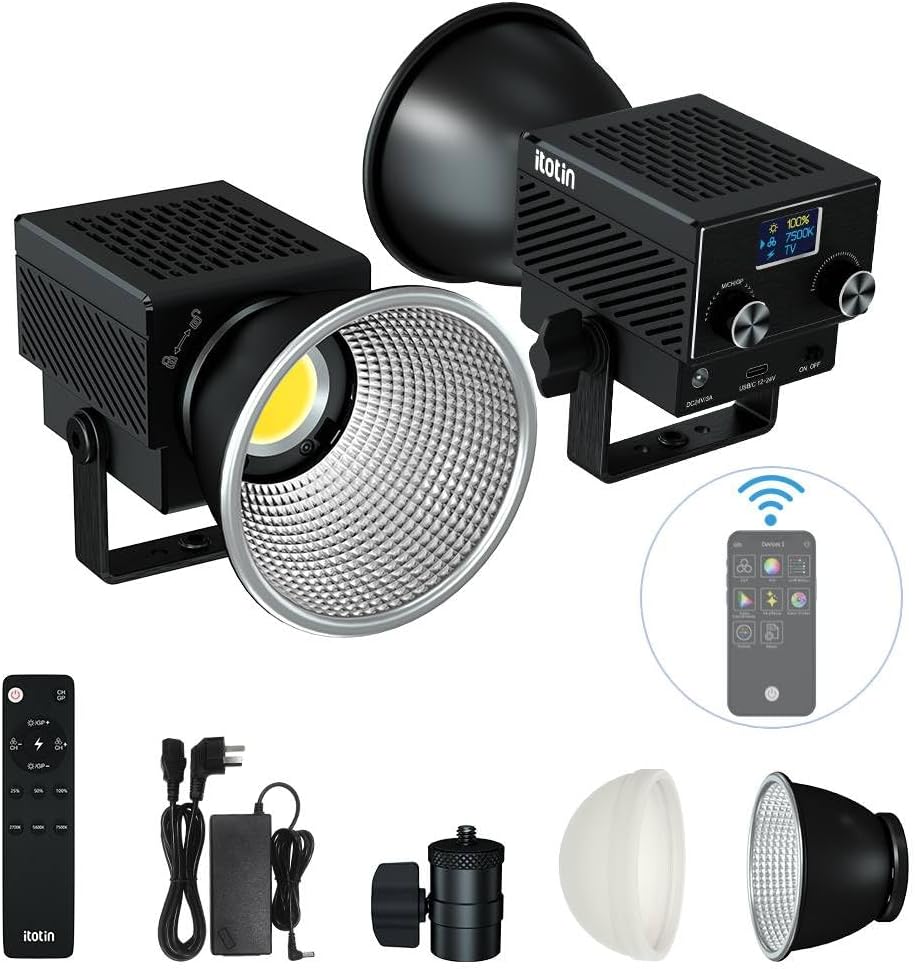
Figure 1.1: The ITOTIN LD-C60B 60W Bi-Color LED Video Light.
2. Package Contents
Verify that all items listed below are included in your package:
- 1 x LED Video Light (Main Body)
- 1 x Silicone Diffuser
- 1 x Spotlight Lampshade
- 1 x Power Supply Adapter
- 1 x Remote Control
- 1 x Bayonet Mount Adapter
- 1 x Ball Head (Light Holder)
- 1 x Instruction Manual

Figure 2.1: Standard items included in the package.
3. Product Overview
The ITOTIN LD-C60B is a compact and powerful 60W bi-color LED video light. It features a high color rendering index (CRI > 96, TLCI > 97) for accurate color reproduction and a wide color temperature range from 2700K to 7500K.

Figure 3.1: Product diagram showing components and dimensions.
3.1 Key Features
- High Power Output: 60W for bright illumination.
- Bi-Color Temperature: Adjustable from 2700K (warm) to 7500K (cool).
- High Color Accuracy: CRI > 96, TLCI > 97 for natural light.
- Compact Design: Weighs approximately 0.55 lbs (250 grams) and measures 4 x 2.9 x 2.7 inches (102 x 74 x 68 mm).
- 8 Lighting Effects: Includes Lightning, Thunder, TV, Candlelight, Ambulance, Fire Truck, Explosion, and Fireworks.
- Control Options: Supports 2.4G remote control and mobile APP wireless control.
- Efficient Cooling: Equipped with an ultra-quiet cooling fan to extend lifespan and prevent noise interference.
- Adjustable Angle: The integrated bracket allows for 180° rotation.

Figure 3.2: The light features a strong reflector for concentrated illumination, 60W output, and a high color rendering index (Ra>96+).

Figure 3.3: The light's palm-sized design makes it compact and portable.
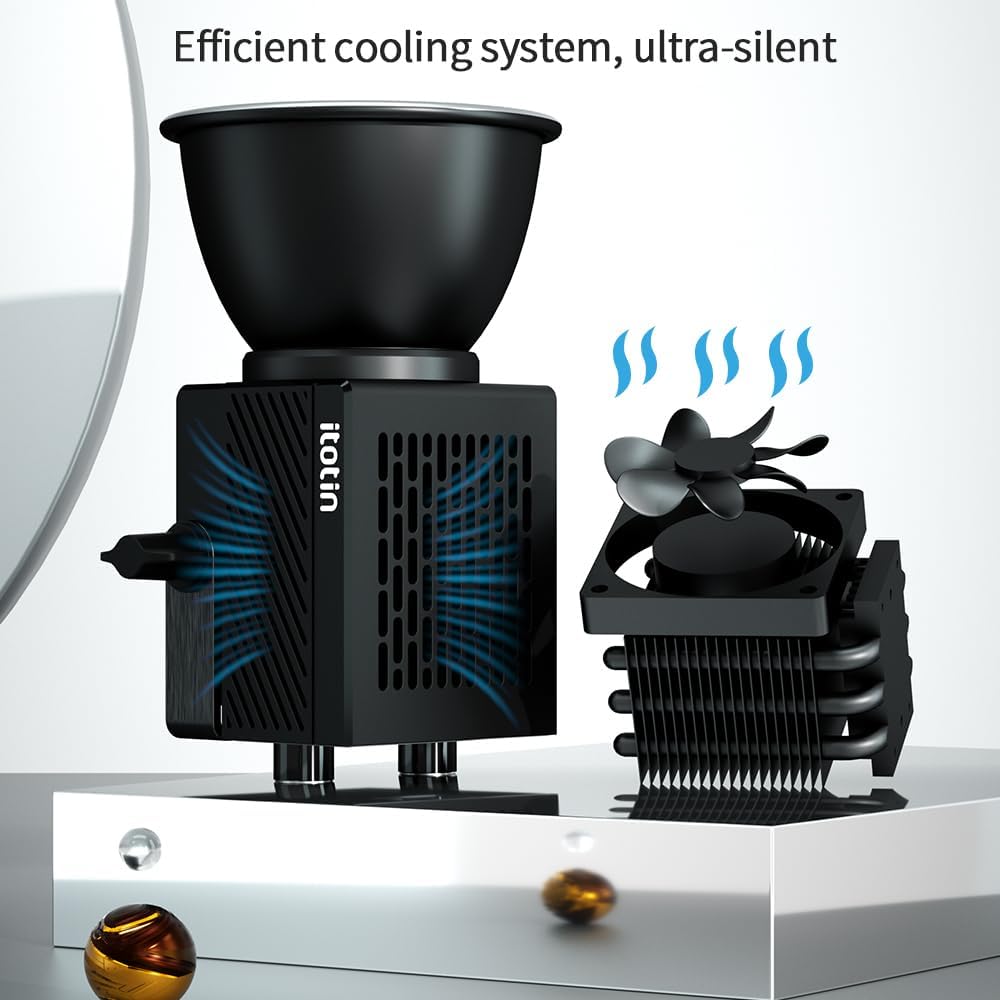
Figure 3.4: The ultra-silent cooling fan ensures efficient heat dissipation.
4. Setup
4.1 Attaching Accessories
- Mounting the Ball Head: Attach the ball head (light holder) to a compatible light stand or tripod.
- Mounting the Light: Secure the ITOTIN LD-C60B main body onto the ball head. Tighten the bracket fixing twist to secure the light's position.
- Attaching Lampshades:
- For diffused light, attach the silicone diffuser to the front of the COB LED.
- For concentrated light, attach the spotlight lampshade to the front of the COB LED.
- Power Connection: Connect the power supply adapter to the DC IN port on the light and plug it into a power outlet.
5. Operating Instructions
5.1 Power On/Off
Locate the power switch on the side of the light. Flip the switch to the "ON" position to power on the device. Flip to "OFF" to power off.
5.2 Adjusting Brightness and Color Temperature
The light can be adjusted using the control knobs on the unit, the 2.4G remote control, or the mobile application.
5.2.1 On-Unit Control
- Brightness Adjustment: Rotate the "Value knob" to adjust the brightness from 0% to 100%. The current brightness level will be displayed on the screen.
- Color Temperature Adjustment: Press the "Function/channel/group knob" to switch to color temperature adjustment mode. Rotate the "Value knob" to select a color temperature between 2700K and 7500K.
5.2.2 Remote Control Operation
Use the provided 2.4G remote control to adjust settings wirelessly. Refer to the remote control's specific instructions for pairing and function details.
5.2.3 Mobile APP Control
Download the dedicated mobile application (details typically found in the included manual or product packaging). Follow the app's instructions to connect and control the light via Bluetooth or Wi-Fi.
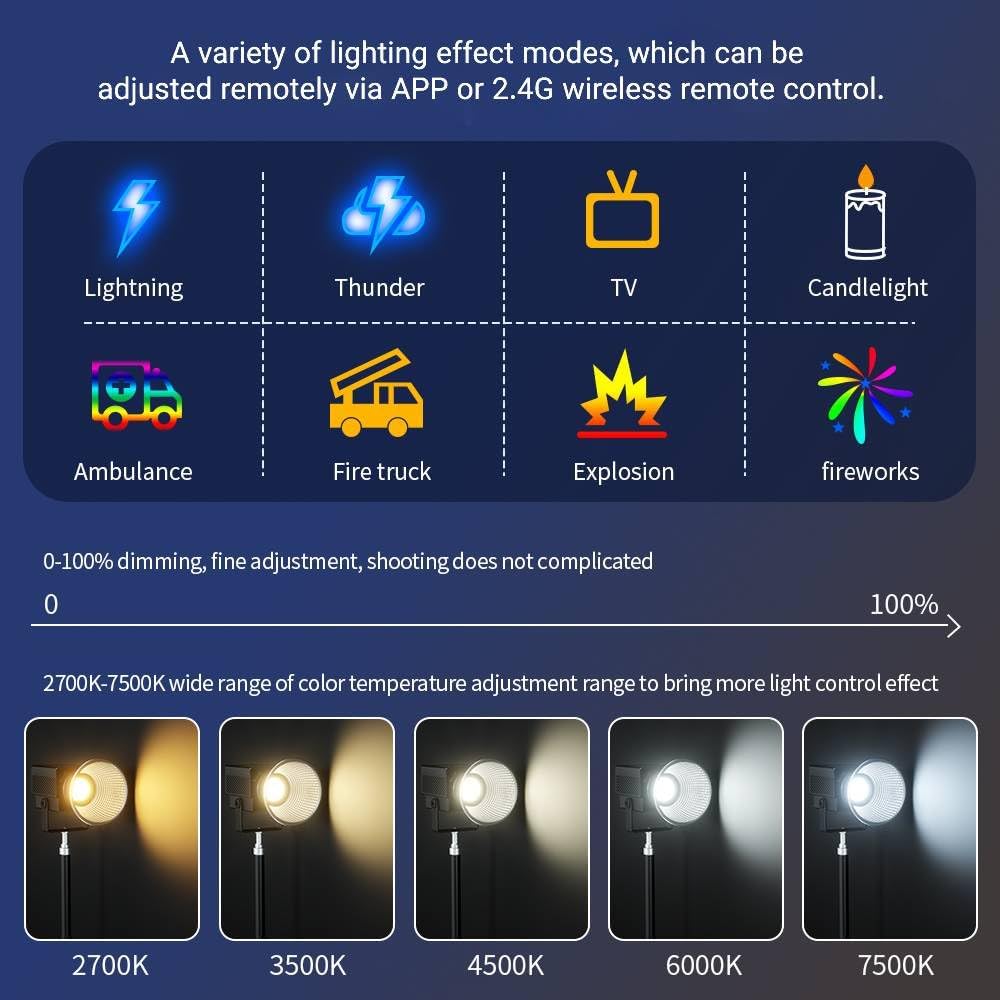
Figure 5.1: The light offers a wide range of color temperatures (2700K-7500K) and 8 special lighting effects, adjustable via APP or 2.4G remote control.
5.3 Special Lighting Effects
The light features 8 pre-programmed lighting effects:
- Lightning
- Thunder
- TV
- Candlelight
- Ambulance
- Fire Truck
- Explosion
- Fireworks
To activate and cycle through these effects, use the "Function/channel/group knob" on the unit or the corresponding buttons on the remote/app.
6. Maintenance
- Cleaning: Use a soft, dry cloth to clean the light's surface. Do not use abrasive cleaners or solvents.
- Storage: Store the light in a cool, dry place away from direct sunlight and moisture when not in use.
- Heat Dissipation: Ensure the cooling fan vents are not obstructed during operation to maintain optimal performance and lifespan.
7. Troubleshooting
| Problem | Possible Cause | Solution |
|---|---|---|
| Light does not turn on. | No power, loose connection, faulty power adapter. | Check power cable connection. Ensure power outlet is functional. Try a different power adapter if available. |
| Remote control not working. | Batteries depleted, out of range, not paired. | Replace remote control batteries. Ensure remote is within operating range. Re-pair the remote control with the light according to its instructions. |
| Light flickers or dims unexpectedly. | Unstable power supply, overheating, internal fault. | Ensure stable power supply. Check for obstructions around cooling vents. If problem persists, contact customer support. |
| APP control not connecting. | Bluetooth/Wi-Fi off, app not updated, light not in pairing mode. | Ensure Bluetooth/Wi-Fi is enabled on your device. Update the app to the latest version. Follow app instructions to put the light into pairing mode. |
8. Specifications
| Feature | Detail |
|---|---|
| Model Number | ITO-LD-C60B |
| Power Output | 60W |
| Color Temperature Range | 2700K - 7500K |
| Color Rendering Index (CRI) | >96 |
| Television Lighting Consistency Index (TLCI) | >97 |
| Brightness Adjustment | 0% - 100% |
| Lighting Effects | 8 (Lightning, Thunder, TV, Candlelight, Ambulance, Fire Truck, Explosion, Fireworks) |
| Control Methods | 2.4G Remote Control, Mobile APP |
| Dimensions (L x W x H) | 4 x 2.9 x 2.7 inches (102 x 74 x 68 mm) |
| Weight | 0.55 pounds (250 grams) |
| Material | Aluminum Alloy |
9. Warranty and Support
For warranty information and technical support, please refer to the official ITOTIN website or contact your retailer. Keep your purchase receipt as proof of purchase for warranty claims.
Manufacturer: ITOTIN
Date First Available: February 10, 2025
Ask a question about this manual
Ask about setup, troubleshooting, compatibility, parts, safety, or missing instructions. Manuals+ will review the question and use this page’s manual context to help answer it.