
1. Introduction
This manual provides detailed instructions for the assembly, operation, maintenance, and troubleshooting of your HESL Massage Office Chair. Please read this manual thoroughly before use to ensure proper function and safety.
Model: office chair
Brand: HESL
Maximum Weight Capacity: 400 lbs
2. Safety Information
Always adhere to the following safety guidelines:
- Always assemble the chair carefully, following the provided instructions.
- Do not exceed the maximum weight capacity of 400 lbs to ensure stability and safety.
- Ensure all screws are tightened securely during assembly.
- Keep children and pets away from the chair during assembly.
- Avoid placing the chair near heat sources or in direct sunlight for prolonged periods.
- Unplug the massage and heating unit when not in use or before cleaning.
- Do not use the massage or heating function if you have any medical conditions that may be aggravated by heat or vibration. Consult a physician if unsure.
3. Package Contents
Verify that all components are present before beginning assembly. If any parts are missing or damaged, contact customer support.
- Backrest (A)
- Seat Cushion (B)
- Armrests (Left & Right) (C)
- Mechanism Plate (D)
- Gas Lift (E)
- Base (F)
- Casters (G)
- Footrest Assembly (H)
- Screws and Tools (Various sizes, labeled I, J, K, L, M, N, O, P, Q, R in diagrams)
4. Assembly Instructions
Follow these steps carefully for assembly. It is recommended to assemble the chair on a soft, clean surface to prevent damage. Important: Screw in 60% of each screw before fully tightening all screws at the end.
Step 1: Attach Casters to Base
Insert the five casters (G) into the holes at the ends of the chair base (F). Push firmly until they click into place. Then, insert the gas lift (H) into the center hole of the base.
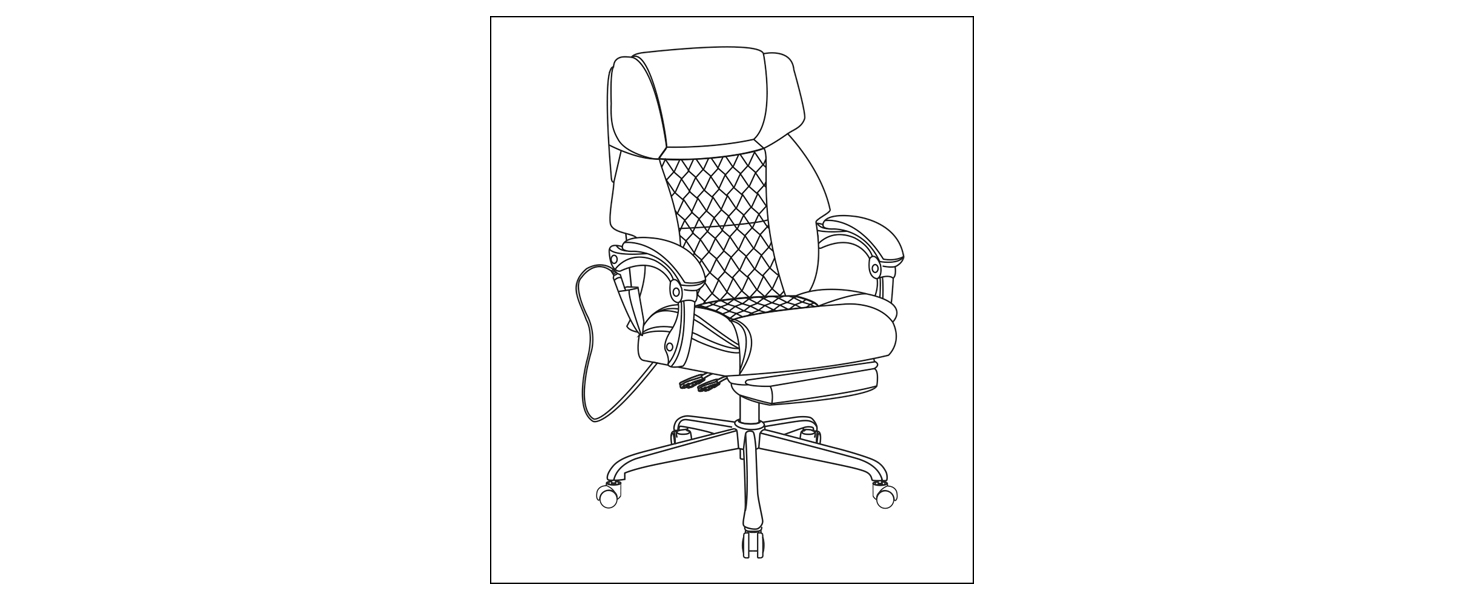
Image: Illustration showing casters (G) being inserted into the base (F) and the gas lift (H) placed in the center. This corresponds to the image with parts G, H, I, K, F.
Step 2: Attach Mechanism Plate to Seat Cushion
Align the mechanism plate (D) with the pre-drilled holes on the underside of the seat cushion (B). Secure it using screws (M). Ensure the front of the mechanism plate faces the front of the seat cushion.

Image: Illustration showing the mechanism plate (D) being attached to the underside of the seat cushion (B) with screws (M).
Step 3: Attach Seat Cushion to Gas Lift
Carefully place the assembled seat cushion onto the gas lift (H) attached to the base. Press down firmly to secure it.
Step 4: Attach Backrest to Seat Cushion
Align the backrest (A) with the metal brackets on the seat cushion (B). Secure it using screws (N) and washers (O).
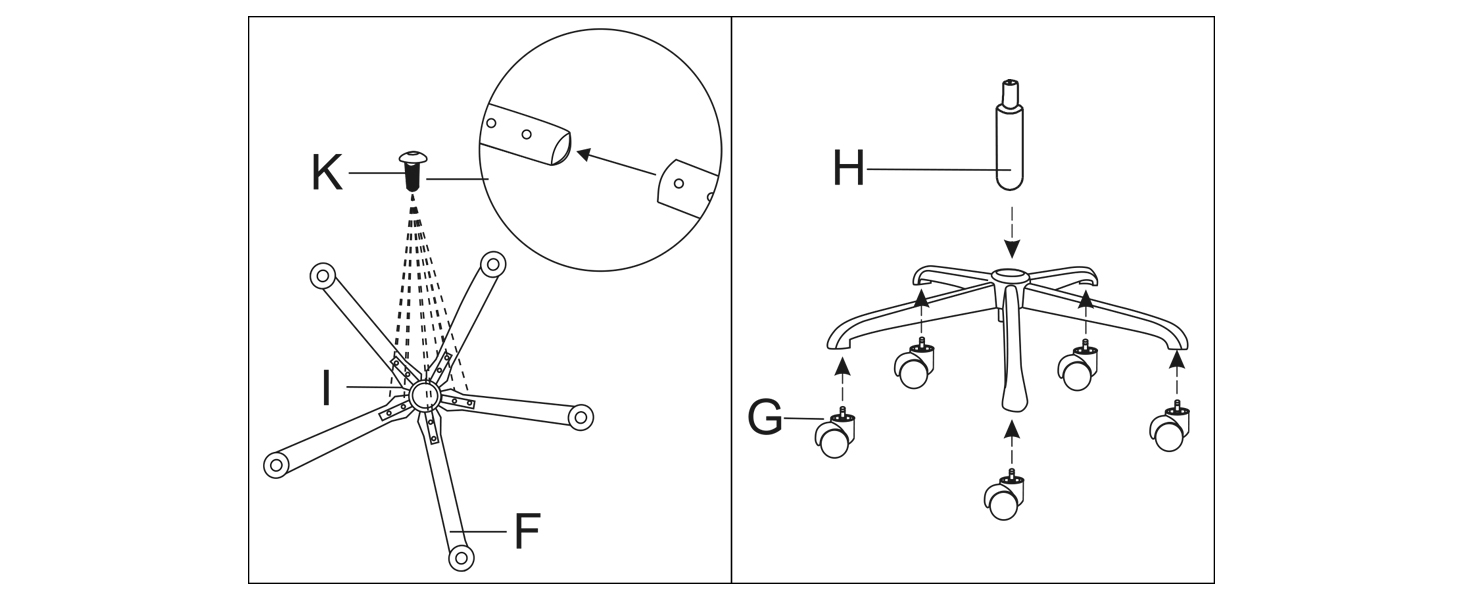
Image: Illustration showing the backrest (A) being attached to the seat cushion (B) with screws (N) and washers (O).
Step 5: Attach Armrests
Attach the left and right armrests (C) to the chair using screws (P) and washers (Q). Ensure the armrests are correctly oriented (L for left, R for right). The massage cable (R) should be routed appropriately.
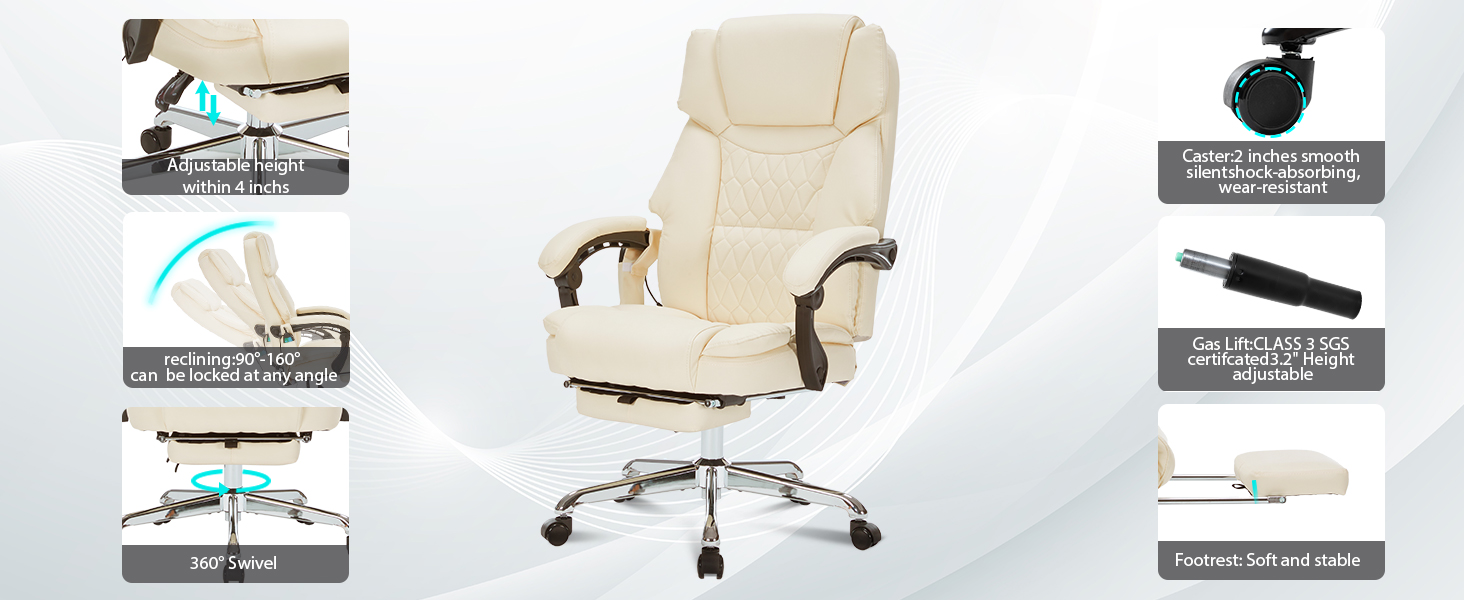
Image: Illustration showing the armrests (C) being attached to the chair with screws (P) and washers (Q), indicating left (L) and right (R) armrests.
Step 6: Attach Footrest
Slide the footrest assembly (H) into the designated slots under the seat cushion. Ensure it moves smoothly.

Image: A cream-colored HESL Massage Office Chair, fully assembled, with the footrest extended and massage points highlighted.
5. Operating Instructions
Chair Adjustments
- Height Adjustment: Pull the lever located under the seat upwards to raise or lower the chair. Release the lever at the desired height.
- Reclining Function: Pull the lever on the side of the chair to recline the backrest. The chair reclines from 90° (upright) to 160° (nearly flat). Release the lever to lock the backrest at your preferred angle.
- Footrest: Pull the footrest out from under the seat when desired. Push it back in when not in use.

Image: A cream-colored office chair demonstrating its reclining capabilities from 90 to 160 degrees, along with illustrations of the height and back adjustable levers.
Video: This video demonstrates the various adjustable features of the HESL office chair, including height adjustment, reclining mechanism, and the retractable footrest. (Note: This is a representative video URL as specific video links were not provided in the product data.)
Massage and Heating Functions
The chair features a 6-point vibration massage system and a back heating function, controlled by a wired remote.
- Power: Press the "POWER" button on the remote to turn the massage function on/off.
- Modes: Cycle through 5 massage modes (Pulse, Press, Wave, Auto, Normal) using the "MODE" button.
- Intensity: Adjust between 2 intensity levels (High, Low) with the "INTENSITY" button.
- Area Selection: Select specific massage areas (Back, Lumbar, Leg) using the corresponding buttons.
- Heating: Press the "HEAT" button to activate the back heating function. The temperature will reach approximately 120°F. Press again to turn off.
- Timer: Set a massage duration (e.g., 15, 30, 60 minutes) using the "TIMING" button.

Image: A cream-colored office chair with visual indicators for 6-point vibration massage and 120°F back heating function.
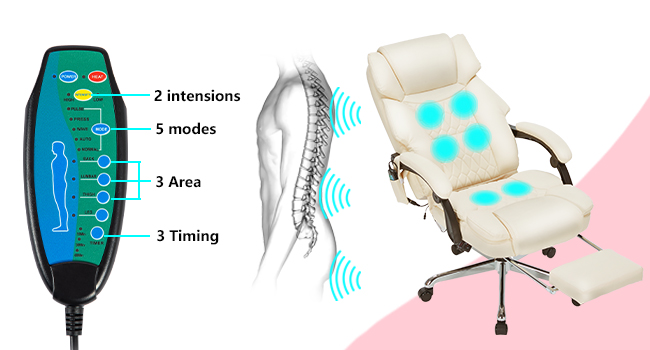
Image: A detailed view of the remote control for the massage and heating functions, showing buttons for power, mode, intensity, area selection, heat, and timing.
6. Maintenance
- Cleaning: Wipe clean with a damp cloth. Avoid harsh chemicals or abrasive cleaners.
- Inspection: Periodically check all screws and bolts to ensure they are tight. Re-tighten if necessary.
- Storage: Store the chair in a cool, dry place away from direct sunlight when not in regular use.
7. Troubleshooting
| Problem | Possible Cause | Solution |
|---|---|---|
| Chair does not adjust height. | Gas lift is faulty or lever is not engaged. | Ensure the lever is fully pulled. If the issue persists, the gas lift may need replacement. Contact customer support. |
| Massage/Heating function not working. | Power cable unplugged, remote faulty, or internal wiring issue. | Check if the power adapter is securely plugged into both the chair and a working outlet. Ensure the remote control cable is connected. If still not working, contact customer support. |
| Chair is wobbly. | Screws are loose or casters are not fully inserted. | Re-tighten all assembly screws. Ensure all casters are fully inserted into the base. |
| Footrest does not extend/retract smoothly. | Obstruction or mechanism issue. | Check for any obstructions. Ensure the footrest rails are clean. If the issue persists, contact customer support. |
8. Specifications
| Feature | Detail |
|---|---|
| Brand | HESL |
| Model Name | Massage Office Chair |
| Product Dimensions | 20.7"D x 21.7"W x 45"H |
| Maximum Weight Recommendation | 400 Pounds |
| Reclining Angle | 90° to 160° |
| Massage Points | 6-point vibration |
| Massage Modes | 5 modes |
| Heating Function | Back heating, up to 120°F |
| Material | Wool linen fabric, high-density foam, Cotton |
| Gas Lift Certification | SGS certified Class 3 |
| Item Weight | 44.7 pounds |
| Date First Available | February 10, 2025 |
9. Warranty and Support
HESL provides comprehensive after-sales support for your product.
- Return Policy: 30-day return policy from the date of purchase.
- Parts Replacement: 365-day parts replacement warranty.
- For support, missing parts, or warranty claims, please contact HESL customer service via the retailer's platform or the official HESL website.