
1. Introduction
This manual provides essential instructions for the safe installation, operation, and maintenance of the DOPZNJWF TOQ3-2P/63 Automatic Transfer Switch (ATS). This device is designed to automatically switch between two power sources, ensuring a continuous power supply to critical loads. It is a 2-pole, 63A, 230V MCB type switch, suitable for dual power input and output configurations.
2. Product Features
- Reliable and Fast Operation: Ensures quick and stable power transfer.
- Strong Load Capacity: Capable of managing high-current electrical equipment.
- High Adaptability: Designed to function effectively in various industrial environments.
- Integrated Protection: Includes features to enhance circuit safety.
- Durability and Easy Maintenance: Constructed for long operational life and simplified upkeep.
3. Safety Information
WARNING: Electrical installation and maintenance should only be performed by qualified and licensed electricians. Failure to follow these instructions can result in electric shock, fire, serious injury, or death.
- Always disconnect all power sources before installing, servicing, or removing the device.
- Ensure proper grounding of the electrical system.
- Verify that the voltage and current ratings of the ATS match your electrical system requirements.
- Do not operate the device if it appears damaged.
- Keep children and unauthorized personnel away from electrical installations.
4. Setup and Installation
The DOPZNJWF TOQ3-2P/63 ATS is designed for 2-input, 2-output configurations. Professional installation is highly recommended to ensure safety and proper functionality.
- Power Disconnection: Before beginning installation, ensure all power to the relevant circuits is completely disconnected at the main breaker.
- Mounting: Securely mount the ATS in a suitable electrical enclosure, ensuring adequate ventilation and clearance.
- Wiring Connections:
- Connect the primary power source (e.g., utility grid) to the "N" (Normal) input terminals.
- Connect the secondary power source (e.g., generator, inverter) to the "R" (Reserve) input terminals.
- Connect the load circuits to the output terminals of the ATS.
- Ensure all connections are tight and secure. Refer to the wiring diagram provided on the device or in supplementary documentation.
- Verification: Double-check all wiring for correctness and security before restoring power.
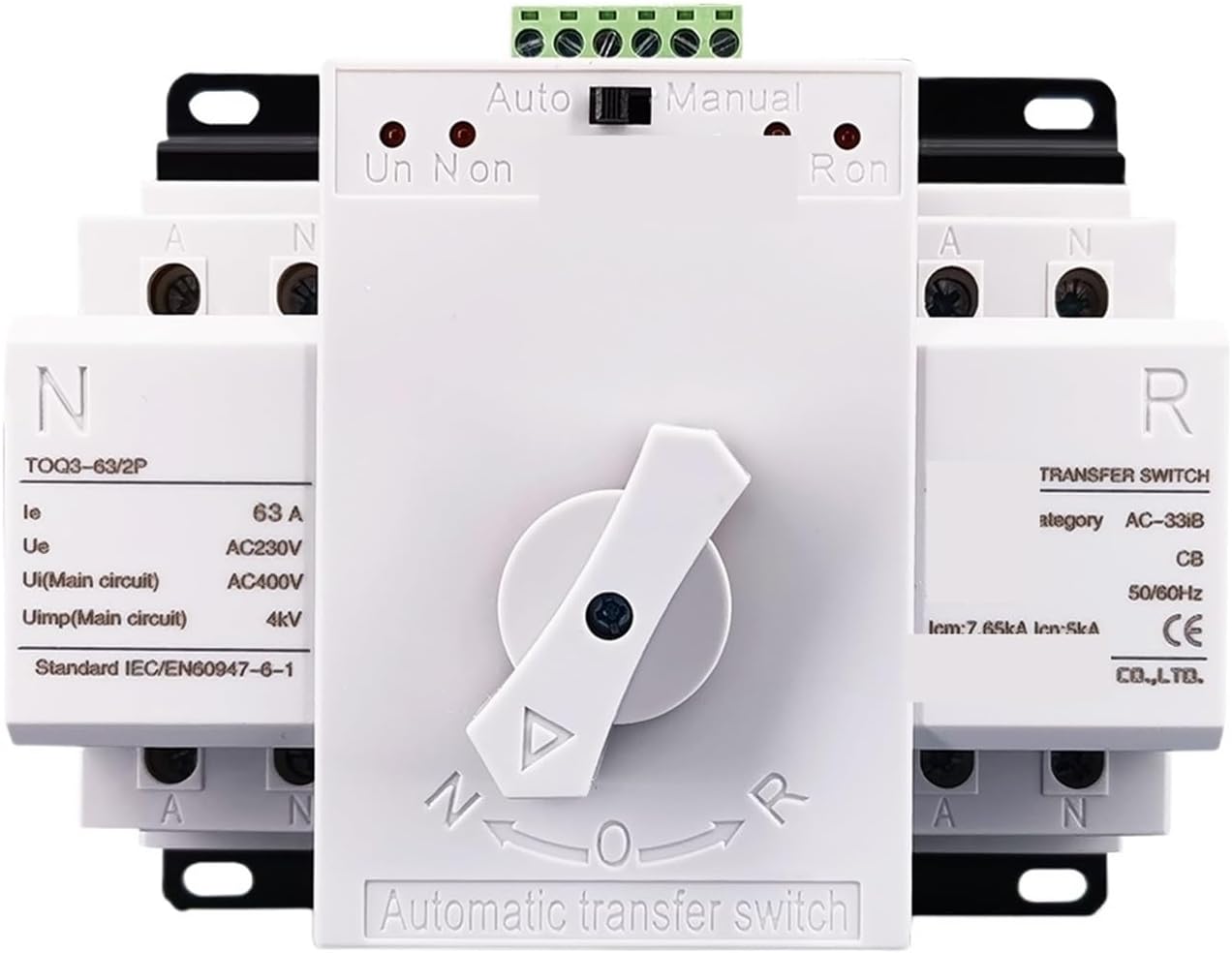
Image 1: Rear view of the ATS showing typical wiring connections for normal and reserve power inputs and load outputs. Note the red and blue wires indicating power lines.
5. Operating Instructions
The ATS features a selector switch for automatic or manual operation and indicators for power source status.

Image 2: Front view of the ATS, highlighting the "Auto/Manual" selector switch and the "N" (Normal) and "R" (Reserve) indicators.
- Mode Selection:
- Automatic Mode: Set the top switch to "Auto". In this mode, the ATS will automatically detect the availability of power from the primary source ("N"). If the primary source fails, it will automatically switch to the secondary source ("R") if available. When the primary source returns, it will switch back.
- Manual Mode: Set the top switch to "Manual". In this mode, the ATS will not automatically switch. You must manually turn the central rotary switch to select either "N" (Normal) or "R" (Reserve) power source.
- Power Source Indicators:
- "Un Non" (Normal On) indicator: Illuminates when the primary power source is active and supplying power.
- "Ur Ron" (Reserve On) indicator: Illuminates when the secondary power source is active and supplying power.
6. Maintenance
Regular maintenance helps ensure the longevity and reliable operation of your ATS.
- Visual Inspection: Periodically inspect the ATS for any signs of physical damage, loose connections, or overheating (discoloration).
- Cleaning: Ensure the device is free from dust and debris. Use a dry, soft cloth for cleaning. Do not use liquids or abrasive cleaners.
- Connection Checks: With power disconnected, periodically check all terminal connections to ensure they remain tight.
- Professional Check: It is recommended to have a qualified electrician inspect the ATS and associated wiring annually.
7. Troubleshooting
If the ATS is not functioning as expected, consider the following common issues:
- No Power to Load:
- Check if both primary and secondary power sources are active.
- Verify that the ATS is in "Auto" mode or manually switched to an active source.
- Inspect all wiring connections for looseness or damage.
- Check upstream circuit breakers or fuses for trips.
- ATS Not Switching Automatically:
- Ensure the mode selector switch is firmly set to "Auto".
- Confirm that the primary power source has failed and the secondary source is available.
- Indicators Not Illuminating:
- Check if the corresponding power source is active.
- Verify internal connections (professional assistance may be required).
If problems persist after performing these checks, contact a qualified electrician or the manufacturer for assistance.
8. Specifications
| Parameter | Value |
|---|---|
| Model Number | TOQ3-2P/63 |
| Rated Current (Ie) | 63 A |
| Rated Voltage (Ue) | AC230V |
| Rated Insulation Voltage (Ui) | AC400V (Main circuit) |
| Rated Impulse Withstand Voltage (Uimp) | 4kV (Main circuit) |
| Standard | IEC/EN60947-6-1 |
| Number of Poles | 2P |
| Type | MCB Type Dual Power Automatic Transfer Switch |
| Package Dimensions | 1.18 x 0.79 x 0.39 inches |
| Item Weight | 1.1 pounds |
| Assembly Required | No |
| Manufacturer | DOPZNJWF |
9. Warranty and Support
For warranty information or technical support, please refer to the documentation provided with your purchase or contact the manufacturer directly. Ensure you have your product model number (TOQ3-2P/63) and purchase details available when seeking support.