
1. Introduction
This manual provides essential information for the installation, operation, and maintenance of your FGJDFD replacement motherboard. This component is designed to restore functionality to compatible Midea air conditioner units.
Compatibility: This A Board is compatible with Midea air conditioner models CE-KFR26G/N1Y-AE.D.01.NP2-SHM and KSA-KT3FR70G/N1Y-AFD. Please verify your air conditioner's model number before proceeding with installation.
The FGJDFD replacement motherboard is engineered for high-quality performance and durability, offering a cost-effective solution for maintaining your HVAC system.
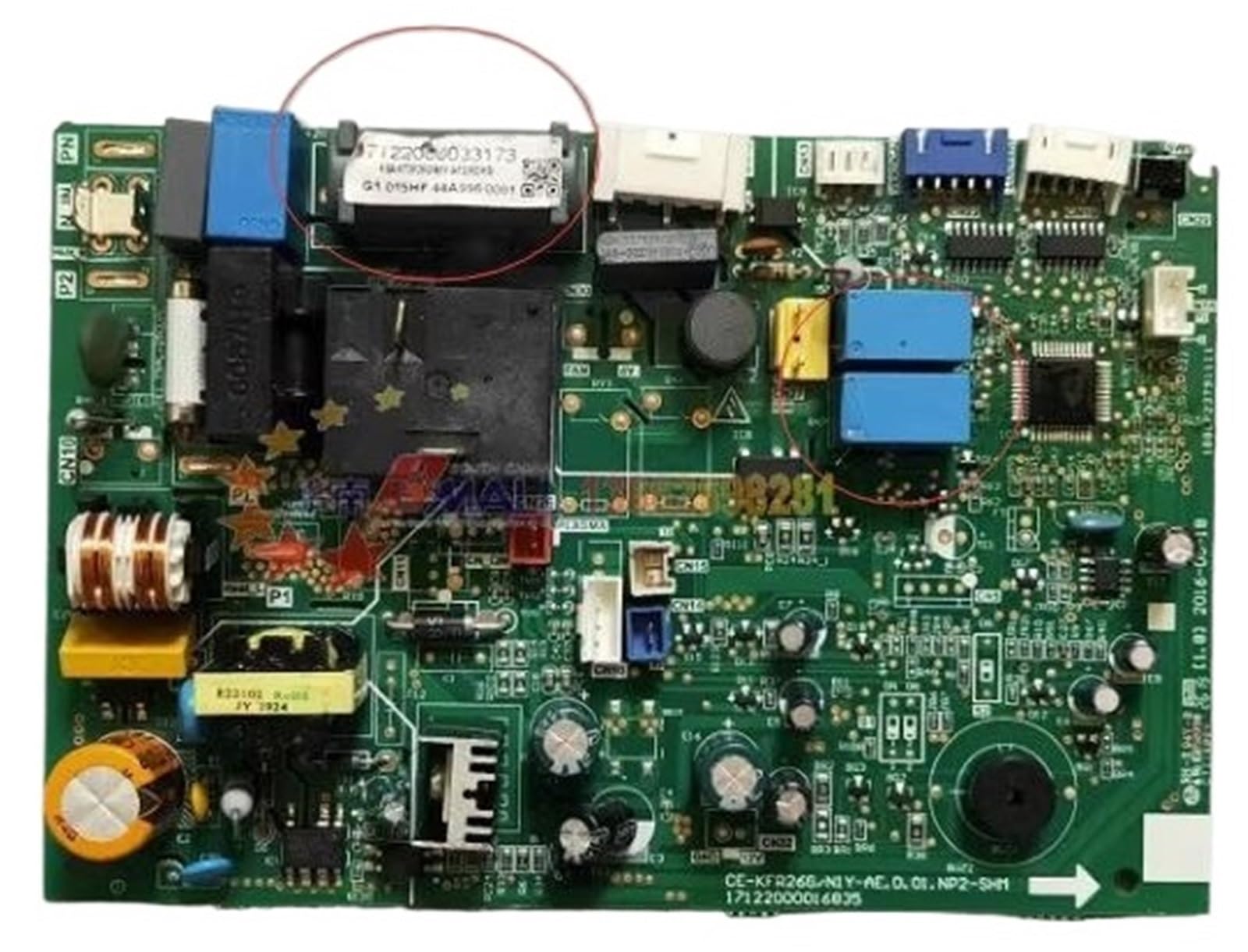
Image 1.1: FGJDFD A Board replacement motherboard. This image shows the main circuit board with various connectors and components.
2. Safety Information
WARNING: Electrical Shock Hazard
- Always disconnect power to the air conditioner unit at the circuit breaker before attempting any installation, maintenance, or repair. Failure to do so can result in serious injury or death.
- Installation should only be performed by a qualified and experienced HVAC technician or electrician. Improper installation can damage the unit, void warranties, and pose safety risks.
- Do not touch electrical components with wet hands or while standing on wet surfaces.
- Ensure all connections are secure and properly insulated after installation.
- Keep children and pets away from the work area during installation.
3. Package Contents
Upon opening the package, please ensure all items are present and undamaged:
- 1 x FGJDFD Midea Compatible Air Conditioner Motherboard (A Board)
If any components are missing or damaged, please contact your retailer or FGJDFD customer support immediately.
4. Installation Guide
Professional installation by a certified technician is strongly recommended for this product.
- Power Disconnection: Locate the circuit breaker for your air conditioner unit and switch it to the OFF position. Verify that power is completely disconnected using a voltage tester.
- Access the Unit: Carefully open the outdoor or indoor unit casing to access the existing motherboard. Refer to your air conditioner's specific service manual for instructions on accessing internal components.
- Document Connections: Before disconnecting any wires, take clear photographs or make detailed diagrams of all existing wire connections to the old motherboard. This will serve as a crucial reference for connecting the new board.
- Remove Old Motherboard: Disconnect all wires and mounting screws securing the old motherboard. Carefully remove it from the unit.
- Install New Motherboard: Position the new FGJDFD A Board in the same location as the old board. Secure it with the appropriate mounting screws.
- Connect Wiring: Refer to your previously taken photographs or diagrams to meticulously reconnect all wires to the new motherboard. Ensure each wire is connected to its correct terminal. Double-check all connections for security.
- Close Unit: Once all connections are verified, carefully close and secure the air conditioner unit casing.
- Restore Power: Return to the circuit breaker and switch the power back ON.
- Test Functionality: Power on the air conditioner unit and test its various functions (cooling, heating, fan speeds, etc.) to ensure proper operation.
5. Functionality
The FGJDFD A Board serves as the central control unit for your Midea air conditioner. It manages critical operations including:
- Compressor control
- Fan motor speed regulation
- Temperature sensing and regulation
- Communication with remote controls and display panels
- Error detection and reporting
Proper installation of this motherboard will restore the full operational capabilities of your compatible Midea air conditioner unit.
6. Care and Maintenance
To ensure the longevity and reliable performance of your motherboard and air conditioner unit:
- Keep Dry: Ensure the air conditioner unit, especially the motherboard compartment, remains dry and free from moisture.
- Clean Environment: Periodically inspect the unit for dust and debris accumulation. While the motherboard itself does not require direct cleaning, keeping the surrounding area clean can prevent overheating and component failure.
- Professional Servicing: Regular professional servicing of your air conditioner unit is recommended to ensure all components, including the motherboard, are functioning optimally.
7. Troubleshooting
If your air conditioner unit does not function correctly after motherboard replacement, consider the following common troubleshooting steps:
- No Power: Verify that the circuit breaker is ON and that the unit is receiving power. Check all power connections to the motherboard.
- Error Codes: If the unit's display shows an error code, consult your air conditioner's original user manual for the meaning of the code and recommended solutions.
- Incorrect Operation: Double-check all wire connections to the motherboard against your diagrams or photographs. Ensure no wires are loose or connected to the wrong terminals.
- Component Failure: If basic troubleshooting does not resolve the issue, there may be a fault with another component in the AC unit, or the motherboard itself may be defective. In such cases, professional diagnosis is required.
For complex issues, contact a qualified HVAC technician.
8. Specifications
| Feature | Detail |
|---|---|
| Model | CE-KFR26G/N1Y-AE.D.01.NP2-SHM (A Board) |
| Compatibility | Midea CE-KFR26G/N1Y-AE.D.01.NP2-SHM, KSA-KT3FR70G/N1Y-AFD |
| Type | Air Conditioner Motherboard |
| Application | Home Air Conditioning Systems |
| Package Dimensions | 1.18 x 0.79 x 0.39 inches |
| Item Weight | 1.76 ounces |
| Manufacturer | FGJDFD |
9. Support Information
For technical assistance, warranty inquiries, or to report a defective product, please contact your retailer or the manufacturer directly.
- Manufacturer: FGJDFD
- Product ASIN: B0DWLS3JBV
Please have your product model number and ASIN ready when contacting support.
Warranty information is not provided in the product details. Please refer to your purchase documentation or contact the seller for specific warranty terms.