
1. Introduction
This manual provides essential information for the installation, operation, maintenance, and troubleshooting of the SQJZWOD DCMD76 and DCMD75 Treadmill Motor Controller. This component serves as a replacement lower control board, circuit board, power supply board, and driver board for compatible treadmills. It is designed for 110V electrical systems.
The motor controller is the central control unit for your treadmill, managing motor speed, incline adjustments, and processing data from various sensors to provide real-time exercise feedback.
2. Safety Information
Warning: Before attempting any installation or repair, ensure the treadmill is completely unplugged from the power source. Failure to do so can result in electric shock, serious injury, or death.
- Always disconnect power before servicing.
- Only qualified personnel should perform installation and repair procedures.
- Handle electronic components with care to avoid static discharge.
- Ensure all connections are secure and correct before restoring power.
3. Setup and Installation
Installation of the treadmill motor controller requires technical knowledge and should ideally be performed by a professional technician. This board is compatible with 110V treadmill systems.
3.1 Component Overview
Familiarize yourself with the layout of the motor controller board. The board features various connectors for the motor, power input, console, and incline motor.

Figure 1: Top view of the DCMD76/DCMD75 Motor Controller.
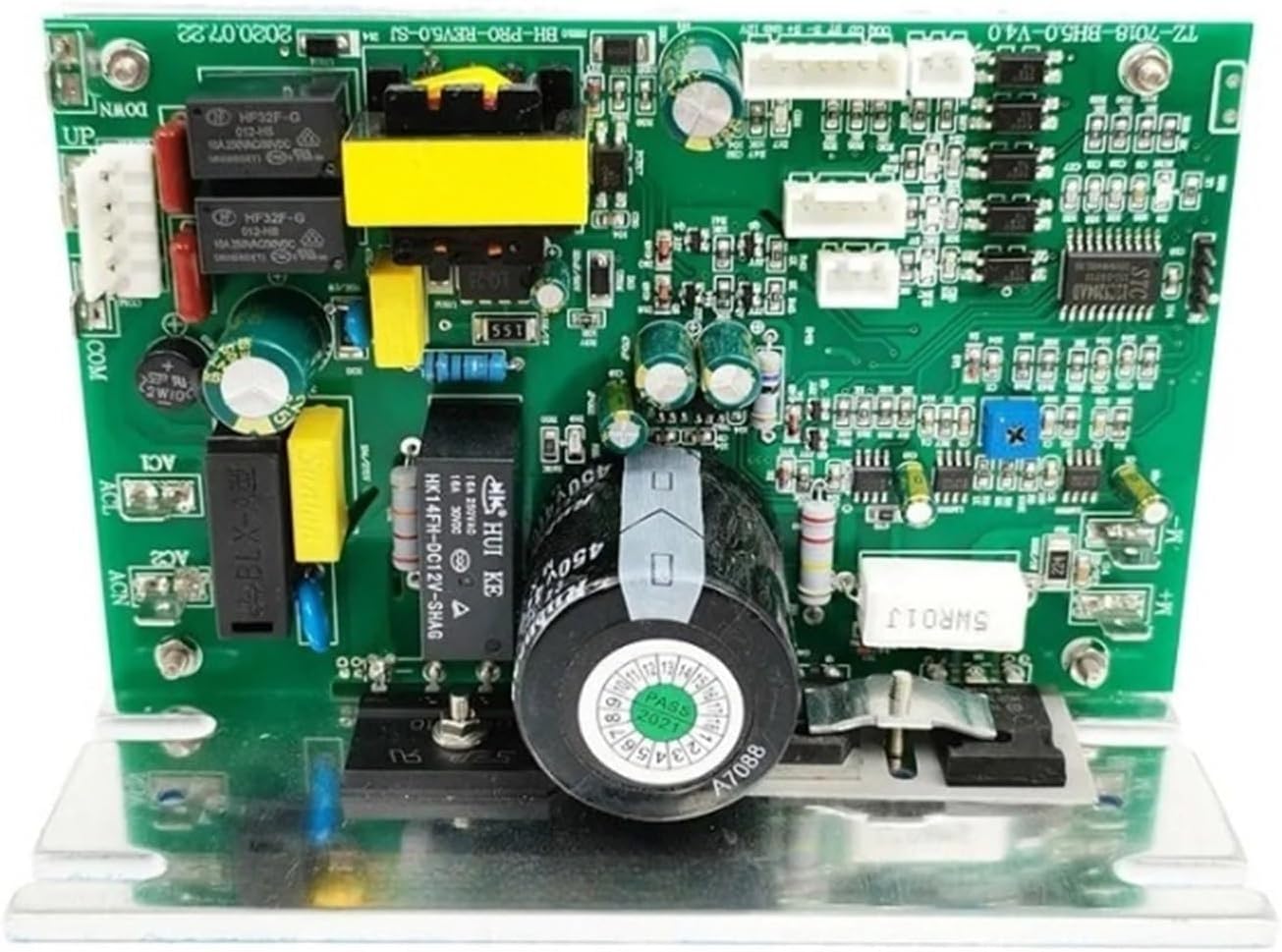
Figure 2: Detailed top view of the motor controller board.
3.2 Connecting the Incline Cable
The incline motor connects to the control board via either a 5-pin or 3-pin cable, depending on your treadmill model. Ensure the cable is securely connected to the designated 'UP' and 'DOWN' terminals, as well as the 'COM' (common) terminal.

Figure 3: Incline cable connection points (COM, UP, DOWN).

Figure 4: Alternative view of incline cable connections.
After connecting all necessary cables, carefully mount the new control board in the treadmill's designated compartment. Double-check all connections before proceeding.
4. Operating Principles
The DCMD76/DCMD75 motor controller is responsible for the core functions of your treadmill. It precisely controls the speed of the drive motor, allowing for smooth acceleration and deceleration of the running belt. It also manages the incline motor, enabling adjustments to the treadmill's slope.
The integrated processor on the board processes data from various sensors (e.g., speed, distance, heart rate) and relays this information to the treadmill's display console. This allows users to monitor their workout progress and adjust settings as needed.
Optimized circuit design and power management contribute to efficient energy consumption, reducing the overall power usage of the treadmill.
5. Maintenance
The DCMD76/DCMD75 motor controller is constructed with high-quality materials and advanced manufacturing processes for a long service life. Minimal user maintenance is required for the board itself.
- Keep Dry: Ensure the treadmill's motor compartment remains dry and free from moisture to prevent damage to electronic components.
- Cleanliness: Periodically inspect the compartment for dust and debris. Use compressed air to gently clean the board if necessary, ensuring the treadmill is unplugged.
- Ventilation: Ensure proper ventilation around the motor controller to prevent overheating.
6. Troubleshooting
If your treadmill displays an error code, refer to the following guide. These are common issues that may indicate a problem with the motor controller or related components.
| Error Code | Description and Action |
|---|---|
| E01 | Communication failure or sensor failure. Check all communication cables and sensor connections. |
| E02 | Motor issue. First, test the treadmill motor to confirm its functionality. If the motor operates normally, the controller may need replacement. |
| E03 | Sensor fault. The treadmill may run for a few seconds before displaying E03. Inspect and test all relevant sensors. |
| E04 | Over-current fault. This often indicates burned components on the controller board due to excessive current. Professional inspection is recommended. |
| E08 | Lift motor control fault. This error suggests an issue with the incline (lift) motor or its control circuit. |
If you encounter persistent issues or require further assistance, please contact customer support.
7. Specifications
- Part Models: DCMD76 / DCMD75
- Application: Treadmill repair
- Quantity: 1 Motor Controller
- Voltage Compatibility: Designed for 110V systems (Note: Product description mentions compatibility for 110V or 220V use, but this specific model is marketed for 110V).
- Package Dimensions: 1.18 x 0.79 x 0.39 inches
- Item Weight: 1.76 ounces
- Manufacturer: tan9983cd00
- Item Model Number: tan9983cd00
8. Support
For any questions or technical assistance regarding your SQJZWOD DCMD76/DCMD75 Motor Controller, please send an email to the manufacturer or seller. You can expect a reply within 24 hours.