
Introduction
Thank you for choosing the Spriak K2301 PRO Rechargeable LED Flashlight. This manual provides essential information for the safe and effective use of your new flashlight. The K2301 PRO is a high-lumen, super bright, magnetic, and waterproof tactical LED flashlight designed for various applications, including emergency situations, outdoor activities, and general use. It features a digital power display, long-range illumination, multiple lighting modes, and a power bank function.
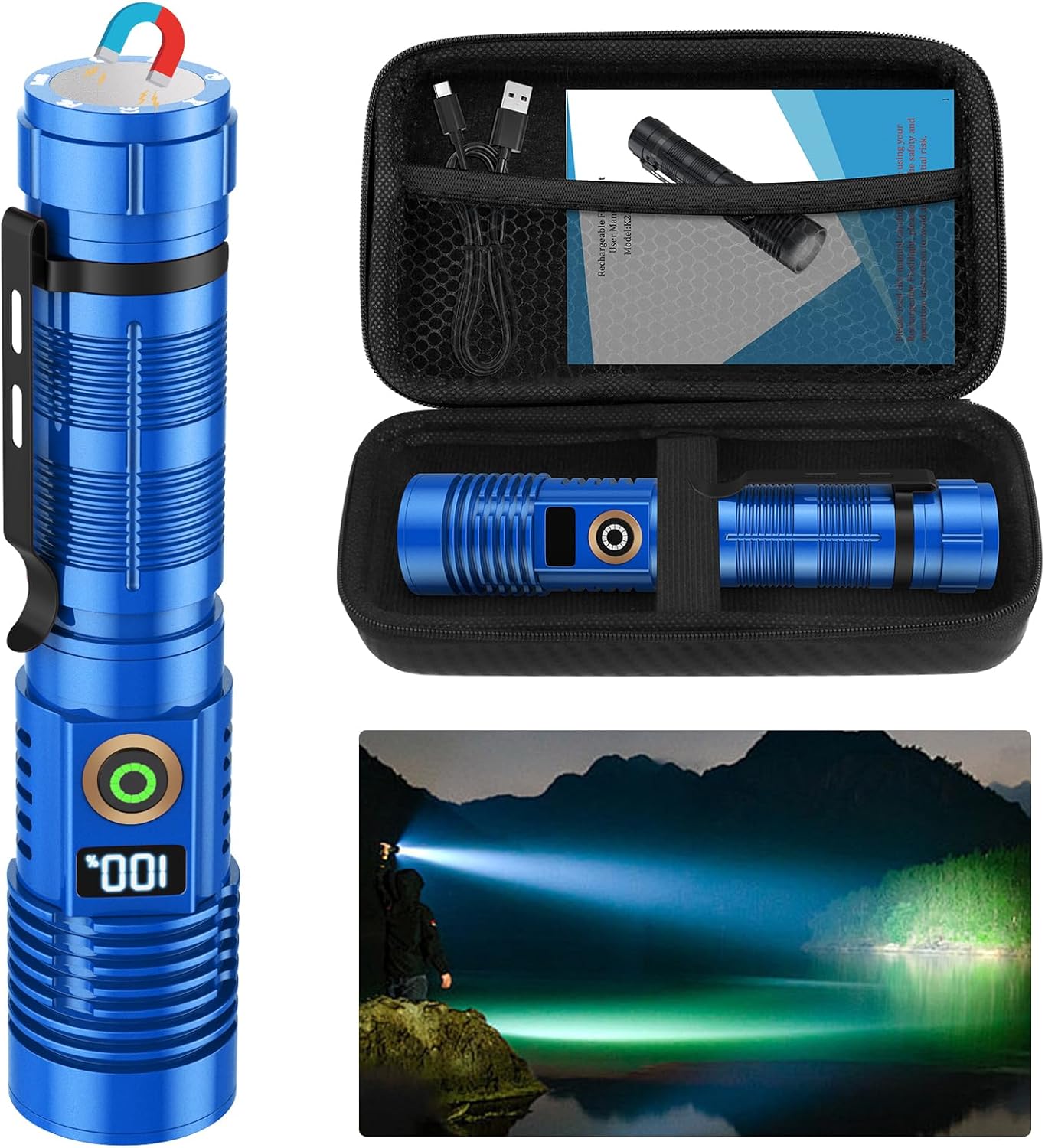
Package Contents
- 1 x Spriak K2301 PRO Rechargeable Flashlight with Digital Display
- 1 x Rechargeable Battery (pre-installed)
- 1 x TYPE-C Charging Cable
- 1 x Carrying Box
- 1 x User Manual

Setup
Initial Charging
- Locate the Type-C charging port on the flashlight.
- Connect the provided Type-C charging cable to the flashlight and a compatible USB power source (e.g., wall adapter, computer USB port).
- The digital display on the flashlight will show the charging progress (1%-100%). A full charge typically takes approximately 3 hours.
- Disconnect the charging cable once the display shows 100%.
Important Note on Charging: While the flashlight features a Type-C port, some users have reported that it may only charge effectively when connected to a USB-A charger (using a USB-A to Type-C cable). If you experience issues charging with a Type-C to Type-C connection, please try a USB-A power source.

Operating Instructions
Power On/Off and Mode Selection
- Power On/Mode Cycle: Press the power button once to turn on the flashlight. Subsequent single presses will cycle through the main lighting modes: High, Medium, Strobe, SOS.
- Ultra-High Brightness: Quickly double-click the power button to activate the Ultra-High brightness mode.
- Smooth Dimming: From any mode, press and hold the power button for 3 seconds to enter smooth dimming. You can adjust the brightness continuously from 100% down to 5%. Release the button at your desired brightness level.
- Stepless-Off Function: If the flashlight has been operating in any mode for more than 5 seconds, a single press of the power button will directly turn it off, without cycling through other modes.

Telescopic Zoom
The flashlight features an adjustable focus design. Extend the head of the flashlight to narrow the beam for a focused spotlight, ideal for long-range illumination. Retract the head to widen the beam for a broad floodlight, suitable for illuminating a large area.

Magnetic Base
The tail cap of the flashlight contains a strong magnet, allowing it to be securely attached to any metal surface. This provides convenient hands-free lighting for tasks such as vehicle maintenance or working in confined spaces.

Power Bank Function
The K2301 PRO flashlight can also function as an emergency power bank. Connect your mobile phone, camera, or earbuds to the flashlight's output port using a compatible USB cable to charge your devices on the go.
Maintenance
Cleaning
Wipe the flashlight with a soft, damp cloth to remove dirt and debris. Avoid using harsh chemicals or abrasive materials that could damage the finish or internal components.
Storage
Store the flashlight in a cool, dry place away from direct sunlight and extreme temperatures. If storing for an extended period, ensure the battery is partially charged (around 50%) and recharge it every few months to maintain battery health.
Water Resistance
The flashlight is rated IPX6 waterproof, meaning it is protected against powerful water jets. It can be used in rainy or stormy conditions. However, it is not designed for submersion in water.

Troubleshooting
- Flashlight not charging: Ensure the Type-C cable is securely connected to both the flashlight and the power source. If using a Type-C to Type-C cable, try using a USB-A to Type-C cable with a USB-A power adapter, as some units may require this for proper charging.
- Inaccurate Battery Display: The digital power display provides an estimate of battery life. In some cases, the percentage may drop rapidly from a mid-range value (e.g., 50%) to 0%. This can be a characteristic of lithium-ion batteries under certain conditions. It is recommended to charge the flashlight when the display indicates a low percentage to avoid unexpected power loss.
- Flashlight not turning on after a drop: While the flashlight is designed to be impact-resistant (up to 10 feet), severe impacts can still cause damage. If the flashlight fails to operate after a fall, check for visible damage. If no damage is apparent, ensure the battery is properly seated and charged. If the issue persists, contact customer support.
- Beam is weak or inconsistent: Ensure the battery is fully charged. If the issue persists, the battery may need replacement or there could be an internal component issue.
Specifications
| Feature | Detail |
|---|---|
| Model Number | K2301 PRO |
| Brand | Spriak |
| Light Source Type | LED |
| Brightness | 1000 Lumens (White Brightness) |
| Power Source | Battery Powered (Lithium Ion) |
| Battery Type | 1 Lithium Polymer battery (included) |
| Charging Port | Type-C |
| Material | Aluminum |
| Product Dimensions | 1.3"D x 1.3"W x 6.2"H |
| Item Weight | 7.2 ounces |
| Water Resistance Level | IPX6 (Waterproof) |
| Special Features | Power Digital Display, Long Throw, Magnetic Base, Stepless Dimming, Stepless Turn Off |
Warranty and Support
Warranty Information
The Spriak K2301 PRO Rechargeable LED Flashlight comes with an 18-month warranty from the date of purchase. This warranty covers manufacturing defects and issues arising from normal use.
Customer Support
If you encounter any issues with your flashlight or have questions regarding its operation, please do not hesitate to contact Spriak customer support. You can typically find contact information (such as an email address) on the product packaging, the official Spriak website, or through your purchase platform.
Important Safety Information
- Do not shine the flashlight directly into eyes, as the high lumen output can cause temporary vision impairment.
- Keep out of reach of children.
- Do not disassemble the flashlight or attempt to replace the internal battery, as this may void the warranty and cause damage.
- Use only the provided charging cable or a certified Type-C cable with a compatible power adapter.
- Avoid exposing the flashlight to extreme heat or fire.