
DC HOUSE L131211300124-1
DC HOUSE 1200W Pure Sine Wave Inverter Charger Instruction Manual
Model: L131211300124-1
1. Introduction
The DC HOUSE 1200W Pure Sine Wave Inverter Charger is a versatile 2-in-1 device, combining a 48V 1200W inverter with a 48V 15A battery charger. This unit is designed to provide stable 110V/120V AC power from a 48V DC source and efficiently charge compatible 48V lithium-ion batteries. It features a high conversion efficiency of over 90% for inverter operation and includes multiple safety protections for reliable performance.

Figure 1: DC HOUSE 1200W Pure Sine Wave Inverter Charger and accessories.
2. Safety Precautions
Please read and understand all safety instructions before installation and operation to prevent injury or damage to the device.
- Certification: This device is CE and FCC dual certified, meeting strict safety standards.
- Battery Compatibility: Designed for 48V lithium-ion (LiFePO4) batteries. Not recommended for charging lead-acid batteries.
- BMS Protection: Equipped with BMS protection. When used with DC HOUSE lithium batteries, a dual protection system is active.
- Voltage Protection: Features input under-voltage and over-voltage protection to safeguard the battery.
- Temperature Protection: Includes charger overheat protection to prevent risks from high temperatures.
- Output Protection: Provides output no-load protection, short-circuit protection, reverse connection protection, and over-current/over-voltage protection for a stable charging process.
- Automatic Cut-off: The charger automatically cuts off when the battery is fully charged.
- Ventilation: Ensure adequate ventilation around the unit. The intelligent cooling fans activate when the internal temperature reaches 35°C.
- Installation: Ensure proper wiring and connections as per instructions to avoid wiring issues.

Figure 2: Multiple safety protections integrated into the inverter charger.
3. Package Contents
Verify that all items are present in the package:
- DC HOUSE 48V 1200W Inverter Charger (x1)
- Utility end AC connection cable (x1)
- User Manual (x1)
- M8-M6 Battery-inverter connection cables (x2)
- Spare Fuses (x3)
Figure 3: Contents of the DC HOUSE 1200W Inverter Charger package.
4. Technical Specifications
| Feature | Specification |
|---|---|
| Rated Power | 1200W |
| Peak Power | 2400W |
| AC Output Voltage | 120V ±10% |
| AC Output Frequency | 60Hz |
| Output Waveform | Pure Sine Wave |
| Battery Input Voltage Range | 42-58.4V |
| Inverter Efficiency | ≥90% |
| Suitable Battery Chemistry | Lithium iron phosphate battery |
| AC Charging Power | Max 800W |
| Rated Charging Current | 15A |
| Rated Charging Voltage | 40-60V |
| Operating Temperature | -20℃ to 60℃ (-4°F to 140°F) |
| Dimensions (L x W x H) | 11.8 x 8.4 x 3.9 inches (30 x 21.35 x 10 cm) |
| Item Weight | 10.34 pounds (4.69 kg) |

Figure 4: Compact size of the inverter charger.

Figure 5: Inverter and charging parameters.
5. Setup Instructions
5.1 Connecting the Inverter/Charger to the Battery
Follow these steps to connect the inverter charger to your 48V lithium-ion battery:
- Ensure the inverter charger is switched OFF.
- Connect the provided M8-M6 battery-inverter connection cables to the positive (+) and negative (-) terminals of your 48V battery.
- Connect the other ends of these cables to the corresponding positive (+) and negative (-) terminals on the inverter charger. Ensure connections are secure and tight.
- Verify correct polarity before proceeding.

Figure 6: Battery connection diagram.
5.2 Connecting to AC Power (for Charging)
To charge the battery or use the pass-through function:
- Connect the utility end AC connection cable to the AC input port on the inverter charger.
- Plug the other end of the AC connection cable into a standard 110V/120V AC wall outlet.
5.3 Connecting AC Loads (for Inverter Function)
To power AC appliances:
- Plug your 110V/120V AC appliances into the dual AC output sockets on the inverter charger.

Figure 7: Front panel with AC input/output and LED indicators.
Video 1: Demonstrates the setup and operation of the DC HOUSE 48V 25A Lithium Battery Charger + 2000W Inverter, showcasing connections and functionality.
6. Operating Modes
6.1 Inverter Mode
In inverter mode, the device converts 48V DC power from your battery into stable 110V/120V Pure Sine Wave AC power. This is suitable for powering various electrical appliances, including sensitive electronics.

Figure 8: The 2-in-1 Inverter and Charger solution.

Figure 9: Pure Sine Wave output characteristics.
6.2 Charger Mode
In charger mode, the device utilizes 110V/120V AC grid power to charge your 48V lithium-ion battery. It features a 15A charging current and supports 0V charging function, zero overcharge, and a three-level charging mode for optimal battery health.
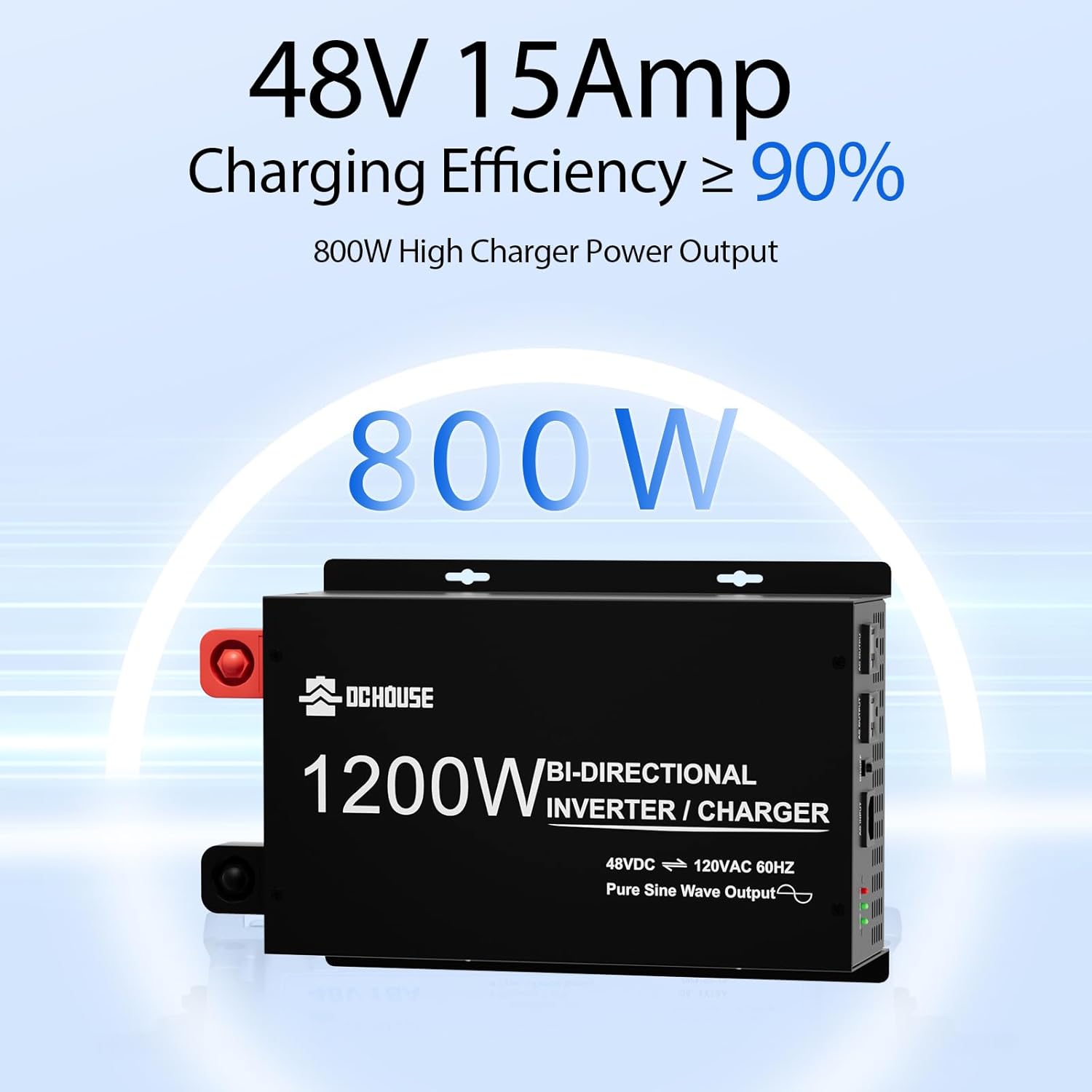
Figure 10: Charging efficiency and power output.
7. LED Indicators
The inverter charger is equipped with three LED indicators to display its operational status:
| LED Indicator | State | Description |
|---|---|---|
| CHARGE (Green) | On | Fully Charged |
| CHARGE (Green) | Flashing | Charging |
| CHARGE (Green) | Off | Not Charging |
| RUN (Green) | On | AC Power Supply (from grid) |
| RUN (Green) | Flashing | Battery Power Supply (inverter mode) |
| RUN (Green) | Off | No AC Output |
| FAULT (Red) | On | Faulty (Error detected) |
| FAULT (Red) | Off | Fault Free |
Figure 11: LED indicator states and meanings.
8. Cooling System
The inverter charger incorporates an intelligent cooling system to maintain optimal operating temperatures and ensure efficiency. It features:
- Intelligent Cooling Fans: The cooling fans automatically activate when the casing temperature reaches 35°C (95°F).
- Convection Duct Design: Enhances airflow penetration for rapid heat dissipation.
- Full Aluminum Alloy Casing: Provides comprehensive rapid heat dissipation during operation.

Figure 12: Intelligent cooling fans for efficient heat dissipation.
9. Applications
This power inverter charger is suitable for a wide range of applications, providing reliable power for various electrical appliances:
- Electrical Appliances: Fans, refrigerators, freezers, TVs, laptops, air compressors, medical equipment, ovens, electric fans, microwave ovens.
- Vehicles & Outdoor: Golf carts, traveling, camping, pitching tents, boat trips, working on the road, sightseeing vehicles, forklifts, logistics trucks, all-terrain vehicles.
- Battery Charging: Specifically designed for 48V lithium-ion batteries of golf carts (Club Car, EZGO, etc.) and trolling motors.

Figure 13: Examples of appliances powered by the inverter charger.
10. Troubleshooting
If you encounter issues, refer to the LED indicators (Section 7) for fault codes. Common troubleshooting steps include:
- No Power Output: Check battery connections, ensure the inverter is switched on, and verify battery voltage is within the operating range.
- Charging Issues: Ensure AC input cable is securely connected to a live outlet. Check for any fault indicators.
- Overload Protection: If the FAULT LED is on and the device shuts down, reduce the connected load.
- Overheat Protection: Ensure adequate ventilation. If the FAULT LED is on due to overheating, allow the unit to cool down.
- Short Circuit/Reverse Connection: Immediately disconnect power and check all wiring for short circuits or incorrect polarity.
11. Maintenance
Regular maintenance ensures optimal performance and longevity of your inverter charger:
- Keep Clean: Periodically clean the exterior of the unit and ensure cooling vents are free from dust and debris.
- Check Connections: Regularly inspect all battery and AC connections for tightness and corrosion.
- Fuse Replacement: If a fuse blows, replace it with a fuse of the same rating. Spare fuses are included in the package.
- Storage: When not in use for extended periods, store the unit in a cool, dry place.
12. Warranty and Support
For warranty information, technical support, or service inquiries, please refer to the contact details provided in your product packaging or visit the official DC HOUSE website.
Ask a question about this manual
Ask about setup, troubleshooting, compatibility, parts, safety, or missing instructions. Manuals+ will review the question and use this page’s manual context to help answer it.