
B BraiNice for Samsung Solar Remote
B BraiNice Replacement Solar TV Remote Control User Manual
Brand: B BraiNice
Model: for Samsung Solar Remote
1. Introduction
This manual provides detailed instructions for the B BraiNice Replacement Solar TV Remote Control, designed for Samsung Smart TVs manufactured between 2018 and 2025. This remote offers dual charging capabilities (solar and USB-C), voice control, Bluetooth connectivity, and is compatible with a wide range of Samsung TV series including Neo QLED, OLED, The Frame, Terrace, Serif, Crystal UHD, Sero, and Monitor models.
Key features include:
- Dual Charging: Rechargeable via solar cell (indoors/outdoors) and USB-C cable.
- Voice Control: Utilize smart voice commands for navigation and content search.
- Broad Compatibility: Replaces over 100 Samsung remote models and works with 2018-2025 Samsung Smart TVs.
- Durability: Constructed from ABS material, designed to withstand drops and offer a long lifespan.
- Eco-Friendly: Eliminates the need for disposable batteries, contributing to a zero-carbon future.
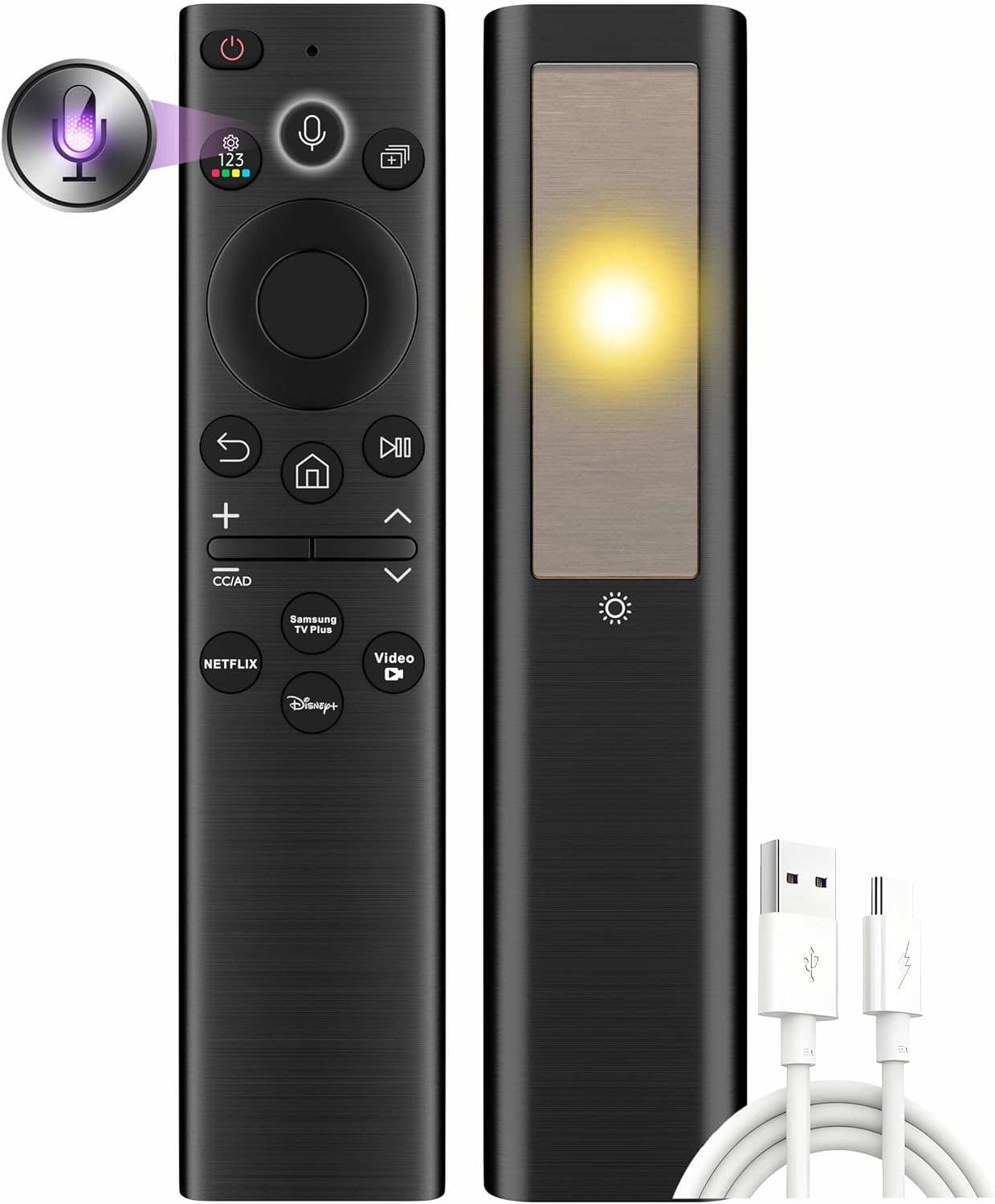
Image: Front and back view of the B BraiNice Replacement Solar TV Remote Control with its USB-C charging cable.

Image: Visual representation of the remote's key features including solar charging, USB charging, voice control, and shortcut buttons.
2. Setup
2.1 Initial Charging
Before first use, ensure the remote is adequately charged. The remote supports both solar and USB-C charging.
- Solar Charging: Place the remote with its solar panel facing up in any indoor or outdoor light source. It will auto-charge. Full charge typically takes 5-8 hours via solar.
- USB-C Charging: Flip the bottom switch to the 'ON' position. Connect the included USB-C cable to the remote's charging port and a 5V/2A charger. A full charge can be achieved in approximately 8 minutes.
Important Note:
- Do not use fast charging adapters.
- Do not use Type-C to Type-C charging cables. Always use the included USB-A to USB-C cable.

Image: Illustration of solar and USB-C cable charging methods for the remote.

Image: Details on solar charging, emphasizing automatic charging in light.

Image: Visual guide for USB-C charging, highlighting quick charging time.

Image: Important warning against using Type-C to Type-C charging cables or fast chargers.
2.2 Pairing with Samsung TV
To enable all functions, especially voice control, the remote must be paired with your Samsung TV. A Samsung TV can only be paired with one remote at a time.
- Turn on your Samsung TV.
- Point the remote at the TV from 1-2 feet away.
- Press and hold the Back (
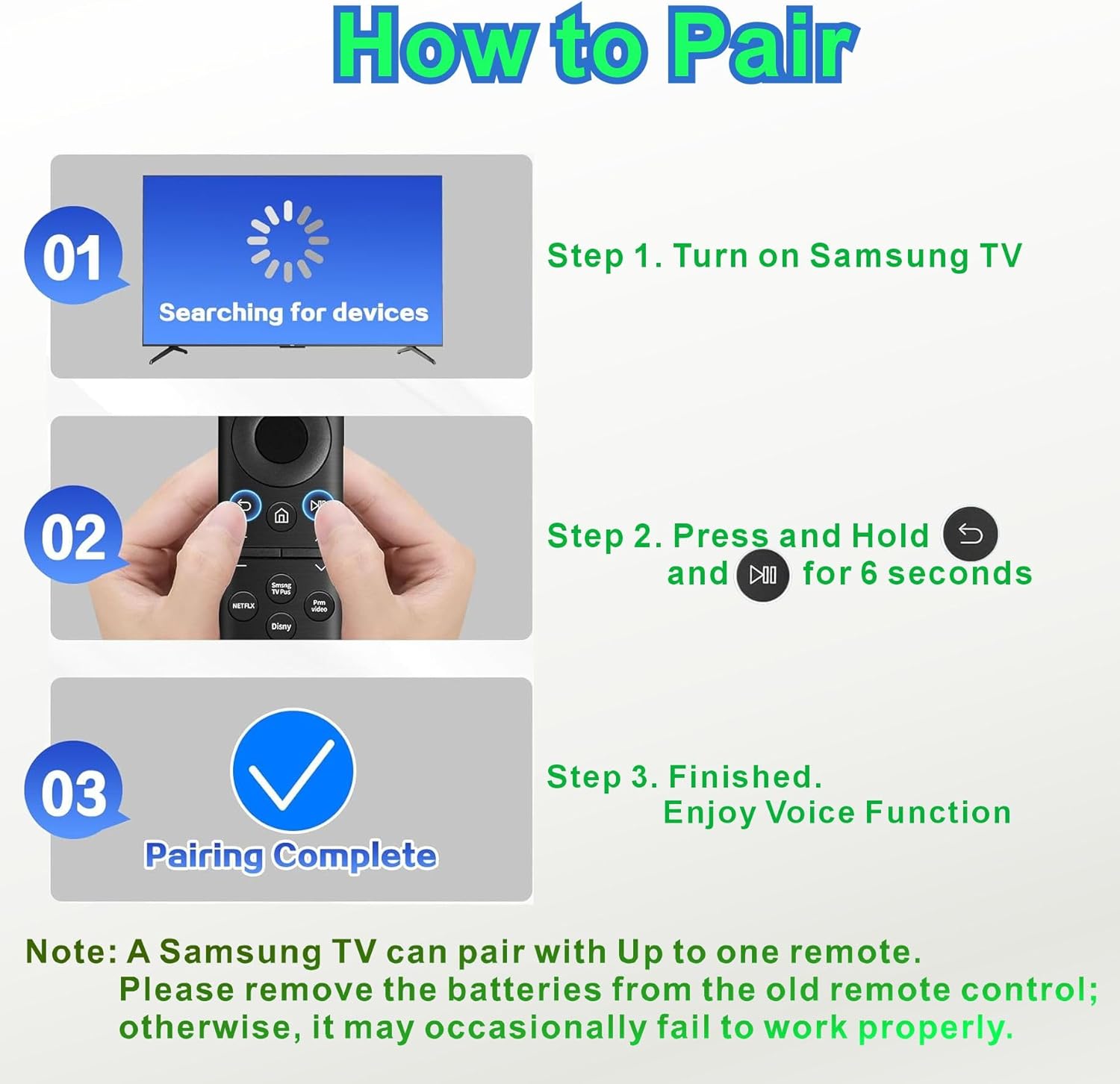 ) and Play/Pause () buttons simultaneously for 6 seconds.
 - Wait for the 'Pairing Complete' message to appear on your TV screen.
Important Note:
- If you have other remotes, remove their batteries to avoid interference during pairing.
- If interference occurs, restart the TV and re-pair your primary remote.
Video: A short instructional video demonstrating the pairing process for the remote with a Samsung TV.
Image: Step-by-step visual guide on how to pair the remote with your Samsung TV.

Image: Another visual guide detailing the three main steps for pairing the remote.
3. Operating Instructions
3.1 Compatibility
This remote is universally compatible with Samsung Smart TV models from 2018 to 2025, including:
- Neo QLED
- OLED
- The Frame
- Terrace
- Serif
- Crystal UHD
- Sero
- Monitor
- Tizen OS models
It replaces numerous original Samsung remote models, such as BN59-01385A/B, BN59-01432A, BN59-01455A, BN59-01357A/F, BN59-01312 series, BN59-01329 series, BN59-01330 series, BN59-01357F, and BN59-01385B. It supports all screen sizes from 32" to 85".

Image: Visual list of compatible Samsung Smart TV series.
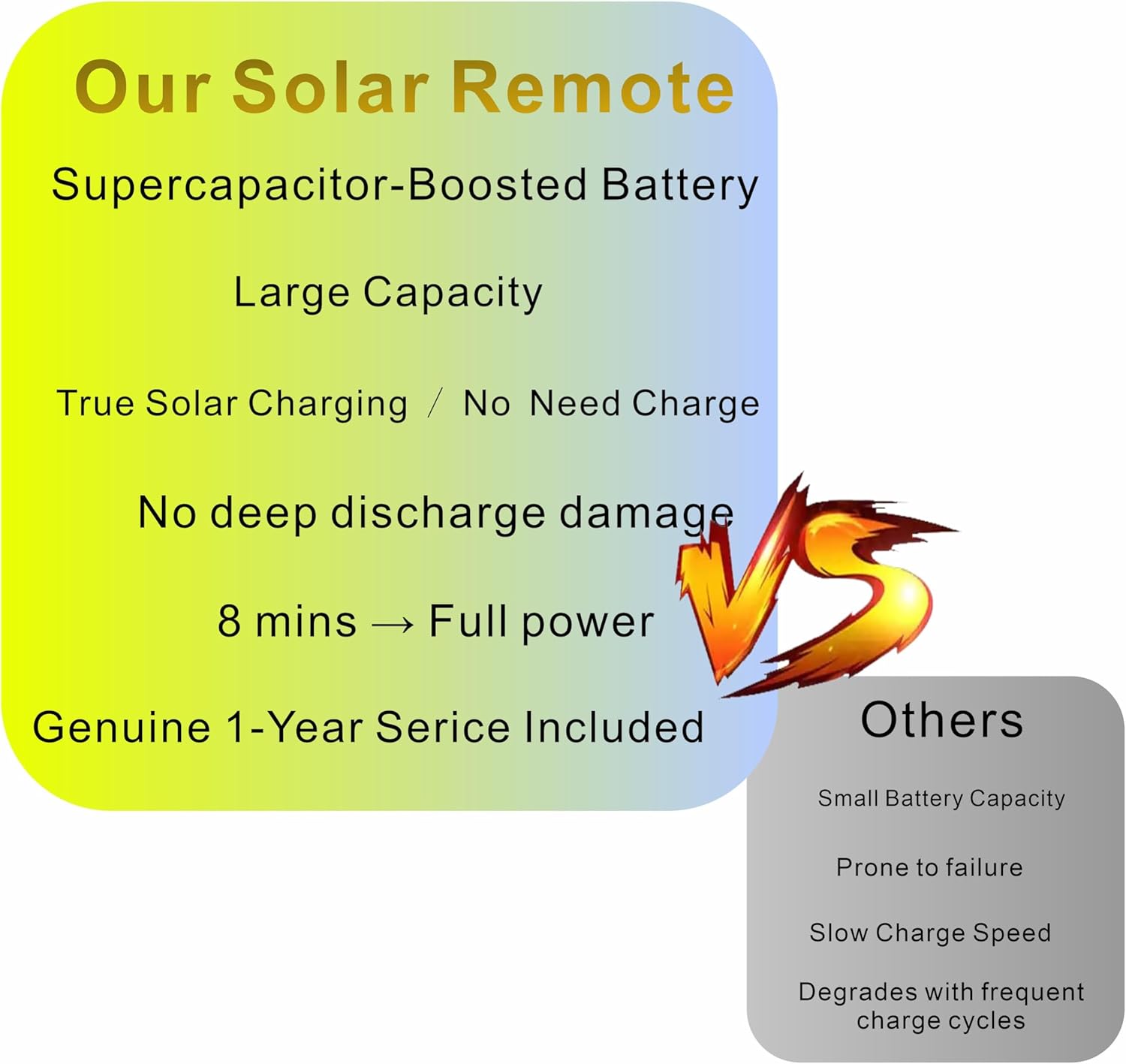
Image: A display of different Samsung remote models that this replacement remote is compatible with.

Image: Confirmation of the remote's ability to work as a substitute for many Samsung remote models.
3.2 Smart Voice Control
After successful pairing, you can use the voice control feature. Press the microphone button on the remote and speak your commands. This feature is particularly useful for searching content, controlling volume, and navigating menus.
- Example commands: "Find action movies on Netflix", "Volume up".
- Voice function requires your Samsung TV's hardware interface to support Bluetooth (4.0, 5.0, 5.3 or higher).

Image: Guide to using the voice control feature on the remote.
3.3 Streaming Shortcuts
The remote includes dedicated shortcut buttons for popular streaming services:
- Netflix
- Prime Video
- SamsungPlus
- Disney+
Ensure the respective applications are installed on your Samsung TV to enable these shortcuts.

Image: Display of the dedicated streaming service shortcut buttons.
4. Maintenance
4.1 Battery Care and Charging Tips
The remote features a supercapacitor-boosted battery designed for longevity and efficiency.
- Low Battery Indicator: If the battery is low, pressing any key will cause a red light to flash three times as a reminder.
- Charging Frequency: A full charge can last up to half a year. For optimal battery health, recharge for 5 minutes every month using the solar cell. The solar cell itself can last over 10 years.
- Battery Protection: The supercapacitor battery is immune to drain damage and outlasts standard batteries, even after prolonged depletion.

Image: Comparison highlighting the advantages of the remote's supercapacitor-boosted battery.
4.2 Durability and Safety
The remote is built with military-grade durability and safety in mind.
- Material: Made from durable ABS material.
- Drop Resistance: Survives drops from up to 6.5 feet.
- Lifespan: Rated for over 100,000 clicks, equivalent to 9+ years of daily use.
- Bluetooth Range: Offers a 40ft Bluetooth range, allowing control from various angles without obstacles.
- Safety: Made with safety materials, ensuring no odor or bad smell, and is safe for use around babies and pregnant women. The hard material is also safe for pets.

Image: Information on the remote's safe and durable materials.

Image: Visual representation of the remote's robust and hard-to-break shell.
5. Troubleshooting
If you encounter issues with your B BraiNice Replacement Solar TV Remote Control, please refer to the following common solutions:
| Problem | Possible Cause / Solution |
|---|---|
| Remote not responding or pairing fails. |
|
| Voice function not working. |
|
| Remote not charging or charging slowly. |
|
6. Specifications
| Feature | Detail |
|---|---|
| Product Dimensions | 6 x 3 x 1.5 inches |
| Item Weight | 2.39 ounces |
| Model Number | for Samsung Solar Remote |
| Batteries | Built-in rechargeable (no disposable AAA batteries required despite listing) |
| Color | Black |
| Max Number of Supported Devices | 18 (Universal compatibility for various Samsung models) |
| Compatible Devices | All Samsung TV (2018-2025 models) |
| Manufacturer | yiqi chengzhang company |
| Country of Origin | China |
7. Warranty
The B BraiNice Replacement Solar TV Remote Control is covered by a one-year full warranty from the date of purchase. This warranty covers manufacturing defects and ensures the product performs as described under normal use. Please retain your proof of purchase for warranty claims.
8. Support
For further assistance, technical support, or warranty inquiries, please refer to the contact information provided with your product packaging or reach out to the seller directly through the platform where the purchase was made. Our team is dedicated to providing high-quality and affordable remote controls, backed by over 30 years of experience.