
1. Introduction
This manual provides essential instructions for the safe and efficient operation of your LG NeoChef MSER2090S 2.0 cu. ft. 1200-Watt Countertop Microwave Oven. Please read all instructions thoroughly before using the appliance and retain this manual for future reference.
Important Safety Information
- Do not attempt to operate this oven with the door open as this can result in harmful exposure to microwave energy.
- Do not place any object between the oven front face and the door or allow soil or cleaner residue to accumulate on sealing surfaces.
- Do not operate the oven if it is damaged. It is particularly important that the oven door closes properly and that there is no damage to the: (1) door (bent), (2) hinges and latches (broken or loosened), (3) door seals and sealing surfaces.
- The oven should not be adjusted or repaired by anyone except properly qualified service personnel.
- Always ensure proper ventilation around the unit.
2. Setup and Installation
Unpacking
Remove all packaging materials from inside and outside the microwave oven. Inspect the oven for any damage, such as a misaligned or bent door, damaged door seals and sealing surfaces, broken or loose door hinges and latches, or dents inside the cavity or on the door. If any damage is present, do not operate the oven and contact your dealer or qualified service personnel.
Placement
Place the microwave oven on a flat, stable surface that can support its weight and the heaviest food item likely to be cooked in it. Ensure there is adequate space for ventilation: at least 4 inches (10 cm) of clearance on the top, sides, and rear of the oven. Do not block any ventilation openings. Keep the oven away from heat sources, steam, or splashing liquids.

Image: Angled front view of the LG NeoChef MSER2090S microwave, illustrating its compact design suitable for countertop placement.
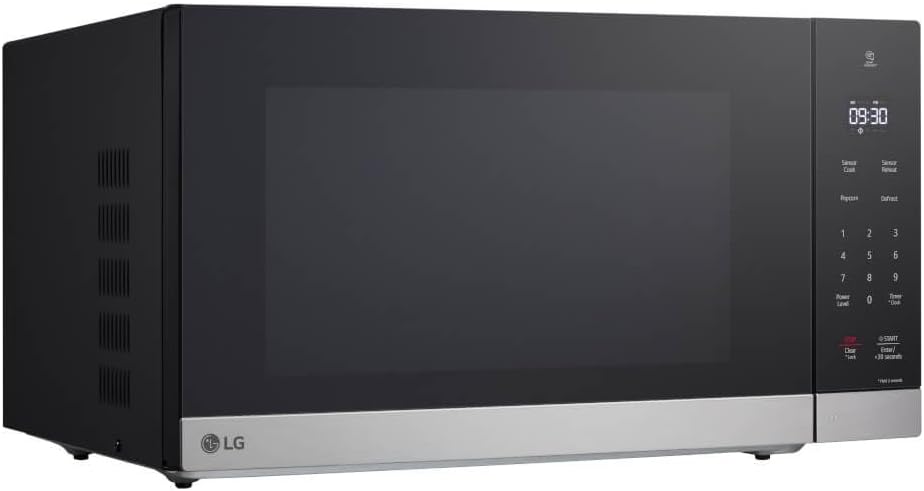
Image: Side view of the LG NeoChef MSER2090S microwave, showing the ventilation grilles on the side panel. Ensure these are not obstructed for proper airflow.
Electrical Requirements
The microwave oven requires a standard 120V AC, 60Hz household electrical outlet with a dedicated 15-amp circuit. Do not use an extension cord. Ensure the electrical outlet is properly grounded.
Initial Setup: Setting the Clock
After plugging in the oven, the display will show '12:00' or '88:88'. To set the clock:
- Press the CLOCK button.
- Use the number pad to enter the current time.
- Press the CLOCK button again to confirm.
3. Operating Instructions
Your LG NeoChef microwave features Smart Inverter technology for precise and even heating.

Image: Front view of the LG NeoChef MSER2090S microwave, highlighting the control panel with digital display and touch buttons.
Basic Heating (Time Cook)
- Place food in the microwave-safe container on the turntable.
- Close the door securely.
- Enter the desired cooking time using the number pad.
- Press START/+30 SECONDS to begin cooking at full power.
Adjusting Power Level
To cook at a power level lower than 100%:
- Enter the desired cooking time.
- Press POWER LEVEL.
- Enter the desired power level (e.g., '7' for 70%).
- Press START/+30 SECONDS.
Smart Inverter Technology
The Smart Inverter system provides precise power control, allowing for more even cooking and defrosting, and preventing overcooked edges or undercooked centers. This technology maintains a consistent temperature, unlike traditional microwaves that cycle between full power and off.
Sensor Cook and Sensor Reheat
These features automatically adjust cooking time and power based on the moisture content of the food. To use:
- Place food in the oven.
- Press SENSOR COOK or SENSOR REHEAT.
- Select the desired food category (if prompted) using the number pad.
- Press START/+30 SECONDS. The oven will detect when the food is done.
Popcorn Function
For convenient popcorn preparation:
- Place a bag of microwave popcorn in the center of the turntable.
- Press the POPCORN button.
- Press START/+30 SECONDS. The oven will automatically set the optimal cooking time.
Defrost Function
To defrost food by weight:
- Place frozen food in the oven.
- Press the DEFROST button.
- Enter the weight of the food using the number pad.
- Press START/+30 SECONDS. The oven will calculate the defrosting time.
Timer Function
The timer can be used independently of the microwave function:
- Press the TIMER/CLOCK button once.
- Enter the desired time using the number pad.
- Press START/+30 SECONDS. The timer will count down without microwave operation.
Child Lock Feature
To prevent unintended operation, the microwave includes a child lock. To activate or deactivate:
- To activate: Press and hold the STOP/CLEAR button for 3 seconds. A lock indicator will appear on the display.
- To deactivate: Press and hold the STOP/CLEAR button again for 3 seconds. The lock indicator will disappear.
4. Maintenance and Cleaning
Regular cleaning and proper maintenance will ensure the longevity and optimal performance of your microwave oven.

Image: Interior view of the LG NeoChef MSER2090S microwave with the door open, showing the turntable and the curved back for easier cleaning.
Cleaning the Interior
- Wipe the interior cavity after each use with a damp cloth to prevent food splatters from drying and hardening.
- For stubborn stains, place a cup of water with lemon slices in the oven and heat for 2-3 minutes until steam forms. This will loosen food particles, making them easier to wipe away.
- Do not use abrasive cleaners, steel wool, or harsh chemicals on the interior surfaces.
Cleaning the Exterior
- Wipe the exterior surfaces with a soft, damp cloth.
- For stainless steel surfaces, use a specialized stainless steel cleaner and polish in the direction of the grain.
- Clean the control panel gently with a damp cloth. Avoid excessive moisture.
Turntable Care
- The glass turntable and roller ring can be removed for cleaning. Wash them in warm, soapy water or in the dishwasher.
- Ensure the turntable and roller ring are completely dry before placing them back in the oven.
5. Troubleshooting
If you encounter issues with your microwave, refer to the following common problems and solutions.
| Problem | Possible Cause / Solution |
|---|---|
| Oven does not start | Check if the power cord is securely plugged in. Ensure the door is fully closed. Check for a blown fuse or tripped circuit breaker. Deactivate child lock if active. |
| Food not heating | Ensure cooking time and power level are set correctly. Check if the door is fully closed. Verify that the food is in a microwave-safe container. |
| Uneven cooking | Stir or rotate food halfway through cooking. Ensure food is placed centrally on the turntable. Use appropriate power levels for different food types. |
| Keypad unresponsive or balky buttons | Ensure the child lock is not active. Press buttons firmly and directly. Clean the control panel to remove any residue that might interfere with touch sensitivity. If the issue persists, contact service. |
| Interior LED lights failing | LED lights are typically not user-replaceable. If the interior lighting fails, contact qualified service personnel for inspection and repair. |
| Oven light on during cooking, but no microwave action | This indicates a possible internal malfunction. Disconnect power and contact qualified service personnel. |
6. Specifications
| Feature | Specification |
|---|---|
| Model Number | MSER2090S |
| Capacity | 2.0 cu. ft. |
| Output Power | 1200 Watts |
| Power Input | 120 Volts (AC), 60 Hz |
| Installation Method | Countertop |
| Color | Stainless Steel |
| Material | Stainless Steel |
| Item Weight | 42.1 pounds |
| Product Dimensions (L x W x H) | 10 x 10 x 10 inches (Approximate) |
7. Warranty and Support
For detailed warranty information, please refer to the warranty card included with your product or visit the official LG website. For technical support, service, or to purchase replacement parts, please contact LG Customer Service.
You can find more information and support resources on the LG Brand Store on Amazon.