
LGHM B0DWJDBHVR
LGHM 70-inch Fluted TV Stand with Power Outlets
Model: B0DWJDBHVR
Brand: LGHM
Introduction
Thank you for choosing the LGHM 70-inch Fluted TV Stand. This modern entertainment center is designed to accommodate TVs up to 80 inches and features a built-in charging station, ample storage, and a durable construction. This manual provides detailed instructions for assembly, operation, and maintenance to ensure safe and proper use of your product.
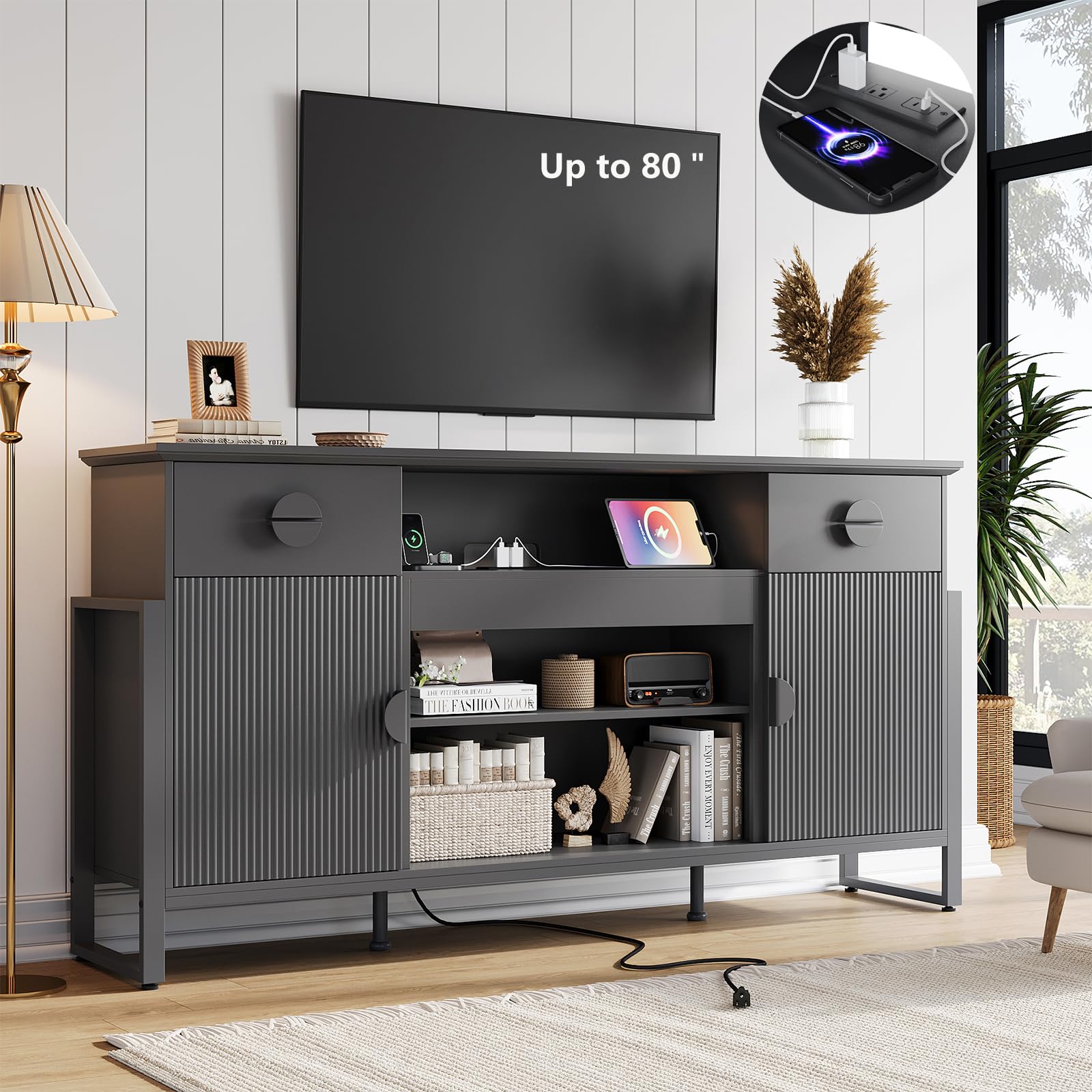
Image: The LGHM 70-inch Fluted TV Stand in a living room setting, showcasing its design and functionality.
Safety Information
CAUTION: This product is heavy and requires assembly. Use appropriate safety gear and techniques during assembly and handling. Due to the size and weight, the product may be delivered in multiple packages, so be prepared to handle and store them safely. Always follow the assembly instructions carefully to avoid injury or damage.
- Ensure all parts are present and undamaged before beginning assembly.
- Assemble on a soft, clean surface to prevent scratches.
- Do not overtighten screws.
- Keep small parts away from children.
- Always use two people for lifting and moving heavy components.
Package Contents
Your LGHM TV Stand package includes all necessary components and hardware for assembly. Please note that due to the size and weight of the item, it will be sent in two packages, which may arrive at different times. Verify all parts against the included parts list before starting assembly.

Image: Illustration showing the TV stand being delivered in two separate packages.
Assembly Instructions
Follow these steps carefully for proper assembly. It is recommended to have two people for assembly.
- Unpack and Identify Parts: Carefully unpack all components and lay them out on a soft, clean surface. Refer to the included parts diagram to identify each piece. Pay close attention to labels (e.g., CL, DL, DR, CR) which may be subtly printed on the items.
- Assemble Base Structure: Begin by connecting the main base components. Ensure all connections are secure but do not overtighten screws until the entire section is aligned.
- Install Shelves and Dividers: Insert the shelves and dividers into their designated slots. The shelves are adjustable, allowing for flexible storage configurations.
- Attach Side Panels and Doors: Secure the side panels and then attach the doors using the provided hinges. The hinges are designed for silent and smooth closing.
- Install Drawers: Assemble the drawers according to the diagram and slide them into their respective compartments.
- Mount Top Panel: Carefully place the top panel onto the assembled structure. Ensure proper alignment. If dowels prevent the top from lying flat, verify their correct placement or temporarily remove them to adjust alignment before reinserting.
- Attach Metal Legs: Secure the black metal "H" legs to the base of the stand. These legs include height adjustment features for stability on uneven floors.
- Connect Power Outlets: Integrate the built-in charging station into its designated area. Ensure all power connections are secure.
- Final Tightening: Once all components are in place and aligned, gently tighten all screws and fasteners.

Image: Detailed product dimensions and an overview of the TV stand's structure, useful for assembly.

Image: Close-up of the adjustable legs and reinforced support, highlighting stability features.
Operating Instructions
Built-in Charging Station
The TV stand features a built-in charging station with 2 AC outlets and 2 USB ports. To use, simply plug your devices into the available ports. This allows for convenient charging of multiple devices simultaneously, reducing cable clutter.

Image: A smartphone charging via the built-in USB port, with AC outlets visible.
Video: Demonstrates the built-in power solution for charging devices.
Storage Options
The TV stand offers versatile storage with 2 spacious drawers, 2 storage doors, and 3 open shelves. The shelves behind the doors are removable and adjustable, allowing you to customize the storage space to fit larger items or create multiple compartments.

Image: Visual representation of how the shelves can be adjusted or removed to create different storage configurations.

Image: The media console displaying various items stored in its shelves and drawers, demonstrating ample storage.
Video: Highlights the entertainment hub features, including power and sleek design.
Maintenance
To maintain the appearance and longevity of your LGHM TV Stand, follow these simple care instructions:
- Cleaning: Wipe the surfaces with a dry cloth. Avoid using harsh chemicals or abrasive cleaners, which can damage the finish.
- Spills: Immediately wipe any spills with a soft, dry cloth to prevent staining or damage to the engineered wood.
- Sunlight: Avoid prolonged exposure to direct sunlight to prevent fading.
- Heat: Do not place hot items directly on the surface without protection.

Image: A detailed view of the luxury-textured finish and fluted panels, emphasizing the product's durable construction.
Troubleshooting
If you encounter issues during assembly or use, refer to the following common solutions:
- Difficulty with Assembly:
- Misaligned Holes: Double-check that you are using the correct pieces for each step. Some pre-drilled holes may require slight adjustment or careful alignment. Ensure dowels are fully inserted but not protruding excessively.
- Identifying Parts: Refer closely to the assembly diagram. Part numbers or letters (e.g., CL, DL, DR, CR) are often printed on the edges of the pieces; these can be faint.
- Heavy Components: Always use two people when lifting or maneuvering large or heavy sections of the stand.
- Wobbly Stand:
- Ensure all fasteners are securely tightened.
- Adjust the height of the metal legs to compensate for uneven floors.
- Doors Not Closing Smoothly:
- Check hinge alignment and adjust as needed. Ensure hinges are properly installed and tightened.
Specifications
| Brand | LGHM |
| Model Number | B0DWJDBHVR |
| Color | Black |
| Dimensions (W x D x H) | 70 x 15.7 x 37.4 inches |
| Item Weight | 145 Pounds |
| Material Type | Engineered Wood |
| TV Size Compatibility | Up to 80 inches |
| Power Outlets | 2 AC outlets, 2 USB ports |
| Assembly Required | Yes |

Image: A visual guide demonstrating the compatibility of the TV stand with various TV sizes, up to 80 inches.
Warranty and Support
For any questions, concerns, or support needs regarding your LGHM TV Stand, please contact customer service. The product is eligible for a 30-day easy return policy. Additional protection plans may be available for purchase.
- Returns: 30-day easy returns.
- Customer Support: Contact LGHM Furniture directly for assistance.
- Protection Plans: Optional 2-Year and 3-Year protection plans are available.
For more information, visit the LGHM Store on Amazon.
Ask a question about this manual
Ask about setup, troubleshooting, compatibility, parts, safety, or missing instructions. Manuals+ will review the question and use this page’s manual context to help answer it.