
Gardway BBH-929s, T30
Gardway BBH-929s Neckband Bluetooth Speaker & T30 True Wireless Earbuds User Manual
Model: BBH-929s (Neckband Speaker), T30 (True Wireless Earbuds)
Introduction
Thank you for choosing the Gardway BBH-929s Neckband Bluetooth Speaker and T30 True Wireless Earbuds. This comprehensive audio solution provides high-fidelity 3D stereo sound for various activities, from home and office use to outdoor adventures. This manual will guide you through the setup, operation, and maintenance of your new devices to ensure optimal performance and longevity.

Image: The Gardway BBH-929s Neckband Bluetooth Speaker and T30 True Wireless Earbuds, showcasing both devices together.
Product Overview
BBH-929s Neckband Bluetooth Speaker
The BBH-929s neckband speaker is designed for comfortable, all-day wear, providing immersive audio without isolating you from your surroundings. It features multiple speaker units for a 360-degree sound experience and a built-in microphone for clear calls.

Image: Close-up view of the Gardway BBH-929s Neckband Bluetooth Speaker, highlighting its ergonomic design and speaker placement.
T30 True Wireless Earbuds
The T30 True Wireless Earbuds offer a compact and secure audio experience, ideal for active use. They come with a portable charging case for extended playtime and feature touch controls for easy management of music and calls.

Image: The Gardway T30 True Wireless Earbuds placed inside their charging case, showing the digital battery display.
Specifications
- Bluetooth Technology: Latest Bluetooth 5.3 for stable and faster transmission.
- Sound Output: High Fidelity 3D Stereo Sound, 360-degree surround sound (Neckband Speaker).
- Speaker Units (BBH-929s): 4 strategically placed speaker units.
- Weight (BBH-929s): Approximately 78g.
- Battery Life: Up to 15 hours of music playback (BBH-929s) with a 500mAh lithium-ion battery.
- Microphone: Built-in noise-canceling microphone for clear calls.
- Water Resistance: IPX4 Sweatproof (Neckband Speaker).
- Compatibility: Compatible with all Bluetooth-enabled devices (iOS, Windows, Android).
- Earbuds Features (T30): Ergonomic anti-fall earhook, secure and comfy fit.
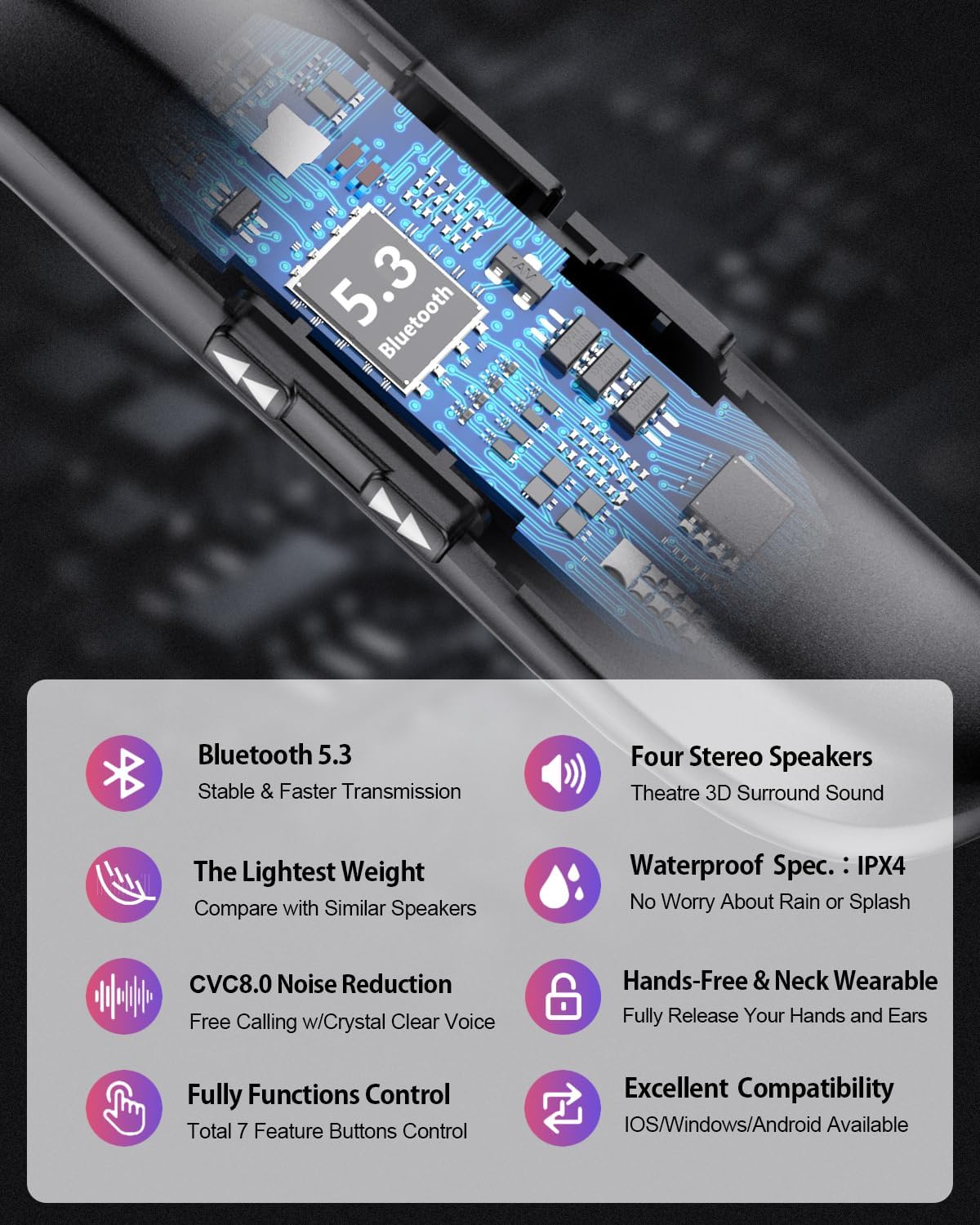
Image: Infographic detailing key features of the neckband speaker, including Bluetooth 5.3, four stereo speakers, lightweight design, IPX4 waterproof rating, CVC8.0 noise reduction, hands-free functionality, full function control, and broad compatibility.
Setup
1. Charging Your Devices
Before first use, fully charge both the Neckband Speaker and the Earbuds.
- Neckband Speaker: Connect the provided USB charging cable to the charging port on the neckband speaker and a power source. The indicator light will show charging status and turn off or change color when fully charged.
- True Wireless Earbuds: Place the earbuds into their charging case. Connect the charging case to a power source using the provided USB cable. The LED display on the case will indicate the charging status of both the case and the earbuds.
2. Pairing with Your Device
Both devices use Bluetooth for connection. You can pair them individually.
Pairing the Neckband Speaker (BBH-929s)
- Ensure the neckband speaker is charged.
- Press and hold the power button until the indicator light flashes, indicating pairing mode.
- On your device (smartphone, tablet, computer), go to Bluetooth settings and turn Bluetooth on.
- Search for "BBH-929s" or similar in the list of available devices and select it to connect.
- Once connected, the indicator light will stop flashing.
Pairing the True Wireless Earbuds (T30)
- Ensure the earbuds and charging case are charged.
- Open the charging case. The earbuds will automatically enter pairing mode.
- On your device, go to Bluetooth settings and turn Bluetooth on.
- Search for "T30" or similar in the list of available devices and select it to connect.
- Once connected, a voice prompt will confirm the connection.
Note: Both devices support multi-point connection, allowing you to connect to two devices simultaneously.
Operating Instructions
BBH-929s Neckband Bluetooth Speaker Controls
| Button/Action | Function |
|---|---|
| Power Button (Long Press) | Power On/Off |
| Power Button (Short Press) | Play/Pause Music, Answer/End Call |
| Volume + Button | Increase Volume |
| Volume - Button | Decrease Volume |
| Next Track Button | Skip to Next Track |
| Previous Track Button | Go to Previous Track |
| Call Button (Double Press) | Redial Last Number |
| Call Button (Long Press) | Reject Incoming Call |
T30 True Wireless Earbuds Touch Controls
The T30 earbuds feature intuitive touch controls. Specific functions may vary slightly based on your device and app.
- Single Tap: Play/Pause music, Answer/End call.
- Double Tap (Left Earbud): Previous track.
- Double Tap (Right Earbud): Next track.
- Long Press (Left Earbud): Decrease volume.
- Long Press (Right Earbud): Increase volume.
- Triple Tap: Activate voice assistant (Siri, Google Assistant, etc.).

Image: Demonstrates the versatility of the neckband speaker in different environments, including driving, working out, and relaxing at home.

Image: A man wearing the T30 True Wireless Earbuds during a workout, illustrating their secure and comfortable fit.
Maintenance
- Cleaning: Use a soft, dry, lint-free cloth to clean the devices. Do not use abrasive cleaners, alcohol, or chemical solvents.
- Water Exposure: The neckband speaker is IPX4 sweatproof, meaning it can withstand splashes and sweat. Do not submerge either device in water. Dry thoroughly if exposed to moisture.
- Storage: Store the devices in a cool, dry place away from direct sunlight and extreme temperatures.
- Battery Care: To preserve battery life, avoid fully discharging the battery frequently. Charge the devices regularly, even if not in use for extended periods.
- Earbud Hygiene: Regularly clean the ear tips of the T30 earbuds to prevent wax buildup, which can affect sound quality.
Troubleshooting
| Problem | Possible Solution |
|---|---|
| Device not powering on | Ensure the device is fully charged. Connect to a power source and try again. |
| Cannot pair with Bluetooth device |
|
| No sound or low volume |
|
| Sound cutting in/out or distorted |
|
| Microphone not working |
|
Warranty and Support
Gardway products are manufactured to the highest quality standards. For information regarding warranty coverage, technical support, or service inquiries, please refer to the warranty card included with your purchase or visit the official Gardway website. Please retain your proof of purchase for warranty claims.
For further assistance, you may contact Gardway customer support through the contact information provided on the product packaging or the official brand website.
Ask a question about this manual
Ask about setup, troubleshooting, compatibility, parts, safety, or missing instructions. Manuals+ will review the question and use this page’s manual context to help answer it.