
Introduction
Congratulations on your purchase of the Timex Expedition Field Solar 41mm Watch. This timepiece combines rugged durability with the convenience of solar power, ensuring reliable performance for your daily adventures. This manual provides essential information for setting up, operating, and maintaining your watch to ensure its longevity and accuracy.
Key features include a solar-powered movement, a durable stainless-steel case and bracelet, a military-inspired dial with 12 and 24-hour indices, luminescent hands for low-light readability, and a date window.
Product Overview
The Timex Expedition Field Solar watch is designed for outdoor enthusiasts, featuring a robust construction and practical functions. Familiarize yourself with the main components of your watch:
- Dial: Green military-inspired dial with 12 and 24-hour markers.
- Hands: Hour, minute, and second hands, with luminescent coating for visibility in low light.
- Crown: Located on the right side of the case, used for setting time and date. Features a sturdy crown protector.
- Date Window: Displays the current date, located at the 3 o'clock position.
- Case: 41mm gunmetal stainless-steel case, providing 100m water resistance.
- Bracelet: Gunmetal stainless-steel bracelet for secure and comfortable wear.
- Movement: Solar-powered quartz movement.
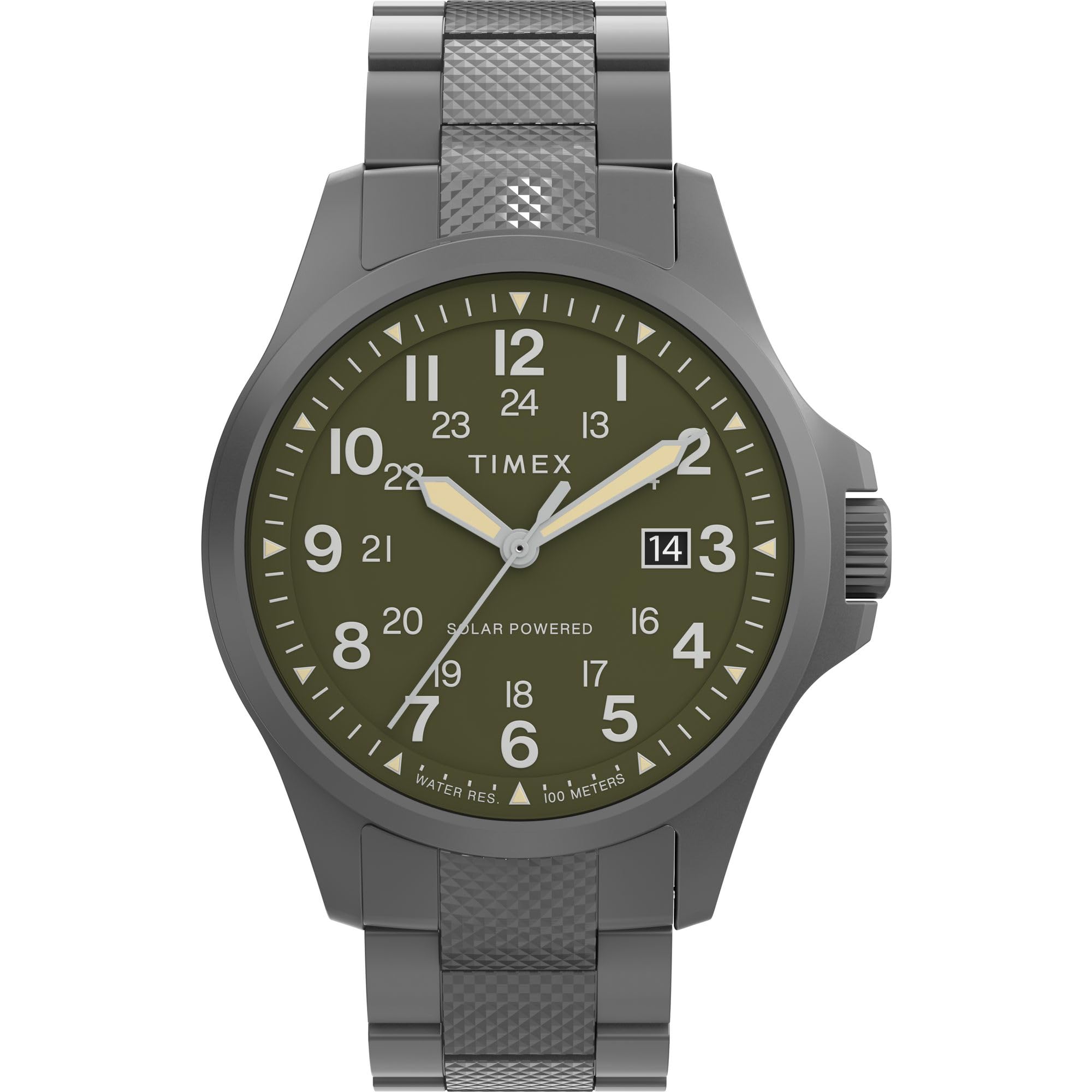
Figure 1: Front view of the Timex Expedition Field Solar 41mm Watch. This image shows the watch face, including the green dial, hands, and date window, along with the gunmetal stainless-steel case and bracelet.

Figure 2: Side view of the watch, illustrating the crown with its protector and the profile of the 41mm gunmetal case.

Figure 3: Rear view of the watch, displaying the engraved stainless-steel case back with 'Expedition Timex' and 'Solar Powered' markings.
Setup
Initial Charging
Your Timex Expedition Field Solar watch is powered by light. Upon receiving your watch, it may not be running due to insufficient charge. To activate and fully charge the watch:
- Place the watch in direct sunlight or under a strong artificial light source.
- Ensure the dial is exposed to the light.
- Allow several hours for a full charge. The second hand will begin moving normally once sufficient power is stored.
Note: Avoid placing the watch in excessively hot environments during charging, such as on a car dashboard in direct sun, as this may damage the watch.
Setting Time and Date
- Pull out the crown to the second click position (farthest out). The second hand will stop.
- Rotate the crown to set the hour and minute hands. Turn the hands clockwise until the correct time is displayed. Ensure you set the correct AM/PM for the date change mechanism.
- Push the crown back in to the first click position.
- Rotate the crown to set the date. Turn the crown until the correct date appears in the date window.
- Push the crown fully back in to the normal operating position. The second hand will resume movement.
Tip: To avoid setting the date during the automatic date change period (typically between 9 PM and 3 AM), set the time to a different period (e.g., 6 AM) before setting the date, then adjust the time to the current time.
Bracelet Adjustment
The stainless-steel bracelet can be adjusted by removing links to achieve a comfortable fit. This procedure typically requires specialized tools and is best performed by a professional jeweler or watch repair service to prevent damage to the bracelet or watch.
Operating Instructions
Timekeeping
Once set, your watch will accurately keep time. The solar movement ensures continuous operation as long as it receives adequate light exposure.
Date Display
The date window at 3 o'clock will automatically advance once every 24 hours. If the watch is not worn for an extended period and the power reserve depletes, the date may need to be reset.
Luminescence
The hour and minute hands, along with certain dial markers, are treated with a luminescent material. This material absorbs light and glows in low-light conditions, providing readability after exposure to bright light.
Water Resistance (100m)
Your watch is water-resistant to 100 meters (330 feet). This makes it suitable for showering, swimming, and snorkeling. It is not suitable for scuba diving.
- Do not operate the crown or pushers while the watch is wet or submerged.
- Ensure the crown is fully pushed in before exposing the watch to water.
- After exposure to saltwater, rinse the watch with fresh water and dry it thoroughly.
Maintenance
Cleaning Your Watch
To maintain the appearance of your watch:
- Wipe the case and bracelet with a soft, dry cloth regularly.
- For stubborn dirt, use a slightly damp cloth with mild soap, then wipe dry.
- Avoid using harsh chemicals or abrasive materials, which can damage the finish.
Solar Charging Best Practices
To ensure optimal performance and a long power reserve:
- Expose the watch to light regularly. Even indirect light helps maintain the charge.
- If storing the watch for an extended period, ensure it is in a location where it can receive some light, or fully charge it before storage.
- Avoid prolonged storage in complete darkness, as this can deplete the power reserve and require a longer initial charge when reactivated.
Troubleshooting
- Watch is not running or stops frequently: This indicates insufficient charge. Place the watch in direct sunlight for several hours to fully charge the solar battery.
- Time or Date is incorrect: Refer to the "Setting Time and Date" section in this manual to reset the watch.
- Condensation inside the crystal: This may indicate a breach in the water resistance. Avoid further water exposure and consult a professional watch repair service immediately.
- Luminescence is weak: Ensure the watch has been exposed to bright light for a sufficient period to charge the luminescent material.
If problems persist, please contact Timex customer support or an authorized service center.
Specifications
| Model Number | TW2Y30100VQ |
| Case Diameter | 41mm |
| Case Material | Stainless Steel (Gunmetal Finish) |
| Bracelet Material | Stainless Steel (Gunmetal Finish) |
| Dial Color | Green |
| Movement | Solar Quartz |
| Water Resistance | 100 meters (330 feet) |
| Functions | Hour, Minute, Second, Date |
| Package Dimensions | 4.21 x 4.09 x 3.11 inches |
| Item Weight | 10.93 ounces |
Warranty and Support
Your Timex watch is covered by a limited warranty against manufacturing defects. Please refer to the official Timex website or the warranty card included with your purchase for specific terms and conditions.
For customer support, service, or to find an authorized service center, please visit the official Timex website or contact their customer service department. Keep your proof of purchase for warranty claims.
Online Resources: www.timex.com