
1. Introduction
Thank you for choosing the Rubicon DX14 Electric Wheelchair. This manual provides essential information for the safe operation, maintenance, and care of your new mobility device. Please read this manual thoroughly before using the wheelchair to ensure proper function and to prevent injury.
The Rubicon DX14 is designed for individuals requiring assistance with mobility, offering a blend of power, portability, and comfort. Its foldable design and extended battery range make it suitable for both indoor and outdoor use, including travel.
2. Safety Information
Your safety is paramount. Adhere to all warnings and instructions in this manual.
- Weight Capacity: Do not exceed the maximum weight capacity of 330 lbs (150 kg).
- Battery Safety: Use only the provided charger. Do not expose batteries to extreme temperatures or puncture them. Charge in a well-ventilated area.
- Operating Environment: Avoid operating the wheelchair on excessively steep inclines (maximum recommended 12 degrees), uneven surfaces, or in heavy rain. While designed for all-terrain, exercise caution.
- Braking: The electromagnetic brake system provides automatic stopping when the joystick is released. Always ensure the brake is functioning correctly before use.
- Folding/Unfolding: Ensure the wheelchair is powered off and stable before attempting to fold or unfold it. Keep hands and fingers clear of moving parts.
- Children and Pets: Keep children and pets away from the wheelchair during operation and when folding/unfolding.
- Airline Travel: The DX14 is airline approved. Consult your airline for specific regulations regarding battery transport before travel.
3. Product Components
Familiarize yourself with the main parts of your Rubicon DX14 Electric Wheelchair.
- Main Frame: Aircraft-grade aluminum alloy with weatherproof coating.
- Joystick Controller: 360-degree control with adjustable speed, horn, and SOS call function.
- Motors: Dual 300W motors (total 600W).
- Batteries: Dual 12AH Lithium-Ion batteries.
- Seat: High-density single-cell foam seat with breathable, removable leather cushion.
- Footrest: Foldable for easy entry and exit.
- Armrests: Foldable for easy entry and exit.
- Wheels: Solid wheels for durability.
- Storage: Includes one compartment behind the seat and two armrest bags.
- Bluetooth Remote Control: For remote assistance.
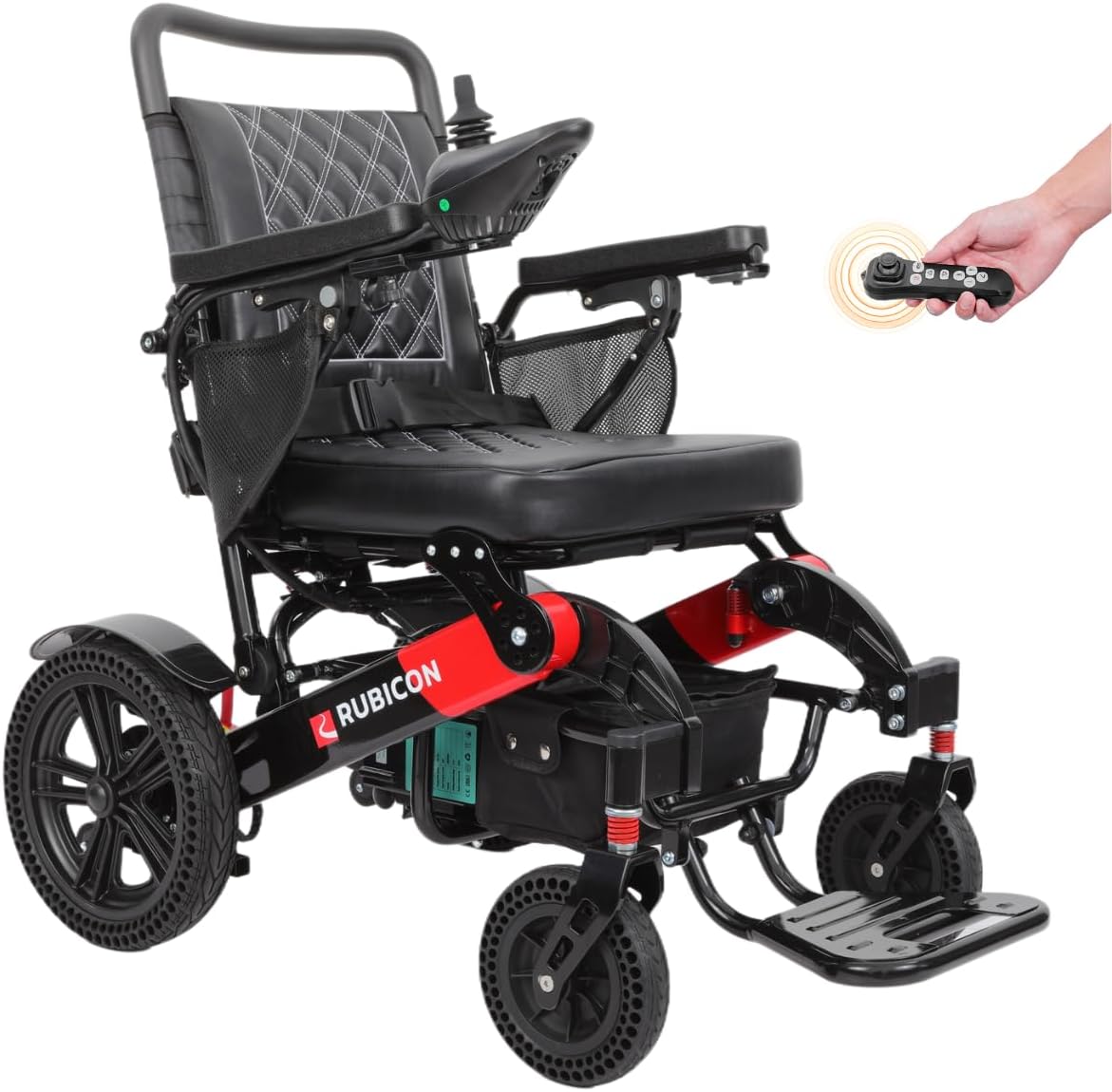
Figure 3.1: The Rubicon DX14 Electric Wheelchair in its fully assembled, ready-to-use state. This image highlights the overall design and key features such as the joystick and leather cushion.

Figure 3.2: Close-up view of the 360-degree joystick controller, showing buttons for power, speed adjustment, horn, and SOS call. This is the primary control interface for the wheelchair.
4. Setup and Assembly
- Unfolding the Wheelchair: Place the folded wheelchair on a flat, stable surface. Release any locking mechanisms. Gently pull the backrest upwards and outwards until the frame locks into place. Ensure all parts are securely engaged.
- Attaching the Joystick: The joystick can be mounted on either the left or right armrest. Slide the joystick into the designated slot until it clicks securely. Connect the joystick cable to the corresponding port, ensuring a firm connection.
- Battery Installation/Connection: The DX14 comes with dual 12AH lithium batteries. Ensure they are properly inserted into their compartments and connected. The off-vehicle charging cable allows charging without removing the seat.
- Adjusting Footrest and Armrests: Adjust the footrest and armrests to a comfortable position. They can be folded up for easier entry and exit.

Figure 4.1: The Rubicon DX14 Electric Wheelchair in its folded state, demonstrating its compact design for transport and storage. It folds to only 13 inches high.
5. Operating Instructions
- Power On/Off: Press the power button on the joystick controller to turn the wheelchair on or off.
- Driving: Use the 360-degree joystick to control direction and speed. Push forward to move forward, pull back to move backward, and push left or right to turn. The wheelchair features responsive steering with no dead spots.
- Speed Adjustment: Use the '+' and '-' buttons on the joystick to increase or decrease speed.
- Horn: Press the horn button to alert others.
- SOS Call: In an emergency, press the SOS button to activate an alert.
- Manual Mode: To operate the wheelchair manually, locate and flip the red lever near the motors. This disengages the motors, allowing it to be pushed like a traditional wheelchair. Remember to re-engage the motors for electric operation.
- Bluetooth Remote Control: The DX14 includes a Bluetooth remote. This allows a caregiver to drive or adjust the wheelchair from a distance. Refer to the separate remote control guide for pairing and operation.
Video 5.1: This video demonstrates the Rubicon DX14 Electric Wheelchair's all-terrain capabilities, extended range, auto brake system, leather cushions, 360-degree joystick, and Bluetooth remote control features. It shows the wheelchair navigating various outdoor environments and highlights its maneuverability.

Figure 5.2: The Rubicon DX14 demonstrating its all-terrain performance, capable of handling various surfaces including grass, ramps, sand, mud, snow, and bumpy roads.

Figure 5.3: Image showing the Bluetooth remote control for the Rubicon DX14, allowing for remote operation and assistance.
6. Maintenance
- Cleaning: Wipe down the frame and seat with a damp cloth. Avoid using harsh chemicals. The leather cushion is removable for easy cleaning.
- Battery Care: Charge batteries regularly, even if not in frequent use, to prolong their lifespan. Do not allow batteries to fully discharge for extended periods.
- Tire Inspection: Periodically check the solid tires for wear and tear.
- General Inspection: Regularly check all bolts, screws, and connections to ensure they are tight and secure.
7. Troubleshooting
| Problem | Possible Cause | Solution |
|---|---|---|
| Wheelchair does not power on. | Battery not connected, low battery, power button not pressed. | Ensure batteries are connected and charged. Press power button firmly. |
| Wheelchair does not move. | Motors disengaged (manual mode), joystick not connected, error code. | Check red levers are engaged for electric mode. Ensure joystick cable is secure. Consult error codes if displayed. |
| Reduced range or power. | Low battery charge, aged batteries, operating on steep inclines. | Fully charge batteries. Consider battery replacement if performance consistently degrades. Avoid prolonged use on steep slopes. |
| Unresponsive joystick. | Loose connection, internal fault. | Check joystick cable connection. If issue persists, contact customer support. |
8. Specifications
| Feature | Detail |
|---|---|
| Model | DX14 (Model16) |
| Brand | Rubicon |
| Max Range | Up to 30 miles |
| Motors | 2 x 300W (Total 600W) |
| Batteries | Dual 12AH Lithium-Ion |
| Weight Capacity | 330 lbs |
| Wheelchair Weight | 64 lbs |
| Turning Radius | 32 inches |
| Frame Material | Aircraft-grade Aluminum Alloy |
| Seat Depth | 16 inches |
| Brake Style | Electromagnetic |
| Wheel Type | Solid |
9. Warranty and Support
Rubicon, a US-based company headquartered in California, provides comprehensive customer support.
- Frame Warranty: 1 year
- Motor and Joystick Controller Warranty: 1 year
- Battery Warranty: 6 months
For technical assistance, warranty claims, or any questions regarding your Rubicon DX14 Electric Wheelchair, please contact our Gold Standard Customer Support. Refer to your purchase documentation for specific contact details or visit the official Rubicon Mobility website.