
1. Introduction
The Linkvil W710D is an advanced DECT IP Base Station designed to provide superior wireless communication for small to medium-sized environments. It supports up to 10 simultaneous wireless handsets and manages up to 20 SIP accounts, offering flexibility and scalability for your communication needs. This manual will guide you through the installation, operation, and maintenance of your W710D base station.
Key Features:
- DECT Technology: Supports up to 10 simultaneous wireless handsets for flexible communication setup.
- High Capacity: Handles up to 10 concurrent calls with crystal-clear voice connectivity and reliable wireless performance.
- SIP Accounts: Manages up to 20 SIP accounts, ideal for business environments requiring multiple lines.
- Compatibility: Specifically designed to work with W610D handsets for seamless integration and optimal performance.
- Design Features: Equipped with dual high-gain antennas and LED status indicators for easy monitoring of system operation.
2. Package Contents
Please check the package contents carefully. If any item is missing or damaged, contact your vendor.
- Linkvil W710D DECT IP Base Station
- Power Adapter
- Ethernet Cable
- Quick Start Guide (not included in this manual)
3. Product Overview
Familiarize yourself with the components of your W710D DECT IP Base Station.
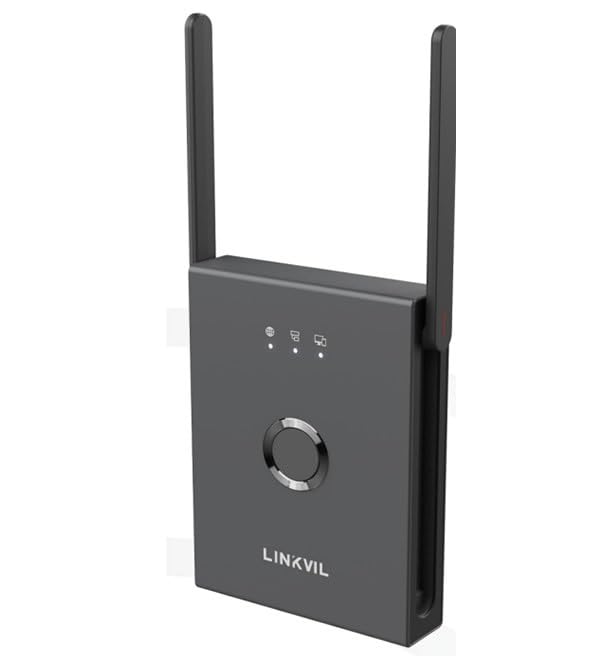
Image: Front view of the Linkvil W710D DECT IP Base Station, showing its compact design, dual high-gain antennas, and LED status indicators.
Base Station Components:
- LED Indicators: Provide visual status of power, network, and DECT activity.
- Antennas: Dual high-gain antennas for optimal signal coverage.
- Central Control Button: For system management and pairing.
- Power Port: Connects to the power adapter.
- Ethernet Port: Connects to your network router or switch.
4. Setup
4.1 Physical Installation
- Position the Base Station: Place the W710D in a central location, away from large metal objects, concrete walls, and other electronic devices that may cause interference. Ensure it is within range of the handsets.
- Connect Power: Plug the power adapter into the power port on the base station, then plug the other end into a power outlet. The Power LED should illuminate.
- Connect to Network: Connect one end of the Ethernet cable to the Ethernet port on the base station and the other end to an available LAN port on your router or network switch. The Network LED should illuminate and blink, indicating network activity.
4.2 Handset Registration
The W710D base station is compatible with Linkvil W610D handsets. Follow these general steps to register a handset:
- Prepare the Base Station: Press and hold the central control button on the W710D base station for approximately 3 seconds until the DECT LED starts flashing. This indicates the base station is in registration mode.
- Prepare the Handset: On your W610D handset, navigate to the registration menu (refer to your W610D handset manual for specific steps). Select "Register Handset" or a similar option.
- Enter PIN: When prompted, enter the base station's PIN (default is usually 0000 or 1234).
- Confirm Registration: Once registration is successful, the handset will display a confirmation message, and the DECT LED on the base station will stop flashing and remain solid.
- Repeat for additional handsets, up to a maximum of 10.
5. Operating Instructions
5.1 Basic Call Operations (via Registered Handset)
- Making a Call:
- Pick up the handset or press the Talk button.
- Dial the desired number.
- Press the Talk or Send button to initiate the call.
- Answering a Call:
- When the handset rings, press the Talk button.
- Ending a Call:
- Press the End button or place the handset back in its charging cradle.
5.2 Managing Multiple SIP Accounts
The W710D supports up to 20 SIP accounts. Configuration of these accounts is typically done via the base station's web interface (refer to the advanced administration guide for details). Once configured, registered handsets can select which SIP line to use for outgoing calls and receive calls from any configured line.
5.3 Advanced Features
- Conference Calls: The W710D supports multiple conference calls. Initiate a conference call from a registered handset by following the handset's specific instructions for conferencing.
- Multi-line Operation: With support for 12 SIP lines, handsets can manage multiple active calls simultaneously, allowing for call waiting, transfer, and hold functions.
- Caller ID: The base station supports Caller ID functionality, displaying incoming caller information on registered handsets.
6. Maintenance
- Cleaning: Use a soft, dry cloth to clean the base station. Do not use liquid or aerosol cleaners, as they may damage the device.
- Firmware Updates: Periodically check the Linkvil official website for firmware updates. Firmware updates can improve performance and add new features. Refer to the administration guide for instructions on how to update the firmware.
- Environmental Conditions: Ensure the base station is operated within recommended temperature and humidity ranges to prevent damage.
7. Troubleshooting
| Problem | Possible Cause | Solution |
|---|---|---|
| No Power / Power LED Off | Power adapter not connected or faulty; power outlet not working. | Check power connections. Try a different power outlet. |
| No Network / Network LED Off | Ethernet cable disconnected or faulty; network issue. | Check Ethernet cable connection. Restart router/switch. Verify network settings. |
| Handset cannot register | Base station not in registration mode; incorrect PIN; handset out of range. | Ensure base station DECT LED is flashing. Verify PIN. Move handset closer to base station. |
| Poor call quality / Static | Interference from other devices; handset too far from base station. | Relocate base station away from other electronics. Move closer to base station. |
8. Specifications
| Feature | Description |
|---|---|
| Brand | Linkvil |
| Model | W710D |
| Color | Black |
| Material | Plastic |
| Power Source | Electrical Power Supply |
| Item Dimensions (L x W x H) | 20 x 15 x 5 centimeters |
| Item Weight | 500 Grams |
| Compatible Devices | Linkvil W610D Handsets, Ehs |
| Handset Support | Up to 10 simultaneous wireless handsets |
| SIP Accounts | Up to 20 SIP accounts |
| Concurrent Calls | Up to 10 concurrent calls |
| Multi-line Operation | 12 SIP lines |
| Conference Capacity | Multiple conference support |
| Caller ID | Yes |
9. Warranty and Support
For warranty information, please refer to the warranty card included with your product or visit the official Linkvil website. For technical support, frequently asked questions, and additional resources, please visit the Linkvil support portal.
Note: Warranty terms and conditions may vary by region and retailer.


