
Introduction
This user manual provides essential information for the safe and effective use of your Varon 10400mAh Rechargeable Battery, model NT-2/18650-4S4P. This battery is specifically designed to support the Varon NT02 oxygen generator, providing portable power for its operation and charging capabilities. Please read this manual thoroughly before using the product and retain it for future reference.
Important Safety Information
Your safety is paramount. Please observe all warnings and precautions to prevent injury or damage to the product.
General Attention
The Varon rechargeable battery is exclusively intended for use with the Varon NT02 oxygen generator. It is designed to support the oxygen generator's operation and charging when connected via the oxygen generator's special adapter. If the battery fails to charge, immediately contact service personnel for assistance.
Critical Warnings
- Do not disassemble, impact, squeeze, throw, or puncture the battery.
- Do not immerse the battery in water or expose it to fire.
- Avoid short-circuiting the battery terminals.
- Only use the charging method and equipment specified by the manufacturer.
- Replace the battery only with the exact same model (NT-2/18650-4S4P).
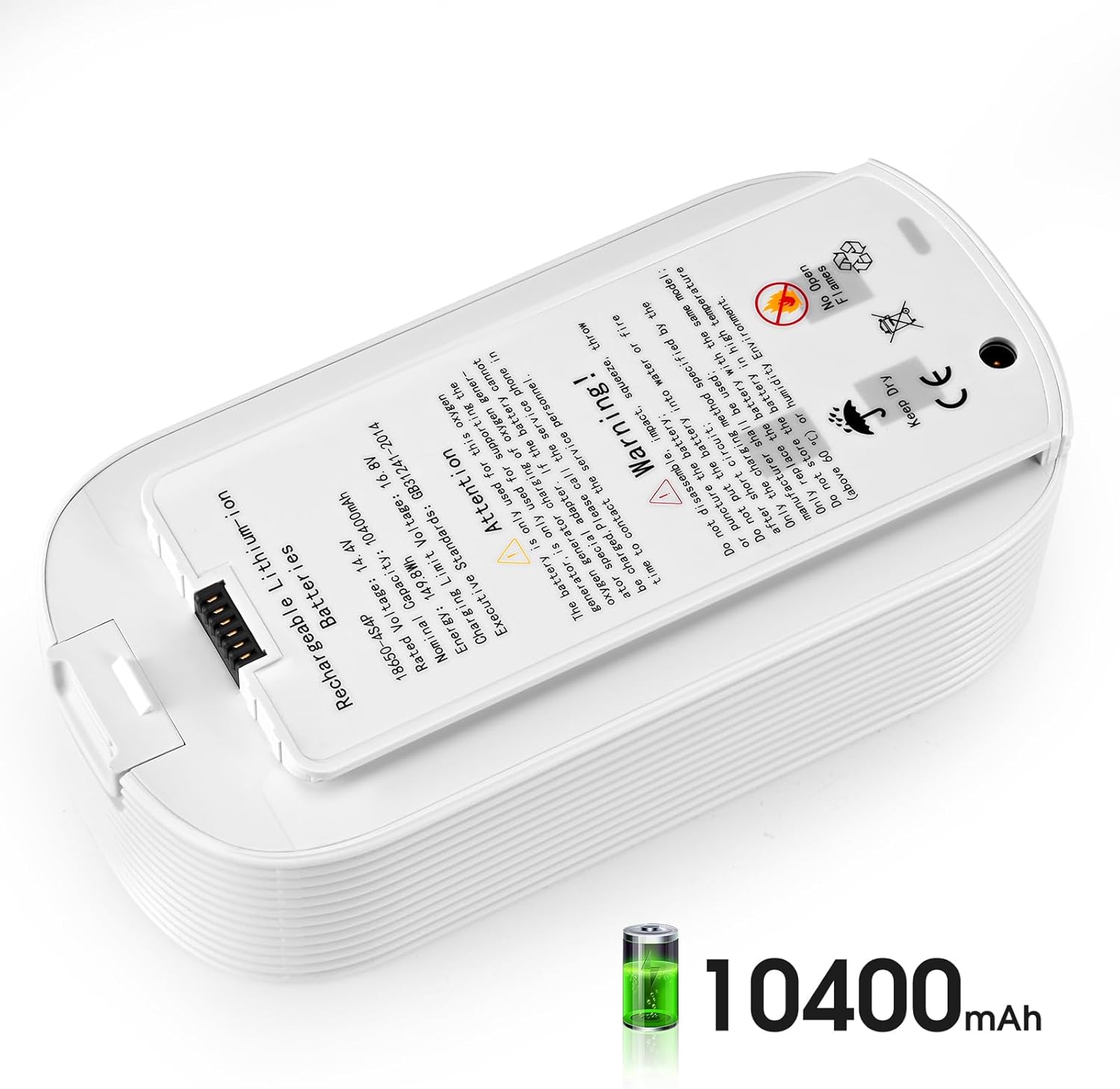
- Do not store the battery in high temperatures (above 60 ℃ / 140 ℉) or high humidity environments.
Safety Symbols
Familiarize yourself with the symbols on the battery label:
- Keep Dry: Indicates the product should be protected from moisture.
- No Open Flames: Warns against exposure to fire or open flames.
- CE Mark: Signifies compliance with European health, safety, and environmental protection standards.
- Crossed-out Wheeled Bin: Indicates that the product should not be disposed of with general household waste but should be recycled separately.


Product Overview
The Varon 10400mAh Rechargeable Battery is a high-capacity lithium-ion power source designed for the NT02 oxygen generator. It provides reliable and portable power, ensuring extended operation of your device.


Setup
Installation into NT02 Oxygen Generator
- Ensure the NT02 oxygen generator is powered off and disconnected from any external power source.
- Locate the battery compartment on your NT02 oxygen generator. Refer to your oxygen generator's manual for specific instructions on accessing this compartment.
- Align the Varon rechargeable battery with the compartment, ensuring the connector pins on the battery match the corresponding port in the generator.
- Gently slide the battery into place until it is securely seated. You may hear a click or feel it lock into position.
- Close the battery compartment cover, if applicable, and ensure it is latched securely.
Initial Charging
Before first use, it is recommended to fully charge the battery. Connect your NT02 oxygen generator (with the Varon battery installed) to its special adapter and a power outlet. The charging indicator on your oxygen generator will typically show the charging status. Refer to your NT02 oxygen generator's manual for details on charging indicators.
Operating
Using the Battery with NT02
Once installed and charged, the Varon battery will power your NT02 oxygen generator, allowing for portable operation. The battery automatically provides power when the generator is disconnected from an external power source. Monitor the battery level indicator on your NT02 oxygen generator to understand remaining power.
Charging the Battery
To charge the Varon battery, connect the NT02 oxygen generator (with the battery installed) to its dedicated power adapter and a suitable electrical outlet. The battery will charge while installed in the generator. Always use the charging method and adapter specified by the manufacturer of the NT02 oxygen generator to ensure safe and efficient charging.
Maintenance
Storage
When not in use for extended periods, store the battery in a cool, dry place. Avoid direct sunlight, high temperatures (above 60 ℃ / 140 ℉), and high humidity environments. It is advisable to store the battery with a partial charge (around 50%) to prolong its lifespan.
Cleaning
Wipe the exterior of the battery with a soft, dry cloth. Do not use harsh chemicals, abrasive cleaners, or immerse the battery in liquids. Ensure the connector pins are clean and free of debris.
Battery Replacement
If the battery's performance significantly degrades over time, it may need replacement. Always replace the battery with an authentic Varon NT-2/18650-4S4P model to ensure compatibility and safety. Refer to your NT02 oxygen generator's manual or contact Varon customer support for guidance on obtaining a replacement.
Troubleshooting
Battery Not Charging
- Ensure the NT02 oxygen generator is properly connected to its power adapter and the adapter is plugged into a working electrical outlet.
- Verify that the battery is correctly installed in the NT02 oxygen generator.
- Check for any visible damage to the battery, adapter, or generator's charging port.
- If the issue persists, the battery or charging system may be faulty.
Contacting Service Personnel
For any persistent issues or if the battery cannot be charged, please contact the service personnel or the seller immediately. Do not attempt to repair the battery yourself.
Specifications
| Feature | Detail |
|---|---|
| Model Number | NT-2/18650-4S4P |
| Brand | Varon |
| Battery Type | Rechargeable Lithium-ion |
| Rated Voltage | 14.4V |
| Nominal Capacity | 10400mAh |
| Energy | 149.8Wh |
| Charging Limit Voltage | 16.8V |
| Executive Standards | GB31241-2014 |
| Dimensions (L⨯W⨯H) | 182.0 ⨯ 91.0 ⨯ 53.3 mm (approximately 7.17 ⨯ 3.58 ⨯ 2.10 inches) |
| Weight | 906.9 g (approximately 2.0 lbs) |
| Manufacturer | HUIZHOU SUNWONDER NEW ENERGY TECHNOLOGY CO., LTD |
| Date First Available | February 7, 2025 |
Warranty and Support
Warranty Information
Specific warranty terms and conditions for the Varon Rechargeable Battery are provided by the manufacturer or the authorized seller at the time of purchase. Please refer to your purchase documentation or contact the seller for detailed warranty information.
Customer Support
For technical assistance, troubleshooting, or inquiries regarding your Varon battery, please contact the seller (JinQ-AAA) or the manufacturer (HUIZHOU SUNWONDER NEW ENERGY TECHNOLOGY CO., LTD) directly. Contact details are typically available on your purchase receipt or the product packaging.