Introduction
The SHOKZ OpenDots ONE are innovative open-ear headphones designed for comfort, awareness, and premium audio experience. Featuring a personalized clip-on fit, rich Dolby Audio with Bassphere Technology, and a lightweight design, these earbuds are built for all-day wear and on-the-go use. They are IP54 water resistant and offer up to 40 hours of playtime with the charging case.

SHOKZ OpenDots ONE earbuds and charging case in grey.
What's in the Box
- OpenDots ONE True Wireless Earbuds
- Charging Case & Carrying Bag
- USB-C Charging Cable
- User Guide & Legal Statement
- AppCard
All items included in the SHOKZ OpenDots ONE package.
Setup
First-time Pairing
For first-time pairing, simply open the charging case. The earbuds will automatically enter pairing mode, and the indicator light on the case will blink orange and green. Turn on Bluetooth on your device and select 'OpenDots ONE by Shokz'. The pairing is complete when your device displays 'Pairing Successful'.
Official video demonstrating how to pair SHOKZ OpenDots ONE earbuds for the first time.
Connecting and Disconnecting Bluetooth
To connect or disconnect, place both earbuds inside the charging case and keep the cover open. Press and hold the function button on the back of the case for 3 seconds until the indicator light blinks orange and green. Enable Bluetooth on your device and select 'OpenDots ONE by Shokz'.
Official video demonstrating how to connect and disconnect SHOKZ OpenDots ONE earbuds via Bluetooth.
Resetting the Earbuds
To reset the earbuds to factory settings, place both earbuds in the charging case and keep the cover open. Press and hold the button on the charging case for 15 seconds. The orange light will blink for 5 seconds, indicating that factory settings have been restored.
Official video demonstrating how to power on and off SHOKZ OpenDots ONE earbuds.
Wearing Instructions
The left and right earbuds can be worn interchangeably. Pinch the JointArc with your thumb and forefinger and raise it toward your ear. Place the ball-shaped speaker against the inner ridge of your ear (not inside the ear canal) and the cylindrical battery compartment behind your ear. Adjust the earbuds for a secure and comfortable fit. For the best fit, the recommended angle between the JointArc and the horizontal line is 0° to 30°, but you can adjust it based on your personal preference.
Official video demonstrating how to properly wear SHOKZ OpenDots ONE earbuds.

Diagram illustrating the correct way to wear the earbuds, highlighting the speaker, JointArc, and battery compartment placement.
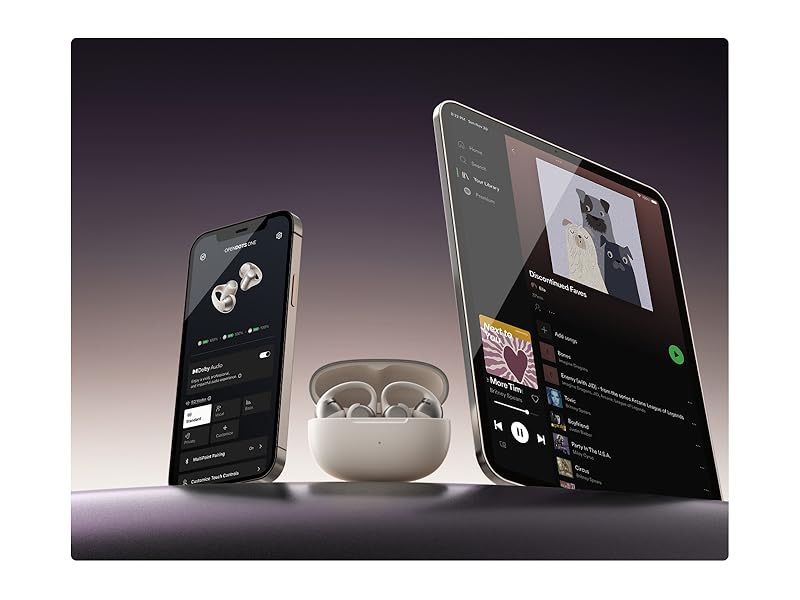
Diagram illustrating common wearing mistakes to avoid for optimal fit and sound.
Operating Instructions
Touch Controls
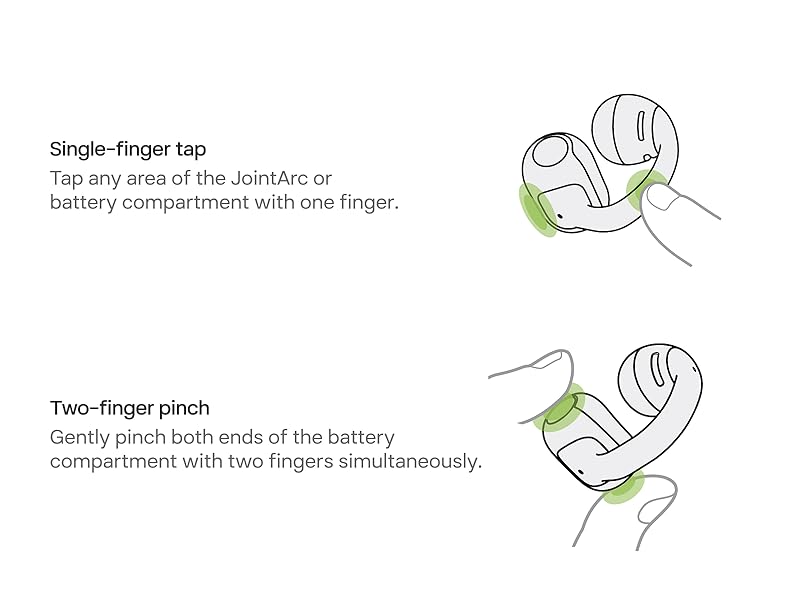
Operate the earbuds with a single-finger tap or a two-finger pinch. You can customize these functions in the SHOKZ App.
- Single-finger tap: Play/pause audio, answer/end calls.
- Two-finger pinch: Play/pause audio, answer/end calls, skip to previous/next track, activate voice assistant, adjust volume.
You can also turn off the touch controls in the SHOKZ App.
Official video demonstrating how to use touch controls on SHOKZ OpenDots ONE earbuds.
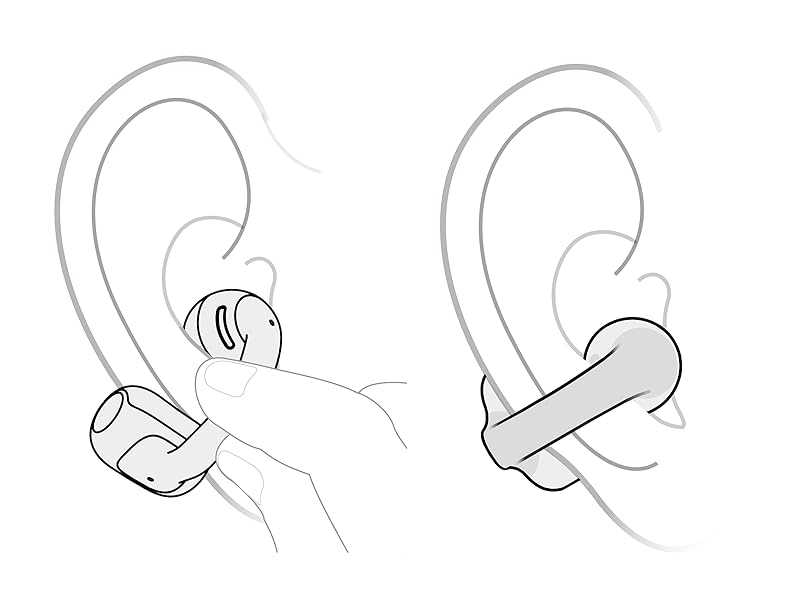
Diagram illustrating the single-finger tap and two-finger pinch areas for control.
Power Management
The OpenDots ONE offer up to 10 hours of listening on a single charge and up to 40 hours with the charging case. A 10-minute quick charge provides 2 hours of playtime (quick charge is not available via wireless charging). Wireless charging is supported.
Power On/Off and Standby
To power on, simply open the charging case. The indicator light will turn on, and the earbuds will power on. To power off, place both earbuds into the charging case and close the cover. If the earbuds are not in the charging case and remain unconnected to a device for 3 minutes, they will enter standby mode.

The charging case provides up to 40 hours of total playback time.
Specifications
| Feature | Detail |
|---|---|
| Model Name | SHOKZ OpenDots One |
| Connectivity Technology | Wireless (Bluetooth 5.4) |
| Battery Life (Earbuds) | 10 Hours |
| Battery Life (with Case) | Up to 40 Hours |
| Charging Time (Quick Charge) | 10 minutes for 2 hours playtime |
| Water Resistance Level | IP54 Water Resistant |
| Control Method | App, Touch |
| Weight (each earbud) | 6.5g |
| Included Components | USB-C Charging Cable, User Guide & Legal Statement, OpenDots ONE True Wireless Earbuds, Charging Case & Carrying Bag, AppCard |
Troubleshooting
If you experience issues with pairing, connectivity, or sound, try the following:
- Ensure earbuds are charged.
- Reset the earbuds to factory settings (refer to Setup section).
- Clear Bluetooth connections on your device and re-pair.
- Ensure the SHOKZ App is updated to the latest version.
Maintenance
To ensure the longevity of your SHOKZ OpenDots ONE earbuds:
- Clean earbuds regularly with a soft, dry cloth.
- Avoid exposing them to extreme temperatures or harsh chemicals.
- Store in the charging case when not in use to protect them and maintain charge.
- Avoid bending the JointArc backward or stretching it excessively when not in use, as this may impact your wearing experience.
Warranty & Support
For warranty information, technical support, or further assistance, please visit the official SHOKZ website or contact their customer service. Details can typically be found in the included User Guide & Legal Statement or on the product's Amazon listing page.


