1. Introduction
This manual provides comprehensive instructions for the installation, operation, maintenance, and troubleshooting of the zatagen HL-3202-410X Automatic Lubrication Oil Pump. Please read this manual thoroughly before using the product to ensure safe and efficient operation.
2. Safety Information
Always adhere to the following safety guidelines to prevent injury or damage to the equipment:
- Ensure the power supply matches the pump's specifications before connection.
- Do not operate the pump with a damaged power cord or plug.
- Keep hands and clothing away from moving parts during operation.
- Use only recommended lubrication oil. Refer to the specifications for oil type.
- Disconnect power before performing any maintenance or repairs.
- Install the pump in a stable, dry, and well-ventilated area.
- Do not modify the pump in any way. Unauthorized modifications may void the warranty and pose safety risks.
3. Product Components
The zatagen HL-3202-410X Automatic Lubrication Oil Pump consists of several key components:
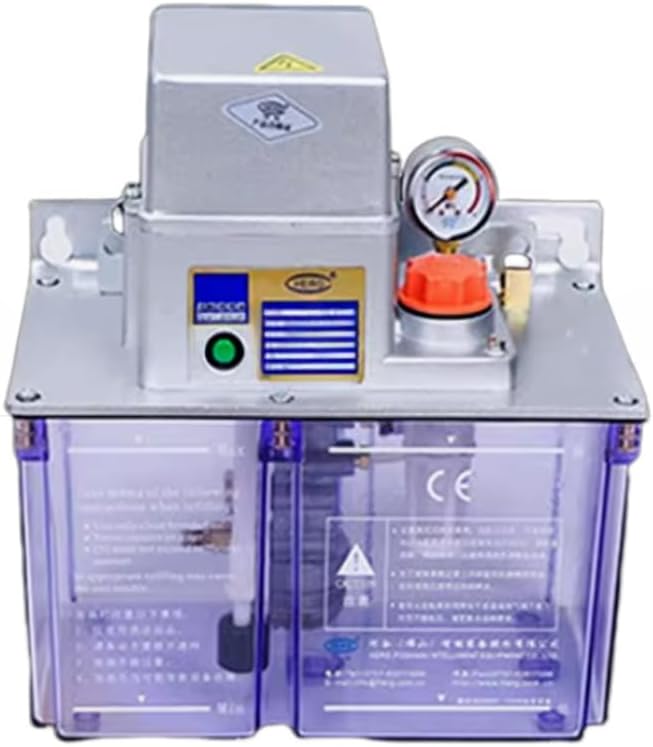
Figure 1: zatagen HL-3202-410X Automatic Lubrication Oil Pump
Description of Figure 1: This image displays the complete zatagen HL-3202-410X Automatic Lubrication Oil Pump. It features a silver-colored motor unit on top, which houses the electrical components and pump mechanism. A pressure gauge is visible on the right side of the motor unit, indicating system pressure. An orange filler cap is located near the pressure gauge, used for adding lubrication oil. Below the motor unit is a transparent purple oil reservoir, allowing for visual inspection of the oil level. The reservoir has clearly marked 'Max' and 'Min' level indicators to guide refilling. A CE marking is also visible on the reservoir, indicating compliance with European safety standards.
- Motor Unit: Houses the pump motor and control circuitry.
- Pressure Gauge: Displays the current operating pressure of the lubrication system.
- Oil Filler Cap: Used to access the oil reservoir for refilling.
- Oil Reservoir: Transparent container for storing lubrication oil, with 'Max' and 'Min' level indicators.
- Output Ports: (Not explicitly visible but implied) Connect to the lubrication points.
4. Setup and Installation
- Mounting: Securely mount the pump on a stable surface using appropriate fasteners. Ensure the pump is level to allow for accurate oil level readings.
- Electrical Connection: Connect the pump to a suitable power supply according to local electrical codes. Verify voltage and frequency requirements.
- Oil Filling: Unscrew the orange oil filler cap. Carefully pour the recommended lubrication oil into the reservoir until the level reaches the 'Max' indicator. Do not overfill. Securely replace the cap.
- Lubrication Line Connection: Connect the lubrication lines from the pump's output ports to the designated lubrication points on your machinery. Ensure all connections are tight and leak-free.
- Initial Priming: After installation, it may be necessary to prime the pump. Refer to the operating instructions for initial startup procedures.
5. Operating Instructions
Follow these steps for proper operation of the automatic lubrication oil pump:
- Power On: Turn on the main power switch to the pump. The pump will typically initiate a self-check or start its programmed lubrication cycle.
- Monitor Pressure: Observe the pressure gauge. It should indicate a stable operating pressure within the recommended range for your system. Fluctuations or zero pressure may indicate an issue.
- Check Oil Level: Regularly check the oil level in the transparent reservoir. Refill when the oil level approaches the 'Min' indicator.
- Cycle Adjustment (if applicable): If your model allows for cycle time adjustments, refer to the specific controls on the motor unit to set the desired lubrication frequency and duration.
- Power Off: To stop operation, turn off the main power switch.
6. Maintenance
Regular maintenance ensures the longevity and optimal performance of your lubrication pump:
- Oil Level Check: Inspect the oil level daily or before each use. Refill with the specified oil type when necessary.
- Oil Replacement: Periodically replace all oil in the reservoir according to the oil manufacturer's recommendations or your system's maintenance schedule.
- Filter Cleaning/Replacement: If your pump is equipped with an oil filter, inspect and clean or replace it as per the maintenance schedule to prevent clogging.
- System Inspection: Regularly check all lubrication lines and connections for leaks, damage, or blockages. Repair or replace any faulty components immediately.
- External Cleaning: Keep the exterior of the pump clean and free from dust and debris. Use a soft, dry cloth. Do not use harsh chemicals.
7. Troubleshooting
This section addresses common issues you might encounter with the HL-3202-410X pump:
| Problem | Possible Cause | Solution |
|---|---|---|
| Pump does not start | No power supply; Faulty wiring; Motor issue. | Check power connection and circuit breaker; Inspect wiring; Contact support if motor is faulty. |
| No oil output | Low oil level; Clogged filter; Blocked lubrication line; Air in system. | Refill oil; Clean/replace filter; Clear blockage; Bleed air from system. |
| Low pressure reading | Oil leak; Worn pump components; Incorrect oil viscosity. | Inspect for leaks and repair; Contact support for component replacement; Use recommended oil. |
| Excessive noise during operation | Low oil level; Air in system; Loose components; Worn bearings. | Refill oil; Bleed air; Tighten loose parts; Contact support for worn components. |
If the problem persists after attempting these solutions, please contact customer support.
8. Specifications
| Feature | Detail |
|---|---|
| Brand | zatagen |
| Model Number | HL-3202-410X |
| Manufacturer | zatagen |
| ASIN | B0DWF3FLLQ |
| First Available Date | February 7, 2025 |
| Product Type | Automatic Lubrication Oil Pump |
| Warranty | 180 days |
9. Warranty and Support
The zatagen HL-3202-410X Automatic Lubrication Oil Pump comes with a 180-day warranty from the date of purchase. This warranty covers defects in materials and workmanship under normal use.
For technical support, warranty claims, or service inquiries, please refer to the contact information provided with your purchase or visit the official zatagen website. When contacting support, please have your model number (HL-3202-410X) and purchase details ready.