
Introduction
Thank you for choosing the GUNOZE Cordless Handheld Vacuum Cleaner GZ-CHV. This manual provides essential information for the safe and efficient operation, maintenance, and troubleshooting of your new vacuum cleaner. Please read this manual thoroughly before first use and retain it for future reference.
Safety Instructions
To reduce the risk of fire, electric shock, or injury, please observe the following safety precautions:
- This appliance is designed for dry pick-up only. Do not use it to pick up liquids or wet materials.
- Do not use the vacuum cleaner near flammable or combustible liquids, gases, or explosive dust.
- Ensure the battery pack is securely installed before operation. Remove the battery pack before performing any maintenance or cleaning.
- Do not operate the vacuum cleaner with a damaged cord or plug. If the appliance is not working as it should, has been dropped, damaged, left outdoors, or dropped into water, return it to a service center.
- Keep hair, loose clothing, fingers, and all parts of the body away from openings and moving parts.
- Do not pick up anything that is burning or smoking, such as cigarettes, matches, or hot ashes.
- Use only as described in this manual. Use only manufacturer's recommended attachments.
- Do not use without the dust cup and filter in place.
- Store the vacuum cleaner indoors in a cool, dry place when not in use.
Package Contents
Verify that all items listed below are included in your package:
- 1 x GUNOZE Cordless Handheld Vacuum Cleaner
- 1 x Floor Nozzle
- 1 x Crevice Nozzle
- 1 x Long Strip Brush
- 1 x Round Head Brush
- 2 x Extension Tubes
- 2 x HEPA Filters
- 1 x User Manual (this document)

This image displays the GUNOZE cordless vacuum cleaner in red and black, along with its included accessories: a floor nozzle, crevice nozzle, long strip brush, round head brush, extension tubes, and a HEPA filter.
Product Overview
The GUNOZE GZ-CHV is a versatile 5-in-1 cordless handheld vacuum cleaner designed for various cleaning tasks. It features a 500W high-power motor, providing 46 CFM (cubic feet per minute) airflow for effective suction. The dual filtration system includes a washable HEPA filter to capture fine particulate matter. An integrated LED light assists in cleaning dark areas, and its lightweight design ensures ease of use.
Setup
1. Battery Installation
This vacuum cleaner is designed to be compatible with Milwaukee 18V Li-ion batteries. Compatible models include 48-11-1820, 48-11-1822, 48-11-1840, 48-11-1841, 48-11-1828, 48-11-1850, 48-11-1852, 48-11-1860, 48-11-1862, and 48-11-1880. (Battery not included)
- Ensure the vacuum cleaner is turned off.
- Align your Milwaukee 18V battery with the battery slot on the rear of the vacuum cleaner.
- Slide the battery into the slot until it clicks securely into place.
- To remove the battery, press the release button on the battery pack and slide it out.
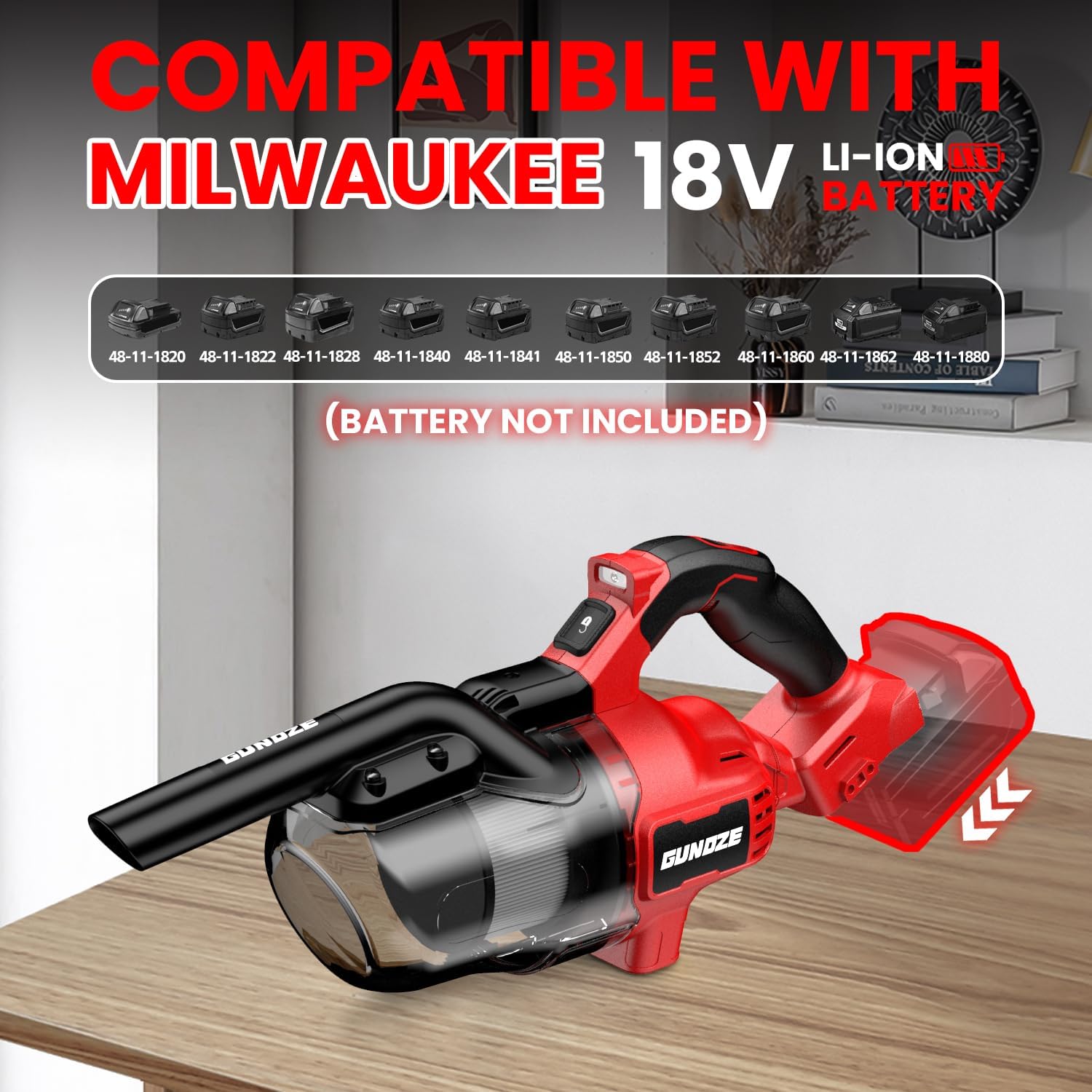
This image illustrates the GUNOZE cordless vacuum cleaner with a Milwaukee 18V battery slot, highlighting compatibility with various Milwaukee M18 battery models.
2. Attachment Assembly
The vacuum comes with various attachments for different cleaning needs:
- Floor Nozzle: For cleaning large floor areas, carpets, and hard floors. Can be used with extension tubes for upright cleaning.
- Crevice Nozzle: Ideal for reaching tight spaces, corners, and edges.
- Long Strip Brush: Suitable for upholstery, car interiors, and delicate surfaces.
- Round Head Brush: Effective for dusting and cleaning irregular surfaces.
- Extension Tubes: Connect to the main unit and attachments to extend reach for floors or high areas.
To attach an accessory, simply push it firmly onto the suction opening of the main unit or the end of an extension tube until it is securely fitted.

This image shows the GUNOZE cordless vacuum's five-in-one attachment system, including the floor nozzle, crevice nozzle, long strip brush, and round head brush, designed for diverse cleaning needs.
Operating Instructions
1. Powering On/Off
- Ensure a charged Milwaukee 18V battery is installed.
- Press the power button located on the handle to turn the vacuum cleaner on.
- Press the power button again to turn the vacuum cleaner off.
2. Using the LED Light
The vacuum cleaner is equipped with a built-in LED light to illuminate dark areas during cleaning.

This image demonstrates the GUNOZE cordless vacuum's integrated LED light illuminating dust in a dark corner, enhancing visibility during cleaning.
3. General Cleaning
Select the appropriate attachment for the surface you intend to clean. For floors, attach the floor nozzle, optionally with extension tubes. For handheld cleaning of furniture, car interiors, or tight spots, use the crevice nozzle or brushes directly on the main unit.

This image depicts the GUNOZE cordless vacuum being used in various household scenarios, showcasing its versatility for different cleaning tasks and areas.
Maintenance
1. Emptying the Dust Cup
For optimal performance, empty the dust cup regularly, especially when debris reaches the MAX fill line.
- Ensure the vacuum cleaner is turned off and the battery is removed.
- Locate the dust cup release button and press it to unlock and remove the dust cup from the main unit.
- Carefully empty the contents of the dust cup into a waste bin.
2. Cleaning the HEPA Filter
The HEPA filter is washable and should be cleaned periodically to maintain suction power.
- With the dust cup removed, gently twist and pull out the HEPA filter.
- Rinse the HEPA filter under cool running water until the water runs clear. Do not use detergent or hot water.
- Allow the filter to air dry completely for at least 24 hours before reinserting. Do not use a dryer or heat to dry the filter.
- Once dry, align the top of the filter with the buckle in the dust cup and push it to the bottom to secure it.
- Reinstall the dust cup onto the main unit until it clicks into place.

This image provides a six-step visual guide on how to unlock and remove the dust cup, take out the filter, clean the dust cup with water, align and secure the filter, reinstall the dust cup, and turn on the vacuum.
3. Storage
Store the vacuum cleaner and its accessories in a clean, dry place away from direct sunlight and extreme temperatures.
Troubleshooting
| Problem | Possible Cause | Solution |
|---|---|---|
| Vacuum does not turn on. | Battery not installed correctly or discharged. | Ensure battery is fully charged and properly seated. |
| Low suction power. | Dust cup full, filter clogged, or blockage in nozzle/hose. | Empty dust cup, clean/replace filter, check for and remove blockages. |
| Dust escapes from vacuum. | Dust cup or filter not installed correctly. | Ensure dust cup and filter are securely in place. |
| Unusual noise during operation. | Blockage in the air path or damaged component. | Turn off and remove battery. Check for and remove any blockages. If noise persists, contact support. |
Specifications
- Brand: GUNOZE
- Model Name: GZ-CHV
- Power: 500W Motor
- Maximum Suction: 46 CFM (Cubic Feet per Minute)
- Filter Type: HEPA Filter (Washable)
- Dust Cup Capacity: 600 ml
- Form Factor: Handheld
- Product Dimensions: 11.4"L x 10.2"W x 7.5"H
- Item Weight: 4.5 pounds
- Compatible Batteries: Milwaukee 18V Li-ion (e.g., 48-11-1820, 48-11-1850)
- Special Features: Cordless, Built-in LED Light, 2 Power Levels
Warranty and Support
The GUNOZE Cordless Handheld Vacuum Cleaner GZ-CHV comes with a 12-month replacement warranty for any quality issues from the date of purchase.
If you encounter any problems or have questions regarding your product, please refer to the troubleshooting section of this manual. If the issue persists, please contact the seller or manufacturer for assistance. Please have your purchase information and product model number (GZ-CHV) ready when contacting support.