
Introduction
The kamapulo EM03 Emergency Weather Radio is a versatile device designed for emergency preparedness and outdoor activities. It integrates multiple essential functions including AM/FM/NOAA weather radio reception, a powerful LED flashlight, a 5000mAh power bank for charging external devices, Bluetooth connectivity, and an SOS alarm. With its robust IPX5 waterproof rating and multiple charging options (solar, hand crank, USB-C), this radio ensures you stay informed and connected in various situations.
Product Overview
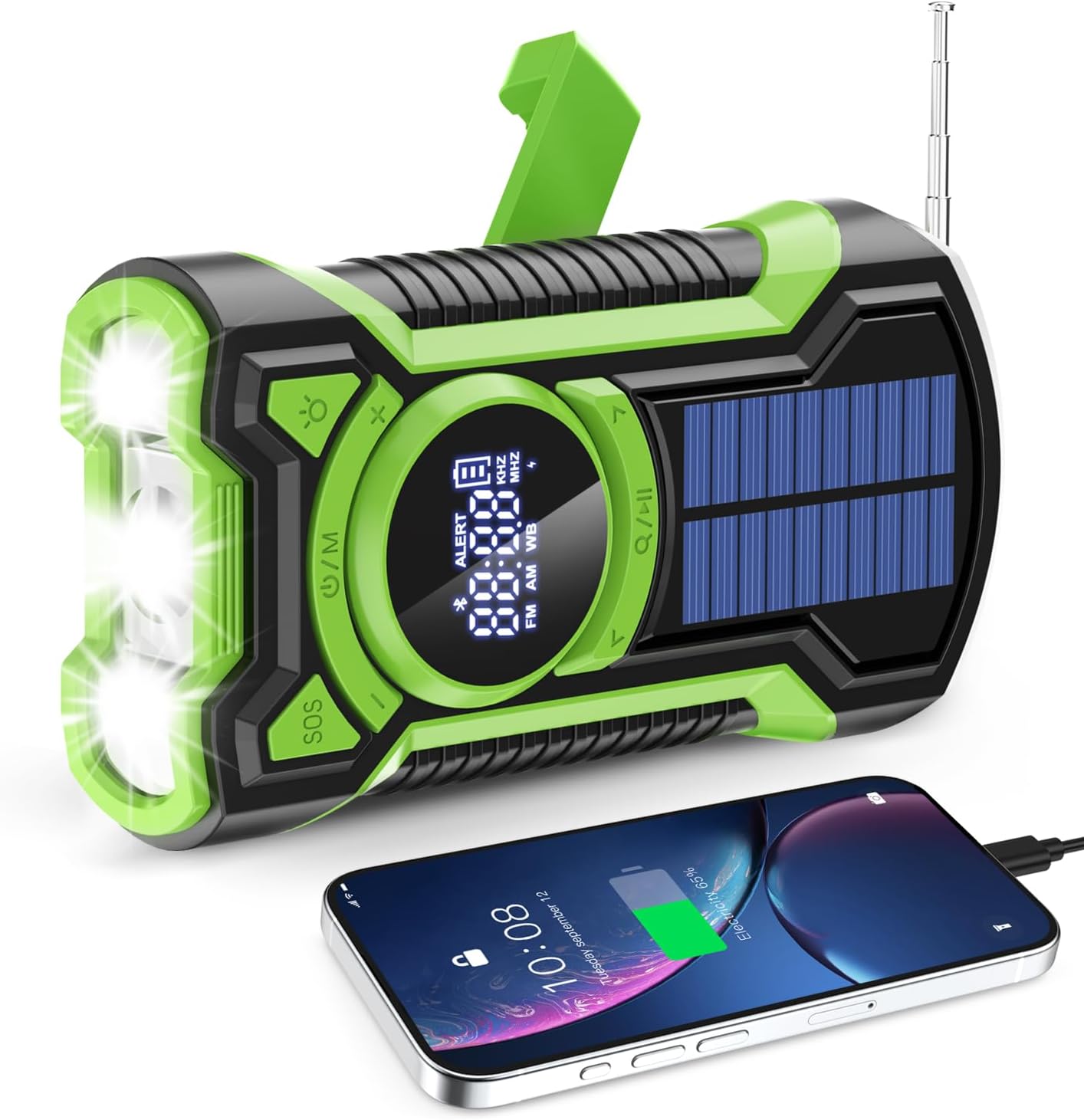
Figure 1: kamapulo EM03 Emergency Weather Radio
Components:
- Digital Display: Shows frequency, battery level, and mode.
- Control Buttons: Power/Mode, Tuning, Volume, SOS.
- Telescopic Antenna: For improved radio reception.
- LED Flashlight: Multi-mode illumination.
- Solar Panel: For emergency solar charging.
- Hand Crank: For manual power generation.
- USB-C Input Port: For charging the radio.
- USB-A Output Port: For charging external devices.
- 3.5mm Headphone Jack: For private listening.
- SOS Alarm Button: Activates emergency siren and flashing light.
Setup
- Initial Charge: Before first use, fully charge the radio using the provided USB-C cable and a standard USB power adapter (not included). This ensures optimal battery performance.
- Antenna: For best radio reception, extend the telescopic antenna fully.
Charging Methods
The EM03 radio offers three methods to ensure it remains powered in any situation.

Figure 2: Multiple Charging Options
1. USB-C Charging (Recommended for Daily Use)
- Connect the provided USB-C cable to the radio's USB-C input port.
- Plug the other end into a USB power source (e.g., wall adapter, computer USB port).
- The battery indicator on the digital display will show charging status.
2. Solar Charging (Emergency Backup)
- Place the radio with the solar panel facing direct sunlight.
- Solar charging is primarily for maintaining battery life or for emergency power when other sources are unavailable. It is slower than USB-C charging.
3. Hand Crank Charging (Emergency Backup)
- Unfold the hand crank handle located on the back of the radio.
- Rotate the crank clockwise or counter-clockwise at a steady pace (approximately 130-150 RPM) for 3-5 minutes to generate power for a short period of radio use or flashlight operation.
- This method is intended for emergency power generation.
Radio Operation

Figure 3: Radio Frequencies and NOAA Alert
Power On/Off
- Press the Power/M button to turn the radio on or off.
Band Selection
- With the radio on, press the Power/M button repeatedly to cycle through FM, AM, and WB (Weather Band) modes. The selected band will be displayed on the screen.
Tuning
- Manual Tuning: In FM, AM, or WB mode, short press the Tuning +/- buttons to adjust the frequency incrementally.
- Auto Scan: Long press the Tuning +/- buttons to automatically scan for available stations. The radio will stop at the next strong signal.
NOAA Weather Alert
- In WB mode, the radio can automatically monitor for NOAA weather alerts. When an alert is detected, the radio will sound an alarm and display an alert message.
- Ensure you are in a region that supports NOAA weather broadcasts for this feature to function.
Volume Control
- Use the Volume +/- buttons to adjust the audio level.
Bluetooth Operation
The EM03 radio can function as a Bluetooth speaker to play audio from your smartphone or other Bluetooth-enabled devices.
- Enter Bluetooth Mode: Turn on the radio and press the Power/M button until 'BT' appears on the digital display. The radio will enter pairing mode, indicated by a flashing Bluetooth icon.
- Pairing: On your mobile device, enable Bluetooth and search for available devices. Select 'EM03' from the list.
- Connection: Once paired, the Bluetooth icon on the radio's display will stop flashing, indicating a successful connection. You can now play audio through the radio.
- Range: The effective Bluetooth range is approximately 30 feet (10 meters).
Flashlight Operation
The integrated LED flashlight provides illumination with multiple modes.

Figure 4: Flashlight Modes
- Activate Flashlight: Press the Flashlight button (often marked with a lightbulb icon) to turn on the flashlight.
- Cycle Modes: Press the Flashlight button repeatedly to cycle through the available modes: High-beam, Low-power, and Reading lamp.
- Turn Off: Continue pressing the Flashlight button until the light turns off, or long press the button.
SOS Alarm
The SOS alarm is designed to attract attention in emergency situations.

Figure 5: SOS Alarm Activation
- Activate SOS: Long press the SOS button. The radio will emit a loud siren and the flashlight will flash in an emergency signal pattern.
- Deactivate SOS: Long press the SOS button again to turn off the alarm.
Power Bank Function
The EM03 radio includes a 5000mAh internal battery that can be used to charge external USB-powered devices.
- Connect Device: Open the protective cover on the side of the radio. Connect your device's charging cable to the radio's USB-A output port.
- Charging: The radio will begin charging your connected device. The internal battery capacity is 5000mAh, providing a significant power boost for smartphones or other small electronics.
- Note: The USB-C port on the radio is for input charging only; it cannot be used to charge external devices.
Waterproofing (IPX5 Rated)
The kamapulo EM03 radio features an IPX5 waterproof rating, meaning it is protected against low-pressure water jets from any direction.

Figure 6: IPX5 Waterproof Protection
- This rating makes the radio suitable for use in rainy conditions or environments where it might be exposed to splashes.
- Important: IPX5 does not mean the device can be submerged in water. Avoid intentional submersion to prevent damage. Ensure all port covers are securely closed when exposed to moisture.
Maintenance
- Cleaning: Wipe the radio with a soft, damp cloth. Do not use harsh chemicals or abrasive cleaners.
- Storage: Store the radio in a cool, dry place away from direct sunlight and extreme temperatures.
- Battery Care: For optimal battery life, fully charge the radio at least once every three months, even if not in use.
Troubleshooting
| Problem | Possible Solution |
|---|---|
| Radio not turning on. | Check battery level. Charge the radio via USB-C, solar, or hand crank. |
| Poor radio reception. | Fully extend the telescopic antenna. Try repositioning the radio. Perform an auto scan for stations. |
| Device not charging from power bank. | Ensure the radio has sufficient charge. Confirm you are using the USB-A output port. Check the charging cable connection. |
| Bluetooth not connecting. | Ensure the radio is in Bluetooth pairing mode. Check your device's Bluetooth settings and try re-pairing. Move closer to the radio. |
| Solar/Hand crank charging is slow. | These methods are for emergency use and are slower than USB-C charging. Ensure direct sunlight for solar charging. Maintain a consistent cranking speed. |
Specifications
| Feature | Detail |
|---|---|
| Model Number | EM03 |
| Dimensions | 6.69"L x 3.2"W x 1.96"H (17 x 8.1 x 5 cm) |
| Weight | 12.3 ounces (348.7 grams) |
| Battery Capacity | 5000mAh (Nonstandard Battery, included) |
| Radio Bands | AM/FM/WB (Weather Band) |
| Waterproof Rating | IPX5 |
| Connectivity | Bluetooth 5.3, Auxiliary (3.5mm headphone jack) |
| Special Features | Built-In Flashlight (3 modes), SOS Alarm, Hand Crank, Solar Panel, Power Bank Function |
| Power Source | Battery Powered (USB-C, Solar, Hand Crank) |
Warranty and Support
For any questions, technical support, or warranty inquiries regarding your kamapulo EM03 Emergency Weather Radio, please contact the manufacturer or your retailer. Refer to the packaging or purchase documentation for specific contact information and warranty terms.