
1. Introduction
The PXFOCOYD Z4 Expansion Sleeve is a precision-engineered transmission component designed for keyless connections between shafts and hubs. This device operates by generating a powerful clamping force through axial compression, ensuring a secure and reliable transmission of torque. It is an essential component for various mechanical equipment requiring high load transfer capabilities.

Figure 1: PXFOCOYD Z4 Expansion Sleeve (Z4 80x130) - General View. This image displays two units of the Z4 expansion sleeve, highlighting their sturdy construction and the arrangement of the tightening bolts.
2. Product Overview
2.1 Key Features
- Product Function: The primary function is to tighten high-strength bolts to create a significant clamping force between the shaft and the hub, enabling efficient load transmission.
- Product Features: This expansion sleeve coupling can transmit large torque through the cooperation of the expansion sleeve and shaft, making it suitable for heavy-load or medium-to-low speed transmission systems.
- Application Scope: Widely used in various mechanical equipment, particularly in applications requiring high load transfer.
- Material: Constructed from high-quality materials to ensure resistance to abrasion and tearing, providing excellent durability and strength for long-lasting performance.
- Easy to Install: Expansion couplings are designed for user-friendliness, allowing for straightforward installation, adjustment, and disassembly.
2.2 Operating Principle
The Z4 expansion sleeve operates on the principle of friction locking. When axial force is applied by tightening the bolts, the inner and outer sleeves of the expansion device are forced to expand radially. This expansion creates a high-pressure fit between the sleeve and both the shaft and the hub, generating sufficient friction to transmit torque without the need for traditional keys or splines. This keyless connection offers advantages in terms of concentricity, balance, and ease of assembly/disassembly.
3. Components and Installation
3.1 Components Overview
A typical Z4 expansion sleeve assembly consists of an inner tapered ring, an outer tapered ring, and a set of high-strength hex head bolts. The design allows for precise control over the clamping force.

Figure 2: Disassembled Components of the Z4 Expansion Sleeve. This image illustrates the individual parts that make up the expansion sleeve, including the two main rings and the array of high-strength bolts.
3.2 Installation Procedure
- Preparation: Ensure that the shaft and hub bores are clean, dry, and free from burrs or damage. Lightly oil the tapered surfaces of the expansion sleeve components and the threads of the bolts.
- Assembly: Slide the inner and outer tapered rings onto the shaft, followed by the hub. Position the expansion sleeve within the hub bore.
- Initial Tightening: Insert all high-strength bolts into their respective holes. Hand-tighten all bolts to ensure the components are seated correctly.
- Progressive Tightening: Using a torque wrench, progressively tighten the bolts in a star pattern (or diametrically opposite pairs) to the specified tightening torque. Repeat this process several times, gradually increasing the torque until the final specified torque is reached for all bolts.
- Verification: After tightening, verify that the hub is securely fastened to the shaft and that there is no axial or radial play.
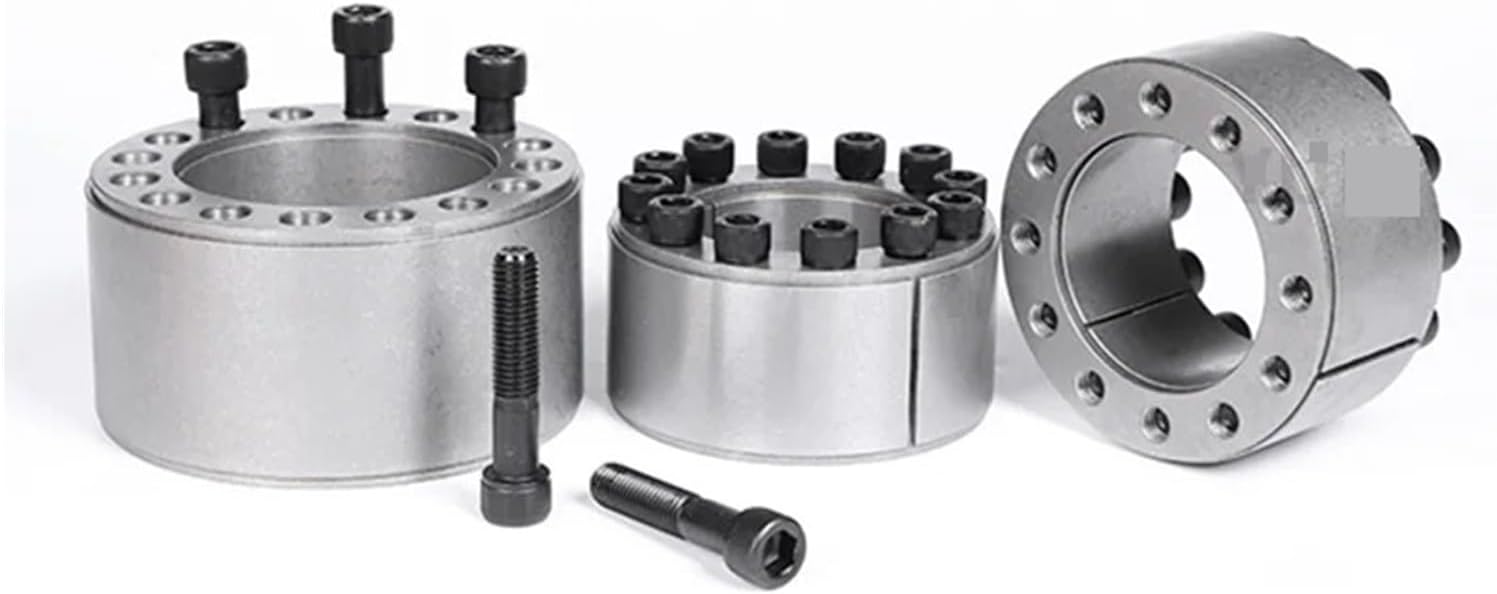
Figure 3: Z4 Expansion Sleeve Assembly Examples. This image shows various states of the expansion sleeve, including assembled units and loose bolts, illustrating the components involved in the assembly process.
3.3 Disassembly Procedure
- Loosen Bolts: Loosen all high-strength bolts gradually and evenly, typically in reverse order of tightening, until the clamping force is released.
- Remove Bolts: Remove all bolts.
- Separate Components: If the components do not separate easily, gently tap the outer ring with a soft mallet to release the taper lock. Avoid using excessive force or prying tools that could damage the surfaces.
4. Specifications
The following table provides detailed specifications for various Z4 expansion sleeve models, including dimensions, transmitted forces, and tightening torques. Please refer to the specific model number for accurate data.
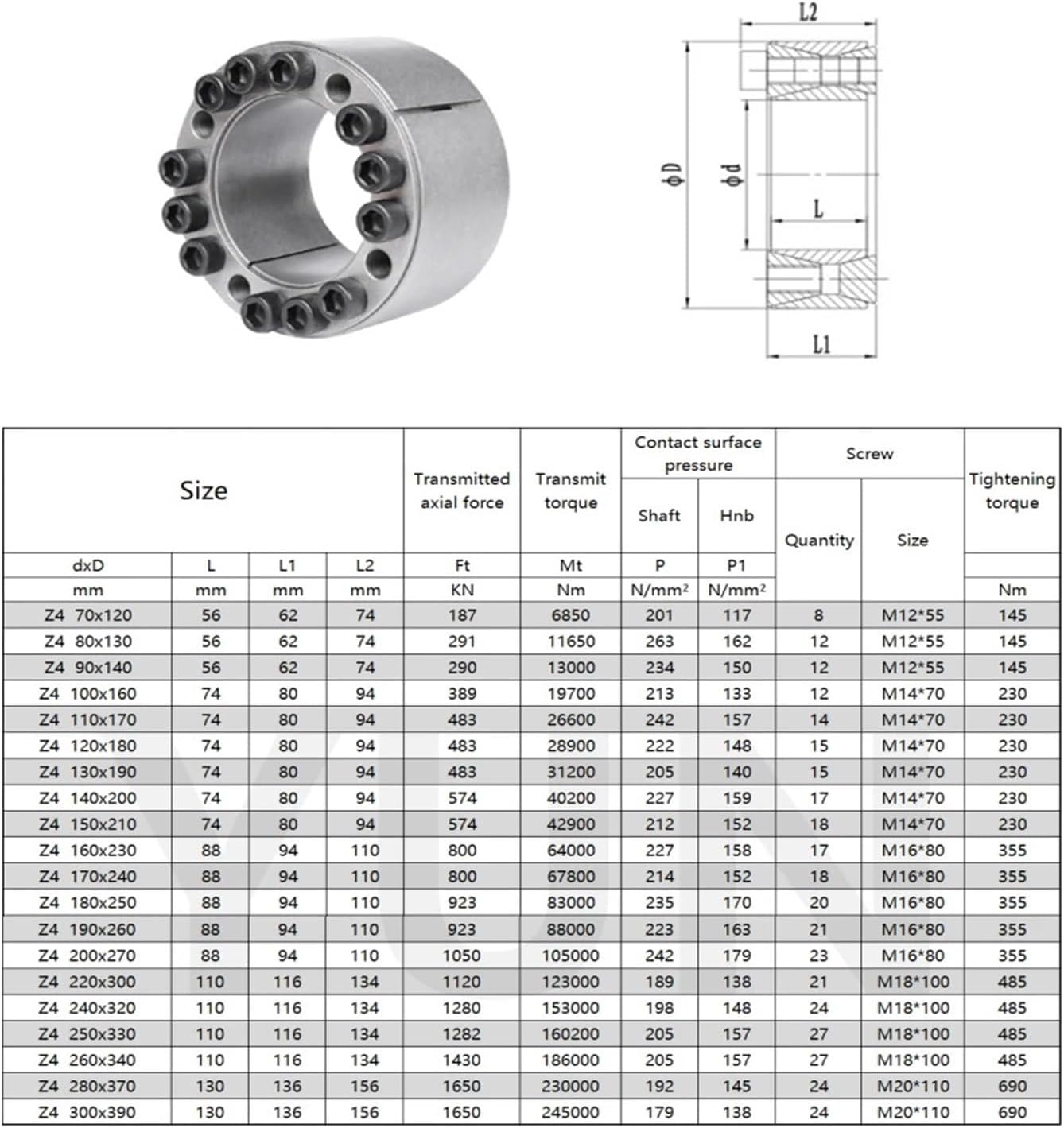
Figure 4: Z4 Expansion Sleeve Technical Specifications Table. This table provides critical data for different Z4 models, including dimensions (L, L1, L2, D, d), transmitted axial force, transmitted torque, contact surface pressure, screw specifications, and recommended tightening torque.
4.1 General Product Specifications (Z4 80x130)
- Model: Z4 80x130
- Package Dimensions: 1.18 x 0.79 x 0.39 inches
- Item Weight: 10.58 pounds (approx. 4800 Grams)
- Number of Pieces: 1 (per assembly)
- Assembly Required: Yes (user assembly of components)
- Manufacturer: PXFOCOYD
4.2 Performance Data (from Figure 4 for Z4 80x130)
- L (mm): 56
- L1 (mm): 62
- L2 (mm): 74
- Transmitted Axial Force (KN): 290
- Transmitted Torque (Nm): 11650
- Contact Surface Pressure (Shaft N/mm²): 263
- Contact Surface Pressure (Hub N/mm²): 162
- Screw Quantity: 12
- Screw Size: M12*55
- Tightening Torque (Nm): 145
5. Maintenance
The Z4 Expansion Sleeve is designed for durability and requires minimal maintenance. However, periodic inspection is recommended to ensure optimal performance and longevity.
- Inspection: Regularly inspect the expansion sleeve and surrounding components for any signs of wear, corrosion, or loosening of bolts.
- Cleaning: Keep the assembly clean and free from excessive dirt, dust, or debris, which could affect performance or lead to corrosion.
- Lubrication: During reassembly, lightly lubricate the tapered surfaces and bolt threads with a suitable lubricant to ensure smooth operation and proper torque application.
- Re-tightening: If the application involves significant vibration or dynamic loads, consider periodically checking and re-tightening the bolts to the specified torque, especially after initial operation.
6. Troubleshooting
While the Z4 Expansion Sleeve is a robust component, issues can arise if installation procedures are not followed correctly or under extreme operating conditions. Here are some common issues and their potential solutions:
- Issue: Hub/Shaft Slippage
- Cause: Insufficient tightening torque, contaminated tapered surfaces, or incorrect sizing.
- Solution: Disassemble, clean all surfaces thoroughly, re-lubricate, and reassemble, ensuring all bolts are tightened to the specified torque using a calibrated torque wrench. Verify correct sleeve size for the application.
- Issue: Difficulty in Disassembly
- Cause: Excessive corrosion, overtightening, or lack of lubrication during initial assembly.
- Solution: Ensure all bolts are fully loosened. Apply penetrating oil if corrosion is present. Gently tap the outer ring with a soft mallet. Avoid prying or using excessive force that could damage components.
- Issue: Uneven Clamping Force / Vibration
- Cause: Uneven tightening of bolts, damaged tapered surfaces, or improper seating.
- Solution: Disassemble and inspect components for damage. Reassemble carefully, following the progressive and star-pattern tightening procedure to ensure even force distribution.
7. Contact and Support
For further assistance, technical inquiries, or support regarding your PXFOCOYD Z4 Expansion Sleeve, please contact your supplier or the manufacturer directly. Provide your product model number (Z4 80x130) and any relevant details when seeking support.
Manufacturer: PXFOCOYD
For the most up-to-date contact information, please refer to the product packaging or the official PXFOCOYD website.