
1. Introduction
Thank you for choosing the WBGANG Intelligent Electronic Scale. This advanced 8-electrode body fat scale is designed to provide comprehensive body composition analysis beyond just weight. By utilizing modern technology and a dedicated smartphone application, you can gain a deeper understanding of your physical condition, track progress, and manage health goals effectively. This manual will guide you through the setup, operation, and maintenance of your new scale.
2. Safety Information
- Always use the scale on a hard, flat, and stable surface to ensure accurate measurements.
- Do not use the scale on wet or slippery floors to prevent accidents.
- Keep the scale dry. Avoid contact with water or other liquids.
- This scale is for household use only and is not intended for medical diagnosis or treatment. Consult a healthcare professional for medical advice.
- Individuals with pacemakers or other internal medical devices should not use this scale.
- Keep the scale out of reach of children.
- Do not attempt to disassemble or repair the scale yourself. Contact customer support if issues arise.
- The glass surface can be slippery when wet. Ensure your feet and the scale surface are dry before use.
3. Package Contents
Please check the package to ensure all items are present:
- 1 x 8 Electrode Body Fat Scale
- 1 x English Manual
4. Product Overview
The WBGANG Intelligent Electronic Scale features a sleek design with a tempered glass platform, an LED display, and a retractable handle for advanced body composition analysis. The 8 electrodes (4 on the platform, 4 on the handle) enable segmented fine measurement.

Image: Top-down view of the scale with the handle folded, displaying the main weighing platform and central electrode.

Image: Top-down view of the scale with the handle extended, showing the additional electrodes for comprehensive body analysis.

Image: Angled view of the scale with the handle folded, demonstrating its compact and portable form factor.
5. Setup
5.1 Battery Installation
- Locate the battery compartment on the underside of the scale.
- Open the battery compartment cover.
- Insert 4 x AAA batteries (not included), ensuring correct polarity (+/-).
- Close the battery compartment cover securely.
5.2 App Download and Bluetooth Connection
- Download the accompanying smartphone application. Search for the app name (usually mentioned in the packaging or a QR code) on your device's app store (e.g., Apple App Store or Google Play Store).
- Ensure Bluetooth is enabled on your smartphone.
- Open the downloaded app and follow the on-screen instructions to create a user profile.
- Step onto the scale to activate it. The scale's display should light up.
- The app should automatically detect and connect to the scale via Bluetooth. If not, manually search for the device within the app's settings.
6. Operating Instructions
6.1 Basic Weight Measurement
- Place the scale on a hard, flat surface.
- Gently step onto the scale with bare feet. Ensure your feet are positioned on the electrodes.
- Stand still until your weight is displayed and stabilized on the LED screen.
- If connected to the app, your weight data will automatically sync to your profile.
6.2 Segmented Body Composition Analysis (8-Electrode Measurement)
For a detailed body composition analysis, including body fat and muscle distribution across different body segments, use the retractable handle.
- Extend the retractable handle from the scale.
- Step onto the scale with bare feet, ensuring your feet are on the platform electrodes.
- Hold the handle firmly with both hands, ensuring your palms are in full contact with the handle electrodes.
- Stand still and maintain contact with both the platform and handle electrodes until the measurement is complete. The app will display a progress indicator.
- Once complete, the app will show 25 body data points, including weight, body fat, bone mass, BMI, and segmented analysis for arms, torso, and legs.

Image: A user standing on the scale for a weight measurement, demonstrating proper foot placement on the electrodes.
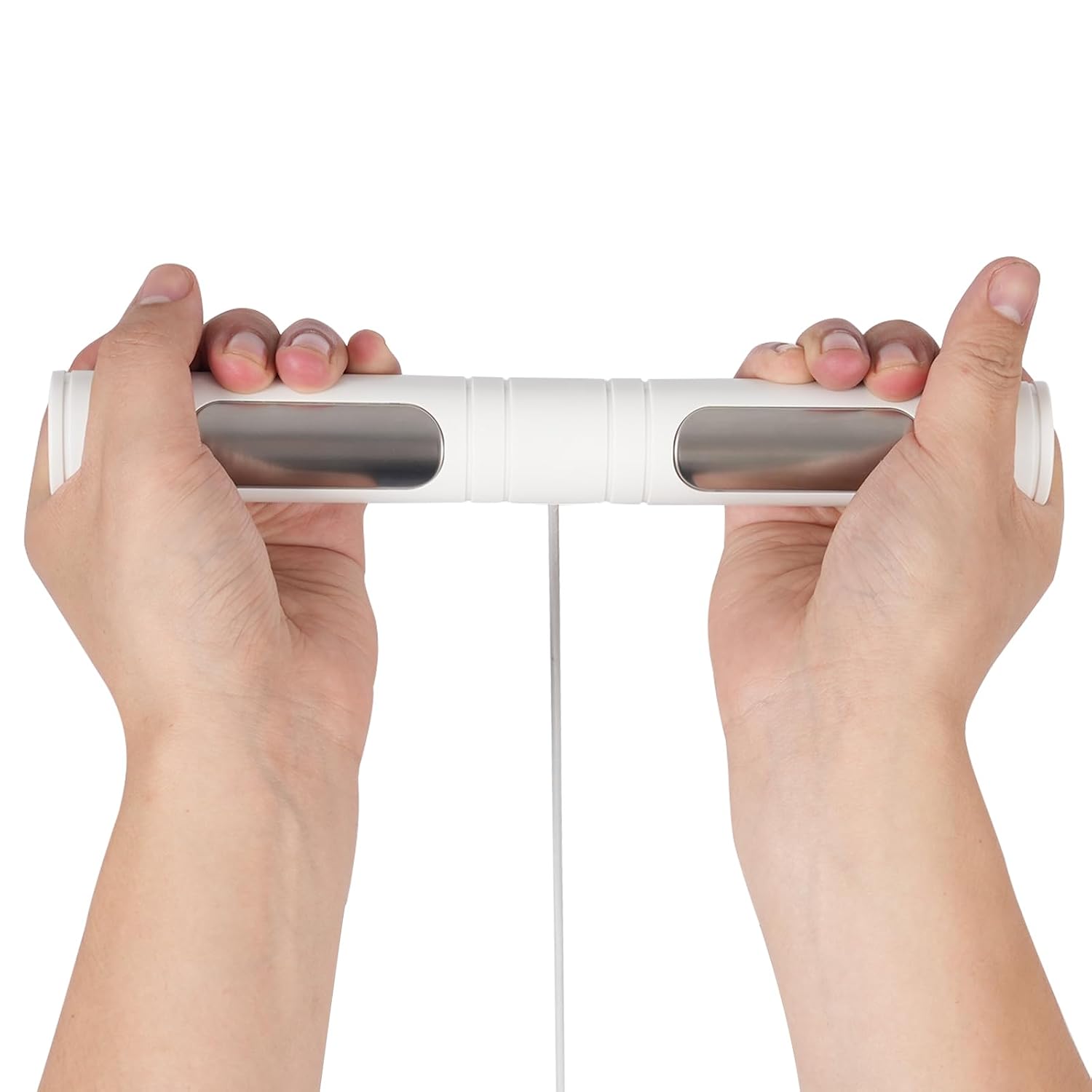
Image: Hands holding the retractable handle, illustrating the correct way to make contact with the handle electrodes for segmented analysis.

Image: The scale in use, with the companion app on a smartphone displaying detailed body composition data after a measurement.
6.3 Unit Selection
The scale supports weighing units in kilograms (kg), pounds (lb), and stones (st). You can typically change the unit setting within the smartphone application or via a button on the underside of the scale (if available).
6.4 Multi-User Management
The app allows for the creation of up to 8 user profiles. Each user's data is stored separately, enabling personalized tracking for family members or individuals with different fitness goals. Ensure the correct user profile is selected in the app before taking a measurement.
7. Maintenance
7.1 Cleaning
- Wipe the scale surface with a soft, damp cloth.
- Do not use abrasive cleaners, harsh chemicals, or immerse the scale in water.
- Ensure the scale is completely dry before storage or next use.
7.2 Storage
- Store the scale in a cool, dry place, away from direct sunlight and extreme temperatures.
- Avoid placing heavy objects on the scale when not in use.
7.3 Battery Replacement
When the display shows "LO", it indicates low battery. Replace all 4 AAA batteries simultaneously with new ones to ensure optimal performance.
8. Troubleshooting
- "LO" displayed: Indicates low battery. Replace the 4 AAA batteries.
- "ERR" displayed: Indicates overload. The maximum weight capacity has been exceeded. Step off the scale immediately.
- Inaccurate readings: Ensure the scale is on a hard, flat surface. Avoid carpets or uneven floors. Ensure your feet are bare and dry, and positioned correctly on the electrodes.
- No display: Check if batteries are inserted correctly and are not depleted.
- App not connecting via Bluetooth: Ensure Bluetooth is enabled on your phone. Restart the app and the scale. Try re-pairing the device within the app settings.
- No body composition data: Ensure you are standing barefoot on the scale and holding the handle with bare hands, making full contact with all 8 electrodes.
9. Specifications

Image: Product dimensions for the WBGANG Intelligent Electronic Scale.
| Feature | Specification |
|---|---|
| Model | G72E-BT (Item model number: JKGQFJ-000200-GHQ) |
| Color | White |
| Material | ABS, Tempered Glass, Stainless Steel |
| Display Type | LED |
| Input | 6V |
| Battery | 4*AAA Batteries (Not Included) |
| Weighing Units | kg / lb / st |
| Automatic Shutdown Time | 15 Seconds |
| Weighing Range | 3-180kg / 6.61-396.83lbs |
| Precision Value | 100g / 0.22lbs |
| Product Size (L*W*H) | 32.7*29*4.25cm / 12.87*11.41*1.67in |
| Net Weight | 2kg / 4.41lbs |
10. Warranty and Support
For warranty information and customer support, please refer to the documentation included with your purchase or visit the official WBGANG website. Keep your purchase receipt as proof of purchase for any warranty claims.